Toolkit: tool-cache's downloadTool can't download private repo assets
Describe the bug
Even I configure auth argument as below:
const assetPath = await tc.downloadTool(
      'https://github.com/KeisukeYamashita/setup-release-test-repo-private/releases/download/v0.2.0/setup-release-test-repo-private_0.2.0_linux_amd64.tar.gz', <-- Private repo, okay to share
      `/tmp/tmp,
      `token ${token}`
    )
It will fail with the error below
##[debug]Failed to download from "https://github.com/KeisukeYamashita/setup-release-test-repo-private/releases/download/v0.2.0/setup-release-test-repo-private_0.2.0_linux_amd64.tar.gz". Code(404) Message(Not Found)
Error: Unexpected HTTP response: 404
##[debug]Error: Unexpected HTTP response: 404
##[debug]    at /home/runner/work/setup-release/setup-release/webpack:/typescript-action/node_modules/@actions/tool-cache/lib/tool-cache.js:100:1
##[debug]    at Generator.next (<anonymous>)
##[debug]    at fulfilled (/home/runner/work/setup-release/setup-release/webpack:/typescript-action/node_modules/@actions/tool-cache/lib/tool-cache.js:5:1)
##[debug]    at processTicksAndRejections (internal/process/task_queues.js:93:5)
To Reproduce
Steps to reproduce the behavior:
- Create a PAT with
reposcope - Add
tc.downloadToolscript and pass theauth(third) argument - Run the script
Expected behavior
Be able to download assets from private repo.
Additional context
I checked the log:
##[debug]Downloading https://github.com/KeisukeYamashita/setup-release-test-repo-private/releases/download/v0.2.0/setup-release-test-repo-private_0.2.0_linux_amd64.tar.gz
##[debug]Destination /tmp/c1cbb25c-b925-4c07-b1e5-98a9e6fd7313
##[debug]set auth
It contains set auth that means the header is set. And also, I tested with the admin PAT (has all scope) but still run into this error.
I checked that this URL https://github.com/KeisukeYamashita/setup-release-test-repo-private/releases/download/v0.2.0/setup-release-test-repo-private_0.2.0_linux_amd64.tar.gz is valid. I can download the asset from the browser.
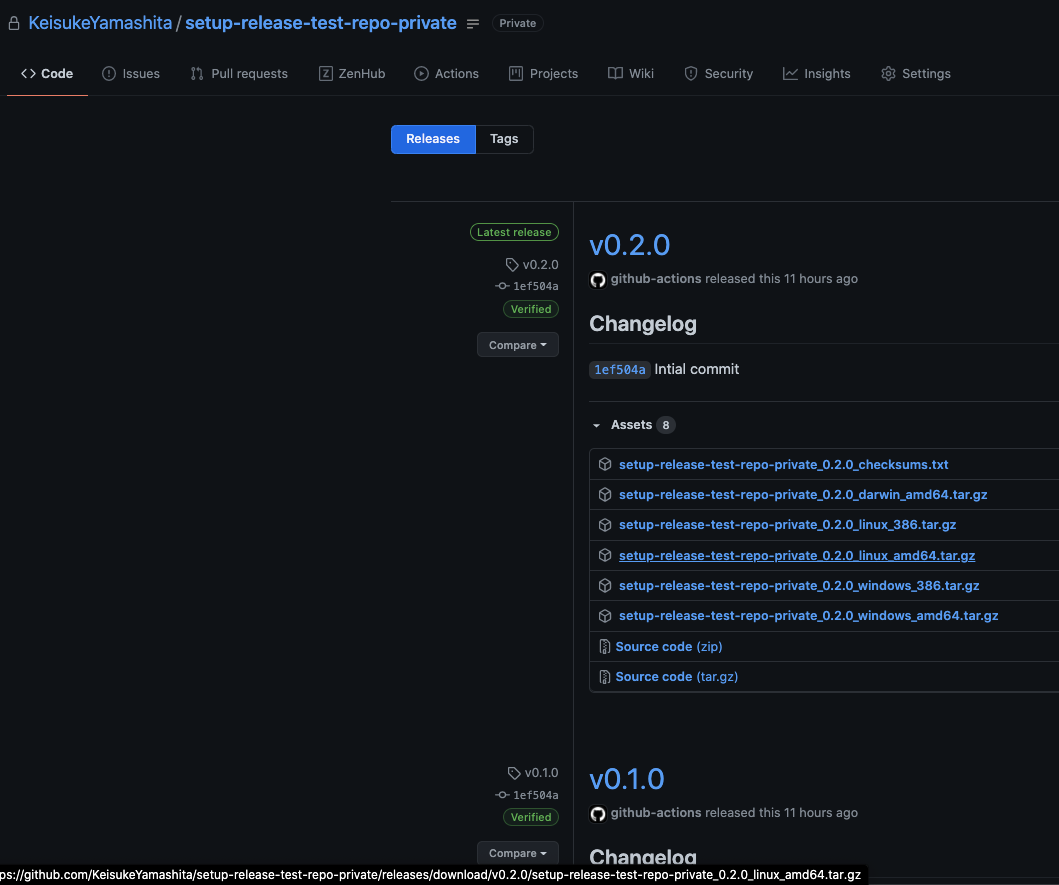
Note: This private repo is okay to share because I created it just to reproduce this error.
I realized that I can't download with curl too.
$ curl -H 'Accept: application/vnd.github.v3+json' -H "Authorization: token $TEST_TOKEN" https://github.com/KeisukeYamashita/setup-release-test-repo-private/releases/download/v0.2.0/setup-release-test-repo-private_0.2.0_linux_amd64.tar.gz
Not Found
 KeisukeYamashita
All 4 comments
I found this issue when I was trying to raise another, so I would like to answer with a dirty code. In conclusion, the tool-cache package can't do that right now. And one of the easiest ways to do this right now is:
import * as core from "@actions/core";
import * as github from "@actions/github";
import * as fs from "fs";
import got from "got";
import * as stream from "stream";
import * as util from "util";

const pipeline = util.promisify(stream.pipeline);

const token = core.getInput("github-token");
const octokit = github.getOctokit(token);

export async function downloadAsset(
  owner: string,
  repo: string,
  assetName: string,
  dest: string
) {
  const {
    data: { assets },
  } = await octokit.repos.getLatestRelease({ owner, repo });
  const [asset] = assets.filter((asset) => asset.name.includes(assetName));
  await pipeline(
    got.stream(asset.url, {
      method: "GET",
      headers: {
        "User-Agent": "GitHub Actions",
        Accept: "application/octet-stream",
        Authorization: `token ${token}`,
      },
    }),
    fs.createWriteStream(dest)
  );
}
 smorimoto
on 31 Dec 2020
smorimoto
on 31 Dec 2020
Thank you very much!
KeisukeYamashita
on 31 Dec 2020
You’re welcome!
smorimoto
on 31 Dec 2020
will tool-cache support this in the future?
Doesn't tool-cache also cache these private assets?
 so0k
on 25 Mar 2021
so0k
on 25 Mar 2021
Related issues
 warrenbuckley
·
6Comments
warrenbuckley
·
6Comments
 svartalf
·
4Comments
svartalf
·
4Comments
 SaschaMann
·
3Comments
SaschaMann
·
3Comments
 Kerizer
·
4Comments
Kerizer
·
4Comments
 vlsi
·
4Comments
vlsi
·
4Comments