Toolkit: Job-level if conditional unable to use prerequisite job's environment variable
Describe the bug
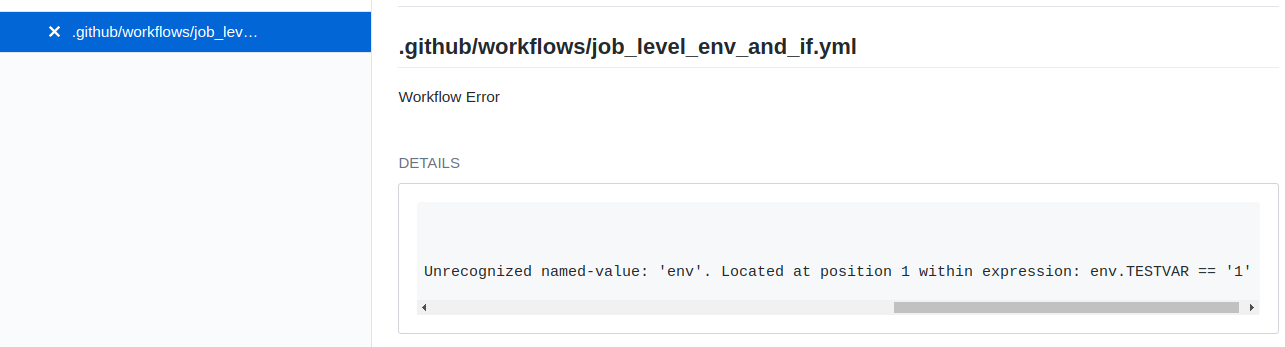
Environment variables set in job: A cannot be used in dependent job: B's job-level if: conditional.
These fine grained exclusions of what you can and cannot do across jobs is not articulated in the documentation, which uses carte-blanche statements like _"environment variables that are available to all jobs and steps in the workflow"_ and _"You can use the if conditional to prevent a job from running (and) you can use any supported context and expression"_
So the bug is either:
- documentation that doesn't document the inclusions or exclusions of the features its describing, or
- the actions-code being unable to support all the constructs across a workflow's
jobsthat are available across a workflow'ssteps.
To Reproduce
Run the following action in a GitHub workflow:
name: Test creating and using workflow-level ENVs across jobs
on: push
jobs:

  # This job sets an environment variable as documented by GitHub [1]:
  #  1. env is a map of environment variables that are available to all
  #     jobs and steps in the workflow.
  #  2. .. you can also set environment variables for the entire workflow
  #
  set_variable:
    name: Set an environment variable for the entire workflow
    runs-on: ubuntu-latest
    steps:
      - name: Sets TESTVAR=0
        run:  'echo ::set-env name=TESTVAR::0'

  # This job uses an environment variable as documented by GitHub [2]:
  #   jobs.<job_id>.if
  #   1. You can use the if conditional to prevent a job from running
  #   2. .. You can use any supported context and expression ..
  #
  use_variable:
    name: Use an environment variable to prevent this job from running
    runs-on: ubuntu-latest
    needs: set_variable
    if: env.TESTVAR == '1'
    steps:
      - name: Print TESTVAR
        run:  echo "${TESTVAR}"

# References:
# [1] https://help.github.com/en/actions/automating-your-workflow-with-github-actions/workflow-syntax-for-github-actions#env
# [2] https://help.github.com/en/actions/automating-your-workflow-with-github-actions/workflow-syntax-for-github-actions#jobsjob_idif
Expected behavior
Scenario 1: job: set_variable should pass, and job: use_variable should be skipped.
Scenario 2: if you change TESTVAR::0 to TESTVAR::1 in job: set_variable, then job: use_variable should run and print 1 to stdout.
Screenshots
Additional context
I expect to hear the following from the back-end developers: _"of-course this won't work because you're trying to use dynamic output from one VM as the input to another VM; we only support up-front hardcoded environment variables in the workflow so they can be provided to all VMs on instantiation."_
My response is: _"When the YAML's dependency graph determines that one VM depends on another VM via the needed: variable, then you absolutely _can_ 1) harvest the variables as a post-action in all prerequisite VMs and 2) aggregate and pass those variables into the construction step of any dependent VMs."_
Edit: shout if there's a more applicable repo this should be filed under; I wasn't sure which of the action repos does the yaml parsing and VM-generation for jobs. Regards.
 kcgen
kcgen
All 6 comments
set-env is scoped to a job
We do have a feature on the backlog to enable flowing outputs across jobs. Unfortunately today there is not a good workaround.
An inelegant workaround today would be something like job a uploads an artifact, job b downloads the artifact and sets an output variable that all downstream steps use in their if condition.
e.g.
steps:
  - uses: actions/download-artifact@v1
    with:
      name: my-artifact
      path: path/to/artifact
  - id: check
    run: |
      if [ -f ./path/to/artifact/continue.txt ]; then
        echo ::set-output name=continue::yes
      fi
  - if: steps.check.outputs.continue == 'yes'
    run: echo hello
 ericsciple
on 16 Jan 2020
ericsciple
on 16 Jan 2020
Thanks @ericsciple; I'm glad it's in the queue!
Regarding the work-around, I'm already repeating if: <criteria> statements in every step, which is what I'm trying to avoid by using a single if check ay the job-level.
All I'm trying to do is:
- if
- skip or continue this entire job (job-level toggle).
I think what's also interesting in your workaround, is that if we go by the documentation that set-env is scoped to the job level, then the documentation regarding the job-level if is still incorrect - because you can't even use a job-scoped set-env variable in the job's if statement. (yeah, ignoring the logic inversion of a child step influencing the parent-level job.. none the less).
I'm all for you tackling this and coming up with an elegant way to solve these cross-job, cross-step, and cross-workflow variable and dependency handling, without needing some lawyer-level fine-print around these things.
kcgen
on 16 Jan 2020
I was caught out by this today with the exact same thing - it's not documented and it doesn't work. I'm glad I found this open ticket. This would be a clean solution to the problems I was trying to solve today.
 jeannielynnmoulton
on 13 Aug 2020
jeannielynnmoulton
on 13 Aug 2020
Job outputs should solve this now.
ericsciple
on 17 Aug 2020
This is great news @ericsciple , thanks!
Is this live for everyone, or do I need to set a job API version (such as to 'latest') somewhere in my workflow.yaml?
kcgen
on 17 Aug 2020
It's everywhere. No API version setting required.
ericsciple
on 17 Aug 2020
Related issues
 rbellamy
·
6Comments
rbellamy
·
6Comments
 vlsi
·
4Comments
vlsi
·
4Comments
 nwtgck
·
3Comments
nwtgck
·
3Comments
 WaldoJeffers
·
5Comments
WaldoJeffers
·
5Comments
 peternewman
·
3Comments
peternewman
·
3Comments
Most helpful comment
set-env is scoped to a job
We do have a feature on the backlog to enable flowing outputs across jobs. Unfortunately today there is not a good workaround.
An inelegant workaround today would be something like job
auploads an artifact, jobbdownloads the artifact and sets an output variable that all downstream steps use in theirifcondition.e.g.