Tooling: Test runner should pick up environment variables from launchSettings.json
This has been reported a couple of times in other repos:
And it seems like it would be quite useful, as environment variables are important for a lot of code to run correctly, and thus important in testing scenarios.
cc @vijayrkn @BillHiebert
 Eilon
Eilon
All 16 comments
TFS: 219219
I've added this to our internal TFS, we will reply back here soon.
 sayedihashimi
on 5 May 2016
sayedihashimi
on 5 May 2016
@sayedihashimi any updates?
 gzak
on 14 Jun 2016
gzak
on 14 Jun 2016
We won't be fixing this for VS2015 and the next version of VS will have a different experience.
 barrytang
on 16 Jun 2016
barrytang
on 16 Jun 2016
Just got bit by this. @barrytang, what do you suggest as the workaround for VS2015? Our team relies on unit tests working properly as part of our CI/CD process and the idea of hard coding environment values in our unit tests or loading and managing environment values from another source is not ideal.
 senwen
on 23 Jun 2016
senwen
on 23 Jun 2016
Is it fixed on VS 2017? how can I use environment variables on integration tests? thanks!
 arielcloud
on 18 Dec 2016
arielcloud
on 18 Dec 2016
I have exactly the same problem. Dont know whether this helps but when I create a a test server I do the following
var config = new ConfigurationBuilder()
.AddCommandLine(new[] {"--environment=Development"})
.Build();
var server = new TestServer(new WebHostBuilder()
.UseConfiguration(config)
.UseStartup<Startup>());
This lets me inject the environment I am using via the command line. It seems to work for me
 sthomas1978
on 27 Jan 2017
sthomas1978
on 27 Jan 2017
Is this fixed? The test framework isn't picking up environment variables for me. This should be reopened. I am using VS 2017 pro.
 eswann
on 1 May 2017
eswann
on 1 May 2017
Also for me this does not seem to be working.
Microsoft Visual Studio Professional 2017
Version 15.2 (26430.4) Release
The environment variables in launchSettings.json are not available in the EnvironmentVariablesConfigurationProvider .
 justin-lavelle
on 18 May 2017
justin-lavelle
on 18 May 2017
@sthomas1978 your solution didn't work for me. I suspect via --environment parameter you cannot pass your env var anymore
 edward93
on 11 Jul 2017
edward93
on 11 Jul 2017
Why is this issue (and duplicates) closed?
This is a fundamental problem that setting the environment variables in a test project should be available in the tests, only thing for this at the moment seems to be to parse the launchSettings.json file and pass the environment variables into the ConfigurationBuilder
 richturner
on 3 Oct 2017
richturner
on 3 Oct 2017
Looking at this commit in dotConnectOracle project, there's a workaround in this SO answer
 GiuseppePiscopo
on 13 Nov 2017
GiuseppePiscopo
on 13 Nov 2017
I have also been trying to get the specific EnvironmentVariable depending on the profile I am running (as you can do in an Web.MVC applicaiton) and have had no success. I looked at the dotConnectOracle but this is pulling in all the profiles which doesn't help because I want to know which is the currently active profile.
I looked at the ASPNETCORE_ENVIRONMENT variable that is contained in the ConfigurationBuilder when running the tests and it does not match any of my ASPNETCORE_ENVIRONMENT variables I have set so I cant tell what is setting it.
If there is a way to read the commandLineArgs before the test runs start that would also work.
I am using Xunit 2.3.1 in .net Core 2.0.
Is there any way to work around this issue?
 koertner
on 15 Feb 2018
koertner
on 15 Feb 2018
To report new issues, use the Report a Problem tool. The GitHub Issue Tracker for the aspnet/Tooling repo is now deprecated in favor of the Report a Problem tool.
If you encounter a problem with Visual Studio, we want to know about it so that we can diagnose and fix it. By using the Report a Problem tool, you can collect detailed information about the problem, and send it to Microsoft with just a few button clicks. See here for more details.
barrytang
on 19 Feb 2018
I'm not sure this ever got resolved. In this issue, which was closed because this issue was opened, says:
I tried setting the
Hosting:Environmentenvironment variable to Development within the test's.xprojfile, but when the test executes within VS, the environment still resolves to Production (which appears to be the default value for that property). How do I set environment variables for test projects?
This is the exact same problem I'm facing.
WebHost.CreateDefaultBuilder(); produces a hostingEnvironment with EnvironmentName of Production, even though I have localhost specified in ASPNETCORE_ENVIRONMENT variable.

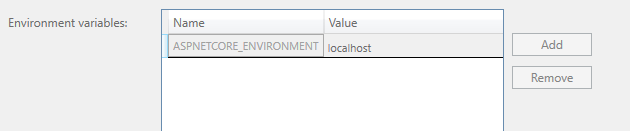
What is strange is I swear this worked before and is a recent regression.
 Levitikon217
on 27 Feb 2019
Levitikon217
on 27 Feb 2019
@barrytang you said that it would not be fixed in VS 2015, but it is not working in VS 2017 either. Shouldn't this issue be reopen?
 lmcarreiro
on 3 Mar 2019
lmcarreiro
on 3 Mar 2019
Please do and please use the Report a Problem too. See here for more details. Thanks!
barrytang
on 6 Mar 2019
Related issues
 BrennanConroy
·
7Comments
BrennanConroy
·
7Comments
 kevinharing
·
7Comments
kevinharing
·
7Comments
 sadjadbp
·
7Comments
sadjadbp
·
7Comments
 ivalexa
·
3Comments
ivalexa
·
3Comments
 TheRealPiotrP
·
5Comments
TheRealPiotrP
·
5Comments
Most helpful comment
Why is this issue (and duplicates) closed?
This is a fundamental problem that setting the environment variables in a test project should be available in the tests, only thing for this at the moment seems to be to parse the launchSettings.json file and pass the environment variables into the ConfigurationBuilder