tonic-examples build crashes: "No such file or directory"
Bug Report
Building the examples in tonic-examples in this repository crashes.
Version
I just checked out this repository, so it's just master of tonic.
$ git rev-parse HEAD
af5754bd437ffbb5c7a9fbe36af14cd182d48c53
Platform
$ uname -a
Linux think5 4.19.80 #1-NixOS SMP Thu Oct 17 20:45:44 UTC 2019 x86_64 GNU/Linux
$ rustc --version
rustc 1.39.0-beta.7 (23f8f652b 2019-10-26)
$ cargo --version
cargo 1.39.0-beta (1c6ec66d5 2019-09-30)
Description
Following tonic-examples/README.md, I tried to run helloworld-client.
This resulted in the following build error:
$ cargo run --bin helloworld-client
[...]
   Compiling tonic-examples v0.1.0 (/home/leo/Code/other/tonic/tonic-examples)
error: failed to run custom build command for `tonic-examples v0.1.0 (/home/leo/Code/other/tonic/tonic-examples)`

Caused by:
  process didn't exit successfully: `/home/leo/Code/other/tonic/target/debug/build/tonic-examples-c5600591329ec7f8/build-script-build` (exit code: 101)
--- stderr
thread 'main' panicked at 'called `Result::unwrap()` on an `Err` value: Os { code: 2, kind: NotFound, message: "No such file or directory" }', src/libcore/result.rs:1165:5
stack backtrace:
   0: backtrace::backtrace::libunwind::trace
             at /cargo/registry/src/github.com-1ecc6299db9ec823/backtrace-0.3.37/src/backtrace/libunwind.rs:88
   1: backtrace::backtrace::trace_unsynchronized
             at /cargo/registry/src/github.com-1ecc6299db9ec823/backtrace-0.3.37/src/backtrace/mod.rs:66
   2: std::sys_common::backtrace::_print_fmt
             at src/libstd/sys_common/backtrace.rs:76
   3: <std::sys_common::backtrace::_print::DisplayBacktrace as core::fmt::Display>::fmt
             at src/libstd/sys_common/backtrace.rs:60
   4: core::fmt::write
             at src/libcore/fmt/mod.rs:1030
   5: std::io::Write::write_fmt
             at src/libstd/io/mod.rs:1412
   6: std::sys_common::backtrace::_print
             at src/libstd/sys_common/backtrace.rs:64
   7: std::sys_common::backtrace::print
             at src/libstd/sys_common/backtrace.rs:49
   8: std::panicking::default_hook::{{closure}}
             at src/libstd/panicking.rs:196
   9: std::panicking::default_hook
             at src/libstd/panicking.rs:210
  10: std::panicking::rust_panic_with_hook
             at src/libstd/panicking.rs:477
  11: std::panicking::continue_panic_fmt
             at src/libstd/panicking.rs:380
  12: rust_begin_unwind
             at src/libstd/panicking.rs:307
  13: core::panicking::panic_fmt
             at src/libcore/panicking.rs:85
  14: core::result::unwrap_failed
             at src/libcore/result.rs:1165
  15: core::result::Result<T,E>::unwrap
             at /rustc/23f8f652bcea053b70c0030008941f5f8476b5a0/src/libcore/result.rs:933
  16: build_script_build::main
             at tonic-examples/build.rs:2
  17: std::rt::lang_start::{{closure}}
             at /rustc/23f8f652bcea053b70c0030008941f5f8476b5a0/src/libstd/rt.rs:64
  18: std::rt::lang_start_internal::{{closure}}
             at src/libstd/rt.rs:49
  19: std::panicking::try::do_call
             at src/libstd/panicking.rs:292
  20: __rust_maybe_catch_panic
             at src/libpanic_unwind/lib.rs:80
  21: std::panicking::try
             at src/libstd/panicking.rs:271
  22: std::panic::catch_unwind
             at src/libstd/panic.rs:394
  23: std::rt::lang_start_internal
             at src/libstd/rt.rs:48
  24: std::rt::lang_start
             at /rustc/23f8f652bcea053b70c0030008941f5f8476b5a0/src/libstd/rt.rs:64
  25: main
  26: __libc_start_main
  27: _start
note: Some details are omitted, run with `RUST_BACKTRACE=full` for a verbose backtrace.

warning: build failed, waiting for other jobs to finish...
error: build failed
 curiousleo
All 32 comments
@curiousleo yeah this could be a bug of running the examples from within the example crate itself. Try running this command from the root of the repo with cargo run -p tonic-examples --bin helloworld-client.
 LucioFranco
on 29 Oct 2019
LucioFranco
on 29 Oct 2019
Thanks for the help @LucioFranco! Unfortunately, I get the exact same error with the build command you suggest, run from the root directory of the repo:
$ cargo run -p tonic-examples --bin helloworld-client
[...]
warning: unused import: `tracing::trace`
--> tonic/src/transport/service/tls.rs:17:5
|
17 | use tracing::trace;
| ^^^^^^^^^^^^^^
|
= note: `#[warn(unused_imports)]` on by default
error: failed to run custom build command for `tonic-examples v0.1.0 (/home/leo/Code/other/tonic/tonic-examples)`
Caused by:
process didn't exit successfully: `/home/leo/Code/other/tonic/target/debug/build/tonic-examples-c5600591329ec7f8/bui
ld-script-build` (exit code: 101)
--- stderr
thread 'main' panicked at 'called `Result::unwrap()` on an `Err` value: Os { code: 2, kind: NotFound, message: "No suc
h file or directory" }', src/libcore/result.rs:1165:5
stack backtrace:
0: backtrace::backtrace::libunwind::trace
at /cargo/registry/src/github.com-1ecc6299db9ec823/backtrace-0.3.37/src/backtrace/libunwind.rs:88
1: backtrace::backtrace::trace_unsynchronized
at /cargo/registry/src/github.com-1ecc6299db9ec823/backtrace-0.3.37/src/backtrace/mod.rs:66
2: std::sys_common::backtrace::_print_fmt
at src/libstd/sys_common/backtrace.rs:76
3: <std::sys_common::backtrace::_print::DisplayBacktrace as core::fmt::Display>::fmt
at src/libstd/sys_common/backtrace.rs:60
4: core::fmt::write
at src/libcore/fmt/mod.rs:1030
5: std::io::Write::write_fmt
at src/libstd/io/mod.rs:1412
6: std::sys_common::backtrace::_print
at src/libstd/sys_common/backtrace.rs:64
7: std::sys_common::backtrace::print
at src/libstd/sys_common/backtrace.rs:49
8: std::panicking::default_hook::{{closure}}
at src/libstd/panicking.rs:196
9: std::panicking::default_hook
at src/libstd/panicking.rs:210
10: std::panicking::rust_panic_with_hook
at src/libstd/panicking.rs:477
11: std::panicking::continue_panic_fmt
at src/libstd/panicking.rs:380
12: rust_begin_unwind
at src/libstd/panicking.rs:307
13: core::panicking::panic_fmt
at src/libcore/panicking.rs:85
14: core::result::unwrap_failed
at src/libcore/result.rs:1165
15: core::result::Result<T,E>::unwrap
at /rustc/23f8f652bcea053b70c0030008941f5f8476b5a0/src/libcore/result.rs:933
16: build_script_build::main
at tonic-examples/build.rs:2
17: std::rt::lang_start::{{closure}}
at /rustc/23f8f652bcea053b70c0030008941f5f8476b5a0/src/libstd/rt.rs:64
18: std::rt::lang_start_internal::{{closure}}
at src/libstd/rt.rs:49
19: std::panicking::try::do_call
at src/libstd/panicking.rs:292
20: __rust_maybe_catch_panic
at src/libpanic_unwind/lib.rs:80
21: std::panicking::try
at src/libstd/panicking.rs:271
22: std::panic::catch_unwind
at src/libstd/panic.rs:394
23: std::rt::lang_start_internal
at src/libstd/rt.rs:48
24: std::rt::lang_start
at /rustc/23f8f652bcea053b70c0030008941f5f8476b5a0/src/libstd/rt.rs:64
25: main
26: __libc_start_main
27: _start
note: Some details are omitted, run with `RUST_BACKTRACE=full` for a verbose backtrace.
warning: build failed, waiting for other jobs to finish...
error: build failed
Ok odd I am able to compile this locally off of a clean clone with your command. So I am not sure what is going on. One thing to try would be maybe to attempt to write your own helloworld to see if you can get tonic to work outside of the repo?
LucioFranco
on 29 Oct 2019
Cheers, I'll give this a try and will report back here.
curiousleo
on 30 Oct 2019
I've also been unable to replicate this issue locally as well. 😞
 RetWolf
on 31 Oct 2019
RetWolf
on 31 Oct 2019
I've set up a "helloworld-tonic" project outside of the tonic source tree following this tutorial: https://github.com/hyperium/tonic/blob/master/tonic-examples/helloworld-tutorial.md - and still get the same error:
$ cargo build
[...]
error: failed to run custom build command for `helloworld-tonic v0.1.0 (/home/leo/Code/untracked/helloworld-tonic)`
Caused by:
process didn't exit successfully: `/[...]/helloworld-tonic/target/debug/build/helloworld-tonic-fce885f2e67115ba/build-script-build` (exit code: 1)
--- stderr
Error: Os { code: 2, kind: NotFound, message: "No such file or directory" }
warning: build failed, waiting for other jobs to finish...
error: build failed
@curiousleo Can you check if OUT_DIR env is set? If it is, can you unset and try it again?
 blittable
on 4 Nov 2019
blittable
on 4 Nov 2019
Cannot dup on
Linux tribble 5.0.0-32-generic #34~18.04.2-Ubuntu SMP Thu Oct 10 10:36:02 UTC 2019 x86_64 x86_64 x86_64 GNU/Linux
23f648b5175b24c24f61bfd8cfb7235fcbae552a
blittable
on 4 Nov 2019
I wonder if this leaves a backtrace if you run RUST_BACKTRACE=full?
LucioFranco
on 4 Nov 2019
I wonder if this leaves a backtrace if you run
RUST_BACKTRACE=full?
When I try to build the out-of-tree "helloworld" project, RUST_BACKTRACE=full does not give me a backtrace of the failure, that is, there is no difference in output between RUST_BACKTRACE=full cargo build and cargo build.
Since the path of the program that build.rs is compiled into is shown, I think it might help to strace its invocation, mimicking what cargo build does.
[...]
process didn't exit successfully: `/home/leo/Code/other/tonic/target/debug/build/tonic-examples-c5600591329ec7f8/build-script-build` (exit code: 101)
[...]
Unfortunately I haven't found a way to convince cargo build to show me the full invocation of the build script, including (crucially) all the environment variables that it sets and the working directory from which the build script is run.
curiousleo
on 4 Nov 2019
I've pushed the project here: https://github.com/curiousleo/helloworld-tonic.
@curiousleo Can you check if OUT_DIR env is set? If it is, can you unset and try it again?
Just to check - cargo build sets OUT_DIR before invoking the build script, right? So the question here would be to add a bunch of logging to build.rs to see if the environment variables are in fact set?
I'm quite new to Rust, I may have a misconception of what is supposed to be happening here.
curiousleo
on 4 Nov 2019
NP - thanks for logging the issue.
I hit my head on this a while back and may need to create an issue around it - so the issue is timely.
There is a custom build method in Tonic that uses the OUT_DIR variable. I don't believe it is documented outside of the code. So, does your system have OUT_DIR defined?
Like from a shell prompt if you type env - do you see that value defined?
It almost has to be environment related - so things like directory permissions could be in play.
blittable
on 4 Nov 2019
Like from a shell prompt if you type
env- do you see that value defined?
Hi! No, OUT_DIR is not defined in my normal shell environment. My understanding from https://doc.rust-lang.org/cargo/reference/environment-variables.html was that cargo build would launch the build script in an environment with OUT_DIR set to an appropriate value for that build, but I may have misunderstood that.
curiousleo
on 4 Nov 2019
Thanks for the clarifying.
The repository you shared... I saw a couple of issues:
- Updated the version of tonic and tonic build. So, I changed the dependencies to:
[dependencies]
tonic = "0.1.0-alpha.5"
bytes = "0.4"
prost = "0.5"
prost-derive = "0.5"
futures-preview = { version = "=0.3.0-alpha.19", default-features = false, features = ["alloc"]}
tokio = "=0.2.0-alpha.6"
[build-dependencies]
tonic-build = "0.1.0-alpha.5"
- The line:
let mut client = GreeterClient::connect("http://[::1]:50051")?;
should be:
let mut client = GreeterClient::connect("http://[::1]:50051").await?;
After that the client runs.
blittable
on 4 Nov 2019
@blittable thanks for the pointers! I've updated the repo accordingly: https://github.com/curiousleo/helloworld-tonic/commit/761be924b9f095e09fadf15e16800a6890df882c
After that the client runs.
I still get the same build error.
curiousleo
on 4 Nov 2019
wow - now I'm really curious! You're running under virtualization with NixOS?
blittable
on 4 Nov 2019
I've added a bunch of debugging to my build script:
use std::os::unix::fs::PermissionsExt;
fn main() -> Result<(), Box<dyn std::error::Error>> {
let out_dir = std::env::var("OUT_DIR")?;
let out_dir_path = std::path::Path::new(&out_dir);
let metadata = out_dir_path.metadata()?;
let permissions = metadata.permissions();
println!("OUT_DIR={}, is_dir={}, permissions={:#o}", out_dir, out_dir_path.is_dir(), permissions.mode());
tonic_build::compile_protos("proto/helloworld.proto")?;
Ok(())
}
which gives:
$ cargo build
Compiling helloworld-tonic v0.1.0 (/home/leo/Code/helloworld-tonic)
error: failed to run custom build command for `helloworld-tonic v0.1.0 (/home/leo/Code/helloworld-tonic)`
Caused by:
process didn't exit successfully: `/home/leo/Code/helloworld-tonic/target/debug/build/helloworld-tonic-4257e0bd3a0d1414/build-script-build` (exit code: 1)
--- stdout
OUT_DIR=/home/leo/Code/helloworld-tonic/target/debug/build/helloworld-tonic-6d7fc43eba6fdcb7/out, is_dir=true, permissions=0o40755
--- stderr
Error: Os { code: 2, kind: NotFound, message: "No such file or directory" }
The important part here is
OUT_DIR=/home/leo/Code/helloworld-tonic/target/debug/build/helloworld-tonic-6d7fc43eba6fdcb7/out, is_dir=true, permissions=0o40755
So OUT_DIR is set (in the environment in which the build script is run by cargo build), the directory exists and can be written to.
curiousleo
on 4 Nov 2019
wow - now I'm really curious! You're running under virtualization with NixOS?
Yes, this is on NixOS. There is no real virtualisation going on - but NixOS (and nix-shell, which I'm using to get the dependencies for the project via shell.nix) do a bunch of things to set up environments by manipulating PATH and putting things in their special directories.
I don't see at this point how my issue is related to NixOS (other than that I'm the only person seeing the issue and also the only person on NixOS, it seems) since OUT_DIR is actually there and writable. But perhaps the issue is env / path related, just not due to OUT_DIR but some other directory or file system operation that is not working as intended.
curiousleo
on 4 Nov 2019
Ok... there is a dependency on rustfmt - can you very if it is installed?
helloworld-tonic on master [!] is 📦 v0.1.0 via 🦀 v1.40.0-nightly
❯ rustup component list | grep fmtrustfmt-x86_64-unknown-linux-gnu (installed)
Also, try running cargo build with the -vv switch. The code should display the rustfmt output, like:
Running `/code/helloworld-tonic/target/debug/build/helloworld-tonic-3cdfdda5a5db1eb4/build-script-build`
[helloworld-tonic 0.1.0] out: Output { status: ExitStatus(ExitStatus(0)), stdout: "", stderr: "" }
If that's the culprit, perhaps we can put together a PR to bubble up that error somehow.
blittable
on 4 Nov 2019
@curiousleo
So, it seems the directory exists, permissions are correct, etc. But, if rustfmt fails to emit the source files into the directory, we get the exact same (somewhat misleading) error.
Beyond that, I'd:
1) look at the build dependency requirements configuration for rust in NixOS. rustfmt may need to be added to the array.
https://github.com/NixOS/nixpkgs/blob/master/doc/languages-frameworks/rust.section.md
2) See if another sample can be run by cloning the git repository (tonic)
blittable
on 5 Nov 2019
- [...]
rustfmtmay need to be added to the array.
I added the following to build.rs:
let output = std::process::Command::new("rustfmt")
.args(&["--help"])
.output()
.expect("rustfmt --help failed")
.stdout;
println!("{}", std::str::from_utf8(&output).unwrap());
and it prints out rustfmt's help, so the build process itself has access to rustfmt (i.e. it's on the path and executable by the build script).
- See if another sample can be run by cloning the git repository (tonic)
On a checkout of tonic (current master at 23f648b5175b24c24f61bfd8cfb7235fcbae552a), I ran:
$ cargo run -p tonic-examples --bin tonic-examples
$ cargo run -p tonic-examples --bin helloworld-server
$ cargo run -p tonic-examples --bin helloworld-client
$ cargo run -p tonic-examples --bin routeguide-server
$ cargo run -p tonic-examples --bin routeguide-client
$ cargo run -p tonic-examples --bin authentication-client
$ cargo run -p tonic-examples --bin authentication-server
$ cargo run -p tonic-examples --bin load-balance-client
$ cargo run -p tonic-examples --bin load-balance-server
$ cargo run -p tonic-examples --bin tls-client
$ cargo run -p tonic-examples --bin tls-server
$ cargo run -p tonic-examples --bin tls-client-auth-server
$ cargo run -p tonic-examples --bin tls-client-auth-client
$ cargo run -p tonic-examples --bin multiplex-server
$ cargo run -p tonic-examples --bin multiplex-client
$ cargo run -p tonic-examples --bin gcp-client
All of them failed to build with the same error.
curiousleo
on 5 Nov 2019
I guess really we gotta figure out what call is failing. I wonder if strace can help us here?
LucioFranco
on 5 Nov 2019
@curiousleo Can you try adding protobuf to your overlay's buildInputs and then setting PROTOC = "${protobuf}/bin/protoc";?
 cpcloud
on 6 Nov 2019
cpcloud
on 6 Nov 2019
@curiousleo Can you try adding
protobufto your overlay'sbuildInputsand then settingPROTOC = "${protobuf}/bin/protoc";?
OMG that worked @cpcloud! :man_facepalming: sorry about this, and thanks to everyone for the help!
Side note - I get that Rust's NotFound is designed not to allocate and therefore can't contain the name of the thing that it failed to find. But it would have been _so_ useful in this case for it to say "No such file or directory: protoc" instead of "No such file or directory" ...
Anyway, thanks! I'm not sure if you anticipate a lot of Nix users using tonic. Here's the shell.nix that worked for me in case you'd like to refer to it somewhere:
let
  moz_overlay = import (builtins.fetchTarball
    "https://github.com/mozilla/nixpkgs-mozilla/archive/master.tar.gz");
  nixpkgs = import <nixpkgs> { overlays = [ moz_overlay ]; };
in with nixpkgs;
stdenv.mkDerivation {
  name = "moz_overlay_shell";
  buildInputs =
    [ latest.rustChannels.beta.rust openssl pkgconfig protobuf  ];
  PROTOC = "${pkgs.protobuf}/bin/protoc";
}
@cpcloud is this something we could add to the docs maybe? I guess that really is more of a prost thing though...
LucioFranco
on 14 Nov 2019
Digging a little deeper into the lack of error message here:
tonic-builddepends onprost = "0.5": https://github.com/hyperium/tonic/blob/v0.1.0-alpha.5/tonic-build/Cargo.toml#L19prost = "0.5"currently resolves to v0.5.0 because there's no other v0.5.xprostv0.5.0 should actually fail with a nice error when it can't findprotoc: https://github.com/danburkert/prost/blob/v0.5.0/prost-build/build.rs#L98-L99- question: where is that error message swallowed? Here?
curiousleo
on 15 Nov 2019
@curiousleo I think that gets bubbled up to the user there with the ??
LucioFranco
on 15 Nov 2019
@curiousleo I think that gets bubbled up to the user there with the
??
It should, right? That's my understanding too. However, the prost 0.5.0 error message
            "Failed to find the protoc binary. The PROTOC environment variable is not set, \
             there is no bundled protoc for this platform, and protoc is not in the PATH",
(https://github.com/danburkert/prost/blob/v0.5.0/prost-build/build.rs#L98-L99)
is nowhere to be seen in my logs. Having it there would have made it immediately obvious what the problem was. So _somewhere_ that error message must be swallowed, right?
curiousleo
on 15 Nov 2019
yeah, somewhere it must be...not sure where though...I am out of town for another week so won't be able to look till then.
LucioFranco
on 15 Nov 2019
In case of use, I landed here after this https://github.com/danburkert/prost/issues/182 were https://github.com/nagisa strace'd out the other bit of the puzzle.
So looks like prost finds its own bundled protoc which will have a bad interpreter on a nixos system (being a non-patchelf'd foreign binary) and am guessing the NotFound comes up from std at the point of executing the bundled protoc referring more to NotFounding the interpreter rather than the binary.
 b333z
on 11 Dec 2019
b333z
on 11 Dec 2019
@b333z thanks for the pointers! Coming back to tonic after a while, I encountered the same issue again. For the record, here is how to run the helloworld example in NixOS:
nix-shell -p cargo rustfmt protobuf
PROTOC=$(which protoc) cargo run --bin helloworld-server
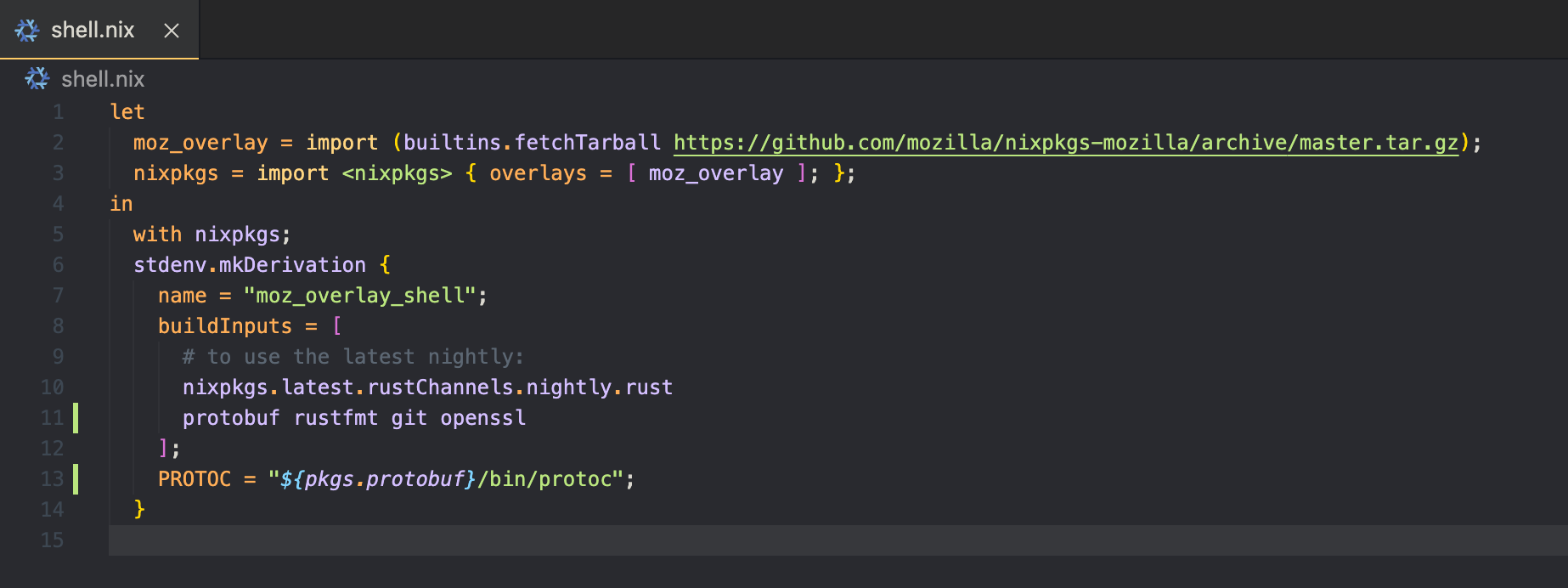
this shell.nix would provide a good access to Tonic development on NixOS with nix-shell
 thienpow
on 1 Nov 2020
thienpow
on 1 Nov 2020
Related issues
 mariogemoll
·
4Comments
mariogemoll
·
4Comments
 matthauck
·
6Comments
matthauck
·
6Comments
 jen20
·
6Comments
jen20
·
6Comments
 xmclark
·
10Comments
xmclark
·
10Comments
 Jasper-Bekkers
·
6Comments
Jasper-Bekkers
·
6Comments
Most helpful comment
OMG that worked @cpcloud! :man_facepalming: sorry about this, and thanks to everyone for the help!
Side note - I get that Rust's
NotFoundis designed not to allocate and therefore can't contain the name of the thing that it failed to find. But it would have been _so_ useful in this case for it to say "No such file or directory: protoc" instead of "No such file or directory" ...Anyway, thanks! I'm not sure if you anticipate a lot of Nix users using tonic. Here's the
shell.nixthat worked for me in case you'd like to refer to it somewhere: