Toggl-button: Buttons no longer showing on Trello (Firefox)
Please follow this guide when creating a new issue. This speeds up the process of replicating the issue and finding a solution.
Environment details
- Operation system: macOS Mojave 10.14.1
- Extension version: Firefox 1.14
Expected behavior
Show toggl button in trello
Actual behavior
Toggl buttons do not show in any trello board, including boards I own
Steps to reproduce the behavior
Open up any card in trello and no Toggl button shows up
Additional details
I can still use the tracker normally to track time by clicking the add on or right clicking
 ColinCee
All 10 comments
Same for JIRA, since latest update.
Update: Right, found the solution. Need to go to about:addons, select settings for Toggl Button: Productivity & Time Tracker, then scroll down, click on Permissions and check atlassian.net for JIRA support.
 janpapenbrock
on 5 Dec 2018
janpapenbrock
on 5 Dec 2018
Hey @ColinCee, can you please check your permission settings and re-enable the extension for Trello if needed?
You can find instructions in the above comment if you need them. Let us know if the button still doesn't show.
 tcrammond
on 5 Dec 2018
tcrammond
on 5 Dec 2018
@janpapenbrock @tcrammond Can confirm this works by enabling the permissions again, not sure why this was the case as it worked originally when I first installed it. Thanks for the help though!
ColinCee
on 5 Dec 2018
What will this about:addons be for Chrome?
TMetric injecting a nice button directley in the Trello-Card like this:
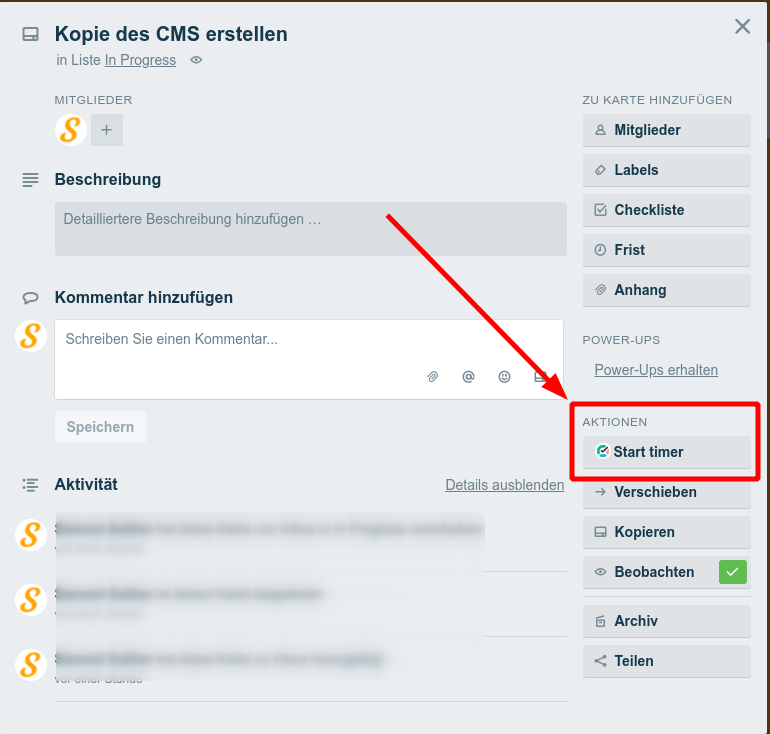
Would expect, that Toggl Button also appear there. Is this possible?
 xstable
on 13 Dec 2018
xstable
on 13 Dec 2018
Hi @xstable, for Chrome I'd recommend looking at this article: https://support.toggl.com/toggl-button-chrome-extension/#settings (this link should jump to the Toggl Button Settings section)
It shows how to open the settings, and then enable permissions under the next section Permissions and Custom Domains. You'll want to either enable everything or tick trello.com in the permissions list.
Once you have enabled Trello in the settings, the Toggl Button should appear in the location you pointed to.
tcrammond
on 13 Dec 2018
That works. Thank you.
xstable
on 13 Dec 2018
Why is this not documented here? https://toggl.com/trello-time-tracking/
From what I can tell, this is a _necessary_ setup step. Very confusing!
 jhbertra
on 28 Nov 2019
jhbertra
on 28 Nov 2019
@jhbertra we hear you, there's a WIP PR https://github.com/toggl/toggl-button/pull/1598
that will help improve the onboarding process, and show how to enable integrations and use other extension features
 shantanuraj
on 28 Nov 2019
shantanuraj
on 28 Nov 2019
I am having this issue now. I have selected settings for Toggl Button as listed above (checked permissions for atlassian.net and atlassian.com). Sill no button showing up...
 Shadrock
on 18 Dec 2019
Shadrock
on 18 Dec 2019
@Shadrock could you please get in touch with our support team (support[at]toggl.com) with some screenshots of your Toggl Button settings and the Atlassian page where the button isn't showing? Thanks!
 lise-toggl
on 19 Dec 2019
lise-toggl
on 19 Dec 2019
Related issues
 IndrekV
·
4Comments
IndrekV
·
4Comments
 soham2008xyz
·
5Comments
soham2008xyz
·
5Comments
 oliveratgithub
·
5Comments
oliveratgithub
·
5Comments
 grethelvandrik
·
6Comments
grethelvandrik
·
6Comments
 sergey-alekseev
·
4Comments
sergey-alekseev
·
4Comments
Most helpful comment
Same for JIRA, since latest update.
Update: Right, found the solution. Need to go to
about:addons, selectsettingsforToggl Button: Productivity & Time Tracker, then scroll down, click onPermissionsand checkatlassian.netfor JIRA support.