Toggl-button: Button does not sync with Toggl webapp
- Operating system: Ubuntu 16.04 / Chromium 66.0.3359.181
- Extension version: 1.10.7
Expected behavior
When timer is started/stopped from the Toggl webapp (https://toggl.com/app/timer), the extension notices this and begins/ends tasks such as tracking idle time.
Actual behavior
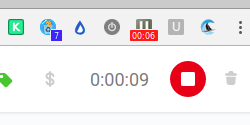
Extension does not notice timer has started until the extension button is clicked, causing idle time tracking to fail.
Steps to reproduce the behavior
Seems to happen at random. I will update if I see some pattern. It's been getting worse in the past week or two. I've tried removing the extension and reinstalling; no change.
Screenshot showing website timing and extension not noticing:
 lee-tts
All 7 comments
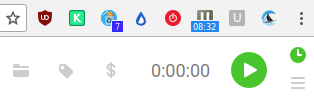
Quick update with a screenshot showing the extension still running despite the webapp being stopped.
lee-tts
on 11 Jul 2018
Might be worth re-visiting how we handle websocket connections. Seems like this might be cause by some intermittent issues.
 langri-sha
on 29 Aug 2018
langri-sha
on 29 Aug 2018
Was already reported in #723
Issue affects app users too (https://github.com/toggl/toggldesktop/issues/2576).
 jlsjonas
on 4 Oct 2018
jlsjonas
on 4 Oct 2018
@langri-sha this issue happens quite consistently btw. Everytime I need to change something from the plugin I have to click the button for it to sync up (and thus; f.e. show "stop" instead of "start" time on the issue I'm working on in gitlab)
jlsjonas
on 5 Oct 2018
Hey guys, is this related to the following scenario shared by another user? /conversation/18595527513)
Prerequisite
Start the timer and let it run.
Trigger event
Receive a notification through the Firefox add-on (ie. « Don't forget to […] »). No action is taken on this notification.
Occurred Behavior
The time for my task stops and another task is triggerred with no description and no project.
Expected behavior
The timer continues running.
 ricotheque
on 8 Oct 2018
ricotheque
on 8 Oct 2018
Would be surprised @ricotheque unless the behavior for FireFox is different; as the problem causing this issue is that the extension is out of sync//no longer connected to the Toggl server
jlsjonas
on 8 Oct 2018
My experience is that this happens without taking any particular series of actions, and can cause the timer to continue running, fail to start running, or issue tracking reminders and idle reminders at inappropriate times.
Reinstalling the extension seems to fix the problem for a day or so, but this might be psychological.
lee-tts
on 9 Oct 2018
Related issues
 mgsloan
·
5Comments
mgsloan
·
5Comments
 orlando
·
5Comments
ricotheque
·
4Comments
orlando
·
5Comments
ricotheque
·
4Comments
 traedamatic
·
3Comments
traedamatic
·
3Comments
 dpashkevich
·
3Comments
dpashkevich
·
3Comments
Most helpful comment
Might be worth re-visiting how we handle websocket connections. Seems like this might be cause by some intermittent issues.