Toggl-button: Firefox Add-On: Add Permissions Disable All Settings
Updated Issue
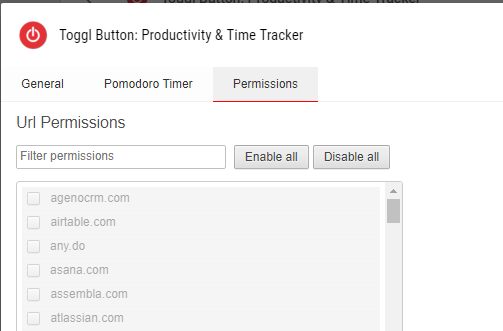
Firefox Add-On currently lacks the following settings menu that's present in the Chrome Extension.
Original Issue
Hi Toggl team,
Big fan of this extension, thanks for your work on it.
This is a feature request; if Issues isn't an appropriate place for this, feel free to close.
I love having the button available in my browser, and really wish that the button was _not_ integrated into the DOM.
I'd imagine that there are others who'd desire a setting that allows a user to turn off these integrations.
 EthanJStark
All 7 comments
Hi @EthanJStark,
You can already disable the DOM integration through the settings. If you click on the Toggl button in the browser, then click on the Open Settings gear button, then select the Permissions tab. You should be able to use the "Disable all" button to prevent the button from showing up on any websites.
I'm not part of the Toggl team, just a fellow user.
 rudivs
on 21 Jun 2018
rudivs
on 21 Jun 2018
Brilliant, thanks, @rudivs ! I'd hunted around for how this might be possible, but didn't find it. Closing!
EthanJStark
on 21 Jun 2018
Actually, doesn't look like this is available on Firefox's add-on yet. Ah, well.
EthanJStark
on 21 Jun 2018
Just checked and it does seem that the settings page is different in Firefox. Maybe reopen, since it's still an issue.
rudivs
on 21 Jun 2018
Updated description + issue title.
EthanJStark
on 21 Jun 2018
Thanks! We're going to take a look at this for the next FF release.
 langri-sha
on 27 Jul 2018
langri-sha
on 27 Jul 2018
Thanks for your patience. Firefox permission settings will be available again in the next release 🎉 It may take a few days to roll out to you.
 tcrammond
on 27 Nov 2018
tcrammond
on 27 Nov 2018
Related issues
 soham2008xyz
·
5Comments
soham2008xyz
·
5Comments
 mgsloan
·
5Comments
mgsloan
·
5Comments
 aeromorrison
·
3Comments
aeromorrison
·
3Comments
 orlando
·
5Comments
orlando
·
5Comments
 dpashkevich
·
3Comments
dpashkevich
·
3Comments