.tmux: The user in the status bar is stuck at root
The problem
I just pulled the latest commit from the master branch. Then I found that if I execute any sudo-prefixed command (such as sudo whoami), the user in the status bar will remain root!, even if I've returned to a standard user.
My setup
$ uname -a
Linux as-server 5.8.7-arch1-1 #1 SMP PREEMPT Sat, 05 Sep 2020 12:31:32 +0000 x86_64 GNU/Linux

$ tmux -V
tmux 3.1b

$ ssh -V
OpenSSH_8.3p1, OpenSSL 1.1.1g  21 Apr 2020
 aofei
aofei
All 17 comments
Hello @aofei 👋
I can't reproduce the problem here:
$ uname -a
Linux mustafar 5.8.9-arch2-1 #1 SMP PREEMPT Sun, 13 Sep 2020 23:44:55 +0000 x86_64 GNU/Linux
$ tmux -V
tmux 3.1b
After having pulled master, did you reload the configuration?
Before reloading the configuration can you please do a thing or two?
- Can you please paste the output of
$ tmux show -gv status-right - In a pane where you're not root but the status bar still displays
root!, can you please do
$ cut -c3- ~/.tmux.conf | sh -sx _username
 gpakosz
on 19 Sep 2020
gpakosz
on 19 Sep 2020
Yes, I reloaded the configuration (C-a + r) and the problem exists.
However, I just killed the tmux session and recreated a new one, then the problem disappeared. So it's not a bug.
Sorry for wasting your time. Next time I'll also remember to restart the session before giving a feedback. 😥
aofei
on 19 Sep 2020
You shouldn't have to restart the session.
I'll investigate more on this issue.
gpakosz
on 19 Sep 2020
Okay, I'll pay attention. If I encounter it again, I'll report back here.
aofei
on 19 Sep 2020
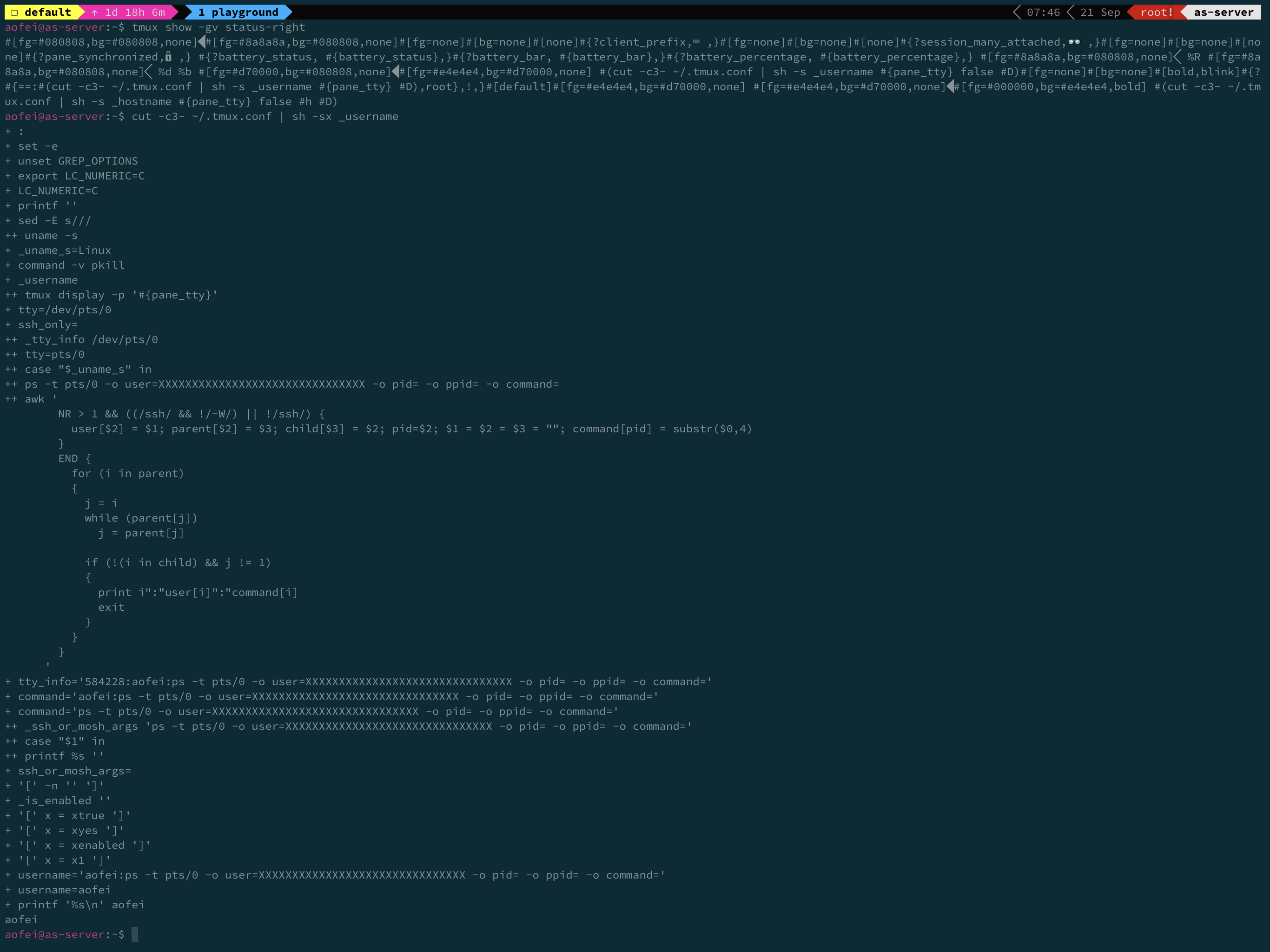
Yes it happened again.
$ tmux show -gv status-right
#[fg=#080808,bg=#080808,none]#[fg=#8a8a8a,bg=#080808,none]#[fg=none]#[bg=none]#[none]#{?client_prefix,⌨ ,}#[fg=none]#[bg=none]#[none]#{?session_many_attached,👓 ,}#[fg=none]#[bg=none]#[none]#{?pane_synchronized,🔒,} #{?battery_status, #{battery_status},}#{?battery_bar, #{battery_bar},}#{?battery_percentage, #{battery_percentage},} #[fg=#8a8a8a,bg=#080808,none] %R #[fg=#8a8a8a,bg=#080808,none] %d %b #[fg=#d70000,bg=#080808,none]#[fg=#e4e4e4,bg=#d70000,none] #(cut -c3- ~/.tmux.conf | sh -s _username #{pane_tty} false #D)#[fg=none]#[bg=none]#[bold,blink]#{?#{==:#(cut -c3- ~/.tmux.conf | sh -s _username #{pane_tty} #D),root},!,}#[default]#[fg=#e4e4e4,bg=#d70000,none] #[fg=#e4e4e4,bg=#d70000,none]#[fg=#000000,bg=#e4e4e4,bold] #(cut -c3- ~/.tmux.conf | sh -s _hostname #{pane_tty} false #h #D)
and
$ cut -c3- ~/.tmux.conf | sh -sx _username
+ :
+ set -e
+ unset GREP_OPTIONS
+ export LC_NUMERIC=C
+ LC_NUMERIC=C
+ printf ''
+ sed -E s///
++ uname -s
+ _uname_s=Linux
+ command -v pkill
+ _username
++ tmux display -p '#{pane_tty}'
+ tty=/dev/pts/0
+ ssh_only=
++ _tty_info /dev/pts/0
++ tty=pts/0
++ case "$_uname_s" in
++ ps -t pts/0 -o user=XXXXXXXXXXXXXXXXXXXXXXXXXXXXXXX -o pid= -o ppid= -o command=
++ awk '
        NR > 1 && ((/ssh/ && !/-W/) || !/ssh/) {
          user[$2] = $1; parent[$2] = $3; child[$3] = $2; pid=$2; $1 = $2 = $3 = ""; command[pid] = substr($0,4)
        }
        END {
          for (i in parent)
          {
            j = i
            while (parent[j])
              j = parent[j]

            if (!(i in child) && j != 1)
            {
              print i":"user[i]":"command[i]
              exit
            }
          }
        }
      '
+ tty_info='584228:aofei:ps -t pts/0 -o user=XXXXXXXXXXXXXXXXXXXXXXXXXXXXXXX -o pid= -o ppid= -o command='
+ command='aofei:ps -t pts/0 -o user=XXXXXXXXXXXXXXXXXXXXXXXXXXXXXXX -o pid= -o ppid= -o command='
+ command='ps -t pts/0 -o user=XXXXXXXXXXXXXXXXXXXXXXXXXXXXXXX -o pid= -o ppid= -o command='
++ _ssh_or_mosh_args 'ps -t pts/0 -o user=XXXXXXXXXXXXXXXXXXXXXXXXXXXXXXX -o pid= -o ppid= -o command='
++ case "$1" in
++ printf %s ''
+ ssh_or_mosh_args=
+ '[' -n '' ']'
+ _is_enabled ''
+ '[' x = xtrue ']'
+ '[' x = xyes ']'
+ '[' x = xenabled ']'
+ '[' x = x1 ']'
+ username='aofei:ps -t pts/0 -o user=XXXXXXXXXXXXXXXXXXXXXXXXXXXXXXX -o pid= -o ppid= -o command='
+ username=aofei
+ printf '%s\n' aofei
aofei
and the screenshot
aofei
on 21 Sep 2020
When it happens, does tmux refresh-client -S help?
gpakosz
on 21 Sep 2020
tmux refresh-client -S helped.
Sorry I haven't caught how it's triggered yet. But once it's triggered, executing any sudo-prefixed command in that session will cause problems. Then I have to restart the session or execute tmux refresh-client -S.
aofei
on 21 Sep 2020
Well there's necessarily a lag between when you're no more root and when tmux decides to refresh the status line
What's the value of your tmux_conf_theme_status_left and tmux_conf_theme_status_right variables?
gpakosz
on 21 Sep 2020
Also, tmux I see you have the prefix indicator in tmux_conf_theme_status_right which means tmux should refresh the status line when you hit prefix
gpakosz
on 21 Sep 2020
Both tmux_conf_theme_status_left and tmux_conf_theme_status_right are the default values specified by this project.
In fact, it's not a lag. It'll always be stuck at root! in that panel, no matter what command I execute later (or switch between different windows or panels). Unless I close that panel and create a new one. But if I execute a sudo-prefixed command in the new panel, the problem will show up again.
aofei
on 21 Sep 2020
Ok I will keep investigating.
From what you reported, the fact that cut -c3- ~/.tmux.conf | sh -s _username in a pane for which the problem exhibits returns the proper username seems to indicate the problem lies in tmux not refreshing the status line
gpakosz
on 21 Sep 2020
To further investigate, when it happens can you please
Describe the sequence of commands you launched to make it stuck, ideally a minimal repro
Get the current pane TTY (the pane for which the status bar doesn't update)
$ tmux display -p '#{pane_tty}'Go to another pane, and use
ps -twith the value returned by the previous command, e.g.$ ps -t <TTY> -o user=XXXXXXXXXXXXXXXXXXXXXXXXXXXXXXX -o pid= -o ppid= -o command=
And paste the output?
gpakosz
on 21 Sep 2020
Ok, I'll pay attention next time it happens.
aofei
on 22 Sep 2020
BTW what's the output of
$ tmux show -gv status-inverval
$ tmux show -gv status-interval
10
Hey @aofei 👋
Any news?
gpakosz
on 3 Nov 2020
It happened several times recently. Unfortunately, I still don't know what specific steps are causing it. It's really cunning... 😥
But anyway, I'll still pay attention to it.
aofei
on 3 Nov 2020
Related issues
 obitech
·
4Comments
obitech
·
4Comments
 luisdavim
·
6Comments
luisdavim
·
6Comments
 fwarmuth
·
5Comments
fwarmuth
·
5Comments
 danielporto
·
8Comments
danielporto
·
8Comments
 nikolayzhmurov
·
5Comments
nikolayzhmurov
·
5Comments