.tmux: enabling #tmux_conf_battery_status_charging='⚡ ' # U+26A1 causes weird issues
This started today (6-11-18) for me. I've been using .tmux for about a year now and I've always had the U+26A1 character enabled for charging in my environment rather than the up and down arrows.
This morning I started a new session and it put a white bar across the bottom of my screen which pushed out the status bar, and my prompt kept adding a return line before my input.
After some troubleshooting, I determined that it was the line below being enabled that caused the issue:
#tmux_conf_battery_status_charging='⚡ ' # U+26A1
(I did this by disabling all my custom settings and then re-enabling them one at a time until it broke, then confirmed by removing the line and seeing it fixed)
I'm not sure what broke the config, I just thought I'd mention this in case anybody else ran into this. For now it's no big deal to just have the default up-down arrows.
OS: Mac (High Sierra 10.13.3).
Emulator: iterm2 (3.1.6)
tmux: 2.7
shell: zsh 5.5.1 (x86_64-apple-darwin17.5.0)
omz theme: agnoster
tmux custom settings:
bind a last-window
bind n next-window
enabled block to replace C-b with C-a instead of both (so I can just use C-b in my ssh sessions)
powerline symbols enabled
tmux_conf_copy_to_os_clipboard=true
start with mouse mode enabled
 AXington
All 2 comments
Hi @AXington,
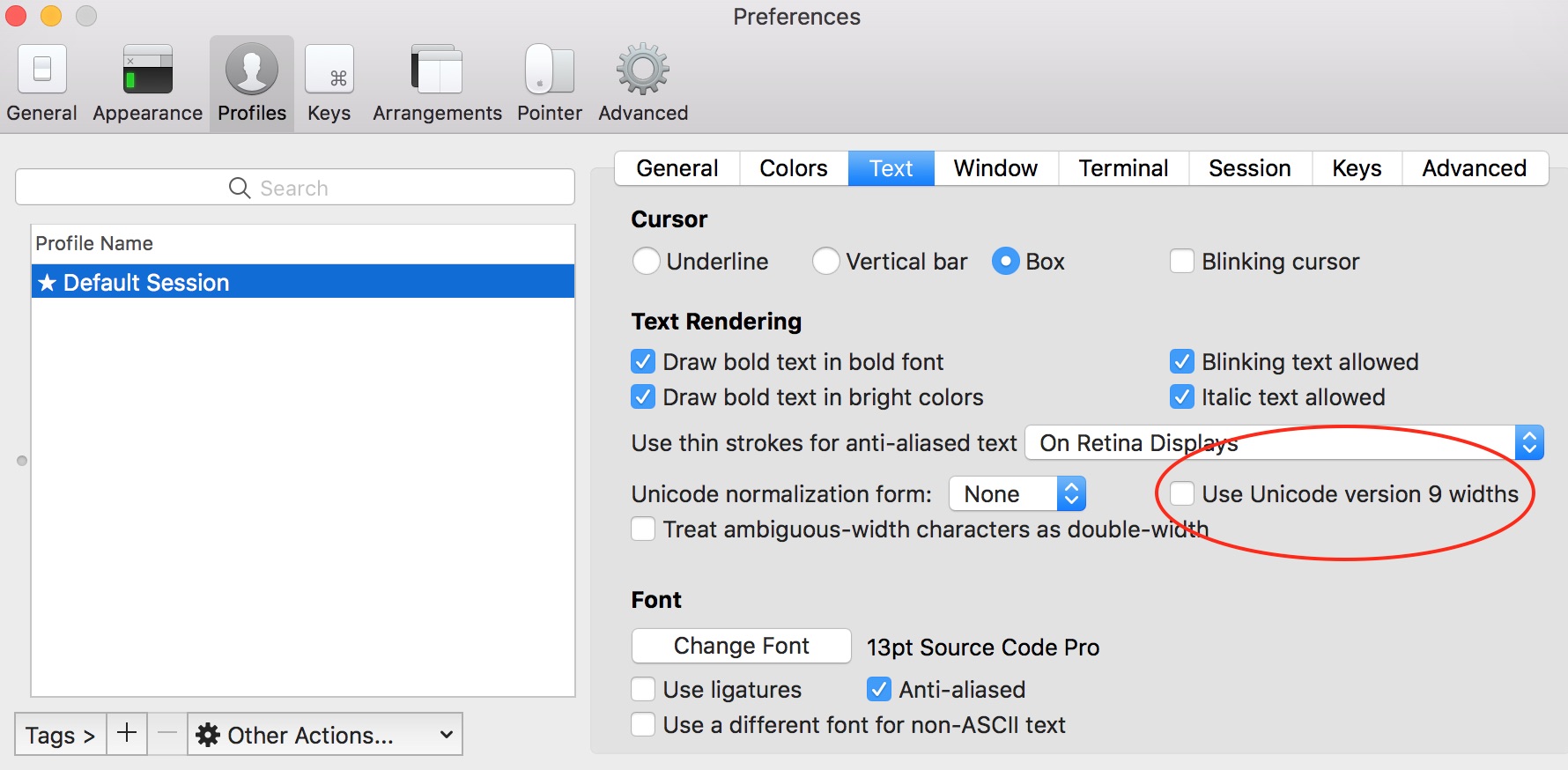
You may want to look at your iTerm 2 settings and uncheck "Use Unicode version 9 widths":
 gpakosz
on 11 Jun 2018
gpakosz
on 11 Jun 2018
what is the cause of this?
 jesuiswk
on 24 Oct 2018
jesuiswk
on 24 Oct 2018
Related issues
 magostinelli
·
6Comments
magostinelli
·
6Comments
 nikolayzhmurov
·
5Comments
nikolayzhmurov
·
5Comments
 luisdavim
·
6Comments
luisdavim
·
6Comments
 ww7
·
4Comments
ww7
·
4Comments
 nick-bull
·
8Comments
nick-bull
·
8Comments
Most helpful comment
Hi @AXington,
You may want to look at your iTerm 2 settings and uncheck "Use Unicode version 9 widths":
