Tmpe: OnResolutionChanged throws null refrence exception when using First-person Auto-Walking mod
from #938 comments:
Found some possible issues when testing in-game.
Note: I'm using First-person Auto-Walking mod, rather than the more commonly used First Person Camera (Updated) mod.
First, if a tool is active, the overlays are still rendering in first person cam. At the very least this is bad for fps.
Second, I pressEscto exit the first person cam, and TM:PE toolbar still visible etc. (this is correct).
However, when I pressEscto exit the toolbar, the toolbar does get closed but thePause Menuis also displayed. It's like the UI fsm somehow got confused. Could it be picking up theEscI used to exit first person cam thinking it's closed the menu and no longer needs to trapEsc?

Actually, it doesn't look like the TM:PE toolbar is getting closed; I suspect it thinks it's already closed (due to
Escpress while exiting the first person cam):
Steps:
- Open TMPE toolbar, select lane connector tool (for example)
- Tab key= go in to first person autowalking cam
- Esc key = exit first person cam
- Esc key = should only close TMPE toolbar, but it doesn't; instead it shows Pause Menu

@aubergine10 The problem you raised is due to an exception preventing the rest of the code from running:
NullReferenceException: Object reference not set to an instance of an object
  at ColossalFramework.UI.UIComponent.OnResolutionChanged (Vector2 previousResolution, Vector2 currentResolution) [0x00000] in <filename unknown>:0
  at ColossalFramework.UI.UIView.OnResolutionChanged (Vector2 oldSize, Vector2 currentSize) [0x00000] in <filename unknown>:0
  at ColossalFramework.UI.UIView.OnResolutionChanged (Int32 oldSize, Int32 currentSize) [0x00000] in <filename unknown>:0
  at ColossalFramework.UI.UIView.OnResolutionChanged () [0x00000] in <filename unknown>:0
  at ColossalFramework.UI.UIView.OnEnable () [0x00000] in <filename unknown>:0
UnityEngine.Behaviour:set_enabled(Boolean)
ColossalFramework.UI.UIView:ShowView(Boolean)
ColossalFramework.UI.UIView:Show(Boolean)
IINS.AutoWalking.MonoCamera:UpdateFreeCamera()
IINS.AutoWalking.MonoCamera:OnDestroy()
IINS.AutoWalking.WalkingCamera:OnDestroy()

(Filename:  Line: -1)

NullReferenceException: Object reference not set to an instance of an object
  at ColossalFramework.UI.UIComponent.OnResolutionChanged (Vector2 previousResolution, Vector2 currentResolution) [0x00000] in <filename unknown>:0
  at ColossalFramework.UI.UIView.OnResolutionChanged (Vector2 oldSize, Vector2 currentSize) [0x00000] in <filename unknown>:0
  at ColossalFramework.UI.UIView.Update () [0x00000] in <filename unknown>:0
 kianzarrin
All 14 comments
Hey,
I would like to work on this.
 baizsof
on 30 Jun 2020
baizsof
on 30 Jun 2020
I'm not 100% sure, but I think that issue occurs only on 11.4.0 Stable, works without any issue on 11.5.0 Labs or 11.5.1.
I encountered that or very similar bug while testing FPS Booster. IIRC in 11.5 were some changes to menu, so I think that bug was actually fixed.
 krzychu124
on 14 Jul 2020
krzychu124
on 14 Jul 2020
Used mods during testing:
- TM:PE V11 STABLE
- Intersection Marking Tool 1.1
https://drive.google.com/file/d/11Ryx5luloJCYsY8NU1TBj6klC7alm1p8/view?usp=sharing
Preface:
I followed @krzychu124 instructions with the lane connector:
Steps:
- Open TMPE toolbar, select lane connector tool (for example)
- Tab key= go in to first person autowalking cam
- Esc key = exit first person cam
- Esc key = should only close TMPE toolbar, but it doesn't; instead it shows Pause
For these steps, I could not reproduce the problem.
Then I tried each TMPE feature with escaping first person cam both with TAB and ESC and finally I could trigger the issue.
Steps that I executed:
- Open TMPE toolbar, select change lane arrows feature
- Tab key= go in to first person autowalking cam
Esc key = exit first person cam
- Aforementioned NullReferenceException raised.
Open TMPE toolbar, select change lane arrows feature
- Tab key= go in to first person autowalking cam
- Tab key = exit first person cam
- Aforementioned NullReferenceException raised.
Then NullReferenceException raised every time IINS is used after a Tool is already enabled:
- Intersection Marking Tool
- Vanilla statistical views
Tests are recorded, logs captured and shared.
https://drive.google.com/drive/folders/1QOUIrtBq1vDGAKKiMmgoaZ7SCzBdyYUD?usp=sharing
- LABS version of TMPE could not trigger the NullReferenceException.
- Intersection Marking Tool could trigger exactly the same NullReferenceException, but I could not record that.
- Only change lane arrows could trigger the issue.
baizsof
on 15 Jul 2020
@baizsof what is IINS?
Only change lane arrows could trigger the issue.
Do you mean the lane connector tool? note that the lane arrow tool is a separate tool.
No other TMPE tool can reproduce the exception?
kianzarrin
on 15 Jul 2020
IINS is the namespace of first person autowalking cam.
IINS.AutoWalking.MonoCamera:UpdateFreeCamera()
IINS.AutoWalking.MonoCamera:OnDestroy()
IINS.AutoWalking.WalkingCamera:OnDestroy()
I use _lane connector_ and _change lane arrows_ names as they are used in the TMPE tool too.
Lane connector of TMPE
https://drive.google.com/file/d/1Ea7im6O97Wru02_vJV8n5Zo9MDBCMzRA/view?usp=sharing
Change lane arrows of TMPE
https://drive.google.com/file/d/1ay3m2n9UKpY5WtxdpHNvnNRcfvP1I30p/view?usp=sharing
No other TMPE tool can reproduce the exception?
I think further testing is required because yesterday the issue could be triggered by only _change lane arrows_, but today I could reproduce it with _lane connector_ too.
Please note, that I have very limited knowledge of modding, so I am interested in your opinion (@krzychu124 , @kianzarrin ).
I could not found any error log in TMPE.log after the exception occurred, so I would like to also test further whether other mods can trigger this issue.
TMPE logs of tst1 and tst2:
https://drive.google.com/file/d/1wQm2eZ9C47D9u0aAUJTlCVmwgTShYDZw/view?usp=sharing
https://drive.google.com/file/d/1B7Qf3hN6snOkRzKty06zdUDsbMXOTOWz/view?usp=sharing --> (I inserted _Change lane arrows_ string in the log file to follow what has been logged after I triggered the exception. )
baizsof
on 15 Jul 2020
This is harder than I initially thought. You need to use dnSpy to read CS code. https://github.com/CitiesSkylinesMods/TMPE/wiki/Attaching-Debugger-to-Cities-Skylines . the CS dlls are in C:\Program Files (x86)\Steam\steamapps\common\Cities_Skylines\Cities_Data\Managed .
This issue is caused because There something is null. you need to first find out what is null by reading the decompiled code
at ColossalFramework.UI.UIComponent.OnResolutionChanged (Vector2 previousResolution, Vector2 currentResolution) [0x00000] in <filename unknown>:0
You might need to put a breakpoint at the method and execute code step by step to see which line is causing error.
Then load TrafficManager.dll in decompiler and analyze the null variable to see where in TMPE is it set to null.
That's what I would do if I wanted to debug this problem but I could be wrong.
kianzarrin
on 15 Jul 2020
Not sure whether this is related or not, but I could see this error log in TMPE.log during the beginning of the testing.
_Info 204.5143111: Removing Controls from UI.
Info 204.5194411: Reverting manual detours
Info 204.5203896: Reverting attribute-driven detours
Info 204.5230836: Reverting Harmony detours
Info 204.6233362: Reverting detours finished.
Info 212.6804868: ModUI.DisableTool: CurrentTool is not traffic manager tool!
Info 212.6815620: Removing Traffic Manager Tool.
Info 216.9193294: TrafficManagerTool.OnDestroy() called
Info 219.8528747: TM:PE disabled._
@kianzarrin alright, then my next step will be to find out exactly what object is null.
Meanwhile, there is 3 video (2-5mins long) shared at google link that I inserted here. Those are about the testing that Ive done. @kianzarrin, could you check them whether there is anything useful inside the videos, that could help to find the root cause of this issue?
baizsof
on 15 Jul 2020
BTW, please test it on Labs version because current Stable 11.4 will get 11.5 from Labs (with bug fixes, if any)
Version 11.4 is dead-end, there won't be added any bugfix there so there is no point of testing it.
Our version model is: current Labs version(with bugfixes, if necessary), become automatically Stable when we release new version for Labs. I will be changed a bit after next Labs release (11.6.0)
krzychu124
on 15 Jul 2020
@krzychu124 Alright. Then I test with TMPE v11.5
baizsof
on 17 Jul 2020
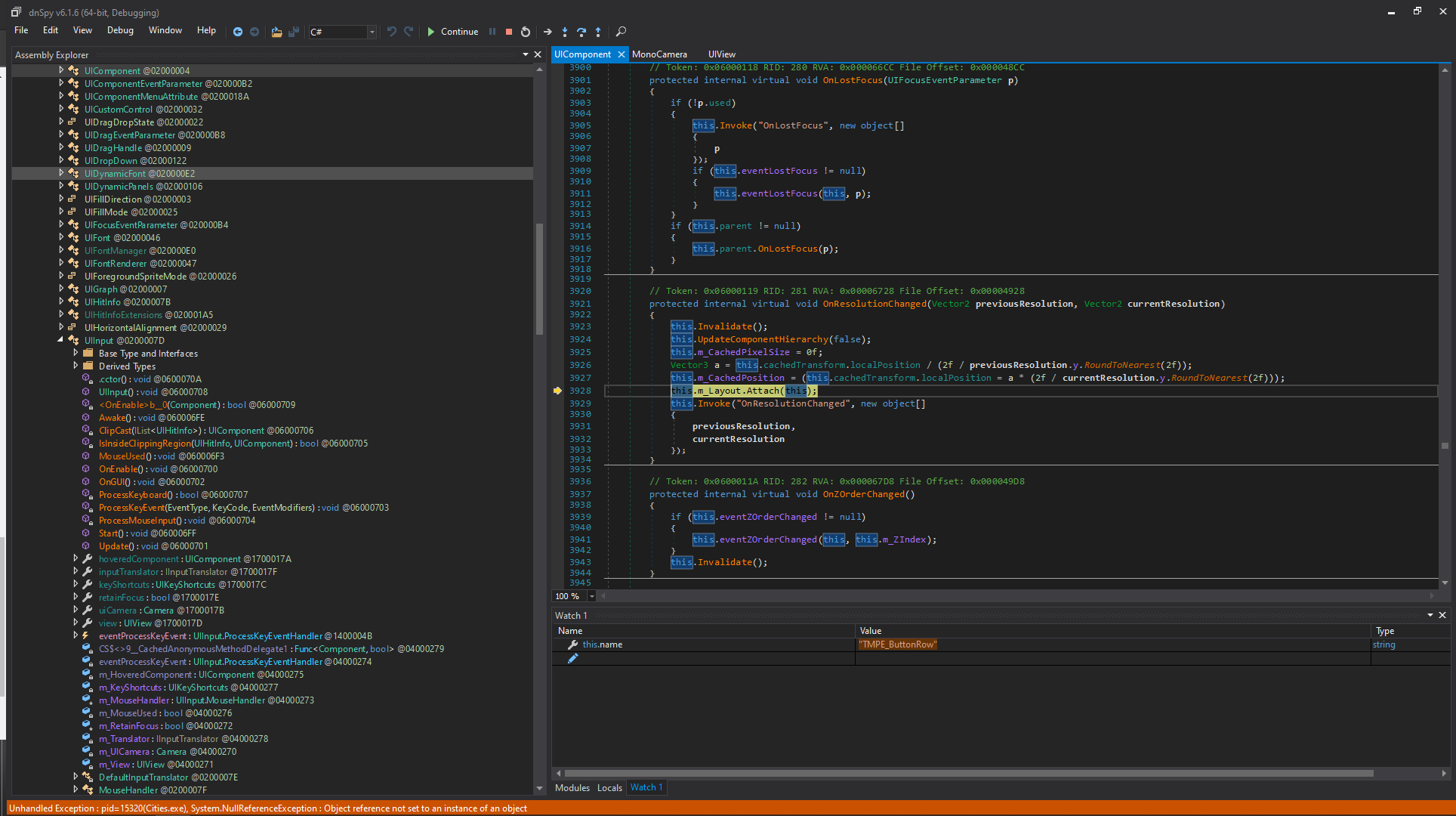
I could trigger the issue with TMPE v11.5
Steps:
Open TMPE toolbar, select change lane arrows feature
Tab key= go in to first person autowalking cam
Esc key = exit first person cam
Aforementioned NullReferenceException raised.
dnSpy also raised an nullreference exception and stopped the debugging.
baizsof
on 18 Jul 2020
Here is a sort sum up where I got stuck.
As you already know from the stack trace, the issue is triggered when IINS.AutoWalking.WalkingCamera:OnDestroy() is called in certain scenario, which eventually leads to ColossalFramework.UI.UIView.Show(), public static function. This function tries to iterate on ColossalFramework.UI.UIView.sUIViews.Values, and calls the non existing UIView object function.
Here is the sUIViews dic.
private static Dictionary<string, UIView> sUIViews = new Dictionary<string, UIView>();
Let's find our way back to TMPE, shall we?
I could only find local Show() function inside TMPE namespace, and no call for ColossalFramework.UI.UIView.Show(). Furthermore, I could neither find exact call for ColossalFramework.UI.UIView.sUIViews Values, nor Keys. I might not made a detailed search although...
Is TMPE updating this dictionary?
Something definitely nulling out that UIView inside that dictionary, but could not yet find out where.

baizsof
on 21 Jul 2020
Ok, thank you for tests. I've done few more tests
- 11.5 Labs ❌- I can confirm, issue is there, throws even if panel is closed(after first error occurrence)
- latest
masterbuild ✔️ - cannot reproduce issue, behaviour was changed recently due to some @kianzarrin fixes to quick mass edit some time ago.
The difference between master and older versions is, previously panel was auto-closed when entering free camera(very similar to that in Autowalking mod), but now it is not.
I'll extract that part which fixes issue when I'll start preparing for 11.5.1 Stable release (collecting bugfixes added in between 11.5 Labs release and current master 11.6)
krzychu124
on 22 Jul 2020
Alright. Thank you @krzychu124 . After all, can this issue be closed?
baizsof
on 22 Jul 2020
I need to check.
kianzarrin
on 22 Jul 2020
Related issues
kianzarrin
·
38Comments
 aubergine10
·
29Comments
aubergine10
·
32Comments
aubergine10
·
29Comments
aubergine10
·
32Comments
 FireController1847
·
28Comments
kianzarrin
·
32Comments
FireController1847
·
28Comments
kianzarrin
·
32Comments