Tmpe: Display error in options
I just downloaded the MOD. When setting things up in the options menu I have a problem. Under Policies & Restrictions under the sub-section 'At Junctions' all of the options are just one jumbled line of text as if each of the many options are typed on top of each other so you can't read what any of the text says or select individual options. Same problem under the Maintenance tab, 'Activated Features' subsection. It also looks like all 8 options are just written on top of each other so I can't toggle them on or off individually. Anyone else seen this problem before?
 Greenturtle116
All 11 comments
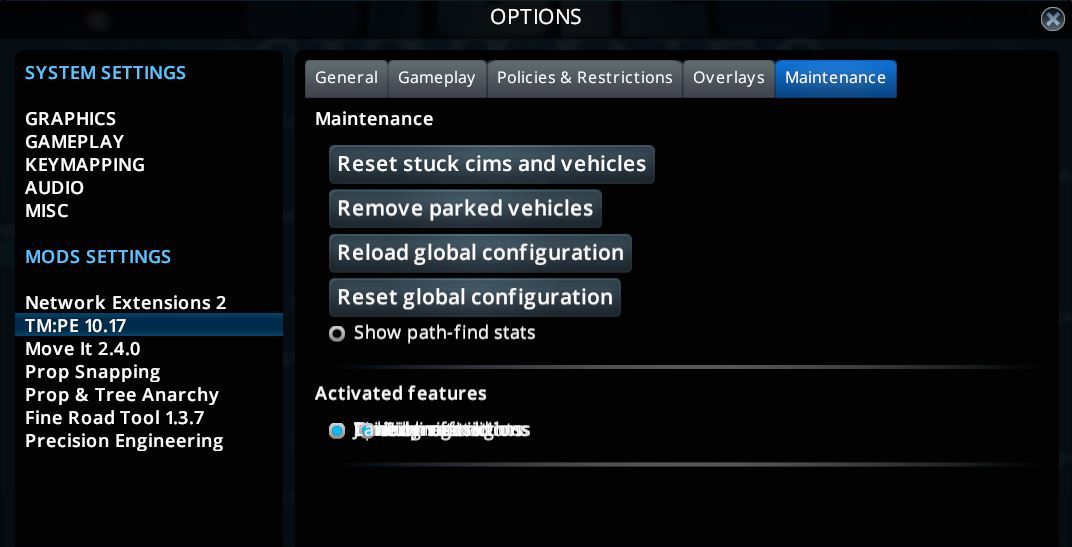

Trying to attach screen shots of the two problems I'm having with the options. You can also see the other MODS I have downloaded in case someone sees an incompatibility issue I've missed.
Greenturtle116
on 26 Mar 2019
This looks like a new issue. I know the code rendering those options was changed in this release to allow for indented options.
Was it like this when first opening the options screen, on only on subsequent openings?
 aubergine10
on 26 Mar 2019
aubergine10
on 26 Mar 2019
This issue only occurs when the options dialog is opened from the main menu.
 VictorPhilipp
on 27 Mar 2019
VictorPhilipp
on 27 Mar 2019
As the options are only valid in-game, is there some way we can show different options screen if opened from main menu?
It should be possible to determine if it's from main menu based on the stuff present on UIView?
aubergine10
on 27 Mar 2019
When someone is looking into this bug: I lose the display of all settings when changing the language in the TM:PE options menu in-game. Restarting brings it back. Changing it in the main menu is fine.
 1Tomber
on 27 Mar 2019
1Tomber
on 27 Mar 2019
aubergine10 - this issue presented itself the first time I opened the menus and has continued on subsequent openings of the menu's. I even did a computer restart for good measure.
Greenturtle116
on 28 Mar 2019
TPB posted some code showing alternate ways to indent checkboxes (which would avoid turning the auto-layout feature off on the parent container)....
Approach 1: Use a group, and indent the group
public void OnSettingsUI(UIHelperBase helper) {
    UIHelperBase group = helper.AddGroup("Mod");
    UIPanel panel = (UIPanel)((UIPanel)((UIHelper)group).self).parent;
    panel.Find<UIPanel>("Content").autoLayoutPadding = new RectOffset(100, 0, 0, 0);
    UICheckBox checkbox = group.AddCheckbox("MyCheckbox", true, (b) => { }) as UICheckBox;
}

Approach 2: Indent sub-components of the checkbox
public void OnSettingsUI(UIHelperBase helper) {
    UIHelperBase group = helper.AddGroup("Mod");
    UICheckBox checkbox = group.AddCheckbox("My Checkbox", true, (b) => { }) as UICheckBox;
    checkbox.Find<UISprite>("Unchecked").relativePosition += new Vector3(100.0f, 0.0f);
    checkbox.Find<UILabel>("Label").padding = new RectOffset(100, 0, 0, 0);
    group.AddCheckbox("My Checkbox 2", true, (b) => { });
}

Note that with this approach, you don't even need the group (so you can get rid of unwanted separator line that appears under groups)...
public void OnSettingsUI(UIHelperBase helper) {
    UICheckBox checkbox = helper.AddCheckbox("My Checkbox", true, (b) => { }) as UICheckBox;
    checkbox.Find<UISprite>("Unchecked").relativePosition += new Vector3(100.0f, 0.0f);
    checkbox.Find<UILabel>("Label").padding = new RectOffset(100, 0, 0, 0);
    helper.AddCheckbox("My Checkbox 2", true, (b) => { });
}

This should be ideal for the TMPE mod options and solve the overlapping options problem.
aubergine10
on 1 Apr 2019
Hrm, looks like the code that adds the components to the UI would need to be passed info about the need to indent. No idea how to do that, sorry :/
aubergine10
on 4 Apr 2019
Bug fix should be in next release thanks to @krzychu124 :)
aubergine10
on 5 Apr 2019
I'm going to reopen and repin this - until the fix is pushed to steam workshop it's still affecting users so we should keep this issue easy to find.
aubergine10
on 15 Apr 2019
Fixed in 10.19 release
aubergine10
on 20 Apr 2019
Related issues
 aditya-murda
·
6Comments
aubergine10
·
4Comments
aubergine10
·
6Comments
aubergine10
·
5Comments
aubergine10
·
6Comments
aditya-murda
·
6Comments
aubergine10
·
4Comments
aubergine10
·
6Comments
aubergine10
·
5Comments
aubergine10
·
6Comments