This is a redux of https://github.com/VictorPhilipp/Cities-Skylines-Traffic-Manager-President-Edition/issues/143
Requires #3 and #4
When customising traffic light sequence, I think it would be much more intuitive if the visualisation was on the roads, rather than floating panels.
Each lane connection (either as customised by user or default routing, as applicable per incoming lane) would be illustrated on junction as a thin white or grey line, also showing conflict points when zoomed in (see #4).
For each incoming lane, a small circle at the junction-end of that lane depicts the traffic light state for that lane in the current step:
- Grey circle outline = none of the steps in the sequence currently have a 'green light' for this lane
- Red circle outline = red light
- Green filled circle = green light
This approach fixes https://github.com/VictorPhilipp/Cities-Skylines-Traffic-Manager-President-Edition/issues/90
Clicking the circle:
- Left click (primary button) toggles between green/red
- Right click (secondary button) clears any green lights for this lane within the entire sequence (ie. circle goes grey)
When an incoming lane has the green filled circle (ie. green light for current step), additional visualisation occurs:
- The 'lane connectors' applicable to that lane turn green (normal width)
- The incoming lane is given a green outline (similar to how old Traffic++ mod outlined lanes) all the way back to the previous junction node (or end of network)
- The outgoing lanes connected to the 'green lit' incoming lane get orange outlines all the way to the next junction node (or end of network)
Note: Visualisation for 2 and 3 above would probably need a segment count limit (eg. if the traffic lights are on a highway junction that trails all the way to the edge of the map; rare but not unheard of).
This would make it massively easier to see what's going on, because it clearly depicts the lane the traffic arrives from, the route across the junction (including conflict points if applicable - see #4), and the lanes the traffic will exit on up to and including the next junctions (hugely useful when sequencing multiple junctions). Also, the presence of any grey circles alerts me to lanes that aren't getting any 'green time' in the entire sequence.
If possible, also allow the pedestrian crossing to work in similar way - ie. circles at both sides of road, and even on median if possible (I saw discussion on Steam with user asking if it's possible to make pedestrians wait at the median before completing journey across the road). The pedestrian crossing could also indicate conflict points (eg. cims crossing a lane that's on green light = bad).
 aubergine10
All 33 comments
Source repo for old T++ mod: https://github.com/joaofarias/csl-traffic
aubergine10
on 1 Feb 2019
In the UI panel that lists the steps, hovering over an existing step could quickly show the UI on the roads (eg. the green lane highlights and so on) allowing user to quickly see how the sequence works.
aubergine10
on 1 Feb 2019
As this new UI would be lane based, it would probably merit a keyboard modifier to allow toggling all lanes on one direction (for a given segment):
- Click: toggle light state of clicked lane
- Right click (secondary mouse button): clear all light changes for clicked lane (i.e. set to grey circle)
- Shift+Click: toggle light state for all lanes on current segment that travel in direction of clicked lane
- Shift+RightClick: like shift+click, but clears all light changes (ie. grey circles them) for affected lanes
aubergine10
on 2 Feb 2019
As this new UI would be lane based, it would probably merit a keyboard modifier to allow toggling all lanes on one direction (for a given segment):
* Click: toggle light state of clicked lane

* Right click (secondary mouse button): clear all light changes for clicked lane (i.e. set to grey circle)

* Shift+Click: toggle light state for all lanes on current segment that travel in direction of clicked lane

* Shift+RightClick: like shift+click, but clears all light changes (ie. grey circles them) for affected lanes
I would add Ctrl+LeftClick to set all lights for the current road, regardless of where the cars are going.
 brunoais
on 5 May 2019
brunoais
on 5 May 2019
Feedback from https://github.com/krzychu124/Cities-Skylines-Traffic-Manager-President-Edition/issues/278#issuecomment-500458216 :
I'm only struggeling with understanding the options for phase switching. The texts are a bit unclear.
aubergine10
on 10 Jun 2019
A design brainstorming session
On a board (or a visual editor canvas) lay out available data: that will be
- For each node involved in a sync light system...
- For each incoming segment into that node...
- For each lane can have a
- a traffic light forward
- a traffic light right for RHD (or left for LHD)
- or a simple traffic light in all directions
- Other types of lanes?
- Buses have different light design in different countries, not 🚦
- Bikes?
- Crosswalk pedestrian lights?
Some questions
- I would suggest a timeline approach like animation and audio/video stream processing software does, scroll horizontally, click on a time, get the current view above the timeline.
- How to fit all that information on screen for the current state?
- Is it possible to make a useful overview panel? How do city planning people do it?
 kvakvs
on 2 Aug 2019
kvakvs
on 2 Aug 2019
rough idea, ugly mockup 😄

- star - lane dir? or traffic light?
- gray background - step
- N E S W, could be node id or traffic light group per segment?
 krzychu124
on 2 Aug 2019
krzychu124
on 2 Aug 2019
I was thinking a separate timeline and the lights view, but this might also be good.
Need some idea how to horizontally group them in roads maybe, not just one color per lane, but also one color per road segment involved, and if you mouse over, it should also highlight an overlay in the world view, and in the reverse if you mouse over in the world it should highlight in this view.
kvakvs
on 2 Aug 2019
Ok, i will try to improve it or start from scratch 😃
krzychu124
on 2 Aug 2019
No no, this prototype is very good. But consider grouping by something intuitive.
All in one direction
All in one segment
All in one node
Something liek this. Maybe try some UI prototyping tools like Figma
kvakvs
on 2 Aug 2019
Could we put the timeline... on the roads?
So we have the lane selection sausages and their length is defined by some math on the lane speed (defined or measured) and amount of green time for that lane in current step. When light goes green, the lane highlight could actually snake through the junction. This sort of on-road visualisation could be very useful when trying to set up "green wave" (#278) traffic light programmes.
aubergine10
on 2 Aug 2019
v0.02 (Figma tool)

krzychu124
on 3 Aug 2019
From here this only gets better
kvakvs
on 3 Aug 2019
The color here is used for the traffic light. And you add another color, of the connector. Don't mix two colors, maybe give numbers or icons, or geom shapes. Assume that some people have a hard time distinguishing red and green, for them we might change red to thin line maybe. Like your first prototype it was good for color blind.
kvakvs
on 3 Aug 2019
OK, so I'll remove lane color line.
I would leave segment background as is (color can be adjusted) and I'll add something for lanes.
[EDIT_1]

krzychu124
on 3 Aug 2019
I assume this is 3 levels of the same editor?
This will need some help and tooltips. It all makes sense after looking at it for a while, but first impression was WOAH what is this and how to use.
- View 2 makes no sense as it shows less info than there is in view 3, how do you remove or merge 5 lanes from Segment_1 in view 3 into 3 lanes in View 2? Do you drop Tram and Ped lights? Maybe view 2 is not needed?
- View 3 with horizontal panels one per color looks nice.
- The background colour kind of makes sense, but some of the lane connector colours are really strong and poisonous to be used as UI background :)
Please think where the controls for editing will go in this UI, find some space for them. The controls can be in a dynamic panel which moves if you click another Segment panel and can push other panels away to make space temporarily.
kvakvs
on 3 Aug 2019
Lane connector colors will be changed( #287 ).
To be honest I am not sure which view is 2 and 3 for you :) It's general idea / experiment rather than mockup we should try implement. I'm trying to mix the best things from previous examples. It's not so easy and I'm not UX designer...
Back to the 'mockup', I even thought about making it bloody simple, say matrix of toggles (green/red) where column would be one step and row would be traffic light 🚦 then add buttons for grouping 🚦 by segment, node, route direction etc.
Now I've got another idea to move whole traffic lights setup to game world space 😄
For example, in the middle of intersection add canvas with basic settings (step + time), another canvas for each segment in which user will select type of traffic light (currently implemented combination - all dir, L + FR, FL + R etc..) then for each lane, draw lane wide rectangle - toggle button (green/red). Somewhere place switch for steps (or manager) and maybe render previous/current step using lane connections.
Quick ugly example

krzychu124
on 3 Aug 2019
This looks like an amazing idea just as it is hard to design well and implement :)
For example of my lane arrows experiments the simplest without UI (highlights only) is so far the best.
kvakvs
on 3 Aug 2019
I think whole traffic light step settings and other node specific options we could place in floating window like it is now.
Possible interactions:
- right click - change traffic light type (floating circular menu?)
- left click - change state
I think it may be way simpler to implement than regular UI dialog, because here we need only to know segment lane width and it's direction vector to properly position rectangle.
For more groups of vehicles we can add another row of toggle buttons (green/red) + vehicle icon,
v0.02 (_crazy idea_) - colours are quite random ;)

krzychu124
on 3 Aug 2019
Rather than up/down arrows, we could add small drag handles to the left of the steps and allow drag to re-order. The space where the up/down arrows are could then be replaced with an icon to access the settings for the adaptive step switching.
aubergine10
on 3 Aug 2019
Good idea, I thought about drag&drop too.
I forgot to add handle/button, whatever to actually select active step and toggle edit mode.
Another problem is that currently we have one traffic light per segment +additional for specific vehicle, not for each lane 😕
krzychu124
on 3 Aug 2019
I remember Victor saying that the data model is per lane, but the classes are currently per direction / traffic type. From user perspective I think the direction stuff still makes sense, although if we did it by lane we could have a keyboard modifier to "apply the change I'm about to make to all lanes on this segment going in that direction"?
aubergine10
on 3 Aug 2019
Hi, not sure how to best reach out to the active folks on this repo, but I've been working on a traffic simulation game from scratch called A/B Street and noticed that we're exploring some of the same UI problems. Representing and editing traffic signals is one of my favorites. :) I just uploaded a new video of what it looks like now: https://github.com/dabreegster/abstreet/blob/master/docs/videos/fix_traffic_signal.gif
If y'all ever want to collaborate or brainstorm together, let me know! Not sure if the TM:PE community is interested in bootstrapping from real cities, but I've done a fair amount of work mangling OpenStreetMap into a form usable for traffic simulations. If the map format TM:PE uses is documented somewhere, it could be fun to try that import out.
 dabreegster
on 6 Dec 2019
dabreegster
on 6 Dec 2019
@dabreegster
Not sure if the TM:PE community is interested in bootstrapping from real cities, but I've done a fair amount of work mangling OpenStreetMap into a form usable for traffic simulations. If the map format TM:PE uses is documented somewhere, it could be fun to try that import out.
TM:PE is a mod for Cities: Skylines game, which is built in Unity engine running in Mono environment. There have been a few integrations in the past, but I'm not sure if any are actively maintained. The following mods might be of interest:
- Cimtographer (source) - this is what everyone used to use, but it's outdated
- Newer Cimtographer (source)
- CSL Map View (source) - this takes map data from the game, and exports it, plus external app to render export data as map
aubergine10
on 6 Dec 2019
Yesterday I set up the traffic light at a difficult intersection. It took a lot of time because always somewhere some traffic light forgot to turn on. Then I drew this intersection on paper and set it up the first time. How do you like the idea of showing lines where cars can go from each green light? And also show which traffic lights remain red all the time?


 MacSergey
on 15 May 2020
MacSergey
on 15 May 2020
Maybe, as an inspiration, I'll just leave the link to a video I once made here. I think, this would be really complicated, but it would also be really cool, if possible.

 s2500111
on 7 Nov 2020
s2500111
on 7 Nov 2020
Nice, just like i imagined it.
The game operates segments and lanes, so it is no problem to highlight segments where the cars can go and link them with a line in some pretty way. But it will not be as pretty like the intersection marking mod can do, though.
kvakvs
on 7 Nov 2020
Maybe one could even reuse code from the IMT for the intersection part? We could ask the author if he can create some kind of API to autogenerate markings dynamically. Maybe even with transitions for this use case.
Would be great anyway, if those mods could interact and autogenerate some markings, even though this would probably be a long way to go.
s2500111
on 7 Nov 2020
Anyone thought about how to convert current setups to a lane based model?
I also found that the underlying data model is lane based, but when vehicles are interacting with the traffic light, it is based on the direction the car is taking. It should be standard, to change all traffic lights of the same direction at the same time, as long as they aren't decoupled manually. It would be even better, if users could change groups of lights manually.
However, currently, there can be multiple states for one line of traffic. E.g. a lane that is straight + left and straight is green while left is red. This is unwanted, bad behavior in most cases, but makes sense for some vehicles such as trams in dedicated lanes. So while lane based is good in general, maybe it should be possible to still split this direction wise.
So features I would expect from this are:
- lane based green or red
- grouping of lanes
- splitting of lanes by direction
The last one would also allow to convert any current light into the new system.
s2500111
on 31 Jan 2021
I disagree. In real life, traffic lights are direction-based and not lane-based. The custom traffic lights should reflect that. Currently, it reflects that. If you think otherwise, pls explicify.
brunoais
on 31 Jan 2021
I disagree. In real life, traffic lights are direction-based and not lane-based. The custom traffic lights should reflect that. Currently, it reflects that. If you think otherwise, pls explicify.
Yes and no. In real life traffic lights are direction based most of the time. But this is not completely translatable into the simulation, as complex intersections are containing multiple nodes in the game and a certain lanes direction at a node might not correspond to their direction at an intersection. Even a plain old diamond interchange runs into that trouble, as when you allow throughtraffic for both directions, left turning vehicles will also drive into the intersection (green marked areas) and start blocking the way of the left turning vehicles (red marked area) from the opposing site. In real life this is solved by differentiating the left turn lane before the DI. In the game, all forward lanes are straight lanes. Therefor, a lane based approach should be used to _model_ this behavior from the _real world_ in the _simulation_ through user interaction.
Click to see image

Another issue is, that directions are arc based. So in some cases, multiple lanes can have the same direction (e.g. straight), even though they lead to different road segments and might deal with different conflicts:
Click to see images


s2500111
on 31 Jan 2021
For case 1: I don't understand your problem. That one is handled by using exclusive action lanes. For example, a lane exclusively for turning left and traffic light selecting for that turn.
For case 2: That is a potential problem but it's not as bad as it seems. With just a very tiny tweak in any of the 3 roads, you can easily go around that limitation. Usually, that limitation isn't a problem at all.
brunoais
on 31 Jan 2021
For case 1: I don't understand your problem. That one is handled by using exclusive action lanes. For example, a lane exclusively for turning left and traffic light selecting for that lane.
The Problem is the light before entering the DI. You can't have a left turning light like this separating turning cars from them going straight, as long as you're in a direction based approach:
Click to see image

For case 2: That is a potential problem but it's not as bad as it seems. With just a very tiny tweak in any of the 3 roads, you can easily go around that limitation. Usually, that limitation isn't a problem at all.
Not having a feature because you can wiggle your way around this, isn't a great argument. And yes, I often struggle with this limitation, as sometimes there are reasons for having an angle like that. Also, Intersections with more then 3 Options exist. Look in the image below and imagine the red arrows being a main direction of traffic. So you want to combine those, but still want to allow turns like the blue arrow is showing. So you give vehicles an extra lane, start setting up the light and will figure, that there is only one option for turning left. Good luck figuring that out.
Click to see image
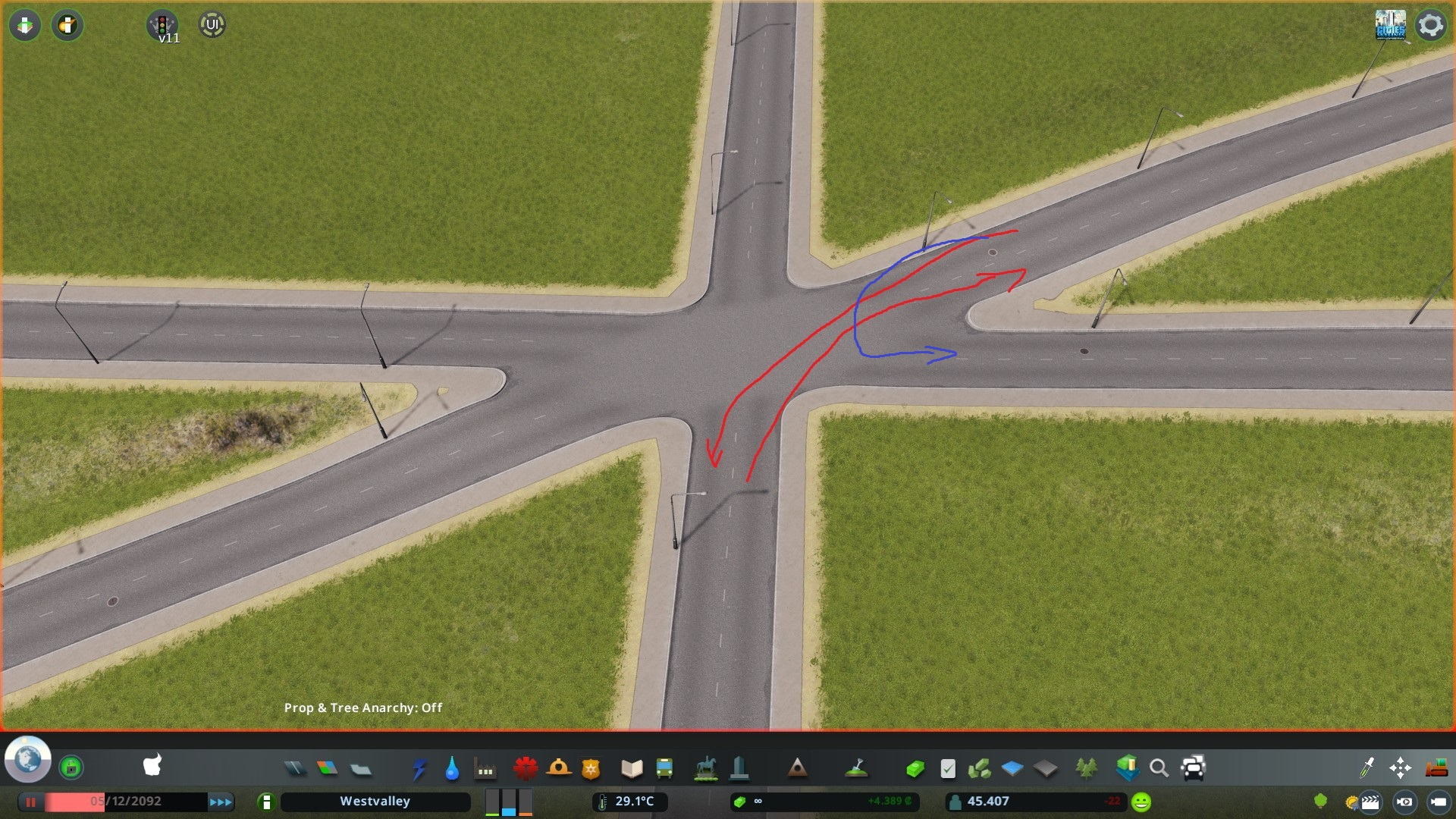
Conclusion: Traffic directions ingame are not necessarily working in the same way as they do in real life and are therefor insufficient to model a lot of scenarios, that are modeled with them in real life. The model currently used has serious limitations for a lot of common, complex intersections, like DIs or signalized roundabouts. The best workaround that is also feasible to implement is a lane based approach. Anything else like path prediction over the next nodes is way more complicated.
s2500111
on 31 Jan 2021
Related issues
aubergine10
·
39Comments
 FireController1847
·
69Comments
FireController1847
·
69Comments
 kianzarrin
·
38Comments
kianzarrin
·
38Comments
 VictorPhilipp
·
34Comments
VictorPhilipp
·
34Comments
 22Pilots
·
27Comments
22Pilots
·
27Comments
Most helpful comment
Maybe, as an inspiration, I'll just leave the link to a video I once made here. I think, this would be really complicated, but it would also be really cool, if possible.