Tm1py: Adding alias values to all elements in a hierarchy
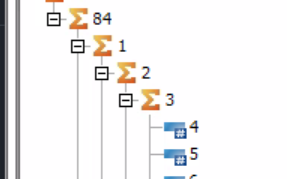
How to add attribute value to each element. When I click on a button in TM1 architect
with alias off
with alias on
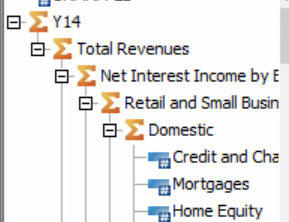
How can I achieve the same with TM1 py?
 pal-16
All 9 comments
Hi @pal-16,
I am not entirely sure what you are trying to accomplish.
Are you attempting to retrieve elements with their alias values or are you trying to create a hierarchy in TM1 with alias attributes on elements?
 MariusWirtz
on 23 Jun 2021
MariusWirtz
on 23 Jun 2021
I want to create a hierarchy. I am able to do with the help of edges. How do I add alias names to my elements?
pal-16
on 23 Jun 2021
To create element attributes, use the add_element_attribute function on the Hierarchy class.
To write attribute values into the }ElementAttributes cube, you can just use the write function in tm1.cells.
Would you like a sample?
MariusWirtz
on 23 Jun 2021
Yes please. I want to give alias names to all the elements individually in my hierarchy
pal-16
on 23 Jun 2021
Here you go
from TM1py import TM1Service, Hierarchy, Dimension

with TM1Service(address='', port=12354, ssl=True, user='admin', password='apple') as tm1:
    dimension_name = "Region2"

    hierarchy = Hierarchy(name=dimension_name, dimension_name=dimension_name)
    hierarchy.add_element(element_name="Europe", element_type='Consolidated')
    hierarchy.add_element_attribute(name="Name", attribute_type="Alias")

    attribute_cells = dict()

    hierarchy.add_component(parent_name='Europe', component_name='DE', weight=1)
    attribute_cells['DE', 'Name'] = 'Germany'
    hierarchy.add_component(parent_name='Europe', component_name='FR', weight=1)
    attribute_cells['FR', 'Name'] = 'France'
    hierarchy.add_component(parent_name='Europe', component_name='CH', weight=1)
    attribute_cells['CH', 'Name'] = 'Switzerland'

    dimension = Dimension(name=dimension_name, hierarchies=[hierarchy])
    tm1.dimensions.update_or_create(dimension)
    tm1.cells.write(cube_name="}ElementAttributes_" + dimension_name, cellset_as_dict=attribute_cells, use_ti=True)
Thanks a lot, this helps. Where can I read more about this?
pal-16
on 23 Jun 2021
About what in particular?
MariusWirtz
on 23 Jun 2021
attribute_cells = dict()
attribute_cells['DE', 'Name'] = 'Germany'
tm1.cells.write(cube_name="}ElementAttributes_" + dimension_name, cellset_as_dict=attribute_cells, use_ti=True)
About the functionalities and more usage of these lines. I understood what these lines are doing but any further reference or examples where this is used?
pal-16
on 23 Jun 2021
the write function is the key part of these lines. If you use PyCharm you can ctrl+click on the function name and jump to the function definition. There you should find a docstring that explains all arguments and optional arguments.
MariusWirtz
on 23 Jun 2021
Related issues
 cubewise-gng
·
3Comments
cubewise-gng
·
3Comments
 scrambldchannel
·
6Comments
scrambldchannel
·
6Comments
 beckyconning
·
3Comments
beckyconning
·
3Comments
 pourushgupta
·
3Comments
pourushgupta
·
3Comments
 fidong
·
3Comments
fidong
·
3Comments