Tm1py: Unable to get Alias of an element when to pull cube data from TM1 cubes using TM1py in Power BI
 sjadha22
All 14 comments
Please provide
- more details on what goes wrong
- the python code
- a screenshot of the dimension
- the error message that you get
 MariusWirtz
on 2 Jun 2021
MariusWirtz
on 2 Jun 2021
Here is a simple tutorial on how to use tm1py to connect to TM1 from PBI
https://code.cubewise.com/blog/connecting-power-bi-to-tm1-for-free-with-tm1py
MariusWirtz
on 2 Jun 2021
Hi @MariusWirtz,
Thanks for your quick response!
Please find below required details.
Issue description: When we pull TM1 cube data using TM1 PY in Power BI, cant see Description of Cost Center whereas in TM1 we saved view with Cost Center Description.
Python code-
from TM1py.Services import TM1Service
import configparser
config = configparser.ConfigParser()
config.read(r'C:Userssjadha22tm1py-samples-mastertm1py-samples-masterconfig.ini')
with TM1Service(**config["Consumer Make"]) as tm1:
server_name = tm1.server.get_server_name()
print("Connection to TM1 established!! your Source Servername is: {}".format(server_name))
data = tm1.power_bi.execute_view(cube_name="MAKE RPT Cost by Module", view_name="Power BI Indirect Labor Cost Details by PG", attributes=["MAKE Cost Center","Cost Center Leaf"], private=False)
print(data)
Screenshot -
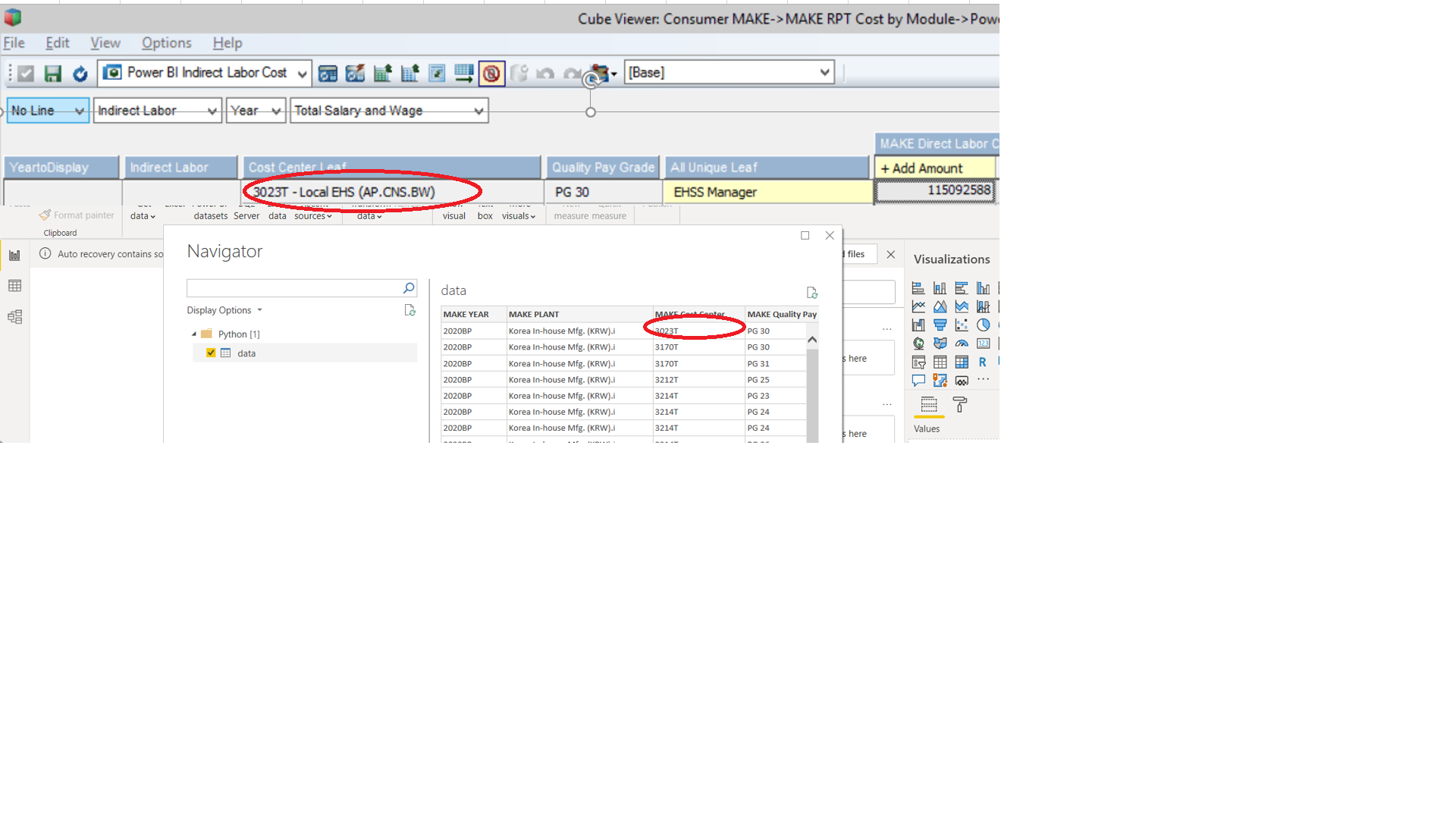
No error
sjadha22
on 2 Jun 2021
Could it be a space in attributes names ?
Op wo 2 jun. 2021 om 18:33 schreef sjadha22 @.*>
Hi @MariusWirtz https://github.com/MariusWirtz,
Thanks for your quick response!
Please find below required details.Issue description: When we pull TM1 cube data using TM1 PY in Power BI,
cant see Description of Cost Center whereas in TM1 we saved view with Cost
Center Description.
Python code-from TM1py.Services import TM1Service
import configparserconfig = configparser.ConfigParser()
config.read(r'C:Userssjadha22tm1py-samples-mastertm1py-samples-masterconfig.ini')
with TM1Service(**config["Consumer Make"]) as tm1:
server_name = tm1.server.get_server_name()
print("Connection to TM1 established!! your Source Servername is:
{}".format(server_name))
data = tm1.power_bi.execute_view(cube_name="MAKE RPT Cost by Module",
view_name="Power BI Indirect Labor Cost Details by PG", attributes=["MAKE
Cost Center","Cost Center Leaf"], private=False)
print(data)Screenshot -
[image: Unable to pull alias TM1 vs Power BI]
https://user-images.githubusercontent.com/85240045/120517356-ffba5880-c3ed-11eb-9a0e-ed505829c2d9.pngNo error
—
You are receiving this because you are subscribed to this thread.
Reply to this email directly, view it on GitHub
https://github.com/cubewise-code/tm1py/issues/547#issuecomment-853175924,
or unsubscribe
https://github.com/notifications/unsubscribe-auth/AEDHULMXBZ4PZH3B33CEJQ3TQZMNPANCNFSM457BKKYA
.>
Best regards / Beste groeten,
Wim Gielis
MS Excel MVP 2011-2014
https://www.wimgielis.com http://www.wimgielis.be
 wimgielis
on 2 Jun 2021
wimgielis
on 2 Jun 2021
Hi @wimgielis
Space has already given. I am not sure what is the exact issue.
sjadha22
on 2 Jun 2021
@sjadha22 please check out the article that I posted above.
You need to bring in facts and metadata as separate datasets. Then in PowerBI in the model tab, you can create a arrow/connection between the two datasets. That allows to display the attribute instead of the element name.
MariusWirtz
on 2 Jun 2021
Hi @MariusWirtz ,
Thanks for your quick response. Appreciated your help:)
I feel your solution will work with this approach. I will do it and update you if it works correctly.
Is there any way we can change in the MDX or Python script to get alias of an element?
sjadha22
on 2 Jun 2021
Yes. You can write an MDX query with DIMENSION PROPERTIES, then you should get everything in one dataset.
MariusWirtz
on 2 Jun 2021
Hi @MariusWirtz,
I am using below MDX query to pull data from same cube. Even it is used Dimension Properties command like "DIMENSION PROPERTIES MEMBER_UNIQUE_NAME, MEMBER_NAME,
MEMBER_CAPTION, LEVEL_NUMBER, CHILDREN_CARDINALITY, [MAKE Cost Center].[MAKE Cost Center].[Code & Description] ON 1" in below python script. Not sure where is the issue?
from TM1py.Services import TM1Service
import configparser

config = configparser.ConfigParser()
config.read(r'C:\Users\sjadha22\tm1py-samples-master\tm1py-samples-master\config.ini')


with TM1Service(**config["Consumer Make"]) as tm1:
    server_name = tm1.server.get_server_name()
    #print("Connection to TM1 established!! your Source Servername is: {}".format(server_name))
    mdx = """
    SELECT NON EMPTY {[MAKE Direct Labor Cost Center Calc Measure].[MAKE Direct Labor Cost Center Calc Measure].[Add Amount],[MAKE Direct Labor Cost Center Calc Measure].
    [MAKE Direct Labor Cost Center Calc Measure].[Over time Amount]} DIMENSION PROPERTIES MEMBER_UNIQUE_NAME, MEMBER_NAME, MEMBER_CAPTION, LEVEL_NUMBER, CHILDREN_CARDINALITY ON 0,
    NON EMPTY CROSSJOIN(TM1SubsetToSet([MAKE YEAR].[MAKE YEAR], "YeartoDisplay"),CROSSJOIN(TM1SubsetToSet([MAKE PLANT].[MAKE PLANT], "Indirect Labor"),
    CROSSJOIN(TM1SubsetToSet([MAKE Cost Center].[MAKE Cost Center], "Cost Center Leaf"),CROSSJOIN(TM1SubsetToSet([MAKE Quality Pay Grades].[MAKE Quality Pay Grades], "Quality Pay Grade"),
    TM1SubsetToSet([MAKE Indirect Labor Employee Group].[MAKE Indirect Labor Employee Group], "All Unique Leaf"))))) DIMENSION PROPERTIES MEMBER_UNIQUE_NAME, MEMBER_NAME,
    MEMBER_CAPTION, LEVEL_NUMBER, CHILDREN_CARDINALITY, [MAKE Cost Center].[MAKE Cost Center].[Code & Description] ON 1 FROM [MAKE RPT Cost by Module]
    WHERE ([MAKE Direct Labor Cost Center Derivation Line].[No Line] , [MAKE Compensation Module].[Indirect Labor] , [MAKE Month].[Year] , [MAKE GL Account].[Total Salary and Wage])
    DIMENSION PROPERTIES MEMBER_UNIQUE_NAME, MEMBER_NAME, MEMBER_CAPTION, LEVEL_NUMBER, CHILDREN_CARDINALITY , [MAKE Month].[MAKE Month].[Description] , [MAKE GL Account].[MAKE GL Account].[Code & Description]
    CELL PROPERTIES CELL_ORDINAL, VALUE, FORMATTED_VALUE, FORMAT_STRING, UPDATEABLE, TM1UPDATEABLE, ANNOTATED, CONSOLIDATED
    """
    Power_BI_Indirect_Labor_Cost_Details_by_PG = tm1.power_bi.execute_mdx_values(mdx)
    print (Power_BI_Indirect_Labor_Cost_Details_by_PG)
It would really helpful if you can give some sample code or any modifications required in above code.
sjadha22
on 2 Jun 2021
Here you go
from TM1py import TM1Service

with TM1Service(address="", port=12354, ssl=True, user="admin", password="apple") as tm1:
    mdx = """
    SELECT
    {TM1SubsetAll([d1])} PROPERTIES [d1].[Attribute Something] ON 0,
    {TM1SubsetAll([d2])} PROPERTIES [d2].[Alias]  ON 1
    FROM [c1]
    """

    df = tm1.power_bi.execute_mdx(mdx, display_attribute=True)

    print(df)
Hi @MariusWirtz,
Thanks for your actively response.
You mean I need to pull separate Metadata using MDX query and then need to make connection between Metadata And Data table in Model Tab in Power BI? Please let me know if I understand correct?
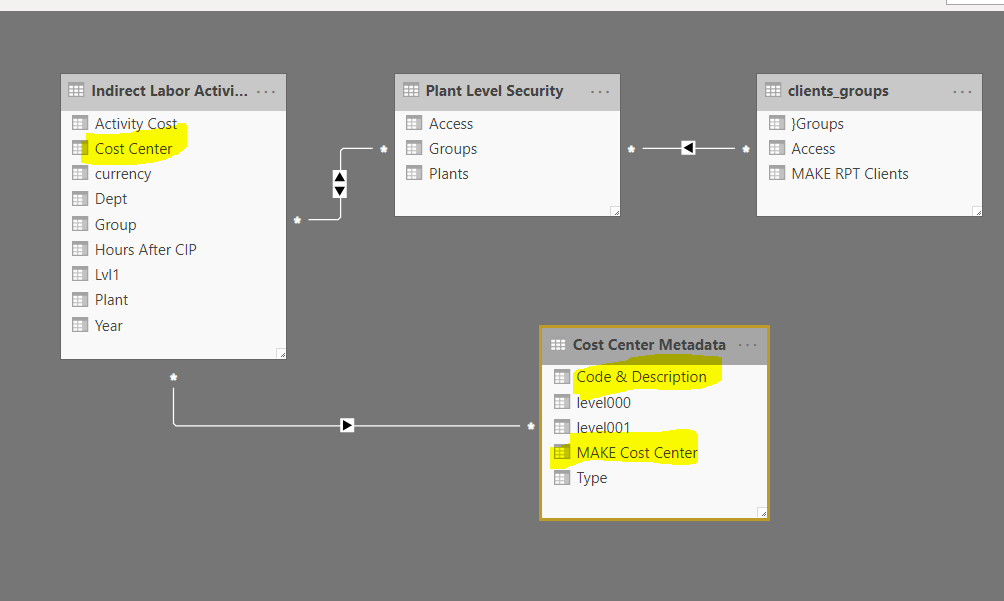
sjadha22
on 3 Jun 2021
Yes. That's correct.
Did it work?
MariusWirtz
on 7 Jun 2021
Hi Marius,
Sorry for late reply.
It worked but we have used Merge function in Python script to join fact table and metadata table together. and It solved our purpose. So by this solution no need to pull metadata separately and do relationship in Power BI.
Thanks for your help and support.
PFB code sample python code I used to merge Metadata and Fact table
from TM1py.Services import TM1Service
import configparser
import pandas as pd

config = configparser.ConfigParser()

with TM1Service(**) as tm1:
    server_name = tm1.server.get_server_name()
    mdx = """
    **
    """
    df1 = tm1.power_bi.execute_mdx(mdx)

    df = tm1.power_bi.get_member_properties(
    dimension_name="",
    hierarchy_name="",
    member_selection="{Tm1SubsetAll([])}",
    skip_consolidations=True,
    attributes=[""],
    skip_parents=False)

    df2=df1.merge(df, left_on='', right_on='',how='left')
    print (df2)
Thanks @sjadha22 for providing the sample code for the merging.
MariusWirtz
on 2 Jul 2021
Related issues
 beckyconning
·
3Comments
beckyconning
·
3Comments
 hermie64
·
3Comments
hermie64
·
3Comments
 pourushgupta
·
3Comments
pourushgupta
·
3Comments
 macmaj
·
4Comments
macmaj
·
4Comments
 yyzz1010
·
3Comments
yyzz1010
·
3Comments