Tm1py: Cannot retrieve Control Object cubes
Dear all,
I want to retrieve data van Control Objects to monitor my application.
I am using this code:
from TM1py.Services import TM1Service
import pandas as pd
import configparser

config = configparser.ConfigParser()
config.read(r'C:\tm1py\config.ini')
tm1 = TM1Service(**config['FAP'])

content = tm1.power_bi.execute_view('}StatsByCube', 'Default', private=False)
print(content)
I am getting the error message: IndexError: list index out of range
Points to consider:
- I am an administrator
- I am able to retrieve data from normal cubes from the same application
- The "Default" View exists (and is public) and also the cube exists
- The cube also consists data
What do I miss?
Thanks in advance,
Andy
 Andy-Hofelmeyer
All 9 comments
- Which version of TM1py do you use?
- Paste the full stack trace
Looks like an issue with the configparser, but again can't be sure without stack trace.
 rkvinoth
on 29 Jan 2021
rkvinoth
on 29 Jan 2021
The is the full stack trace and I am using the latest version of TM1py:
IndexError Traceback (most recent call last)
7 tm1 = TM1Service(**config['FAP'])
8
----> 9 content = tm1.power_bi.execute_view('}StatsByCube', 'Default', private=False)
10 print(content)
c:\users\andy.hofelmeyer\appdata\local\programs\python\python39\libsite-packages\TM1py\Utils\Utils.py in wrapper(self, args, *kwargs)
36 try:
37 import pandas
---> 38 return func(self, args, *kwargs)
39 except ImportError:
40 raise ImportError(f"Function '{func.__name__}' requires pandas")
c:\users\andy.hofelmeyer\appdata\local\programs\python\python39\libsite-packages\TM1py\Services\PowerBiService.py in execute_view(self, cube_name, view_name, private, *kwargs)
29 @require_pandas
30 def execute_view(self, cube_name, view_name, private, *kwargs) -> 'pd.DataFrame':
---> 31 return self.cells.execute_view_dataframe_shaped(cube_name, view_name, private, **kwargs)
32
33 @require_pandas
c:\users\andy.hofelmeyer\appdata\local\programs\python\python39\libsite-packages\TM1py\Utils\Utils.py in wrapper(self, args, *kwargs)
36 try:
37 import pandas
---> 38 return func(self, args, *kwargs)
39 except ImportError:
40 raise ImportError(f"Function '{func.__name__}' requires pandas")
c:\users\andy.hofelmeyer\appdata\local\programs\python\python39\libsite-packages\TM1py\Services\CellService.py in execute_view_dataframe_shaped(self, cube_name, view_name, private, *kwargs)
664 """
665 cellset_id = self.create_cellset_from_view(cube_name, view_name, private)
--> 666 return self.extract_cellset_dataframe_shaped(cellset_id, delete_cellset=True, *kwargs)
667
668 @require_pandas
c:\users\andy.hofelmeyer\appdata\local\programs\python\python39\libsite-packages\TM1py\Services\CellService.py in wrapper(self, cellset_id, args, *kwargs)
38 def wrapper(self, cellset_id, args, *kwargs):
39 try:
---> 40 return func(self, cellset_id, args, *kwargs)
41 finally:
42 if kwargs.get("delete_cellset", True):
c:\users\andy.hofelmeyer\appdata\local\programs\python\python39\libsite-packages\TM1py\Utils\Utils.py in wrapper(self, args, *kwargs)
36 try:
37 import pandas
---> 38 return func(self, args, *kwargs)
39 except ImportError:
40 raise ImportError(f"Function '{func.__name__}' requires pandas")
c:\users\andy.hofelmeyer\appdata\local\programs\python\python39\libsite-packages\TM1py\Services\CellService.py in extract_cellset_dataframe_shaped(self, cellset_id, **kwargs)
1268 response_json = response.json()
1269 rows = response_json["Axes"][1]["Tuples"]
-> 1270 column_headers = [tupl["Members"][0]["Name"] for tupl in response_json["Axes"][0]["Tuples"]]
1271 row_headers = [hierarchy["Name"] for hierarchy in response_json["Axes"][1]["Hierarchies"]]
1272 cell_values = [cell["Value"] for cell in response_json["Cells"]]
c:\users\andy.hofelmeyer\appdata\local\programs\python\python39\libsite-packages\TM1py\Services\CellService.py in
1268 response_json = response.json()
1269 rows = response_json["Axes"][1]["Tuples"]
-> 1270 column_headers = [tupl["Members"][0]["Name"] for tupl in response_json["Axes"][0]["Tuples"]]
1271 row_headers = [hierarchy["Name"] for hierarchy in response_json["Axes"][1]["Hierarchies"]]
1272 cell_values = [cell["Value"] for cell in response_json["Cells"]]
IndexError: list index out of range
Andy-Hofelmeyer
on 29 Jan 2021
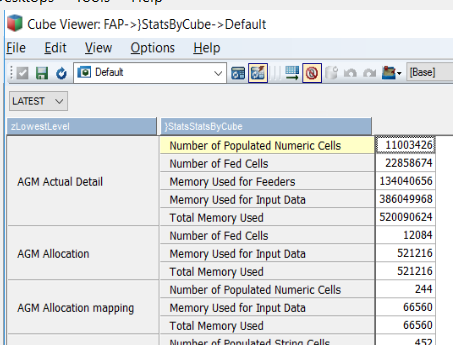
Can you share the Default view screenshot to reproduce the error?
rkvinoth
on 29 Jan 2021
Andy-Hofelmeyer
on 29 Jan 2021
The issue occurs because there is no column dimension in that cube view.
As a workaround, you can move the }StatsStatsByCube dimension to the columns.
rkvinoth
on 29 Jan 2021
Hi @Andy-Hofelmeyer
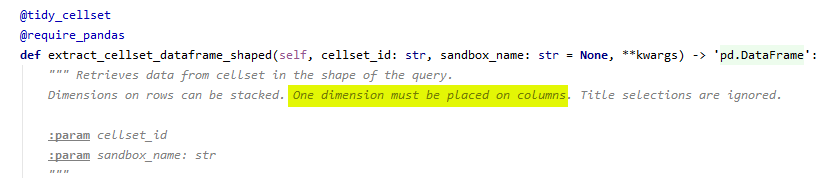
you have to place a dimension on the columns. The "composition" of the dimensions on the axes determines the shape of the resulting data frame.
There must be one selection on the column to use the execute_mdx_dataframe_shaped
 MariusWirtz
on 29 Jan 2021
MariusWirtz
on 29 Jan 2021
ooooh, what a stupid mistake from me.
Thank you very much guys.
I am restarting the server. If it is up and running I will immediately test it.
Andy-Hofelmeyer
on 29 Jan 2021
Ahh there you go its on the docstring!
rkvinoth
on 29 Jan 2021
It is working. Thanks you very much guys.
Also for the very fast response
Andy-Hofelmeyer
on 29 Jan 2021
Related issues
 ykud
·
6Comments
ykud
·
6Comments
 scrumthing
·
4Comments
scrumthing
·
4Comments
 hermie64
·
4Comments
hermie64
·
4Comments
 yyzz1010
·
3Comments
yyzz1010
·
3Comments
 beckyconning
·
3Comments
beckyconning
·
3Comments
Most helpful comment
Ahh there you go its on the docstring!