Tm1py: Unable to install TM1py on server with no internet
Describe what did you try to do with TM1py
I am trying to install TM1py but the server has no internet connection
Describe what's not working the way you expect
I receive an error that i am including when running the setup.py after copying the source directory to the site library folder
Version
- TM1py 1.3.1
- TM1 Server Version: 11.4.00003.8


Thanks
Additional context
If you encounter an error, please add the error message and the stack trace
 jbeanz23
All 25 comments
It seems you are missing one library: requests_negotiate_sspi
You need to download that one manually as well.
 MariusWirtz
on 6 Jun 2019
MariusWirtz
on 6 Jun 2019
i only see it as a wheel. How to i run that?
jbeanz23
on 6 Jun 2019
Just open the command line, go to the folder where you placed the .whl file and run
pip install some-package.whl
MariusWirtz
on 6 Jun 2019
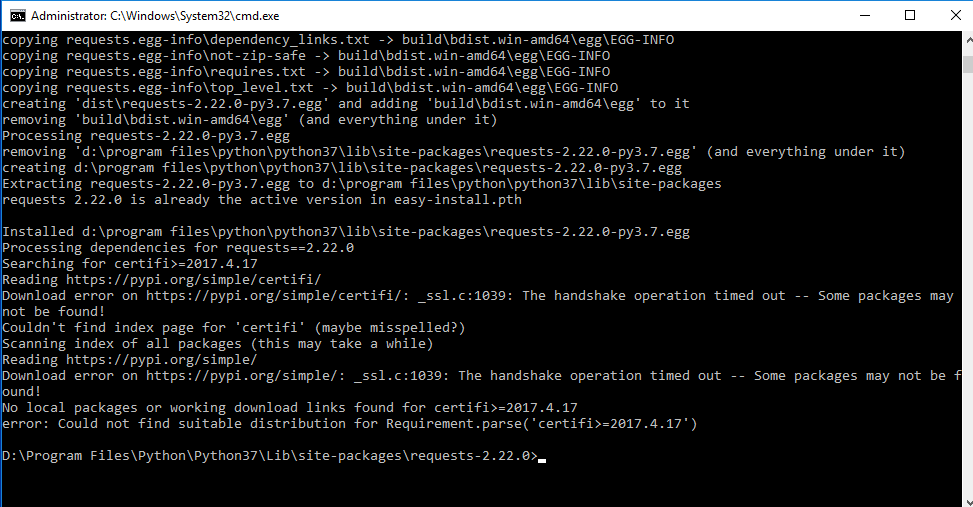
when i try to run that and requests i get the following error about certifi
jbeanz23
on 6 Jun 2019
It seems requests_negotiate_sspi also has dependencies. I don't think it makese sense to install all these packages individually
I think it's easier if you install the Anaconda distribution of python on that machine. Then you already have most of the packages (requests, pandas, numpy, ...) installed.
On top of Anaconda you only need to install requests_negotiate_sspi and TM1py
MariusWirtz
on 7 Jun 2019
ok, ill try that. thanks
jbeanz23
on 7 Jun 2019
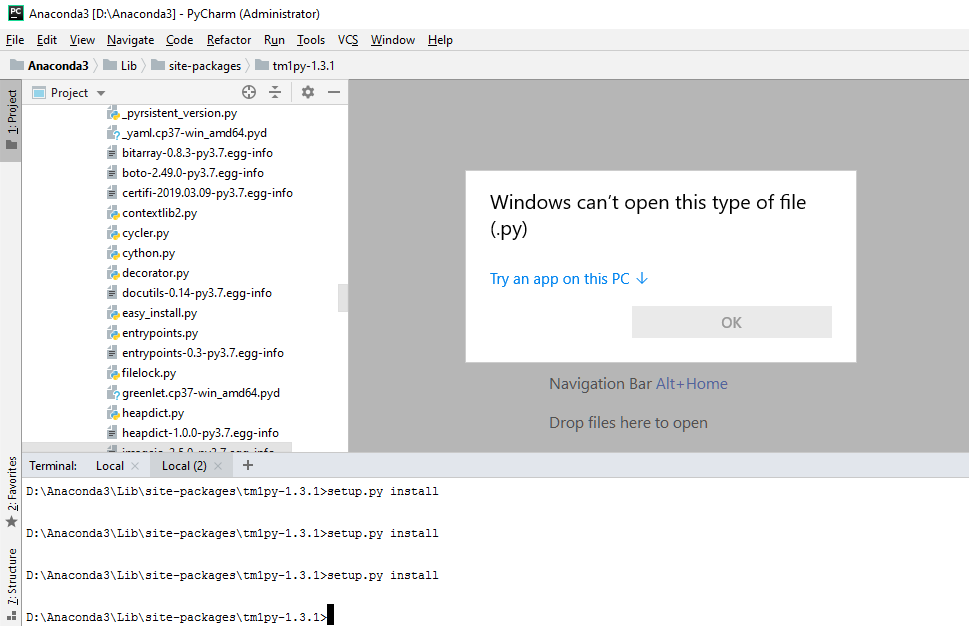
I am having trouble executing anything within the anaconda prompt. How do i run tm1py from the anaconda prompt? I am not familiar with how to use the Anaconda prompt line. I tried in a pycharm terminal but i get a message that windows cant open the type of file.
jbeanz23
on 7 Jun 2019
Hi,
you don't necessarily need to run the setup.py script.
You can just paste the TM1py folder into the Anaconda3/Lib/site-packages/ folder
The Folder structure need to look like this:
Anaconda3
- ...
- Lib
- ...
-- site-packages
--- ...
--- TM1py
---- Exceptions
---- Objects
---- Services
---- Utils
...
Regarding the execution of py files in the terminal, I think you need to type:
python setup.py
or the explicit version:
C:\Anaconda3\python setup.py
MariusWirtz
on 7 Jun 2019
Thanks Marius. I got everything installed but now when i try to run unused dims i get the error below. I am also including the config. Is the issue the https for the gateway?
[tm1srv01]
address= localhost
port= 23999
user=
password=
namespace = TeXXXXX
gateway = https://XXXXXXXX/bi/v1/disp
ssl=True

jbeanz23
on 7 Jun 2019
Hi,
could be related to HTTPS. @rclapp wrote a fix for this yesterday. It's included in the current master branch at GitHub, but not in the latest release (1.3.1) !
If you download the master from github (the green button at the top right in the main page) and place it in the site-packages folder, does that help?
MariusWirtz
on 7 Jun 2019
I have the fix in and it still does not work...it also does not work for me to leave the gateway blank and use my credentials like below....do you think there is something blocking the connection?
port= 23999
user=nfrigo
password=###
namespace =
gateway =
ssl=True

jbeanz23
on 7 Jun 2019
If the TM1 model is using CAM security and you want access it with user and password, you also need to provide the namespace.
MariusWirtz
on 7 Jun 2019
i copied it from the branch, the rest service, the RestService.py, correct?
jbeanz23
on 7 Jun 2019
I think i tried it that way too, but i will check again and post the error
jbeanz23
on 7 Jun 2019
Yes. All the changes @rclapp made were in the RestService, so if you copy that file you should be alright.
MariusWirtz
on 7 Jun 2019
If your password is b64 encoded in the file, you also need to add decode_b64=True in the config.ini
MariusWirtz
on 7 Jun 2019
ya, so i just tried with the namespace. I have also tried with the full computer name and IP address
[tm1srv01]
address= localhost
port= 23999
user=nfrigo
password=###
namespace =
gateway =
ssl=True

jbeanz23
on 7 Jun 2019
oh, i saw that was committed then removed it looked like
i will try that
jbeanz23
on 7 Jun 2019
The 401 Error means that the Authentication failed. It must be either the User, Password or Namespace that is wrong.
Now if you tried it a few times with a wrong password or namespace, it could also be that your user is blocked. 🤔
MariusWirtz
on 7 Jun 2019
i tried and get the following..do i need to change a line in the Rest Service, it says false in the error for base64 decode
[tm1srv01]
address= localhost
port= 23999
user=nfrigo
password=####
namespace = Techdata
gateway =
ssl=True
decode_b64=True

jbeanz23
on 7 Jun 2019
does the username need the domain in front, like us\nfrigo?
jbeanz23
on 7 Jun 2019
No, I believe the domain prefix is not necessary.
The namespace is case-sensitive. Is that perhaps the problem ?
MariusWirtz
on 7 Jun 2019
I added us\nfrigo and its working now. Yay! But for a long term solution for the client, if the RestService script did not fix the issue what can be done? I don't think they want user info in the config
jbeanz23
on 7 Jun 2019
I close this issue. Please open a new one if you are stuck with setting up SSO.
MariusWirtz
on 11 Jun 2019
Related issues
 yyzz1010
·
3Comments
yyzz1010
·
3Comments
 VY109
·
4Comments
VY109
·
4Comments
 macmaj
·
4Comments
macmaj
·
4Comments
 user1493
·
3Comments
user1493
·
3Comments
 cubewise-gng
·
3Comments
cubewise-gng
·
3Comments