Tiptap: Make NodeView NodeSelection configurable
Describe the bug
I have an image inside a Vue Component. It is just a placeholder element and isn't part of the interactive image extension.
I can click anywhere on the parent element and the node is selected. However, clicking on the image doesn't select the parent node.
Steps to Reproduce / Codesandbox Example
Steps to reproduce the behavior:
- Create a Vue component with a parent wrapper and an image
- Click the image
https://codesandbox.io/s/vue-issue-template-8eujx
Expected behavior
The parent node should be selected.
Environment
- OS: macOS
- Browser Safari
- Version 12.2.2
- Mobile / Desktop: Desktop
 theknet
All 6 comments
Same issue +1.
The wrapped structure is similar to the following:
<figure>
<img-vue-component> <!-- auto preview & upload & update -->
<figcaption>description</figcaption>
</figure>
The all <figure> can NOT be selected.
 CodePlayer
on 21 Jun 2019
CodePlayer
on 21 Jun 2019
I can reproduce this bug. A workaround for now is to use draggable: true in your node schema.
 philippkuehn
on 21 Jun 2019
philippkuehn
on 21 Jun 2019
I have tried this. However, it doesn't work. Maybe, we have some differences in the environment or code logic.
CodePlayer
on 22 Jun 2019
I manually set the node selection when the image is clicked,this is ugly,but it works
    makeNodeSelection () {
      let tr = this.view.state.tr
      const pos = this.getPos()
      let pos1 = this.view.state.doc.resolve(pos)
      let selection = new NodeSelection(pos1)
      tr.setSelection(selection)
      this.view.dispatch(tr)
    },
 zssng
on 10 Oct 2019
zssng
on 10 Oct 2019
@zssng
Thanks for your solution, i made this less ugly
import { NodeSelection } from 'prosemirror-state';

makeNodeSelection () {
  const { state } = this.view;
  let tr = state.tr;
  const selection = NodeSelection.create(state.doc, this.getPos());
  tr = tr.setSelection(selection);
  this.view.dispatch(tr);
}
 Leecason
on 14 Mar 2020
Leecason
on 14 Mar 2020
I also had to use @Leecason and @zssng solution to get selection working on my node (its an info panel widget).
Would it be an idea to encapsulate this function as as NodeView Prop @philippkuehn so we would not need to define it or import it explicitly in our vue component views?
For context - i am making a simple panel component like this:
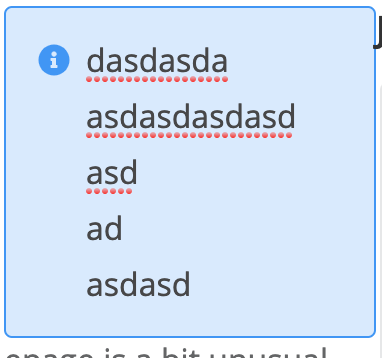
If the user clicks the border of the component i want to select the node, if they click the inner text i want to position the cursor as normal. If there is obvious alternative solution id love to know 😅
Thanks for your work. tiptap is great!
 eamonnmg
on 24 May 2020
eamonnmg
on 24 May 2020
Related issues
 pk-pressf1
·
3Comments
pk-pressf1
·
3Comments
 dolbex
·
3Comments
dolbex
·
3Comments
 afwn90cj93201nixr2e1re
·
3Comments
afwn90cj93201nixr2e1re
·
3Comments
 connecteev
·
3Comments
connecteev
·
3Comments
 santicros
·
3Comments
santicros
·
3Comments
Most helpful comment
I manually set the node selection when the image is clicked,this is ugly,but it works