Tiptap: Editor bubbles in a multi-column container show up at wrong vertical offset
I have a use case where the editor is inside a multi-column container.
<div class="container">
   ...
    <tiptap-editor/>
   ...
</div>
where
.container {
 column-count: 2;
}
Expected behavior
Expect to see menu bubbles in appropriate place.
Screenshots
This is what I see:
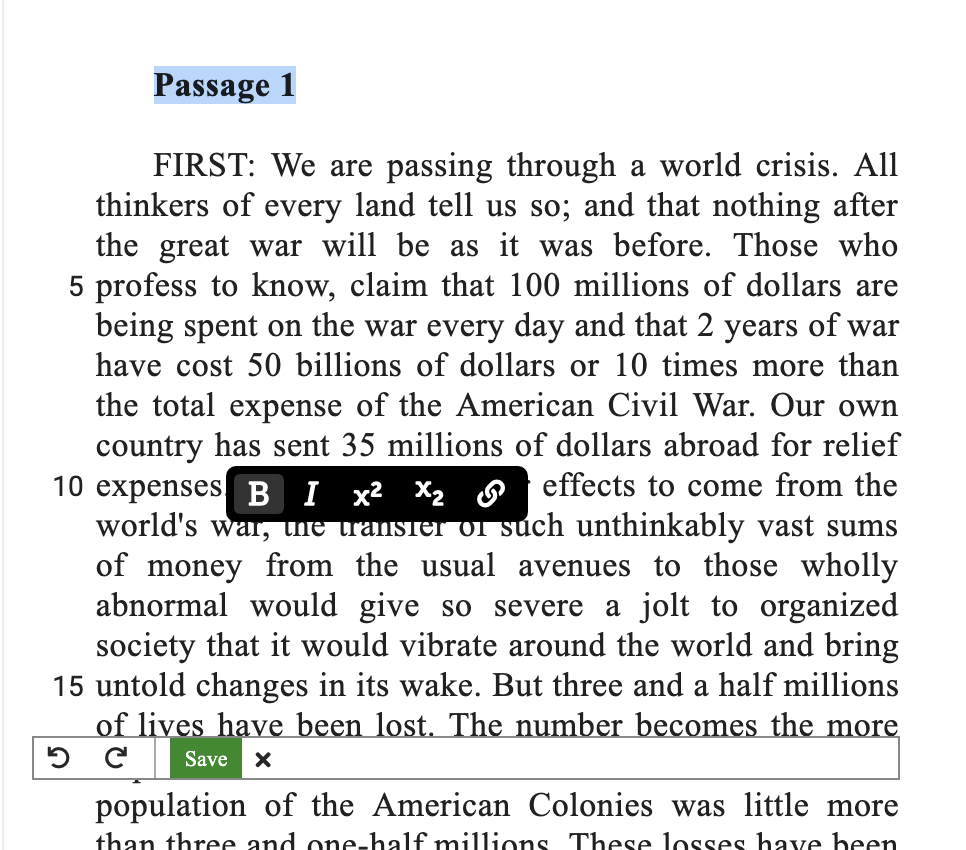
https://codesandbox.io/s/48r92vy8v7
Environment
- Browser Chrome
- Version 1.16.2
 laurentbaig
All 9 comments
Please use updated tip-tap (menububble position was fixed in 1.17.0)
And after changing this line, it works a little bit better (not perfect though, cross column selection is broken)
- .container {
+ .ProseMirror {
 column-count: 2;
}
 Chrissi2812
on 14 May 2019
Chrissi2812
on 14 May 2019
A similar issue shows up when the editor is inside of a overflow: scroll container element and the container is then scrolled. See this video: https://holtwick.de/download/20190617-204439-MenuBubble.mp4
Another problem is, that the menu bubble is not always on top of all elements on the page, as also shown in the example. Approaches like https://portal-vue.linusb.org/ might help here putting the overlay code somewhere, where it is safe, like as last child before </body>.
Or simply something like:
let c = Vue.extend(MenuComponent)
vm = new c({})
let el = document.createElement('div')
document.body.appendChild(el)
vm.$mount(el)
 holtwick
on 17 Jun 2019
holtwick
on 17 Jun 2019
@holtwick Maybe it's possible to integrate external libraries like (tippy.js / popper.js) because I don't want to handle all these edge cases and implement something like a tooltip driver system. Not sure if this could work 😅
 philippkuehn
on 17 Jun 2019
philippkuehn
on 17 Jun 2019
Indeed, this probably the best way to go. The next issue would certainly be showing the menu on window boundaries correctly ;)
holtwick
on 17 Jun 2019
While experimenting a little more I found another bug in Safari and Firefox. If you start selecting from outside of the text area in the MenuBubble demo, the menu does not show up at all.
Video: https://holtwick.de/download/20190617-210426-BubbleNotShowing.mp4
holtwick
on 17 Jun 2019
I made a simple example component using popper.js to track overlay positioning and Portal to escape the position:absolute and scroll context. Hope it is useful.
<template>
  <div>
    <div class="a">

      Lorem ipsum dolor sit amet, consetetur sadipscing elitr, sed diam nonumy eirmod tempor invidunt ut labore et dolore magna aliquyam erat, sed diam voluptua. At vero eos et accusam et justo duo dolores et ea rebum. Stet clita kasd
      gubergren, no sea et clita kasd gubergren, no sea takimata sanctus est Lorem ipsum dolor sit amet.

      <div style="position: relative;">
        <div class="b">
          <button @click="toggle">Show</button>
          <portal to="overflow" v-if="visible">
            <div id="overflow" ref="overflow">
              <p>Content</p>
              <p>{{ counter }}</p>
              <button @click="counter++">Counter</button>
            </div>
          </portal>
        </div>
      </div>

      Lorem ipsum dolor sit amet, consetetur sadipscing elitr, sed diam nonumy eirmod tempor invidunt ut labore et dolore magna aliquyam erat, sed diam voluptua. At vero eos et accusam et justo duo dolores et ea rebum. Stet clita kasd
      gubergren, no sea takimata sanctus est Lorem ipsum dolor sit amet. Lorem ipsum dolor sit amet, consetetur sadipscing elitr, sed diam nonumy eirmod tempor invidunt ut labore et dolore magna aliquyam erat, sed diam voluptua. At vero eos
      et accusam et justo duo dolores et ea rebum. Stet clita kasd gubergren, no sea takimata sanctus est Lorem ipsum dolor sit amet.

      Lorem ipsum dolor sit amet, consetetur sadipscing elitr, sed diam nonumy eirmod tempor invidunt ut labore et dolore magna aliquyam erat, sed diam voluptua. At vero eos et accusam et justo duo dolores et ea rebum. Stet clita kasd
      gubergren, no sea takimata sanctus est Lorem ipsum dolor sit amet. Lorem ipsum dolor sit amet, consetetur sadipscing elitr, sed diam nonumy eirmod tempor invidunt ut labore et dolore magna aliquyam erat, sed diam voluptua. At vero eos
      et accusam et justo duo dolores et ea rebum. Stet clita kasd gubergren, no sea takimata sanctus est Lorem ipsum dolor sit amet.
    </div>
    <portal-target name="overflow">

    </portal-target>
  </div>
</template>

<script>

import Popper from 'popper.js'

import Vue from 'vue'

import PortalVue from 'portal-vue'

Vue.use(PortalVue)

const log = require('debug')('app:sandbox')

export default {

  data() {
    return {
      counter: 1,
      visible: false,
      popper: null
    }
  },

  methods: {

    show(event) {
      this.counter += 1
      this.hide()
      this.visible = true;
      this.$nextTick().then(() => {
        this.popper = new Popper(
          event.target,
          this.$refs.overflow,
          {
            modifiers: {
              preventOverflow: {
                // escapeWithReference: true,
                boundariesElement: 'window',
              }
            }
          })
      })
    },

    hide() {
      this.visible = false
      if (this.popper) {
        this.popper.destroy()
        this.popper = null
      }
    },

    toggle(event) {
      if (this.visible) {
        this.hide()
      } else {
        this.show(event)
      }
    }
  },

  mounted() {
    window.addEventListener('mousedown', event => {
      if (!this.$refs.overflow.contains(event.target)) {
        this.hide()
      }
    })
  },
}

</script>

<style scoped>
.a {
  position: absolute;
  top: 3rem;
  left: 3rem;
  width: 20rem;
  height: 20rem;
  background: teal;
  overflow: scroll;
}

.b {
  position: absolute;
  top: 3rem;
  left: 3rem;
  width: 30rem;
  height: 20rem;
  background: yellow;
}

#overflow {
  position: absolute;
  width: 10rem;
  height: 10rem;
  background: red;
  padding: 0.5rem;

}

</style>
@holtwick not sure how to use this example?
Have you managed integrating something like popper.js with menububble?
 Neophen
on 20 Jan 2020
Neophen
on 20 Jan 2020
Almost. I gained a little more control over the popup by modifying some code in EditorMenuBubble. You can see the result in https://onepile.app/ for macOS.
I am currently working on integrating popper.js or a similar approach, that will keep the correct position when scrolling or resizing the window. I'll share my findings then.
holtwick
on 25 Jan 2020
Thanks for all you work on this @holtwick! We are about to rewrite all interface components, and I added your code snippets to my notes. 🙌
Closing this here for now.
 hanspagel
on 7 Jan 2021
hanspagel
on 7 Jan 2021
Related issues
 connecteev
·
3Comments
connecteev
·
3Comments
 bernhardh
·
3Comments
bernhardh
·
3Comments
 chrisjbrown
·
3Comments
chrisjbrown
·
3Comments
 asseti6
·
3Comments
asseti6
·
3Comments
 glavdir
·
3Comments
glavdir
·
3Comments