Please allow using of v-model in editor
 1dnmr
1dnmr
All 21 comments
This is probably better done one level higher. Lets say you have a component setting up the TipTap editor. There in the Editor setup do:
editor = new Editor({
// ...
onUpdate: ({getJSON}) => {
const state = getJSON()
this.$emit('input', state)
// ...
editor.setContent(this.value)
More at https://vuejs.org/v2/guide/components.html#Using-v-model-on-Components
 holtwick
on 15 Dec 2018
holtwick
on 15 Dec 2018
Hi Dirk,
Thank you for your answer. Anyway my idea was make the editor more user-friendly and following the best Vue component building practice. v-model is a one of these practices. Making component that not supported this out of the box is quite weird.
1dnmr
on 16 Dec 2018
I see. This is certainly a good idea following the best practice.
While working with TipTap I came to the point to decide in which format the editor state should be stored. Instead of serializing to HTML in my case it was better to wrap it into an object like this;
{ api: 1, state: {... } }
api would should be incremented in case I need to change the schema or other related stuff. Using a top level object is also good in case I also need to store selections or additional info like comments. All this is then serialized to JSON.
Therefore I would love to see a dual implementation: 1. The current Editor approach and 2. the v-model one.
BTW, keep up the great work. This is an awesome project!
holtwick
on 16 Dec 2018
@holtwick's solution worked well for me. Ofcourse I had to create a prop called value inside the component. But I needed to add a watcher for the value prop in order to account for data changes in the parent component (for example, I was fetching data with Ajax and setting the parent value):
props: ['value'],
data: {
},
watch: {
value (newValue) {
this.editor.setContent(this.value)
}
}
 motatoes
on 23 Dec 2018
motatoes
on 23 Dec 2018
EDIT: There's a better solution https://github.com/ueberdosis/tiptap/issues/133#issuecomment-559014481
Here's how I did it.
This is my Editor component.
props: [ 'value' ],
data() {
  return {
    editor: null,
  }
},
mounted() {
  this.editor = new Editor({
    extensions: [ ],
    content: this.value,
    onUpdate: ({ getHTML }) => {
      this.$emit('input', getHTML())
    },
  })
  this.editor.setContent(this.value)
},
beforeDestroy() {
  if (this.editor) {
    this.editor.destroy()
  }
},
watch: {
  value (val) {
    // so cursor doesn't jump to start on typing
   if (this.editor && val !== this.value) {
      this.editor.setContent(val, true)
    }
  }
}
I use it on its parent like this
<editor v-model="note.content"/>
Works fine for me.
PS: might have some issue with performance (on 100,000 characters or more)
 laurensiusadi
on 13 Apr 2019
laurensiusadi
on 13 Apr 2019
Bad solution. Double call when you gonna type something, watch gonna be triggered, your check's is terrible. if (val !== this.editor.getHTML()) { try to itterate on 1 million symbols.
 afwn90cj93201nixr2e1re
on 25 Jul 2019
afwn90cj93201nixr2e1re
on 25 Jul 2019
Bad solution. Double call when you gonna type something, watch gonna be triggered, your check's is terrible.
if (val !== this.editor.getHTML()) {try to itterate on 1 million symbols.
Any suggestions how I can improve that?
How about if (this.editor && val !== this.value)
Since I already emit input, it will get new value
laurensiusadi
on 25 Jul 2019
Idk anything 'bout your case.
But im using it like this. With vuex.
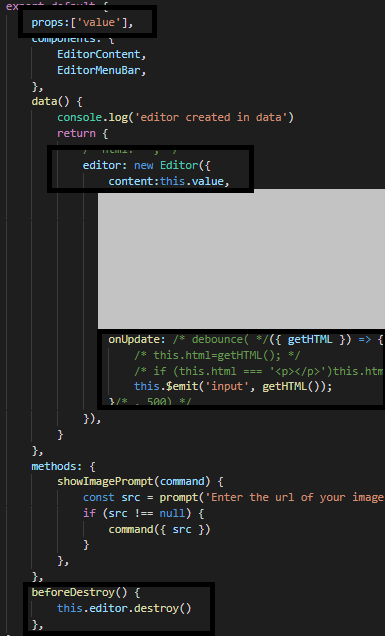

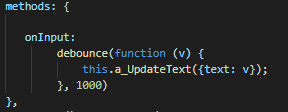
https://github.com/scrumpy/tiptap/issues/155#issuecomment-514826957 - more about this.
afwn90cj93201nixr2e1re
on 25 Jul 2019
@laurensiusadi
That didn't work for me an makes little sense imo. The problem is that the editor changes the value too, via $emit, so you have just tell apart what was the source of the change, and not the change itself.
what I did was to mark the editor change:
  props: ["value"],
  data() {
    return {
      editor: null,
      editorChange: false
    };
  },
  mounted() {
    this.editor = new Editor({
      onUpdate: ({ getHTML }) => {
        this.editorChange = true;
        this.$emit("input", getHTML());
      },
      content: this.value,
      extensions: [/* ... */]
    });
  },
  beforeDestroy() {
    if (this.editor) this.editor.destroy();
  },
  watch: {
    value(val) {
      if (this.editor && !this.editorChange) {
        this.editor.setContent(val, true);
      }
      this.editorChange = false;
    }
  }
Not sure if there's a better way, but this works with vuex
 estani
on 26 Aug 2019
estani
on 26 Aug 2019
Is there a way to use v-model on a custom Node instead of entire editor? For example, with title.js, can I bind the content within ['h1', {id: 'title'}, 0] with document.title? I'm a bit new to Vue and TipTap.
 BrianHung
on 13 Oct 2019
BrianHung
on 13 Oct 2019
I just came across this library and I must say that it's amazing. I was just going through all the issues to see if I can use it in my project and this issues seems very critical to me. I just wanted to confirm if there is anyone working on this issue. I could start looking into it if no one else is already working on it.
Once again, thanks for this awesome editor.
 Ravikc
on 28 Oct 2019
Ravikc
on 28 Oct 2019
@Ravikc I'm not sure if this is a big issue, since it works okay for me now. But if you want to start looking into it, that would be awesome!
laurensiusadi
on 29 Oct 2019
https://www.npmjs.com/package/tiptap-vuetify worked this out
 rameezcubet
on 26 Nov 2019
rameezcubet
on 26 Nov 2019
I'm gonna rewrite the code from tiptap-vuetify here in JS (they're in TS)
  props: ["value"],
  data() {
    return {
      editor: null,
      emitAfterOnUpdate: false
    };
  },
  mounted() {
    this.editor = new Editor({
      onUpdate: ({ getHTML }) => {
        this.emitAfterOnUpdate = true;
        this.$emit("input", getHTML());
      },
      content: this.value,
      extensions: [/* ... */]
    });
  },
  beforeDestroy() {
    if (this.editor) this.editor.destroy();
  },
  watch: {
    value(val) {
      if (this.emitAfterOnUpdate) {
        this.emitAfterOnUpdate = false
        return
      }
      if (this.editor) this.editor.setContent(val)
    }
  }
Pretty similar to @estani code
So I just copied that code above and replace the variables from https://github.com/iliyaZelenko/tiptap-vuetify/blob/master/src/components/TiptapVuetify.vue
Haven't test this yet
EDIT: This works best for me
laurensiusadi
on 27 Nov 2019
this.editor.setContent(val, true);
You must set true to false to avoid re-emitting editor.onUpdate()... and burning CPU cycles needlessly, just like the tiptap-vuteify code does. And thanks for posting that one! It works well.
 A-d-o-n-i-s
on 14 Apr 2020
A-d-o-n-i-s
on 14 Apr 2020
With that i get problem with carret position lag,anyone get same?
or how to resolve it better?
 alloself
on 27 Apr 2020
alloself
on 27 Apr 2020
Thanks for sharing the solutions! ❤️
I’m closing this here. I think we’ll provide support for it in tiptap 2 (or provide a wrapper component).
 hanspagel
on 11 Aug 2020
hanspagel
on 11 Aug 2020
to use custom editor wrapper like this, write this in the parent component
<custom-editor :value="detail" v-on:input="detail = $event" />
detail as props in value
 arifikhsan
on 24 Sep 2020
arifikhsan
on 24 Sep 2020
@alloself
Here's my final editor for now. By far the best implementation for my use case.
Note: This works with v-model but needs an id to be watched instead of value itself.
We need to add watch on id for setContent, or it won't change the editor's value when you load a different content without destroying the component, since the editor gets its content on mounted.
  props: ["value", "id"],
  data() {
    return {
      editor: null
    };
  },
  mounted() {
    this.editor = new Editor({
      content: this.value,
      onUpdate: ({ getHTML }) => {
        this.$emit("input", getHTML());
      },
      extensions: [/* ... */]
    });
  },
  beforeDestroy() {
    if (this.editor) this.editor.destroy();
  },
  watch: {
    id() {
      if (this.editor) {
        this.editor.setContent(this.value, false)
      }
    }
  }
I removed setContent on watch value, so cursor doesn't jump when we're typing because of content change. There's no need to get update from value, since you already updating the editor content while typing.
The onUpdate function will keep firing while typing, then the parent component will keep saving the input to API with 500ms debounce. Note that I use real-time socket for this, haven't tested this with normal non real-time setup.
laurensiusadi
on 23 Nov 2020
@laurensiusadi
You can also just use the key attribute on your component, that way when the editor opens it will detect a different key and force an update.
 bcorcoran
on 12 Jan 2021
bcorcoran
on 12 Jan 2021
@laurensiusadi
You can also just use the key attribute on your component, that way when the editor opens it will detect a different key and force an update.
I should've done that! Thanks!
laurensiusadi
on 15 Jan 2021
Related issues
 chrisjbrown
·
3Comments
chrisjbrown
·
3Comments
 ageeye-cn
·
3Comments
ageeye-cn
·
3Comments
 klaasgeldof
·
3Comments
klaasgeldof
·
3Comments
 jetacpp
·
3Comments
jetacpp
·
3Comments
 agentq15
·
3Comments
agentq15
·
3Comments
Most helpful comment
EDIT: There's a better solution https://github.com/ueberdosis/tiptap/issues/133#issuecomment-559014481
Here's how I did it.
This is my Editor component.
I use it on its parent like this
Works fine for me.
PS: might have some issue with performance (on 100,000 characters or more)