Tipsi-stripe: Could not invoke deviceSupportNativePay on android, iOS working fine
Before I have submitted the issue
[ ] I have read an installation guide
[ ] I know that for an iOS I need to install pods because I've read the installation guide
[ ] I have read a linking guide and checked that everything is OK like in manual linking guide
[ ] I know that before using tipsi-stripe I need to set options for my app as described in usage guide
The problem
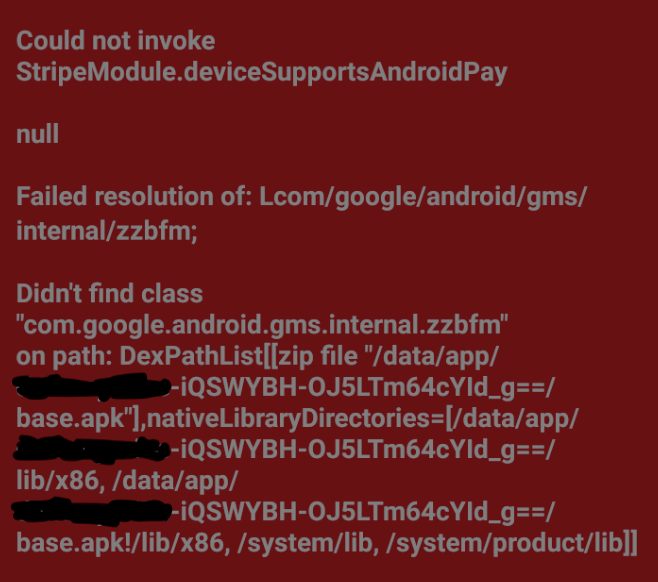
Error on Android when try to call function deviceSupportNativePay, the error shown as image below

Because I'm using RN 0.61.5, first I'm not using manual link, and on iOS is working just fine, not for android though. Now I try manual link for android, but still same issue. Has been followed many issues on stackoverflow and github with no luck. Can confirm stripe object is not null because already initiated it with setOptions.
Environment
tipsi-stripeversion: 7.2.0- Last
tipsi-stripeversion where the issue was not reproduced (if applicable): - iOS or Android: Android
- OS version: any version
- React-Native version: 0.61.5
- (Android only)
com.google.firebase:firebase-coreversion: 16.0.9 - (Android only)
com.google.android.gms:play-services-baseversion: 16.1.0
Related config
/app/build.gradle
apply plugin: "com.android.application"
apply plugin: "io.fabric"

import com.android.build.OutputFile

project.ext.react = [
    entryFile: "index.js",
    enableHermes: false,  // clean and rebuild if changing,
    bundleAssetName: "index.android.bundle",
    bundleInAlpha: true,
    bundleInBeta: true
]

apply from: "../../node_modules/react-native/react.gradle"
apply from: "../../node_modules/react-native-code-push/android/codepush.gradle"

def enableHermes = project.ext.react.get("enableHermes", false);

android {
    compileSdkVersion rootProject.ext.compileSdkVersion

    compileOptions {
        sourceCompatibility JavaVersion.VERSION_1_8
        targetCompatibility JavaVersion.VERSION_1_8
    }

    defaultConfig {
        minSdkVersion rootProject.ext.minSdkVersion
        targetSdkVersion rootProject.ext.targetSdkVersion
        ndk {
            abiFilters "armeabi-v7a", "x86"
        }
        missingDimensionStrategy 'react-native-camera', 'general'
        multiDexEnabled true
        renderscriptTargetApi 23
        renderscriptSupportModeEnabled true
    }
    splits {
        abi {
            reset()
            enable enableSeparateBuildPerCPUArchitecture
            universalApk false  // If true, also generate a universal APK
            include "armeabi-v7a", "x86", "arm64-v8a", "x86_64"
        }
    }
    signingConfigs {
        release {
            if (project.hasProperty('MYAPP_RELEASE_STORE_FILE')) {
                storeFile file(MYAPP_RELEASE_STORE_FILE)
                storePassword MYAPP_RELEASE_STORE_PASSWORD
                keyAlias MYAPP_RELEASE_KEY_ALIAS
                keyPassword MYAPP_RELEASE_KEY_PASSWORD
            }
        }
    }
    buildTypes {
        // debug {
        //     signingConfig signingConfigs.debug
        // }
        release {
            // Caution! In production, you need to generate your own keystore file.
            // see https://facebook.github.io/react-native/docs/signed-apk-android.
            signingConfig signingConfigs.release
            minifyEnabled enableProguardInReleaseBuilds
            proguardFiles getDefaultProguardFile("proguard-android.txt"), "proguard-rules.pro"
        }
    }
    // applicationVariants are e.g. debug, release
    applicationVariants.all { variant ->
        variant.outputs.each { output ->
            // For each separate APK per architecture, set a unique version code as described here:
            // https://developer.android.com/studio/build/configure-apk-splits.html
            def versionCodes = ["armeabi-v7a": 1, "x86": 2, "arm64-v8a": 3, "x86_64": 4]
            def abi = output.getFilter(OutputFile.ABI)
            if (abi != null) {  // null for the universal-debug, universal-release variants
                output.versionCodeOverride =
                        versionCodes.get(abi) * 1048576 + defaultConfig.versionCode
            }

        }
    }
    dexOptions {
        jumboMode true
        preDexLibraries = false
        // javaMaxHeapSize "4g"
    }
    configurations.all {
        resolutionStrategy {
            force 'com.android.support:design:28.0.0'
            force 'com.android.support:support-v4:28.0.0'
            // force 'com.google.android.gms:play-services-base:16.1.0'
            // force 'com.android.support:appcompat-v7:28.0.0'
        }
    }
}

dependencies {
    implementation (project(':tipsi-stripe')){
        exclude group: 'com.google.android.gms'
        exclude group: 'com.google.firebase'
    }
    implementation fileTree(dir: "libs", include: ["*.jar"])
    implementation "com.android.support:support-v4:27.1.0"
    implementation "com.android.support:design:27.1.0"
    implementation "com.android.support:appcompat-v7:27.1.0"
    implementation "com.facebook.react:react-native:+"  // From node_modules

    // fbsdk
    implementation 'com.facebook.android:facebook-android-sdk:[5,6)'

    implementation project(':react-native-firebase')

    // firebase
    implementation "com.google.android.gms:play-services-base:16.1.0"
    implementation "com.google.firebase:firebase-core:16.0.9"

    // firebase messaging
    implementation "com.google.firebase:firebase-messaging:18.0.0"
    implementation 'me.leolin:ShortcutBadger:1.1.21@aar' // <-- Add this line if you wish to use badge on Android

    // firebase crashlytic
    implementation('com.crashlytics.sdk.android:crashlytics:2.9.9@aar') {
        transitive = true
    }

    if (enableHermes) {
        def hermesPath = "../../node_modules/hermes-engine/android/";
        debugImplementation files(hermesPath + "hermes-debug.aar")
        releaseImplementation files(hermesPath + "hermes-release.aar")
    } else {
        implementation jscFlavor
    }
}

// Run this once to be able to run the application with BUCK
// puts all compile dependencies into folder libs for BUCK to use
task copyDownloadableDepsToLibs(type: Copy) {
    from configurations.compile
    into 'libs'
}

apply from: file("../../node_modules/@react-native-community/cli-platform-android/native_modules.gradle"); applyNativeModulesAppBuildGradle(project)

apply plugin: 'com.google.gms.google-services'
android/build.gradle
// Top-level build file where you can add configuration options common to all sub-projects/modules.

buildscript {
    ext {
        buildToolsVersion = "28.0.3"
        minSdkVersion = 22
        compileSdkVersion = 28
        targetSdkVersion = 28
        googlePlayServicesAuthVersion = "16.0.1"
    }
    repositories {
        mavenCentral()
        google()
        jcenter()
        maven {
            url 'https://maven.fabric.io/public'
        }
    }
    dependencies {
        classpath("com.android.tools.build:gradle:3.5.3")
        classpath("com.google.gms:google-services:4.3.3")
        // NOTE: Do not place your application dependencies here; they belong
        // in the individual module build.gradle files
        classpath 'io.fabric.tools:gradle:1.28.1'
    }
}

allprojects {
    repositories {
        mavenLocal()
        google()
        jcenter()
        maven {
            // All of React Native (JS, Obj-C sources, Android binaries) is installed from npm
            url("$rootDir/../node_modules/react-native/android")
        }
        maven {
            // Android JSC is installed from npm
            url("$rootDir/../node_modules/jsc-android/dist")
        }
        maven { url "https://www.jitpack.io" }
        maven { url "https://maven.google.com" }
    }
}

ext {
    compileSdkVersion   = 28
    targetSdkVersion    = 28
    buildToolsVersion   = "28.0.3"
    supportLibVersion   = "28.0.0"
    googlePlayServicesVersion = "11.8.0"
    androidMapsUtilsVersion = "0.5+"
}
MainApplication.java
import android.app.Application;
import android.content.Context;
import com.facebook.react.PackageList;
import com.facebook.react.ReactApplication;
import com.facebook.react.ReactNativeHost;
import com.facebook.react.ReactPackage;
import com.facebook.soloader.SoLoader;
import java.lang.reflect.InvocationTargetException;
import java.util.List;

// codepush
import com.microsoft.codepush.react.CodePush;

// firebase
import io.invertase.firebase.RNFirebasePackage;
import io.invertase.firebase.messaging.RNFirebaseMessagingPackage;
import io.invertase.firebase.analytics.RNFirebaseAnalyticsPackage;
import io.invertase.firebase.fabric.crashlytics.RNFirebaseCrashlyticsPackage;
import io.invertase.firebase.notifications.RNFirebaseNotificationsPackage;

// google sign-in
import co.apptailor.googlesignin.RNGoogleSigninPackage;

import com.gettipsi.stripe.StripeReactPackage;

import java.util.Arrays;
import java.util.List;
import android.content.Intent;

public class MainApplication extends Application implements ReactApplication {

  private final ReactNativeHost mReactNativeHost =
      new ReactNativeHost(this) {
        @Override
        public boolean getUseDeveloperSupport() {
          return BuildConfig.DEBUG;
        }

        @Override
        protected String getJSBundleFile() {
          return CodePush.getJSBundleFile();
        }

        @Override
        protected List<ReactPackage> getPackages() {
          @SuppressWarnings("UnnecessaryLocalVariable")
          List<ReactPackage> packages = new PackageList(this).getPackages();
          // Packages that cannot be autolinked yet can be added manually here, for example:
          // firebase
          // packages.add(new RNFirebasePackage());
          packages.add(new RNFirebaseMessagingPackage());
          packages.add(new RNFirebaseAnalyticsPackage());
          packages.add(new RNFirebaseNotificationsPackage());
          packages.add(new StripeReactPackage());
          return packages;
        }

        @Override
        protected String getJSMainModuleName() {
          return "index";
        }
      };

  @Override
  public ReactNativeHost getReactNativeHost() {
    return mReactNativeHost;
  }

  @Override
  public void onCreate() {
    super.onCreate();
    SoLoader.init(this, /* native exopackage */ false);
    // initializeFlipper(this); // Remove this line if you don't want Flipper enabled
  }

  /**
   * Loads Flipper in React Native templates.
   *
   * @param context
   */
  private static void initializeFlipper(Context context) {
    if (BuildConfig.DEBUG) {
      try {
        /*
         We use reflection here to pick up the class that initializes Flipper,
        since Flipper library is not available in release mode
        */
        Class<?> aClass = Class.forName("com.facebook.flipper.ReactNativeFlipper");
        aClass.getMethod("initializeFlipper", Context.class).invoke(null, context);
      } catch (ClassNotFoundException e) {
        e.printStackTrace();
      } catch (NoSuchMethodException e) {
        e.printStackTrace();
      } catch (IllegalAccessException e) {
        e.printStackTrace();
      } catch (InvocationTargetException e) {
        e.printStackTrace();
      }
    }
  }
}
react-native.config.js
module.exports = {
  dependencies: {
    'tipsi-stripe': {
      platforms: {
        android: null,
      },
    },
  },
};
settings.gradle
include ':tipsi-stripe'
project(':tipsi-stripe').projectDir = new File(rootProject.projectDir, '../node_modules/tipsi-stripe/android')
 hjwlpjr
All 10 comments
@hjwlpjr -- it looks like you're using manual linking on Android, but you're on a version of React-Native that supports auto linking.
I think that might be where your problem lies. -- Our build.gradle on React-Native 0.62 does not include anything related to tipsi.
Additionally, why do you have that stuff in react-native.config.js? I think that means that you're disabling Tipsi on Android!
 fbartho
on 16 Apr 2020
fbartho
on 16 Apr 2020
@fbartho Actually my RN version is 0.61.5, if that make any difference.
Yes, on the first I've using auto linking but does'nt work. I think that I need to try manual linking, so I just disable the autolinking via react-native.config.js, and do the manual linking. Ok, I will try to use auto linking again and post the error
hjwlpjr
on 17 Apr 2020
@fbartho Ok, now there is strange things happen.
I try to do the following step to get the fresh package:
- react-native unlink tipsi-stripe (success)
- npm uninstall tipsi-stripe
- npm install [email protected]
- ./gradlew clean
- rm -rf $TMPDIR/metro-* && rm -rf $TMPDIR/react-* && rm -rf $TMPDIR/haste-*
- double checked all related file react-native.config.js, build.gradle, settings.gradle, and MainApplication.java not contain related tipsi code.
After do the all the step and try to npm run android, it still show Im using manual linking on tipsi-stripe. Any suggestion about this?

hjwlpjr
on 17 Apr 2020
8.0.0-beta.10 is a more modern version. I haven’t ever used version 7.2 (I know, that’s crazy).
fbartho
on 17 Apr 2020
@fbartho now I've tried using latest version 7.5.3 on npm, although not the latest 8.0.0-beta.10, I think this should be new enough. but same things still happening even though I'm uninstall 7.2.0 and reinstall 7.5.3. Here is my following terminal that show after I run unlink n start android script it still says I'm using manual link, something really strange here happening.
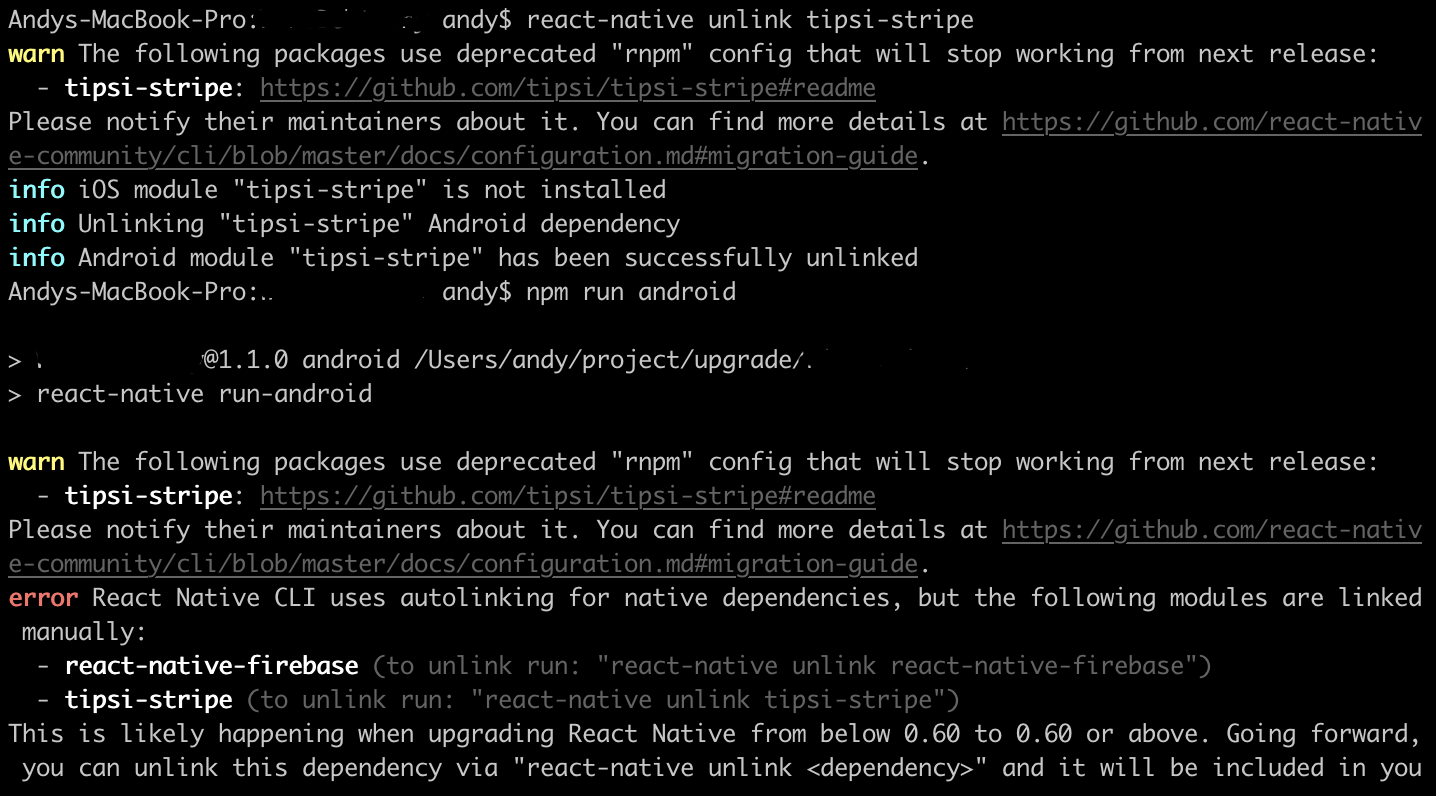
On the iOS though, after I run pod install it can detect new version of tipsi and run smoothly just like before.
One thing to add, if it can help, I just remembered, previously I can not run react-native unlink tipsi-stripe because my package name has dot (.) for example "test.tipsi", and because I'm manually changing my package name after init using "npx react-native init TestTipsi", react native tools try to looking for folder /test/tipsi/MainApplication.java which is not exist path. I manually restructure the folder just like rn cli wanted and it can unlink now.
Here is my full error when try to run stripe.deviceSupportsNativePay on android.
hjwlpjr
on 20 Apr 2020
A. I can't provide any help for tipsi @ < 8.x, because that was before I started using it, and I know there were critical bugs/build issues/compatibility issues that made it not work for my team.
B. tipsi @ < 8.x probably won't work safely on RN >= 0.60.0 because they significantly changed things, and because tipsi was built years before that for older Gradle versions.
I would recommend you remember how to unlink tipsi (or you manually unlink it), and then restart integrating tipsi beta.10 as we are shipping that to production in our application literally today.
fbartho
on 20 Apr 2020
Hi @fbartho I'm still facing the same issue even after upgrade to latest 8.0.0-beta.10..
I'm trying to looking on the project dependencies of tipsi stripe and I saw the tipsi-stripe need firebase messaging service v11.8.0, and instead I'm using v.18.0.0. Is that thing related with the error?
app/build.gradle
dependencies {
implementation fileTree(dir: "libs", include: ["*.jar"])
implementation "com.android.support:support-v4:28.0.0"
implementation "com.android.support:design:28.0.0"
implementation "com.android.support:appcompat-v7:28.0.0"
implementation "com.facebook.react:react-native:+" // From node_modules
implementation project(':react-native-firebase')
// firebase
implementation "com.google.android.gms:play-services-base:16.1.0"
implementation "com.google.firebase:firebase-core:16.0.9"
// firebase messaging
implementation "com.google.firebase:firebase-messaging:18.0.0"
implementation 'me.leolin:ShortcutBadger:1.1.21@aar' // <-- Add this line if you wish to use badge on Android
// firebase crashlytic
implementation('com.crashlytics.sdk.android:crashlytics:2.9.9@aar') {
transitive = true
}
...
tipsi-stripe build.gradle
...
def DEFAULT_COMPILE_SDK_VERSION = 28
def DEFAULT_TARGET_SDK_VERSION = 28
def DEFAULT_GOOGLE_PLAY_SERVICES_VERSION = '11.8.0'
def DEFAULT_FIREBASE_MESSAGING_VERSION = '11.8.0'
android {
compileSdkVersion rootProject.hasProperty('compileSdkVersion') ? rootProject.compileSdkVersion : DEFAULT_COMPILE_SDK_VERSION
defaultConfig {
minSdkVersion 19
targetSdkVersion rootProject.hasProperty('targetSdkVersion') ? rootProject.targetSdkVersion : DEFAULT_TARGET_SDK_VERSION
versionCode 1
versionName "1.0"
testInstrumentationRunner "android.support.test.runner.AndroidJUnitRunner"
manifestPlaceholders = [
tipsiStripeRedirectScheme: "example"
]
}
buildTypes {
release {
minifyEnabled false
proguardFiles getDefaultProguardFile('proguard-android.txt'), 'proguard-rules.pro'
}
}
}
dependencies {
def firebaseVersion = project.hasProperty('firebaseVersion') ? project.firebaseVersion : DEFAULT_FIREBASE_MESSAGING_VERSION
def googlePlayServicesVersion = rootProject.hasProperty('googlePlayServicesVersion') ? rootProject.googlePlayServicesVersion : DEFAULT_GOOGLE_PLAY_SERVICES_VERSION
implementation fileTree(include: ['*.jar'], dir: 'libs')
implementation 'com.facebook.react:react-native:+'
implementation 'com.android.support:support-v4:28.0.0'
implementation 'com.android.support:appcompat-v7:28.0.0'
implementation "com.google.android.gms:play-services-wallet:$googlePlayServicesVersion"
implementation "com.google.firebase:firebase-core:$firebaseVersion"
implementation 'com.stripe:stripe-android:10.4.6'
implementation 'com.github.tipsi:CreditCardEntry:1.5.1'
}
...
I've found the solution. For whoever that came across same problem, I add these 3 lines to my android/build.gradle ext,
firebaseVersion = "17.0.0"
googlePlayServicesVersion = "17.0.0"
googlePlayServicesVisionVersion = "17.0.2"
and everything work like a charm. Thanks.
hjwlpjr
on 12 May 2020
Glad to hear you figured it out before I woke up this morning!
fbartho
on 12 May 2020
Do you ejecte your app to get those android configuration files ? Can I use tipsi without ejecting?
 kopax
on 2 Jun 2020
kopax
on 2 Jun 2020
Related issues
 ikhsanalatsary
·
5Comments
ikhsanalatsary
·
5Comments
 SambhavAnand
·
4Comments
SambhavAnand
·
4Comments
 kingtross88
·
3Comments
kingtross88
·
3Comments
 rheilgm
·
6Comments
rheilgm
·
6Comments
 benjaminreid
·
5Comments
benjaminreid
·
5Comments
Most helpful comment
I've found the solution. For whoever that came across same problem, I add these 3 lines to my android/build.gradle ext,
and everything work like a charm. Thanks.