Tipsi-stripe: Stripe/Stripe.h' file not found
Hi, I've got a problem with this stripe API (only on IOS).
I know they are a lot of topic about this error, but I didn't found anything working...
I can't make the troubleshooting section of this tuto cause I don't have the "build phase" tab in TPStripe.xcodeproj. Only "infos" and "build settings".
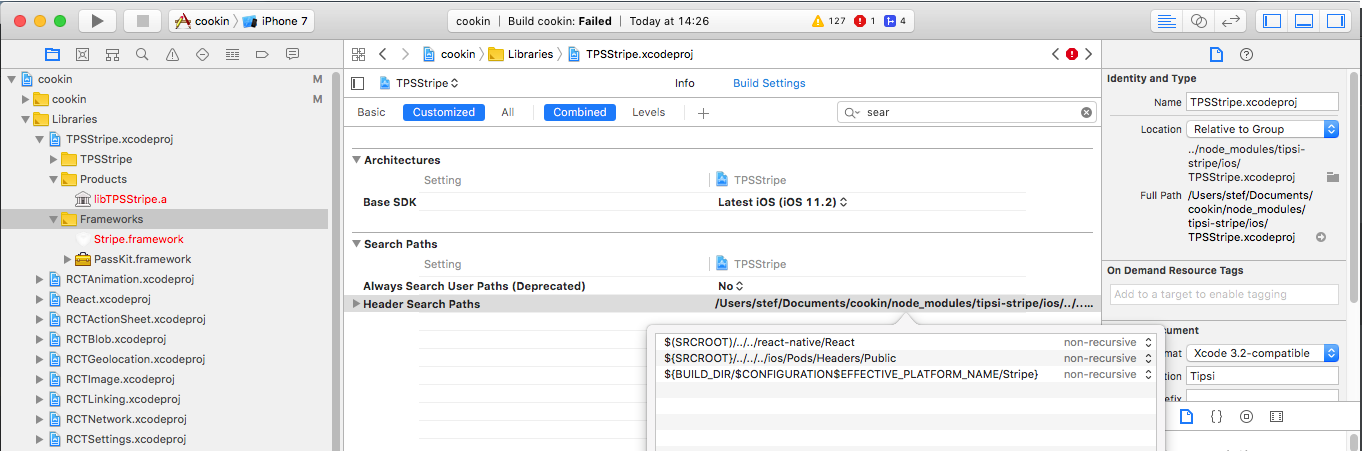
I've trying this :
https://github.com/tipsi/tipsi-stripe/issues/29
But I don't have Framework search path in my build settings of stripe project.
I don't use Cocoapods, I link all my libraries manually.
Thank you in advance :)
 BlackStef
All 17 comments
@BlackStef you should use Pods. If you didn't install pods you've got this error.
 isnifer
on 29 Jan 2018
isnifer
on 29 Jan 2018
It's pretty simple – xcode can't find something if you didn't install it
isnifer
on 29 Jan 2018
And it's pods ?
Strange, in the tuto they are few way, with pods, with react-native link, and manually.
Since I develop on react-native I've never had to install pods. I have a lot of different library ^^
xCode is looking for Stripe.h, not pods ?
BlackStef
on 29 Jan 2018
@BlackStef and it means nothing, lol. tipsi-stripe is a wrapper around iOS and Android bindings for Stripe. Stripe delivers their library as Pod. We just use it and wrap for you.
isnifer
on 29 Jan 2018
So I just installed pods and configure the podsfile as on the example :
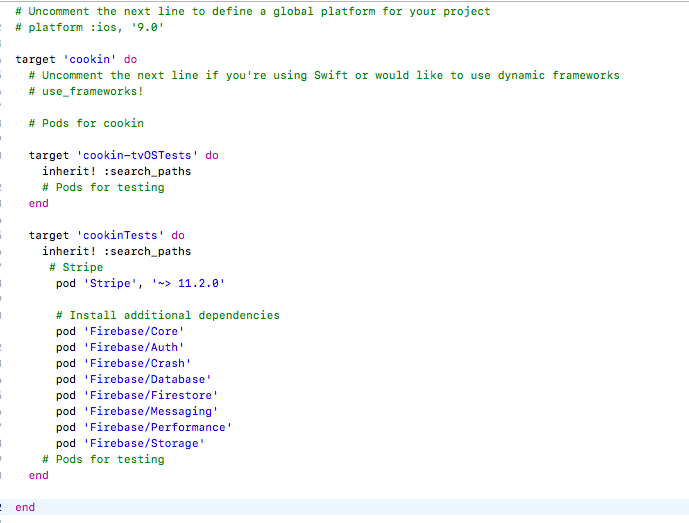
I don't have my error anymore, he pass this step when compiling.
But in the final phase (after "linking" on xCode) I have these errors :
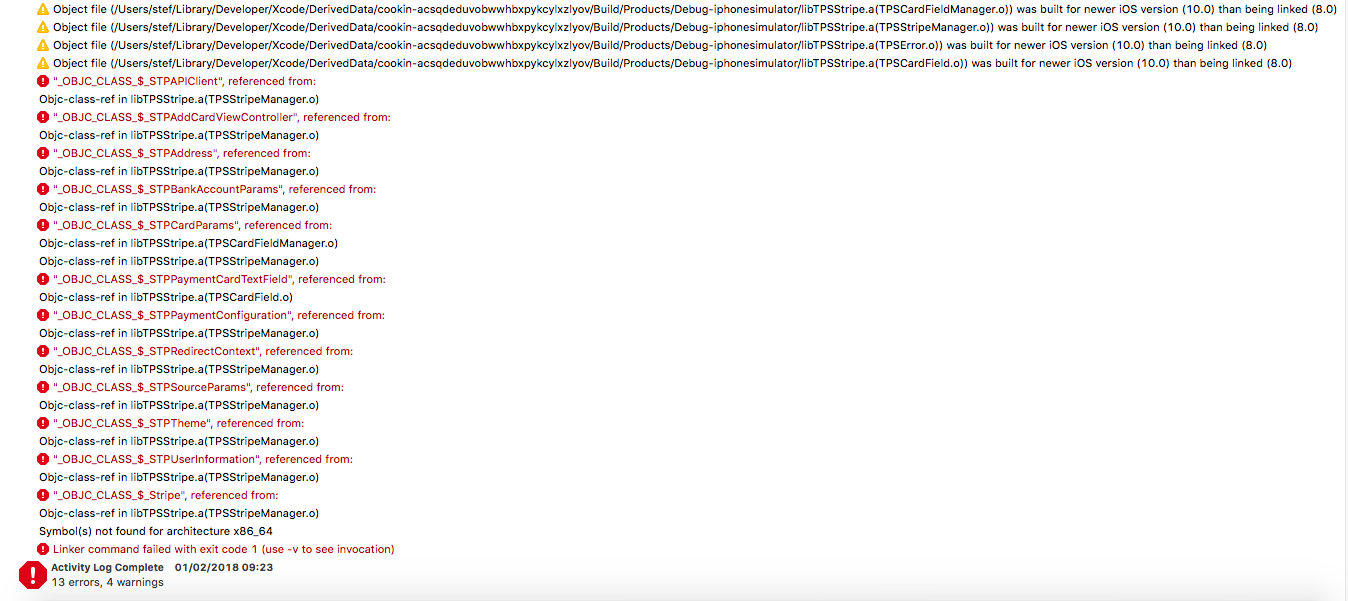
I have lunch my react-native link after that to try but every is already linked :
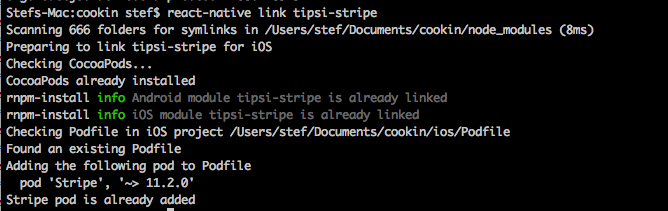
Do you have an idea ?
I did all the steps in the tuto, exept for the 3 : "Drag the following folder into your project:
node_modules/tipsi-stripe/ios/TPSStripe/"
I don't know where to drag in xCod, in which folder ? This is my new architecture (after add pods) :
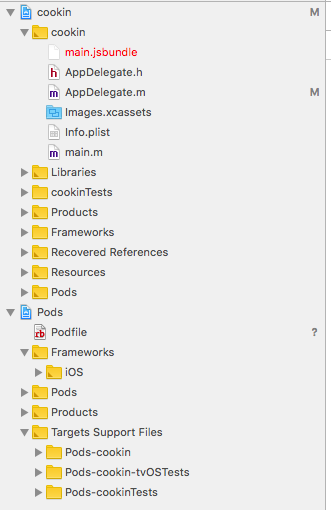
Thank you in advance, and sorry for all the inconvenience
BlackStef
on 1 Feb 2018
@BlackStef you install pods for testing target
Try move lines from #Stripe to #Pods for testing under #Pods for cookin line
 densa
on 2 Feb 2018
densa
on 2 Feb 2018
Ok it work now :)
Sorry I don't know cocoapods.. Seems complicated.
Thank you !
BlackStef
on 6 Feb 2018
Ran into the same problem and suspected that pod install was needed. It wasn't clear from the documentation though.
To me it reads like:
Option A) run react-native link
Option B) use cocoapods
Option C) do it manually
I chose option A, but ended up realizing that you need both Option A + Option B for it to work.
After I read this, I realize no one ever says they were 3 different options :)
I just made that assumption because most other react-native docs are formatted in such way.
 leoskyrocker
on 5 Mar 2018
leoskyrocker
on 5 Mar 2018
@leoskyrocker react-native link includes a step with cocoapods https://github.com/tipsi/tipsi-stripe/blob/master/scripts/post-link-ios.rb#L61
isnifer
on 5 Mar 2018
Thanks @isnifer, it was definitely failing silently then because cocoapods is not installed in my machine as of running react-native link.
Glad to know it has the lines though. For me since I don't have cocoapods I had to do sudo gem install -n /usr/local/bin cocoapods, remove the pod line for Stripe from ios/Podfile and rerun the link script (or manually run pod install).
leoskyrocker
on 5 Mar 2018
Same problem for me. Tried multiple times, always following the documentation instructions and even trying installing Stripe manually, but there is no way for me to compile the example! What can I do?
 guidolodetti
on 8 May 2018
guidolodetti
on 8 May 2018
@guidolodetti 'Stripe/Stripe.h' file not found means — you didn't install Stripe pod correctly.
isnifer
on 8 May 2018
@isnifer what's the correct way to install the framework? git cloned the project and followed the instruction; feels a bit strange I have to install it manually
guidolodetti
on 8 May 2018
@guidolodetti, first of all, you should check that you have pod command. Show me result of:
which pod
So the docs are actually broken and it needs a bit of rewording to make it clear you need both npm and pods to make it work. Where I say broken the example Podfile link is messed up. I'll see if I can sort a PR.
 marcfielding1
on 16 Dec 2018
marcfielding1
on 16 Dec 2018
Thanks @isnifer, it was definitely failing silently then because cocoapods is not installed in my machine as of running
react-native link.
Glad to know it has the lines though. For me since I don't have cocoapods I had to dosudo gem install -n /usr/local/bin cocoapods, remove the pod line for Stripe from ios/Podfile and rerun the link script (or manually run pod install).
was failing silently for me too; once I installed the cocoapods gem it worked!
 celwell
on 13 Apr 2019
celwell
on 13 Apr 2019
Hello,
We ran the following
yarn add tipsi-stripe
cd ios && pod install
POD FILE
require_relative '../node_modules/react-native/scripts/react_native_pods'
require_relative '../node_modules/@react-native-community/cli-platform-ios/native_modules'

platform :ios, '12.0'

target 'mySuperApp' do
  config = use_native_modules!

  use_react_native!(:path => config["reactNativePath"])

  # Pods for mySuperApp

  #OpenSSL
  pod 'OpenSSL-Universal', '~>1.0.2.20'
  #Stripe
  pod 'Stripe'
  #pod 'Stripe', '~> 19.4.0'
  # Add the Firebase pod for Google Analytics
  pod 'Firebase/Analytics'
  pod 'Google-Mobile-Ads-SDK'
  pod 'Firebase/AppDistribution'
  pod 'Firebase/Messaging'
  pod 'Firebase/Crashlytics'
  pod 'Firebase/DynamicLinks'
  pod 'Firebase/InAppMessaging'
  pod 'Firebase/Performance'
  pod 'Firebase/RemoteConfig'

  pod 'tipsi-stripe', :path => '../node_modules/tipsi-stripe'
  target 'mySuperAppTests' do
    inherit! :complete
    # Pods for testing
  end

  # Enables Flipper.
  #
  # Note that if you have use_frameworks! enabled, Flipper will not work and
  # you should disable these next few lines.
  use_flipper!
  post_install do |installer|
    flipper_post_install(installer)
  end
end
Then after this
We did 'npx react-native link tipsi-stripe' and it linked
### NOTE THIS
But we still get the error, we are not sure about 1 thing and that is where to copy the folder of i.e node_modules/tipsi-stripe/ios/TPSStripe/
We're getting build failed for the same reason Stripe/Stripe.h not found however when we check the Pod folder, the Stripe folder is there and pod installed it!
 seamive
on 16 Feb 2021
seamive
on 16 Feb 2021
Related issues
 igemnace
·
6Comments
igemnace
·
6Comments
 llvc
·
4Comments
llvc
·
4Comments
 amralkhayat
·
5Comments
amralkhayat
·
5Comments
 SambhavAnand
·
4Comments
SambhavAnand
·
4Comments
 archieherbias
·
4Comments
archieherbias
·
4Comments
Most helpful comment
Hello,
We ran the following
POD FILE
Then after this
We did
'npx react-native link tipsi-stripe'and it linked### NOTE THIS
But we still get the error, we are not sure about 1 thing and that is where to copy the folder of i.e
node_modules/tipsi-stripe/ios/TPSStripe/We're getting build failed for the same reason Stripe/Stripe.h not found however when we check the Pod folder, the Stripe folder is there and pod installed it!