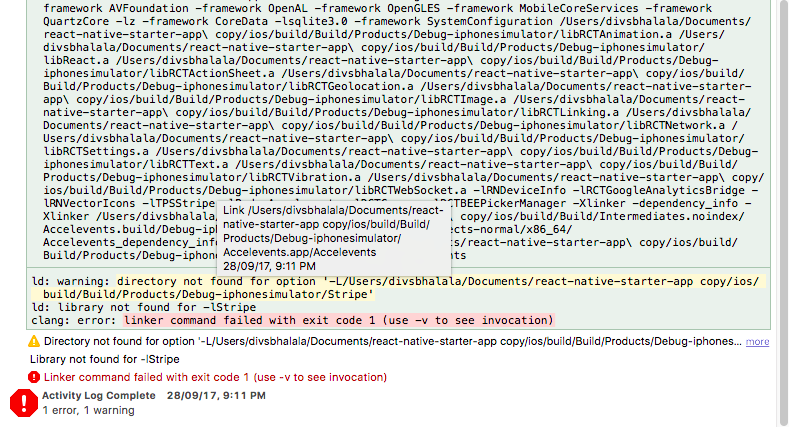
Tipsi-stripe: ld: library not found for -lStripe
I have followed the manual installation instructions as listed in the README (added TPSStripe.xcodeproj to Libraries, etc) and run react-native link as well as react-native link tipsi-stripe (succesfully I might add)
However when I run react-native run-ios, or build with xcode I get:
ld: library not found for -lStripe
clang: error: linker command failed with exit code 1 (use -v to see invocation)


** BUILD FAILED **


The following build commands failed:
    Ld build/Build/Products/Debug-iphonesimulator/myApp.app/myApp normal x86_64
(1 failure)

Installing build/Build/Products/Debug-iphonesimulator/myApp.app
An error was encountered processing the command (domain=NSPOSIXErrorDomain, code=22):
Failed to install the requested application
The bundle identifier of the application could not be determined.
Ensure that the application's Info.plist contains a value for CFBundleIdentifier.
Print: Entry, ":CFBundleIdentifier", Does Not Exist

Command failed: /usr/libexec/PlistBuddy -c Print:CFBundleIdentifier build/Build/Products/Debug-iphonesimulator/flockCover.app/Info.plist
Print: Entry, ":CFBundleIdentifier", Does Not Exist
 apolishch
All 56 comments
Hi @apolishch, show me your Podfile. Also did you install Stripe pod?
 isnifer
on 21 Jul 2017
isnifer
on 21 Jul 2017
I did not install stripe directly, I instead followed the manual installation instructions from the Readme:
https://github.com/tipsi/tipsi-stripe#manual
having said that, the following is the contents of my podfile (in its entirety):
# Uncomment the next line to define a global platform for your project
# platform :ios, '9.0'

target 'flockCover' do
  pod 'Stripe', '~> 10.1.0'
  inherit! :search_paths
end
@apolishch anyway, there is a Cocoapods section
isnifer
on 21 Jul 2017
@apolishch Please, follow this guide and tell me result :)
isnifer
on 21 Jul 2017
@isnifer I didn't end up having to change the podfile at all (it was already correct as pasted above)
I ran cd ios && pod install
It installed succesfully:
pod install
Analyzing dependencies
Downloading dependencies
Using Stripe (10.1.0)
Generating Pods project
Integrating client project
Sending stats
Pod installation complete! There is 1 dependency from the Podfile and 1 total pod installed.

[!] Automatically assigning platform ios with version 8.0 on target myApp because no platform was specified. Please specify a platform for this target in your Podfile. See `https://guides.cocoapods.org/syntax/podfile.html#platform`.
I wasn't sure what the instruction to "drag the folder in " meant so I right clicked on my project, selected Add files to "myApp", and then selected the folder specified (node_modules/tipsi-stripe/ios/TPSStripe)
I then ran react-native run-ios and had the same result - ld: library not found for -lStripe
Also, thanks so much for taking the time to help me debug what I strongly suspect is just a stupid error on my part somewhere.
apolishch
on 21 Jul 2017
@apolishch you're welcome! Please, find in ios folder file %YOUR_PROJECT_NAME%.xcworkspace and open it. Try to run project via xcode and tell me result
isnifer
on 21 Jul 2017
@isnifer
Apple Mach-O Linker Error
Linker command failed with exit code 1 (use -v to see invocation)
Right click -> Reveal in Log:
Ld /Users/abrahampolishchuk/Library/Developer/Xcode/DerivedData/myApp-enjsbnsiwwzbxgcfkihfeqjuobll/Build/Products/Debug-iphonesimulator/myApp.app/myApp normal x86_64
    cd /Users/abrahampolishchuk/github/flock/my-react-app/ios
    export IPHONEOS_DEPLOYMENT_TARGET=8.0
    export PATH="/Applications/Xcode.app/Contents/Developer/Platforms/iPhoneSimulator.platform/Developer/usr/bin:/Applications/Xcode.app/Contents/Developer/usr/bin:/usr/local/bin:/usr/bin:/bin:/usr/sbin:/sbin"
... truncated for brevity ....
ld: library not found for -lStripe
clang: error: linker command failed with exit code 1 (use -v to see invocation)
@apolishch hmmm, please remove ios/build folder and try to run again, tell me result
isnifer
on 21 Jul 2017
@isnifer
same result :/
interestingly on CircleCi the build still fails, but with a different error:
/Users/distiller/flock-react-app/node_modules/tipsi-stripe/ios/TPSStripe/TPSStripeManager.h:11:9: 'Stripe/Stripe.h' file not found

#import <Stripe/Stripe.h>
        ^


▸ Compiling TPSCardField.m

❌  /Users/distiller/flock-react-app/node_modules/tipsi-stripe/ios/TPSStripe/TPSCardField.h:10:9: 'Stripe/Stripe.h' file not found

#import <Stripe/Stripe.h>
Not sure if that is a different symptom of the same problem
apolishch
on 21 Jul 2017
@apolishch As I can see on CircleCI pods didn't install.
So, on your local environment, please do:
rm -rf /Users/abrahampolishchuk/Library/Developer/Xcode/DerivedData/myApp-enjsbnsiwwzbxgcfkihfeqjuobll
In your project root:
rm -rf node_modules && npm i && react-native run-ios
Also, please tell me, did you check this step:
Double click the text to the right of Header Search Paths and verify that it has $(SRCROOT)/../../react-native/React as well as ${SRCROOT}/../../../ios/Pods/Headers/Public - if they aren't, then add them.
isnifer
on 21 Jul 2017
@isnifer On localhost that had no effect. Adding cd ios && pod install on circleci does make circleci fail in the same way as localhost
apolishch
on 21 Jul 2017
@apolishch you should care about cocoapods on CircleCI.
brew install cocoapods
for example, on your CI script
isnifer
on 21 Jul 2017
@apolishch or like this - https://github.com/tipsi/tipsi-stripe/blob/master/.travis/before-install.sh#L37
isnifer
on 21 Jul 2017
No effect:
Also, to answer your previous question:
Header Search path is set as:
$(SRCROOT)/../../../React
$(SRCROOT)/../../react-native/React
$(SRCROOT)/../../../ios/Pods/Headers/Public
@apolishch ok, so I will create a repo with a clean installation. Will follow instructions for manual linking and we will check that project to find what wrong
isnifer
on 21 Jul 2017
@isnifer Thanks so much! Is there anything else I can provide to help you debug this? Listing everything I can think of below
react-native -v
react-native-cli: 2.0.1
react-native: 0.42.3
package.json:
"tipsi-stripe": "^3.2.0"
podfile is listed above
xcode version: 8.3.3
npm version: 4.2.0
node version: 7.9.0
pod --version: 1.2.1
OSX - 10.12.5
apolishch
on 21 Jul 2017
@apolishch I want to stream video of installation to twitch, maybe you will see where you were wrong or I will found our mistake
isnifer
on 21 Jul 2017
@isnifer that would be amazing.
I have a meeting with some a remote team at 2 UTC (in 3 minutes). What time were you thinking of doing this?
apolishch
on 21 Jul 2017
@apolishch haha, me to! Ok, let's try in an hour!
isnifer
on 21 Jul 2017
Perfect! Again, thank you so much for your help.
apolishch
on 21 Jul 2017
You're welcome!
isnifer
on 21 Jul 2017
@apolishch so, do you ready for streaming?
isnifer
on 21 Jul 2017
yup. I've never actually used Twitch before. How is this going to work? You going to give me a link?
apolishch
on 21 Jul 2017
@apolishch yep
isnifer
on 21 Jul 2017
so @apolishch https://www.twitch.tv/tr3m0r1ty
isnifer
on 21 Jul 2017
great! I'm in.
apolishch
on 21 Jul 2017
@apolishch so, where did you wrong?
isnifer
on 21 Jul 2017
I still don't know tbh. The one thing that jumps out at me is that I do not seem to have a libStripe.a even available
apolishch
on 21 Jul 2017
@apolishch may be I can help you via skype call, or zoom. You will share screen - I will help you)
isnifer
on 21 Jul 2017
That would be amazing! I am @ apolishch on Skype also
apolishch
on 21 Jul 2017
or I can install zoom if you prefer
apolishch
on 21 Jul 2017
@apolishch I will call you in skype)
isnifer
on 21 Jul 2017
@apolishch is it works?
isnifer
on 21 Jul 2017
Sorry had a retrospective to go to. I don't know. Will let you know shortly
apolishch
on 21 Jul 2017
ok, thank you
isnifer
on 21 Jul 2017
Thanks for all your help! It eventually just kind started working through react-native run-ios. The issue still occurs within XCode. This doesn't particularly bother me, at least not right now, as I can build through fastlane, and run through react-native without issue.
I will let you decide whether this should be closed or not.
apolishch
on 2 Aug 2017
I am getting same error
 divsbhalala
on 28 Sep 2017
divsbhalala
on 28 Sep 2017
Had same error, but realized that i worked in AppName.xcodeproj when should open AppName.xcworkspace. Hope it helps someone.
 crawler
on 9 Oct 2017
crawler
on 9 Oct 2017
Yes that's work for me as well
divsbhalala
on 10 Oct 2017
what's the difference *.xcodeproj with *.xcworkspace?
 ikhsanalatsary
on 8 Nov 2017
ikhsanalatsary
on 8 Nov 2017
@ikhsanalatsary
A workspace is an Xcode document that groups projects and other documents so you can work on them together. A workspace can contain any number of Xcode projects, plus any other files you want to include. In addition to organizing all the files in each Xcode project, a workspace provides implicit and explicit relationships among the included projects and their targets.
https://developer.apple.com/library/content/featuredarticles/XcodeConcepts/Concept-Workspace.html
CocoaPods, which automatically handles 3rd party libraries for you, uses workspaces. Therefore, you have to use them, too, when you use CocoaPods
 densa
on 8 Nov 2017
densa
on 8 Nov 2017
@crawler I want to buy you a cup of coffee or a beer! The workspace worked for me too! Thanks for posting!
 keithdmoore
on 13 Dec 2017
keithdmoore
on 13 Dec 2017
Hey!
I have followed all steps and opened xcworkspace too. Unfortunately I get a bit different error:
ld: warning: directory not found for option '-L/Users/XYX/Documents/ReactNative/appNative/ios/app'
ld: framework not found Stripe
clang: error: linker command failed with exit code 1 (use -v to see invocation)
The strange thing: my package etc. is called appNative and it looks for the app folder /ios. But there is of course only an appNative folder in /ios.
Thanks for your help!
 GituBojan
on 12 Feb 2018
GituBojan
on 12 Feb 2018
@GituBojan Hi! Did you install pods?
isnifer
on 12 Feb 2018
@isnifer
Podfile
# Use iOS 8 and above
platform :ios, '8.0'

# Specify Workspace
workspace 'appNative'

target 'appNative' do
  # Stripe
  pod 'Stripe', '~> 11.2.0'

  # Install additional dependencies
  pod 'Firebase/Core'
  pod 'Firebase/Auth'
  pod 'Firebase/Crash'
  pod 'Firebase/Database'
  pod 'Firebase/Firestore'
  pod 'Firebase/Messaging'
  pod 'Firebase/Performance'
  pod 'Firebase/Storage'
end
XYXs-MacBook-Pro:ios XYX$ pod install
Analyzing dependencies
Downloading dependencies
Using BoringSSL (9.2)
Using Firebase (4.8.2)
Using FirebaseAnalytics (4.0.9)
Using FirebaseAuth (4.4.2)
Using FirebaseCore (4.0.14)
Using FirebaseCrash (2.0.2)
Using FirebaseDatabase (4.1.4)
Using FirebaseFirestore (0.10.0)
Using FirebaseInstanceID (2.0.8)
Using FirebaseMessaging (2.0.8)
Using FirebasePerformance (1.1.1)
Using FirebaseStorage (2.1.2)
Using FirebaseSwizzlingUtilities (1.0.0)
Using GTMSessionFetcher (1.1.13)
Using GoogleToolboxForMac (2.1.3)
Using Protobuf (3.5.0)
Using Stripe (11.2.0)
Using gRPC (1.9.1)
Using gRPC-Core (1.9.1)
Using gRPC-ProtoRPC (1.9.1)
Using gRPC-RxLibrary (1.9.1)
Using leveldb-library (1.20)
Using nanopb (0.3.8)
Generating Pods project
Integrating client project
Sending stats
Pod installation complete! There are 9 dependencies from the Podfile and 23 total pods installed.
Step 1:
I changed the workspace name from workspace 'app' to 'appNative'.
Step 2:
I installed pod again - no change - still same error
Step 3:
I deleted the pod folder and pod file and installed pod again - still same error
Step 4:
deleted pod folder and build folder. Cleaned before build - still same error.
Step 5:
checked all linkings etc. - still same error.
Thanks for your really fast answer! And help of course :)
GituBojan
on 12 Feb 2018
@GituBojan show me your Podfile and ios folder structure
isnifer
on 12 Feb 2018
Podfile
# Use iOS 8 and above
platform :ios, '8.0'

# Specify Workspace
workspace 'appNative'

target 'appNative' do
  # Stripe
  pod 'Stripe', '~> 11.2.0'

  # Install additional dependencies
  pod 'Firebase/Core'
  pod 'Firebase/Auth'
  pod 'Firebase/Crash'
  pod 'Firebase/Database'
  pod 'Firebase/Firestore'
  pod 'Firebase/Messaging'
  pod 'Firebase/Performance'
  pod 'Firebase/Storage'
end
ios structure:
/appNative
/appNative/AppDelegate.h
/appNative/AppDelegate.m
/appNative/Base.Iproj
/appNative/Images.xcassets
/appNative/Info.plist
/appNative/main.m
/appNative.xcodeproj
/appNative.xcworkspace
/Podfile
/Podfile.lock
/Pods
/Pods/BoringSSL
/Pods/Firebase
/Pods/FirebaseAnalytics
/Pods/FirebaseAuth
/Pods/FirebaseCore
/Pods/FirebaseCrash
/Pods/FirebaseDatabase
/Pods/FirebaseFirestore
/Pods/FirebaseInstanceID
/Pods/FirebaseMessaging
/Pods/FirebasePerformance
/Pods/FirebaseStorage
/Pods/FirebaseSwizzlingUtilities
/Pods/GoogleToolboxForMac
/Pods/gRPC
/Pods/gRPC-Core
/Pods/gRPC-ProtoRPC
/Pods/gRPC-RxLibrary
/Pods/GTMSessionFetcher
/Pods/Headers
/Pods/leveldb-library
/Pods/Local Podspecs
/Pods/Manifest.lock
/Pods/nanopb
/Pods/Pods.xcodeproj
/Pods/Protobug
/Pods/Stripe
/Pods/Target Support Files
@isnifer
GituBojan
on 12 Feb 2018
@GituBojan do you have appNative target in xcode?
densa
on 12 Feb 2018
@densa @isnifer
yes I have it. still not working.
I know it is for sure only about iOS configuration but I have compiled it on Android now and it works without problems. tomorrow I will continue searching for the POD issue.
GituBojan
on 12 Feb 2018
@GituBojan ok. If it your testing project and you can share it we can help find out issue
densa
on 12 Feb 2018
@isnifer @densa
I have now spent the last hours searching for my mistake. After several changes and rebuilds I decided to delete the iOS folder and generate it again with react-native upgrade. After cleaning all my libraries etc. before generating the iOS folder I was able to build the project..
Still don't know what the real issues was. There were for sure some issues with the linking. THanks anyways for your help! Now it is working :)
GituBojan
on 13 Feb 2018
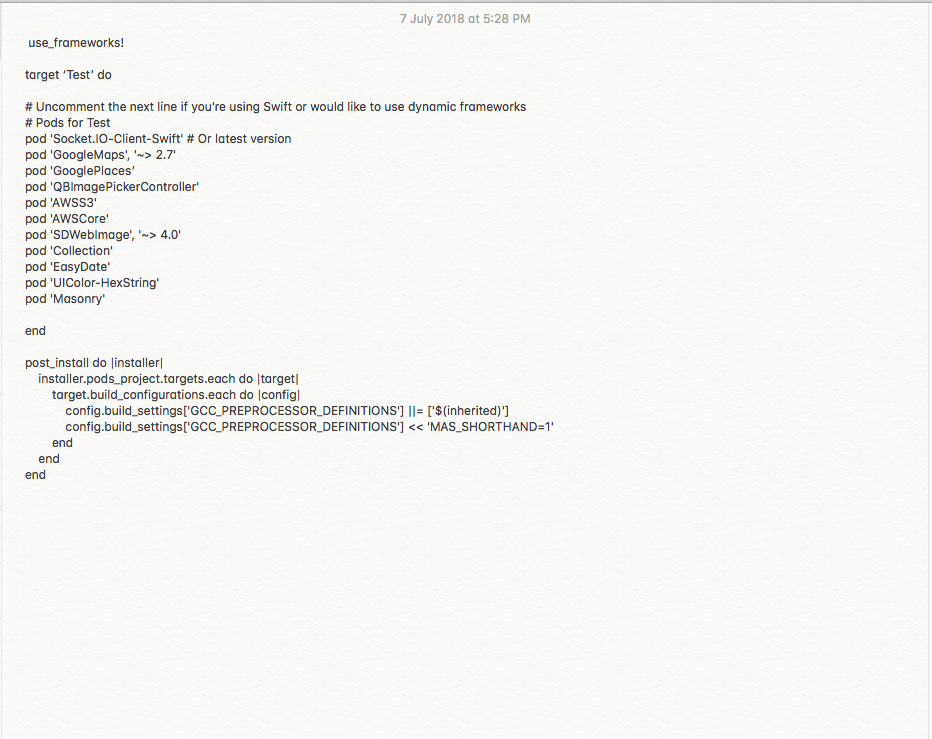
I have no idea why am i getting pod file error, when i started integrating Socket IO, earlier it was working fine.Finally ends up with the error says, ld: library not found for -lAWSCore.Any help would be appreciated.Attached those screenshots below..

 vymallesh
on 7 Jul 2018
vymallesh
on 7 Jul 2018
@vymallesh you need to add Stripe. See https://github.com/tipsi/tipsi-stripe/blob/master/example/ios/Podfile#L9
isnifer
on 7 Jul 2018
@isnifer
I have an issue with AWSCore, while installing Socket iO pod file, i am facing below issue.Are there any dependencies between AWSCore and Socket iO.Earlier in the first build i have added AWS Core, till now it's fine.Now in second build, i have a requirement with socket, i have started integrating Socket iO, now it started throwing errors, which are listed below.
- AWSCore.h' file not found with
include; use "quotes" instead -- Change it to angular brackets ("")
2.Now it is throwing other error like, library not found for -lAWSCore.
Pod which you mentioned here, https://github.com/tipsi/tipsi-stripe/blob/master/example/ios/Podfile#L9 .It is something related to payment i guess.I have issue with AWS Core and Socket iO, no where i am using Stripe pod file which you mentioned.
vymallesh
on 10 Jul 2018
@vymallesh see @Gribadze answer. Is that your mistake?
isnifer
on 16 Jul 2018
Below two steps would solve you the problem of framework not found for a dependency lib and linker error attached to dependency,
- clear Deriveddata
- try running the project using the 'react-native run-ios' from command line.
 Ajaykumar02
on 1 Apr 2019
Ajaykumar02
on 1 Apr 2019
Related issues
 SuhairZain
·
6Comments
SuhairZain
·
6Comments
 duro
·
3Comments
duro
·
3Comments
 nenti
·
5Comments
nenti
·
5Comments
 igemnace
·
6Comments
igemnace
·
6Comments
 amralkhayat
·
5Comments
amralkhayat
·
5Comments
Most helpful comment
Had same error, but realized that i worked in AppName.xcodeproj when should open AppName.xcworkspace. Hope it helps someone.