Tipsi-stripe: 'Stripe/Stripe.h' file not found
Hi,
I am getting this error while building the application in xcode: 'Stripe/Stripe.h' file not found
I have integrated this package manually in xcode.
here is the screenshot:

 ignivaankushrishi
All 53 comments
@ignivaankushrishi did you try react-native link command?
 isnifer
on 17 Dec 2016
isnifer
on 17 Dec 2016
Hi, @ignivaankushrishi, thank you for your interest in our module!
It looks like you did not setup CocoaPods dependencies:
- Setup your
Podfilelike the included example/ios/Podfile - Then run
pod installiniosdirectory
But we recommend using react-native link tipsi-stripe command as a more reliable way to link this module.
 itsmepetrov
on 18 Dec 2016
itsmepetrov
on 18 Dec 2016
i am getting the same error and the suggestions above did not work
 shyaniv7
on 24 Dec 2016
shyaniv7
on 24 Dec 2016
@ignivaankushrishi @shyaniv7 are you open xcworkspace not xcodeproj ?
 densa
on 25 Dec 2016
densa
on 25 Dec 2016
@densa i have using the xcodeproj file
shyaniv7
on 25 Dec 2016
@shyaniv7 you have to use workspace file because of pods
densa
on 25 Dec 2016
@shyaniv7 I belive this issue was resolved, so closing it
 cybergrind
on 12 Jan 2017
cybergrind
on 12 Jan 2017
Hi, thank you guys for great work
Strangely, I am getting this error. I did everything according to the instructions, installed through npm and run react-native link. But it still gives me the same error
 magneticz
on 8 Feb 2017
magneticz
on 8 Feb 2017
Hi, @magneticz, which version of react-native do you use? Are you open .xcworkspace file to build application?
itsmepetrov
on 8 Feb 2017
hi @itsmepetrov, I am using react-native 0.41.2. I usually build with react-native run-ios, but in this case i tried to build through xcode using .xcworkspace, so yes, i used .xcworkspace
magneticz
on 8 Feb 2017
I noticed some problems with link on 0.41.2 version, could you show your ios/Podfile file, please?
itsmepetrov
on 8 Feb 2017
sure, here it is
platform :ios, '8.0'
target 'app' do
  use_frameworks!

  pod 'Firebase/Messaging'
  pod 'RSKImageCropper'
  pod 'QBImagePickerController'
  pod 'Firebase/Core'

  target 'appTests' do
    inherit! :search_paths
  end

end
pod 'Stripe', '~> 9.2.0'
Could you move pod 'Stripe', '~> 9.2.0' under app target, right after pod 'Firebase/Core' and then install pods again: pod install in ios directory.
itsmepetrov
on 8 Feb 2017
not working, i moved and did pod install, it didn't work then i tried to do react-native link but it still didn't work, same file not found error. I looked into the header search path, to make sure paths in the readme are there and they are there, so i do not know why the file is still not found. And I am not good with ios development to dig deeper
magneticz
on 8 Feb 2017
Do you have folder Pods/Stripe folder inside ios folder? And try to change Podfile to be looking like this
platform :ios, '8.0'
target 'app' do
  use_frameworks!
  pod 'Stripe', '~> 9.2.0'
  pod 'Firebase/Messaging'
  pod 'RSKImageCropper'
  pod 'QBImagePickerController'
  pod 'Firebase/Core'
  inherit! :search_paths

  target 'appTests' do
    inherit! :search_paths
  end

end
And make sure you have correctly linked libpods like this (libPods-StripeTest.a, StripeTest is name of my target):

 sergeyzhukov
on 8 Feb 2017
sergeyzhukov
on 8 Feb 2017
I have Pods/Stripe folder and i tried changing podfile.
the libTPSStripe.a is also there, but i do not have libPods-StripeTest.a linked. I couldn't find any libPods file to link, maybe that's the problem, how can i add it?
magneticz
on 9 Feb 2017
You can try to add this lib by tapping on + and select libPods-StripeTest.a

Also please be sure that you are opening xcworkspace file (not project) and you have pods integrated in workspace like this

sergeyzhukov
on 9 Feb 2017
This issue is not resolved, this library has been a nightmare to work with, constant missing files, and cross generation dependencies that seem to sometimes appear and sometimes not.
 ezos86
on 22 May 2017
ezos86
on 22 May 2017
@ezos86 maybe we're missing something and you can point us that?
If you can provide us reproducible steps, eg. share repo where it isn't working it would be great and would help us fix it.
We already have CI tests that are doing everything from scratch so we can be sure that it works at least under some circumstances. With you help, we can find other cases and fix them too.
cybergrind
on 22 May 2017
In my case I can't use inherit! :search_paths because it causes an linking error in react-native-fcm. is there a workaround to using that directive?
 mienaikoe
on 3 Jun 2017
mienaikoe
on 3 Jun 2017
@cybergrind this issue still exists if we do not use pods. I want to add this library without using pods. So, this issue should not be closed like this. you should update your library so that it should work error free.
ignivaankushrishi
on 8 Jun 2017
Solid library but it's riddled with bugs
 GregTheGreek
on 8 Jun 2017
GregTheGreek
on 8 Jun 2017
@ignivaankushrishi you need to use pods, cause you need Stripe Pod.
you should update your library so that it should work error free.
You might help us, PRs welcome!
isnifer
on 8 Jun 2017
@ignivaankushrishi @GregTheGreek @mienaikoe @ezos86 @magneticz @shyaniv7 please, try 3.2.0
isnifer
on 24 Jun 2017
Hey!
I'm using [email protected]
I used react-native link (so no PodFile) and I get the same error.
I tried to :
- clean the build folder in XCode
- link
tipsi-stripeagain - delete the
node_modulesfolder ad runnpm installagain - build the app again
I still get the same error ('Stripe/Stripe.h' file not found) as I build this in XCode.
I think the issue should be re-opened, considering the amount of people in the same case than me.
 SamiChab
on 17 Nov 2017
SamiChab
on 17 Nov 2017
@SamiChab Hey! Show me your Podfile and Podfile.lock. Also, please tell me how are building your app? Are you using workspace instead of project?
isnifer
on 17 Nov 2017
@isnifer thanks for your answer.
I was not using PodFile as I posted this message. It would be really cool if it worked with react-native link.
SamiChab
on 20 Nov 2017
@SamiChab once again, you should use Podfile. it is created when you run react-native link
isnifer
on 20 Nov 2017
@isnifer
while
react-native link
...?
SamiChab
on 20 Nov 2017
@SamiChab please read https://github.com/tipsi/tipsi-stripe#ios-1
isnifer
on 20 Nov 2017
Okay, I understand now that I didn't had to choose between react-native link or CocoaPods or Manual, but do all of them. Sorry for the inconvenience
SamiChab
on 20 Nov 2017
@SamiChab after linking tipsi-stripe use workspace instead of project to build an app
isnifer
on 20 Nov 2017
@isnifer You mean in XCode?
SamiChab
on 20 Nov 2017
@SamiChab Yes
isnifer
on 20 Nov 2017
I have to agree with above comments, this library is finicky and a pain to get set up. great potential for RN but with the difficulty installing and having to link and use .xcworkspace and install pods, im going back to the API and fetch :-(
 cheema38
on 21 Nov 2017
cheema38
on 21 Nov 2017
So, @cheema38 all great libraries need to be linked if they are using native code
isnifer
on 21 Nov 2017
@cheema38 Linking shouldn't be an issue for most libraries. I can't comment anymore on this one since I haven't used it in a very long time (although I'm willing to give it another chance). For whatever reason, the old version was very buggy when I would try and install it. If you have problems linking any library, you most likely are doing something wrong with your ios setup or you aren't using .workspace post linking.
@isnifer Make sure to check versions of RN people are using, that usually solves a lot of issues, and you can probably close more that way.
GregTheGreek
on 21 Nov 2017
@GregTheGreek we are planning to remove automatic linking for tipsi-stripe, cause manual linking much simpler than we are doing in scripts. Usually, people are using project file instead of workspace, that's why problem exists
isnifer
on 21 Nov 2017
Has there been any resolution to this @isnifer that is consistent? I have tipsi-stripe installed and I'm getting the error:
node_modules/tipsi-stripe/ios/TPSStripe/TPSCardField.h:10:9: 'Stripe/Stripe.h' file not found
I am using react-native 0.48
installing with react-native link tipsi-stripe
and the Stripe version in my Podfile is pod 'Stripe', '~> 11.2.0'
 wkwyatt
on 19 Apr 2018
wkwyatt
on 19 Apr 2018
@wkwyatt Hi! Did you start a workspace to run your app?
isnifer
on 19 Apr 2018
@isnifer Yes, my Podfile looks like this:
I used react-native link to link the package
platform :ios, '10.0'

workspace 'myapp'

target 'myapp' do
  use_frameworks!
  inherit! :search_paths

  # Required for Tipsi-Stripe
  pod 'Stripe', '~> 11.2.0'

  # Required by RNFirebase
  pod 'Firebase/Core'
  pod 'Firebase/Auth'
  pod 'Firebase/Database'

  # Pods for AppCenter
  pod 'AppCenter/Crashes', '~> 1.5.0'
  pod 'AppCenter/Analytics', '~> 1.5.0'
  pod 'AppCenterReactNativeShared', '~> 1.4.0'
  platform :ios, '9.0'

end
@wkwyatt did you install pods after updating Podfile?
isnifer
on 19 Apr 2018
Yes
wkwyatt
on 19 Apr 2018
@wkwyatt please, check this section — https://tipsi.github.io/tipsi-stripe/docs/linking.html#manual. And tell me — is everything OK?
isnifer
on 19 Apr 2018
@isnifer I followed the steps exactly and I am still getting the same error. Am I missing something?

Add TPSStipe to the Libraries folder
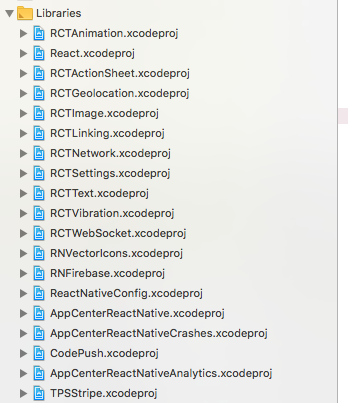
Link binary

add Header Search Paths (I tried recursive and non-recursive)

wkwyatt
on 20 Apr 2018
@wkwyatt show me log of pod install inside your ios folder
isnifer
on 20 Apr 2018
@isnifer - is this what you meant by the log?
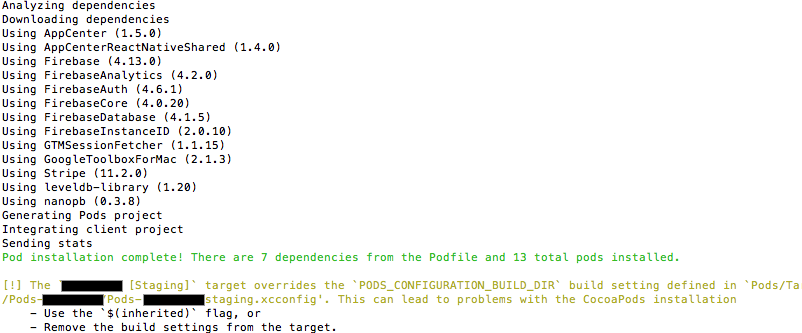
wkwyatt
on 20 Apr 2018
Had this problem.
Check your absolute Header Search Paths from TPSStripe. When definition was $(SRCROOT)/../../../React , mine was pointing in to the root folder of tipi-stripe, not to the example folder (which makes sense since TPSStripe project's actual path is from root folder).
In the end I:
1) copied example project to a different location
2) removed previous dependency from package.json
3) npm i tipsi-stripe --save
4) deleted previous linking of TPSStripe project from xcworkspace and relinked manually (though I guess this could be done with react-native link - after deleting the old TPSStripe of course)
 newah
on 25 Apr 2018
newah
on 25 Apr 2018
@newah after copied the example file to a different location, command "npm i tipsi-stripe --save", error: Could not install from ".." as it does not contain a package.json file
what should I do? thank you for helping!
 brilliantjc
on 25 May 2018
brilliantjc
on 25 May 2018
@brilliantjc just don't move it
isnifer
on 26 May 2018
@brilliantjc you need the whole react-native project - with package.json . Then from project root, install npm dependency tipsi-stripe - just like you do in any other RN project :)
Maybe you only copied ios folder, or xcode file or something... But you need the whole RN example project :)
newah
on 26 May 2018
I am doing it by manual liking , followed each steps , still getting the error as 'Stripe/Stripe.h' file not found, can't afford to use pod , due to other dependencies.need you help / explanation
 ankitgauravapporio
on 12 Aug 2019
ankitgauravapporio
on 12 Aug 2019
In my case, downgrade pod 'Stripe', '~> 20.0.0' fixed the problem
 vincent459
on 19 Mar 2021
vincent459
on 19 Mar 2021
Related issues
 Ania-chan
·
3Comments
Ania-chan
·
3Comments
 igemnace
·
6Comments
igemnace
·
6Comments
 llvc
·
4Comments
llvc
·
4Comments
 trustfall
·
4Comments
trustfall
·
4Comments
 kingtross88
·
3Comments
kingtross88
·
3Comments
Most helpful comment
This issue is not resolved, this library has been a nightmare to work with, constant missing files, and cross generation dependencies that seem to sometimes appear and sometimes not.