Tippyjs: Wrong tooltip positions when X axis has overflow
Bug description
When on mobile, there are some problems with positioning. It looks like tooltips can only be placed within a limited area in the page, if it has overflow at its X axis.
Reproduction
- open https://atomiks.github.io/tippyjs/ with DevTools mobile (as Galaxy S5 or something not too large).
- add
width: 1000pxtobody(or to any other parent container of the page content). - Scroll down until you reach any wide section, I think Placement is a good one to test this on.
- Click some buttons and see that the positioning is relative to the screen width "stuck" into the left.

- Double-click the page to zoom-out (as if you're really on mobile).
- Click those buttons again, we can infer that tippys can't be placed outside the initial zoom boundary.

 itayganor
All 14 comments
I guess this would be a Popper bug
 atomiks
on 29 Apr 2020
atomiks
on 29 Apr 2020
Actually I think it's a DevTools bug with the way they measure the viewport tbh. But can you make an issue on the Popper repo instead?
atomiks
on 29 Apr 2020
Actually I think it's a DevTools bug with the way they measure the viewport tbh. But can you make an issue on the Popper repo instead?
The DevTools reproduction is actually a demonstration of what I have experienced of tooltips in my website from mobile. I didn't expect DevTools to reproduce it, but it did :)
itayganor
on 29 Apr 2020
If you can try one thing, can you edit node_modules/@popperjs/core/lib/dom-utils/getViewportRect.js and remove the visualViewport branch and see if that fixes it?
atomiks
on 29 Apr 2020
If you can try one thing, can you edit
node_modules/@popperjs/core/lib/dom-utils/getViewportRect.jsand remove thevisualViewportbranch and see if that fixes it?
Will do it now.
Meanwhile, I tried to reproduce it with Popper.js but it seems to work as expected:
https://codepen.io/iTayGNR/pen/jObwoqP
itayganor
on 29 Apr 2020
Maybe because it's in an <iframe> (it has different semantics). Can you try in a plain .html document?
atomiks
on 29 Apr 2020
This repros it for me.
<!DOCTYPE html>
<html>
  <head>
    <style>
      body {
        display: flex;
      }

      .push {
        width: 2000px;
        height: 200px;
        background: gray;
        flex-shrink: 0;
      }

      #popcorn {
        width: 200px;
        height: 200px;
        background: green;
        display: inline-block;
        flex-shrink: 0;
      }

      #tooltip {
        background-color: #333;
        color: white;
        padding: 5px 10px;
        border-radius: 4px;
        font-size: 13px;
      }
    </style>
  </head>

  <body>
    <div class="push"></div>
    <div id="popcorn"></div>
    <div id="tooltip">
      tooltip
    </div>

    <script src="https://unpkg.com/@popperjs/core@2"></script>
    <script>
      const popcorn = document.querySelector('#popcorn');
      const tooltip = document.querySelector('#tooltip');
      Popper.createPopper(popcorn, tooltip, {
        placement: 'top',
        modifiers: [
          {
            name: 'preventOverflow',
            options: {
              tether: false,
            },
          },
        ],
      });
    </script>
  </body>
</html>
Damn, I was just creating https://pastebin.com/rXQjhT5N to send it to you. Exactly the same 😂
Anyway, I tried to drop the if statement regarding visualViewport and it doesn't seem to solve the issue.
itayganor
on 29 Apr 2020
Everything seems to work here, what am I doing wrong?

 FezVrasta
on 29 Apr 2020
FezVrasta
on 29 Apr 2020
FezVrasta
on 29 Apr 2020
FezVrasta
on 29 Apr 2020
Open mobile DevTools @FezVrasta
atomiks
on 29 Apr 2020
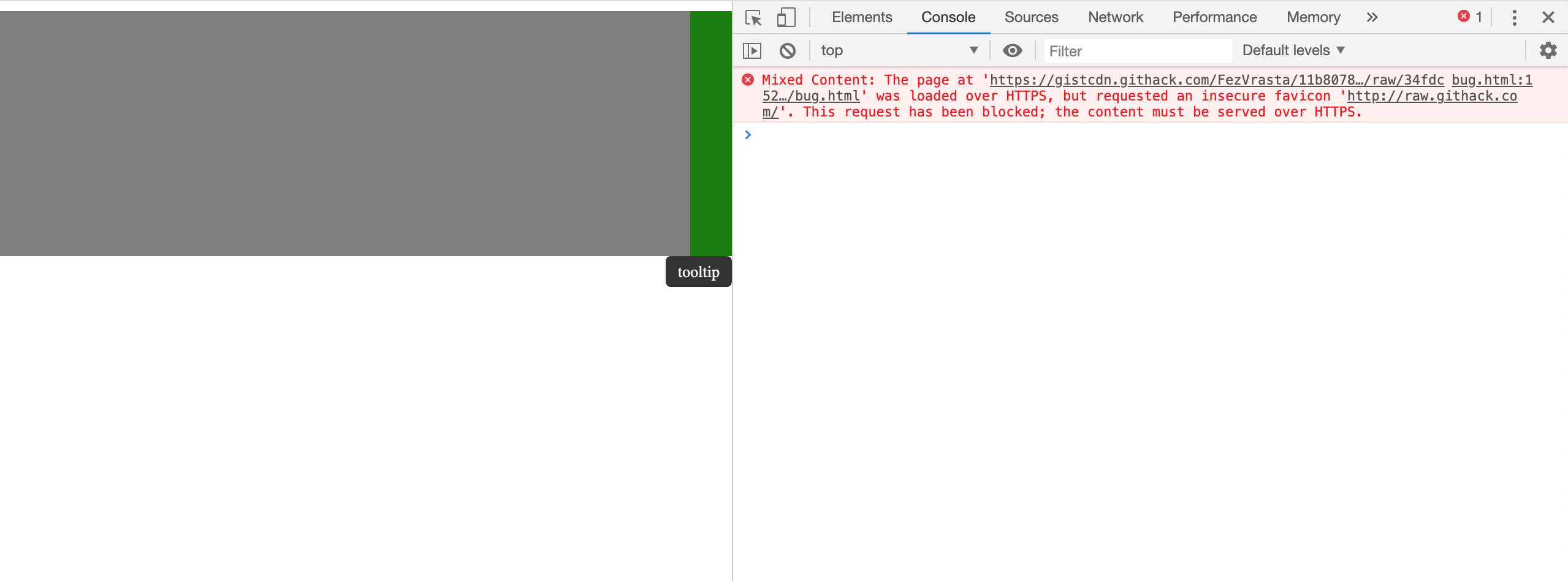
Still working 🤷♂️
FezVrasta
on 29 Apr 2020
@FezVrasta Have you managed to make it work?
itayganor
on 29 Apr 2020
@itayganor you can track the fix here, it's kind of more complicated than we thought. It works in Popper 1 but we have no idea how that thing works 😂
atomiks
on 30 Apr 2020
Related issues
 madjennsy
·
4Comments
madjennsy
·
4Comments
 jemhuntr
·
4Comments
jemhuntr
·
4Comments
 Wyzix33
·
4Comments
Wyzix33
·
4Comments
 dpatra
·
4Comments
dpatra
·
4Comments
 mreinstein
·
5Comments
mreinstein
·
5Comments