I am using TippyJS in my project but i am facing an issue with tooltip + Image
Output I am getting
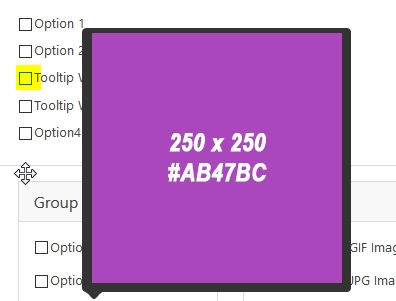
Output Should Be

JS Code
let $arg = this.arg( $fid + 'tooltip' );

            $arg[ 'performance' ] = false;
            if ( $arg[ 'image' ] !== false ) {
                $arg.html           = '#wponiontooltipimagetippy';
                $arg.updateDuration = 2000;
                $arg.followCursor   = false;
                $arg.livePlacement  = true;
                $arg.inertia        = true;

                $arg.onShow             = function () {
                    const content = this.querySelector( '.tippy-content' );
                    if ( $tip.loading ) return;

                    $tip.loading = true;

                    fetch( $arg[ 'image' ] ).then( resp => resp.blob() ).then( blob => {
                        const url         = URL.createObjectURL( blob );
                        content.innerHTML = `<img src="${url}">`;
                        $tip.loading      = false;
                    } ).catch( e => {
                        content.innerHTML = 'Loading failed';
                        $tip.loading      = false;
                    } );
                };
                $arg.onHidden           = function () {
                    const content     = this.querySelector( ".tippy-content" );
                    content.innerHTML = '';
                };
                $arg[ 'popperOptions' ] = {
                    modifiers: {
                        preventOverflow: {
                            enabled: false
                        },
                        hide: {
                            enabled: false
                        }
                    }
                };
            }
            $tip = tippy( this.elem[ 0 ], $arg );
 varunsridharan
All 6 comments
Can you make this on CodePen?
 atomiks
on 29 Jun 2018
atomiks
on 29 Jun 2018
Here you go https://codepen.io/anon/pen/RJEgez
varunsridharan
on 29 Jun 2018
Okay, I think the issue is that the MutationObserver detects the innerHTML content change, but the image doesn't begin loading yet and doesn't affect the layout of the tooltip, so its position is updated too soon.
You might need to detect when the image's dimensions become known by the browser, and then call tip.popperInstance.update() to manually update the tooltip's position.
Or set a width or height attribute on the image so that the dimensions are known.
atomiks
on 29 Jun 2018
@atomiks i am not that good @ JS do you mind providing me an example of tip.popperInstance.update() ?
i can't set width or height.
varunsridharan
on 29 Jun 2018
Sure, here you go https://codepen.io/anon/pen/YvdEjg?editors=0010
I made a custom function onImageDimensionsKnown that invokes the callback once the naturalWidth property is some truthy value (i.e. 1px or more) by testing it every 5ms. I'm not sure what a "safe" value is here such that there are no 1 frame glitches where the popper is incorrectly positioned though.
The key code is here:
content.innerHTML = `<img src="${url}">`
onImageDimensionsKnown(content.querySelector('img'), instance.popperInstance.update)
This seems to work. When the tooltip is flipped on show it does transition undesirably, but it's not incorrectly placed.
Notes:
onShowget passed the relevant tippy instance as an argumentonShow(instance),popperInstanceis a property of tippy instances.createPopperInstanceOnInit: trueensures the popper instance is available for the first show because it is lazily created for increased performance by default.
atomiks
on 29 Jun 2018
This worked. 👍 Thanks a lot 😄
varunsridharan
on 2 Jul 2018
Related issues
 bfirsh
·
3Comments
bfirsh
·
3Comments
 jemhuntr
·
4Comments
jemhuntr
·
4Comments
 ciaoben
·
5Comments
ciaoben
·
5Comments
 madjennsy
·
4Comments
madjennsy
·
4Comments
 andrewckor
·
4Comments
andrewckor
·
4Comments
Most helpful comment
Sure, here you go https://codepen.io/anon/pen/YvdEjg?editors=0010
I made a custom function
onImageDimensionsKnownthat invokes the callback once thenaturalWidthproperty is some truthy value (i.e. 1px or more) by testing it every 5ms. I'm not sure what a "safe" value is here such that there are no 1 frame glitches where the popper is incorrectly positioned though.The key code is here:
This seems to work. When the tooltip is flipped on show it does transition undesirably, but it's not incorrectly placed.
Notes:
onShowget passed the relevant tippy instance as an argumentonShow(instance),popperInstanceis a property of tippy instances.createPopperInstanceOnInit: trueensures the popper instance is available for the first show because it is lazily created for increased performance by default.