Tippyjs: `overflow-x` on ref element parent causes incorrect position
Hello, I've built Tippy.js tooltip with custom theme and custom HTML, it initially worked fine and looked like this:
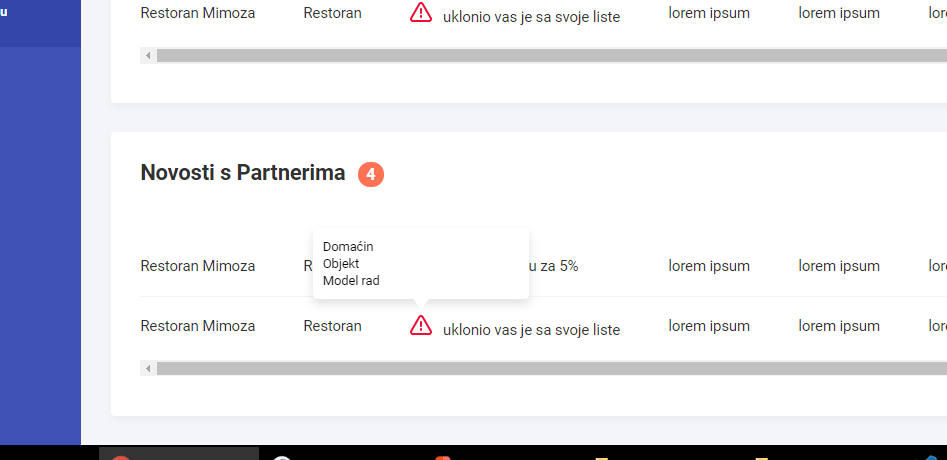
Then, I needed padding on those list items. When I added them, I got this:

It isn't positioned well anymore, it even has "x-placement: bottom".
SCSS code:
.tippy-tooltip {
    &.basic-tooltip-theme {
        background-color: $color-brightest;
        box-shadow: 0px 5px 15px rgba(0, 0, 0, 0.12);
        color: black;
        padding: calculateRem(10px);
    }
    @at-root .tippy-popper {
        pointer-events: all;
    }
    @at-root .tippy-popper[x-placement^=top] &.basic-tooltip-theme .tippy-arrow {
        border-top: calculateRem(5px) solid $color-brightest;
        border-right: calculateRem(4px) solid transparent;
        border-left: calculateRem(4px) solid transparent;
        bottom: -#{calculateRem(5px)};
        margin: 0 calculateRem(9px);
    }
    @at-root .tippy-popper[x-placement^=bottom] &.basic-tooltip-theme .tippy-arrow {
        border-bottom: calculateRem(5px) solid $color-brightest;
        border-right: calculateRem(4px) solid transparent;
        border-left: calculateRem(4px) solid transparent;
        top: -#{calculateRem(5px)};
        margin: 0 calculateRem(9px);
    }
}

.tooltip-template {
    text-align: left;
    &__user-list {}
    &__user-list-link {
        @include transition(0.4, ease-in-out);
        font-size: calculateRem(13px);
        min-width: calculateRem(200px);
        background-color: $color-brightest;
        border-radius: 4px;
        padding: calculateRem(10px);
        display: block;
        &:hover {
            color: $color-brightest;
            background-color: $color-main;
        }
    }
}
Custom HTML template code:
        <div class="tooltip-template tooltip-template--user-header">
            <ul class="tooltip-template__user-list">
                <li><a class="tooltip-template__user-list-link">Domaćin</a></li>
                <li><a class="tooltip-template__user-list-link">Objekt</a></li>
                <li><a class="tooltip-template__user-list-link">Model rad</a></li>
            </ul>
        </div>
Also, that is application in which
doesn't scroll, only that container where tooltip trigger is positioned. Don't know if that has anything to do with issue.Any help?
 Tinmar3
All 14 comments
Can you please make a CodePen to reproduce the issue?
Do you have position set on any parent or the body?
 atomiks
on 2 Mar 2018
atomiks
on 2 Mar 2018
Parent of the tooltip click trigger, or the tooltip itself? Bodyhas noposition property. There is a lot of code, it would be hard to make good codepen... If there is no other options I would do it, later.
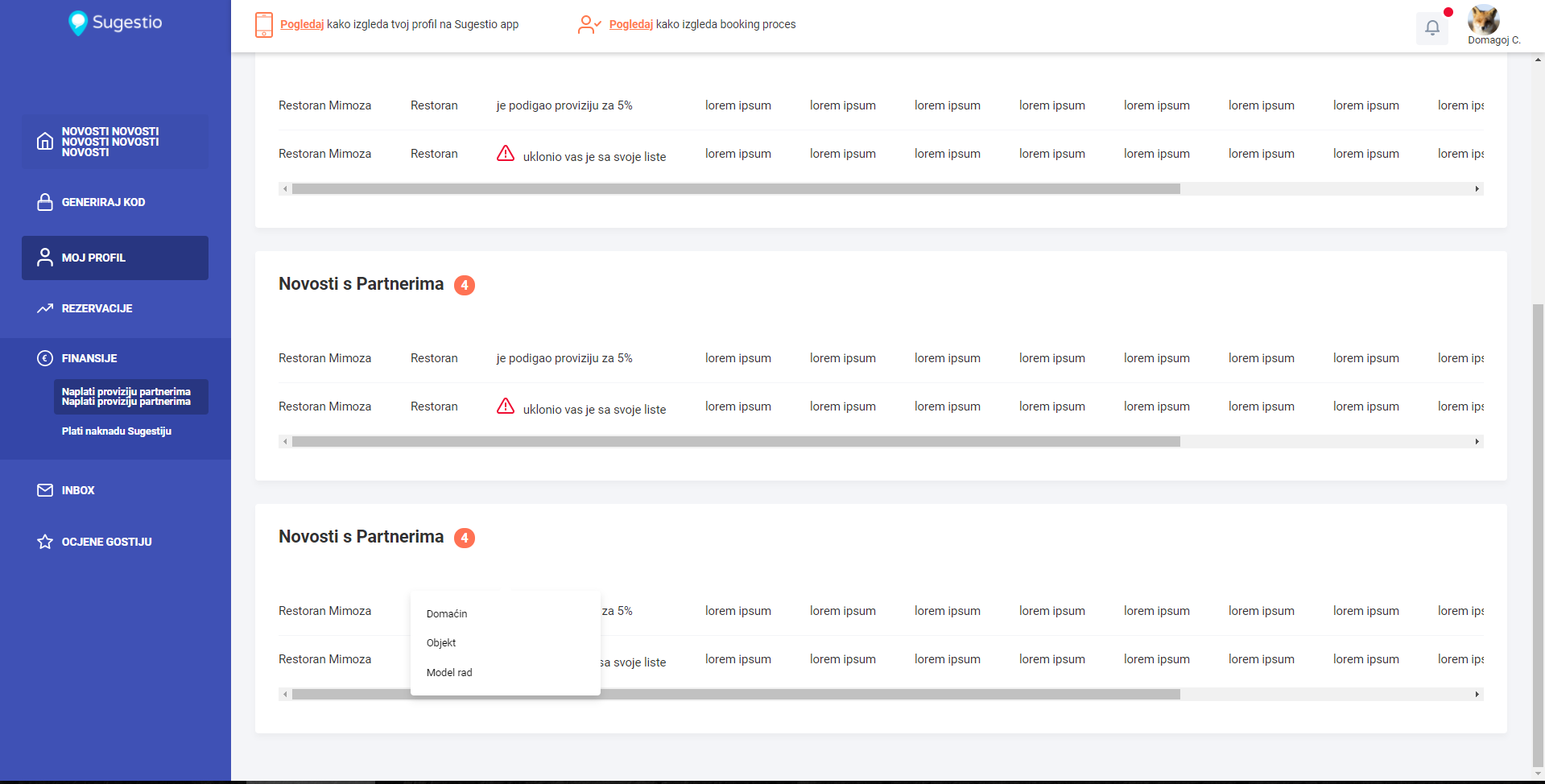
This sidebar/header/main content are done with flex positioning. Main content has no position property too.
Tinmar3
on 2 Mar 2018
It's hard for me to understand the issue without one, esp. since Popper.js controls the positioning
Template: https://codepen.io/atomiks/pen/yvwQyZ
atomiks
on 2 Mar 2018
Ok, I'll do it when I catch some time. :)
Tinmar3
on 2 Mar 2018
https://codepen.io/Tinmar3/pen/WMqBXQ
It's a mess, I imported whole generated CSS file, but you can inspect from browser what you need to.
(Scroll to bottom and try pressing that broken-image link)
Tinmar3
on 6 Mar 2018
I'm pretty sure this is a Popper.js issue, which IIRC has trouble with positioning sometimes when the element is inside table.
Visit https://github.com/FezVrasta/popper.js and try to reproduce using his lib only, placing it inside some <table> markup
I've started: https://codepen.io/atomiks/pen/yvmRVN
I'll try to reduce its size to make it more minimal so maybe an issue can be created
EDIT: If you remove the .content-table__wrapper class the positioning is correct. Going to continue inspection.
atomiks
on 7 Mar 2018
Found it.
.content-table__wrapper {
overflow-x: auto;
}
overflow-x is the issue. I've filed a bug. If you remove that, the tooltip is positioned correctly.
atomiks
on 7 Mar 2018
So this can be fixed with:
tippy(ref, {
  boundary: 'window'
})
Thanks for such fast responses, I'll try some of solutions and let you know.
Tinmar3
on 9 Mar 2018
I can confirm that the solution proposed by @atomiks is working great. Thanks!
 Lc0rE
on 13 Aug 2018
Lc0rE
on 13 Aug 2018
Thanks @atomiks your solution has worked great.
 swashata
on 28 Aug 2018
swashata
on 28 Aug 2018
Closing Popper.js-related bugs, previously left them open for visibility.
If you experience problems with positioning please create an issue over at the Popper.js repo: https://github.com/FezVrasta/popper.js/issues
atomiks
on 17 Nov 2018
@atomiks this way tooltip will go out of window visible zone, better to use:
popperOptions: {
    modifiers: {
      preventOverflow: {
        boundariesElement: 'window'
      }
    }
  }
It's work as clock
 ZiiMakc
on 9 Mar 2019
ZiiMakc
on 9 Mar 2019
Yup I agree, I edited the comment.
atomiks
on 10 Mar 2019
Related issues
 mreinstein
·
5Comments
mreinstein
·
5Comments
 bfirsh
·
3Comments
bfirsh
·
3Comments
 makarov906
·
4Comments
makarov906
·
4Comments
 divmgl
·
3Comments
divmgl
·
3Comments
 kmanolis
·
4Comments
kmanolis
·
4Comments
Most helpful comment
So this can be fixed with: