Let me know what kind changes you would like to see.
V1 didn't have any input from people so I'd like to prepare a bit better, such as the improving the naming of things, use cases, etc.
To align more with Popper.js I'm thinking:
JS:
dataobjects for each tooltip should rename theelproperty (the element given the tooltip) toreference(like Popper does)getReferenceData()should just begetData()? (I had trouble trying to decide what it should be before)- Rename
settingstooptionsthroughout (this seems to be more standard from what I've seen) - Get rid of
srcfrom package, add ESM/UMD files - Naming convention cleanup. I think going all lowercase makes things simple.
tippy.Browser.SUPPORTED/tippy.Defaultsshould probably just betippy.browser.supportedandtippy.defaults?
CSS:
- Switch from
enter/leave"global" classes to data attributes, likedata-state="show"/data-state="hide"? Orx-state? - Rename arrow classes (
.arrow-bigetc) and uselargein favor ofbig - Animation/Theme plugins for more options?
- Also how about injecting CSS to the document straight from the JS to simplify it even further? Not sure if this is bad practice though.
 atomiks
All 23 comments
The html data attributes could be prefixed with tippy- to add some context and encapsulate the functionality. So for example, data-position would become data-tippy-position.
 pomartel
on 11 Sep 2017
pomartel
on 11 Sep 2017
@pomartel That's probably a good idea. A lot of the current API was influenced by Bootstrap 3/early 4 tooltips
atomiks
on 12 Sep 2017
I concur with data-tippy-* attributes for easier maintenance. It can be confusing to track which html
attributes are used in which javascript library.
 padi
on 14 Sep 2017
padi
on 14 Sep 2017
Also I have questions about the interface itself. I wonder if you can completely encapsulate all the popper.js logic and just care about the tippy instance (and perhaps the interface). Also, I like flatpickr's strategy of attaching it's instance to the reference element i.e.
flatpickr("#myInput", {}); // invocation without saving to a var
// ...
const fp = document.querySelector("#myInput")._flatpickr;
What if we did the same to tippy? We could probably simplify the logic in a bunch of places, maybe even simplify or delete getReferenceElement() because it's already attached to the element it refers to:
tippy("#button");
const fp = document.querySelector("#button")._tippy;
Another point of simplification that echoes my previous comment: most of tippy's use cases involve just 1 tooltip for each element, maybe 90% of the time. I wonder how common it is to use multiple poppers that it merits having to save each popper to a variable and optionally destroy just with with destroy(popper).
In my project's case so far, we've never used multiple tooltips/popper instances for each tippy reference, so we ended up using destroyAll() ~most~ all of the time. What am I getting at? Perhaps we could start with the example in the docs (website) on the tippy instance:
Instead of doing this just to show and hide a tooltip:
const tip = tippy('#myButton')
const el = document.querySelector('#myButton')
const popper = tip.getPopperElement(el)
tip.show(popper)
tip.hide(popper)
Why can't we do this?:
tippy('#myButton')
const el = document.querySelector('#myButton')

el._tippy.show() // either shows the first (and mostly the only) popper, or shows all of them(?)
el._tippy.hide()   // either hides the first (and mostly the only) popper,  or hides all of them(?)
That example defers storing to a tip variable in order to just show one tooltip. It doesn't even refer to any popper instance. You could still pass the popper instance, but that shouldn't be required all the time if you have just 1 popper to be shown as a tooltip.
What do you think @atomiks @artyomtrityak?
padi
on 14 Sep 2017
I can help with some of the stuff here since I'm also currently trying to get up to speed with es6. I've been under the rock for most of the resurgence of JS in the last 3-4 years. 😅
The last sizeable project I've tried with an MV* framework was back when backbone.js was the only option. XD
padi
on 14 Sep 2017
Those are some nice ideas. I agree - the current API assumes multiple elements with similar tooltips for every instance but sometimes (or almost every time in your case) you only have one so it's a bit of a hassle. Attaching to the reference element would help simplify that.
getReferenceElement() was added because someone wanted to know what element a tooltip referred to when clicking inside it (i.e. the event.target parent was the popper element), would that still be needed with this implementation?
atomiks
on 14 Sep 2017
Similarly, we can look at attaching the reference element to something like popper.tippyReferenceElement
padi
on 14 Sep 2017
Some changes I've made (in v2-dev branch) so far:
The popper element now has
popper.tippyReferenceElementproperty. Not sure of this name though... seems kind of long and not straight-forward. Since the popper element is created dynamically by the library itself, maybe justpopper._reference?Reference elements now have
reference._tippywhich refers to the instance. By default, callingshow() / hide() / destroy() ...without passing in a popper element uses the first one insidestore(so therefore it's currently only useful with single-tooltip-instances)?optionsis now used throughout instead ofsettingsJust use lowercase for all names now.
tippy.browser.supportsTouch, etc. Andtippy.browser.touchis now more semanticallytippy.browser.usingTouchto indicate it's a dynamic changing property.iOSis now not a function because usingnavigator.platformovernavigator.userAgentappears to stay static on first load, so that's now simplifiedelrenamed toreferencethroughoutdata-*is nowdata-tippy-*positionis nowplacement(aligns with Popper.js)x-*attributes have largely replaced classes anddata-*attributes for popper/tooltip elements for cleaner CSS (less chance of naming collision)
atomiks
on 15 Sep 2017
@atomiks I'm also up for popper._reference, sorry I didn't make it clear at first that I'm just referring to sticking an element attribute and not so specific about the name. 👍
I haven't used all the tippyjs' current features but all those seem to be nice v2 changes! 👍
padi
on 17 Sep 2017
@atomiks perhaps we can pin down all the chores required to make tippy v2 final with milestones so that we don't lose track of small details (e.g. updating docs, notes for migrating from 1 major version to another, etc.)
https://help.github.com/articles/creating-and-editing-milestones-for-issues-and-pull-requests/
Here's an example of Github's feature: https://github.com/rails/rails/milestone/56
padi
on 17 Sep 2017
I removed some methods given these ideas:
update()method removed, as it isn't necessary given you can usedynamicTitle(which automatically updates every time the title attr on the ref el is changed), and theElementoption forhtml, since you can modify the template directly inside the tooltip when saved to a variable.getPopperElement()andgetReferenceElement()methods removed, as they exist attached as properties to the elements themselves. Simply retrieve them frompopper._referenceandreference._popper!
Simplified workflow:
const ref = document.querySelector('.btn')
const tip = tippy(ref)
tip.show(ref._popper)
In fact, it might be easier if they can just pass the reference element in instead of the popper and the function finds what's necessary instead. However I'm not sure about this, what if there's multiple tooltip poppers on a single reference? I think you can do this now but I haven't tried. To support multiple poppers then they'd need to be stored in an array instead 🤔 , which complicates it a bit..
Perhaps there can be an option multiple (renaming that current option to something else) which is false by default, meaning _popper is an Element, otherwise if true it's an array of popper elements.
And for single-ref instances (are they still necessary?):
tippy(ref)
ref._tippy.show()
Re: milestones, not sure I can use it properly lol. Any guidance?
atomiks
on 6 Oct 2017
On milestones: you can create a todo list out of github issues and/or pull requests by attaching them to a milestone. For example, you could break down an "Roadmap to Tippy.js Version 2" milestone as a series of steps instead of one giant v2 branch.
padi
on 15 Oct 2017
I'm for ref._tippy.show(popper) for the general case (multiple poppers) and ref._tippy.show() if there's only one popper (or you want to show the first).
padi
on 15 Oct 2017
What about allowing offset to set both axis? Right now I'm using popperOptions for that but I'm not sure if there's any other way to do that or not.
Here's my current config:
popperOptions: {
  modifiers: {
    offset: {
      enabled: true,
      offset: '80, 25',
    }
  }
}
And here's what I'd like to see (doesn't need to be this exact syntax but since this is the one Popper uses…):
offset: '80, 25'
 hacknug
on 31 Oct 2017
hacknug
on 31 Oct 2017
@hacknug the offset option already allows that 😉 . I will update the docs
atomiks
on 31 Oct 2017
That's good to know then haha. What about an option to disable moving the tooltip arround? I know Propper.js was built with this functionality in mind and I'm not sure if there's a way to do this. I've seen I can use distance so this only takes place once my element is way outside the browser window but I would like to completely disable it for some of my tooltips.
hacknug
on 31 Oct 2017
What do you mean by moving around? Or do you mean flipping? You can disable flip behavior.
Every time a tooltip is shown popper will update its position in case the reference element moved.
If you want total control over the positioning, you can use a reference object (rather than a DOM node) instead which was just introduced in v1.4
atomiks
on 31 Oct 2017
Yeah, sorry for using the wrong word (first time using tippy and popper 🙃 ). I was asking for something like flip: false instead of this:
popperOptions: {
  modifiers: {
    flip: {
      enabled: false
    }
  }
}
Yeah I'll most likely bring a few more important options from popper to the base-level ooptions object instead of needing the nested popperOptions one.
atomiks
on 31 Oct 2017
I'm going to be working hard again on this library now to get V2 finished by December! 😀
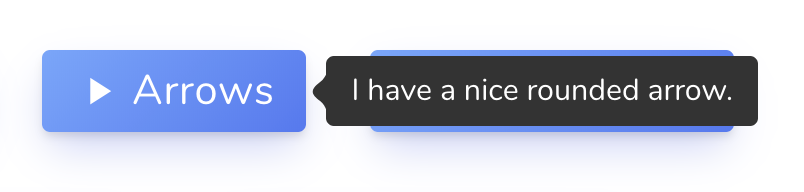
Here's a little feature I am adding –– rounded arrows (like those on Skype next to messages), by using a custom SVG.
atomiks
on 15 Nov 2017
Additional option names:
arrowStyle: 'sharp' or 'round'flip: Boolean value - whether to enable it or notflipBehavior: 'flip', 'clockwise', 'counterclockwise', Array of placement strings
Also it's easy to change the proportions of the arrow using transform scaleX / scaleY, which could be another option too.
Due to the data-tippy-* attributes I'm against using nested objects for customization like Popper does. I also kind of prefer the flat-style options a bit more.
Also I'm thinking about removing the default themes that come with Tippy (light and transparent) because it makes the CSS too big and unwieldy. Given how easy it is to create a theme, I don't think they're necessary. They could be part of the themes plugin but not bundled by default.
Though what do you think?
atomiks
on 15 Nov 2017
I believe I need to change a fundamental part of the library.
Instead of tippy() returning an instance which has a store containing all of the tooltip data objects, the Tippy instance itself should only act as one single tooltip. This means you can call .show() without passing anything in since it is acting on that tooltip instance.
So tippy() still returns an object, but it's something like this...
const tip = tippy('button')

// tip is an object still:
{
  tooltips: [Tippy, Tippy, Tippy, ...] // individual Tippy instances for every tooltip
  destroyAll() {
    this.tooltips.forEach(tooltip => tooltip.destroy())
  },
  ... etc
}

// Show the first tooltip. No need to pass anything in because it's an individual tooltip instance
tip.tooltips[0].show()
So the _tippy property refers to the single Tippy instance for its tooltip.
// Show tooltip for every button, only calling `tippy` once.
const buttons = document.querySelectorAll('button')
tippy(buttons)
buttons.forEach(button => button._tippy.show())
More changes:
There is a bundle
tippy.all.js(should be the main file?) which automatically injects the CSS to the document, so all that's needed is the script file to get started. Sweetalert2 does this as well.followCursordelegates the event listener to the document instead of the reference element. This allows it to continue moving with the cursor even when thehideevent was called, making it smoother.
These are technically possible by using a theme and custom CSS, but it makes it easier on a a tooltip-by-tooltip basis:
maxWidthspecifies the maximum width of the tooltip popperarrowTransformallows you to add custom CSS transforms (scale, rotation, translate) to the arrow element
atomiks
on 16 Nov 2017
Related issues
 KubaJastrz
·
3Comments
KubaJastrz
·
3Comments
 kmanolis
·
4Comments
kmanolis
·
4Comments
 faroukcharkas
·
4Comments
faroukcharkas
·
4Comments
 ciaoben
·
5Comments
ciaoben
·
5Comments
 khanamiryan
·
5Comments
khanamiryan
·
5Comments
Most helpful comment
Some changes I've made (in
v2-devbranch) so far:The popper element now has
popper.tippyReferenceElementproperty. Not sure of this name though... seems kind of long and not straight-forward. Since the popper element is created dynamically by the library itself, maybe justpopper._reference?Reference elements now have
reference._tippywhich refers to the instance. By default, callingshow() / hide() / destroy() ...without passing in a popper element uses the first one insidestore(so therefore it's currently only useful with single-tooltip-instances)?optionsis now used throughout instead ofsettingsJust use lowercase for all names now.
tippy.browser.supportsTouch, etc. Andtippy.browser.touchis now more semanticallytippy.browser.usingTouchto indicate it's a dynamic changing property.iOSis now not a function because usingnavigator.platformovernavigator.userAgentappears to stay static on first load, so that's now simplifiedelrenamed toreferencethroughoutdata-*is nowdata-tippy-*positionis nowplacement(aligns with Popper.js)x-*attributes have largely replaced classes anddata-*attributes for popper/tooltip elements for cleaner CSS (less chance of naming collision)