Can we have a chocolatey package for installing tinytex in windows? I'm not a R user and I'm just asking this for installing latex with ease for other purposes.
Currently the install script in tools directory works good, but yeah it would good for having a choco package by which users install using
choco install tinytex
Cheers.
By filing an issue to this repo, I promise that
- [x] I have fully read the issue guide at https://yihui.org/issue/.
- [x] I have provided the necessary information about my issue.
- If I'm asking a question, I have already asked it on Stack Overflow or RStudio Community, waited for at least 24 hours, and included a link to my question there.
- If I'm filing a bug report, I have included a minimal, self-contained, and reproducible example, and have also included
xfun::session_info('tinytex'). I have upgraded all my packages to their latest versions (e.g., R, RStudio, and R packages), and also tried the development version:remotes::install_github('yihui/tinytex'). - If I have posted the same issue elsewhere, I have also mentioned it in this issue.
- [x] I have learned the Github Markdown syntax, and formatted my issue correctly.
I understand that my issue may be closed if I don't fulfill my promises.
 naveen521kk
All 26 comments
The main complication is the licenses of TeX Live and LaTeX packages. See FAQ 2: https://yihui.org/tinytex/faq/ Other than that, it should be fairly simple.
 yihui
on 7 Aug 2020
yihui
on 7 Aug 2020
Actually, it can be made to download from original repository and this doesn't need to prebuild binaries for this. It's just the batch script in tools directory to a PowerShell script and then publish it to choco.
naveen521kk
on 7 Aug 2020
I think for Chocolatey we can indeed apply the same script logic that is done in the scripts included in tools.
https://chocolatey.org/docs/create-packages#automation-scripts
There is also scoop that could be a way to easily provide the install script to user https://github.com/lukesampson/scoop
It would be
scoop install TinyTex
The 'how it works' is pretty simple as it is only a manifest like those providing information about the tool, links to download from and an install script and uninstall script.
I use this for example for
scoop install pandoc
scoop install hugo
Maybe we could provide the correct scripts for these package manager like to be used to installed TinyTex on windows ?
Surely like
 cderv
on 7 Aug 2020
cderv
on 7 Aug 2020
Okay. Then I'd welcome a pull request if any changes need to be made in this repo. Thanks!
yihui
on 7 Aug 2020
I would like to know why those popups come up? On discussing with chocolatey team on gitter they told it should be fully without any click, so those popup. It would helpful if you tell how can we prevent that popup is occurring and how to stop that! @yihui
naveen521kk
on 13 Aug 2020
@naveen521kk Unfortunately I can't help here, since the pop-ups come from the TeX Live installer, which is beyond my control. I have asked this question long time ago in their mailing list, but no one responded: https://tug.org/pipermail/tex-live/2017-December/040827.html (perhaps we can shamelessly ping @norbusan again)
yihui
on 13 Aug 2020
Well, indeed this is complicated and only a Windows problem. The infraonly scheme does not even install luatex,and on non-windows platforms updmap and fmtutil are scripts that can run without using luatex.
On Windows we rely on a wrapper to run scripts (perl, tlu, ...) and this wrapper requires luatex.dll obviously. We check whether the program is executable (perl -x test), but on Windows this returns true despite missing dlls.
I am honestly not overly inclined to work around this. I strongly suggest tinytex to install in addition to the infra-only scheme at least the minimal luatex package shipping the dlls. That way the error will pass. But I will discuss with Karl about it.
 norbusan
on 14 Aug 2020
norbusan
on 14 Aug 2020
Where exactly is this luatex.dll and where should it be kept(Maybe on PATH variable) before installing so that these errors don't occur?
naveen521kk
on 14 Aug 2020
I have a idea to avoid this. Maybe let's pack the texlive framework (without any packages) so that this is not a problem. Later we can use tlmgr to install the packages in the chocolatey install script. I think there would be any problems with license, as in (FAQ 2), because this is just the framework and contains no packages. What do you think about this @yihui
We can use something like GitHub Actions for doing it.
naveen521kk
on 14 Aug 2020
I strongly suggest tinytex to install in addition to the infra-only scheme at least the minimal luatex package shipping the dlls.
@norbusan TinyTeX does install luatex, but only later (after installing infra-only).
Maybe let's pack the texlive framework (without any packages) so that this is not a problem.
@naveen521kk Indeed there will be license issues. However, I wonder why this popup is not an issue on AppVeyor: https://github.com/yihui/tinytex/blob/master/appveyor.yml#L26 e.g. https://ci.appveyor.com/project/yihui/tinytex/build/job/dpohs7sjebiadv30
yihui
on 14 Aug 2020
However, I wonder why this popup is not an issue on AppVeyor:
I think that doesn't actually stops the process on the whole. It just raises an message.( This is what happened when I tried recently). But it didn't happen while installing the texlive framework. It happened later while installing packages. I just installed it by parts by splitting the batch script and installed. So I could note that.( Or maybe my other miktex install didn't make the popup happen). It would good to know where should the DLL be placed so that the installer works with no errors.
naveen521kk
on 14 Aug 2020
@yihui @naveen521kk I strongly suggest that on windows you add luatex.win32 to the initial set of installed packages. That would fix all problems.
norbusan
on 16 Aug 2020
If that problem is solved the next problem we would probably face is silent mode. Is there mode for texlive installer? ( I'm a noob and asking without reading the docs)
Btw, I will make an PR by today, for add the chocolatey package to this repo and let's discuss there @yihui
naveen521kk
on 16 Aug 2020
@naveen521kk you can use -q to silence it, but completely silent I don't think it will be. Try it out with a preset profile so that no questions are asked, and see whether it outputs something.
norbusan
on 16 Aug 2020
I strongly suggest that on windows you add
luatex.win32to the initial set of installed packages.
@norbusan I'd be happy to do that, but don't know how. In the report https://tug.org/pipermail/tex-live/2017-December/040827.html I mentioned that the error dialog appeared when running install-tl-windows.bat -profile=texlive.profile. How can I specify a specific package to install in the profile file? Per documentation at https://tug.org/texlive/doc/install-tl.html, this doesn't seem to be possible:
As mentioned above, the installer only supports selection by scheme and collections, not individual packages, so packages cannot be specified in profile files either. Use
tlmgrto work at the package level.
yihui
on 17 Aug 2020
@yihui indeed indeed, that makes it difficult.
Other idea would be to download luatex.win32.tar.xz manually (in the installer of yours) and only unpack the luatex.dll from there, or the whole. It will be overwritten by the luatex installation afterwards, but that shouldn't be a problem.
Ahh, why is WIndows always such a pain ...
norbusan
on 18 Aug 2020
indeed indeed, that makes it difficult.
Other idea would be to download luatex.win32.tar.xz manually (in the installer of yours) and only unpack the luatex.dll from there, or the whole. It will be overwritten by the luatex installation afterwards, but that shouldn't be a problem.
Thank you very much @norbusan it's working they was no popups when I tried now. What I did was download luatex.win32.tar.xz extract it add its bin directory to path and yay no popups. Also, I tried -q option but no it wasn't fully silent, but some what ok that before. Need to find a way for that.
naveen521kk
on 19 Aug 2020
Hi @naveen521kk good to hear that it worked out, yes, this is what I suggested.
Can you send me the output with -q and annotate with stuff you would like to disappear? Or do you want an absolute silent option (unless errors appear)?
norbusan
on 20 Aug 2020
Chocolatey expects absolute silence by installer. So maybe a complete and absolute silence (unless error), I will send the output in an hour or two.
Any option for complete silence?
naveen521kk
on 20 Aug 2020
Ok, please send and I will look into it.
norbusan
on 20 Aug 2020
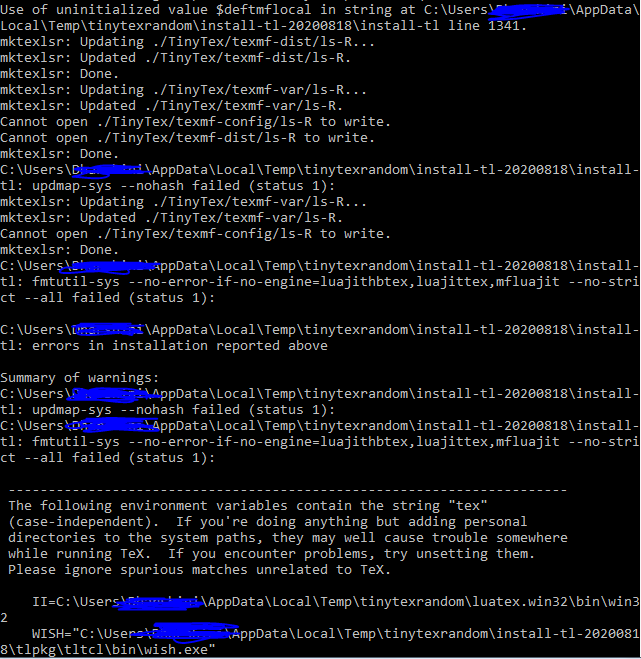
This is what was the log when running in -q option. I don't want any of the output to come. @norbusan
naveen521kk
on 20 Aug 2020
Wait, there are a lot of errors there that should not be silenced:
- why does
mktexlsrnot succeed and cannot write to.\TinyTeX\... - why did
updmapfail? Again, not being able to write?
The whole output above is very suspicious. Ok, many of the messages can be (possibly) suppressed, but not warnings and errors.
norbusan
on 20 Aug 2020
- why does mktexlsr not succeed and cannot write to .\TinyTeX...
- why did updmap fail? Again, not being able to write?
Idk why that happens. I tried in temp directory those. May be let me try it in some other place. Also, how can other messages be suppressed?
naveen521kk
on 20 Aug 2020
@norbusan No worries about that output. I got a way, a function in chocolatey, to display it without output nor error message instead will write in its logs. So looks like his can be completed soon. Thank you very much for your help.
naveen521kk
on 22 Aug 2020
@yihui Looks like it is ok to create executables for installing TinyTeX until it is from TexLive. If I correctly understand this
Pulling from TeX Live is fine, also
license wise. CTAN might have packages that are not in TeX Live due to
more strict restrictions on redistribution. TeX Live contains stuff that
can be redistributed/repackaged/ ... This is what distributions like
Debian are doing.
It was taken from https://tug.org/pipermail/tex-live/2020-September/046056.html This is what @norbusan said I think(sorry if I pinged wrongly.)
naveen521kk
on 10 Sep 2020
Fyi! It is now approved 🎉
naveen521kk
on 18 Sep 2020
Related issues
 FMKerckhof
·
5Comments
FMKerckhof
·
5Comments
 mr-illington
·
4Comments
cderv
·
4Comments
mr-illington
·
4Comments
cderv
·
4Comments
 leafyeh7
·
6Comments
leafyeh7
·
6Comments
 nickp60
·
6Comments
nickp60
·
6Comments
Most helpful comment
Fyi! It is now approved 🎉