Tinymce: bold/italic/underline button active status are carried over to other tinymce instances
What is the current behavior? Describe the bug
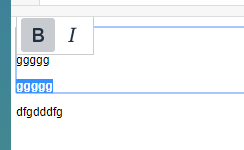
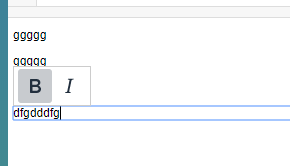
If you have more than 1 TinyMCE instance, and they are inline mode. Try mark content inside first TinyMCE box as bold/italic/underline, then click on another TinyMCE box will also see bold/italic/underline buttons shows active status.
1st one:
2nd:
Please provide the steps to reproduce and if possible a minimal demo of the problem via http://fiddle.tinymce.com/FUgaab
try mark first tinymce content as bold, and then click second tinymce then check toolbar. This may also happen on all other toggle buttons and custom toggle buttons.
Also, if you have predefined \ What is the expected behavior?
shouldn't carry over status.
Which versions of TinyMCE, and which browser / OS are affected by this issue? Did this work in previous versions of TinyMCE?
tested on 5.10. and cluld version 5.0.14 both fails.
 zzs1020
All 3 comments
I can confirm behavior in latest Chrome on Mac using this fiddle: http://fiddle.tinymce.com/FUgaab
Can also reproduce in 4.x.
In my testing, this behavior only occurs if you click directly from bolded content in one Inline Editor into non-bolded content in the other. It does not seem to occur if you click "out" of the first editor before clicking "into" the second.
Also, it appears to happen reliably if that is the _first_ interaction after load, but is only repeatable intermittently after that.
 lincolndennis
on 8 Nov 2019
lincolndennis
on 8 Nov 2019
At a glance, this looks to be caused by an issue in the formatter when using inline mode, as calling editor.formatter.match('bold') from the second editor returns true when the selection is in the bold content of the first editor.
 lnewson
on 9 Nov 2019
lnewson
on 9 Nov 2019
What is the current behavior? Describe the bug
If you have more than 1 TinyMCE instance, and they are inline mode. Try mark content inside first TinyMCE box as bold/italic/underline, then click on another TinyMCE box will also see bold/italic/underline buttons shows active status.
1st one:
2nd:
Please provide the steps to reproduce and if possible a minimal demo of the problem via http://fiddle.tinymce.com/FUgaab
try mark first tinymce content as bold, and then click second tinymce then check toolbar. This may also happen on all other toggle buttons and custom toggle buttons.Also, if you have predefined tag inside first tinymce, the active status will also be carried over
What is the expected behavior?
shouldn't carry over status.
Which versions of TinyMCE, and which browser / OS are affected by this issue? Did this work in previous versions of TinyMCE?
tested on 5.10. and cluld version 5.0.14 both fails.
This issue is not only with bold/italic/underline, also with other options like strike through, subscript and superscript.
 reshma-epsilon
on 26 Nov 2019
reshma-epsilon
on 26 Nov 2019
Related issues
 dorianfm
·
3Comments
dorianfm
·
3Comments
 jsosnowski
·
3Comments
jsosnowski
·
3Comments
 vanillajonathan
·
3Comments
vanillajonathan
·
3Comments
 TinyMCE-User
·
3Comments
TinyMCE-User
·
3Comments
 MissChocoe
·
3Comments
MissChocoe
·
3Comments
Most helpful comment
I can confirm behavior in latest Chrome on Mac using this fiddle: http://fiddle.tinymce.com/FUgaab
Can also reproduce in 4.x.
In my testing, this behavior only occurs if you click directly from bolded content in one Inline Editor into non-bolded content in the other. It does not seem to occur if you click "out" of the first editor before clicking "into" the second.
Also, it appears to happen reliably if that is the _first_ interaction after load, but is only repeatable intermittently after that.