Tinymce: Backspace fails to delete after element with contenteditable="false"
New ticket based on #1385
If attempting to use the backspace key to delete content that appears after an element with contenteditable="false", it fails to delete but does move the caret.
Example:
With this content:
<div contenteditable="false">not this</div>
a b c d e
If I select a b c d e and hit backspace, the caret moves and the content is not deleted. The delete key (aka forward-delete) works fine.
Reproduced on www.tinymce.com which appears to be at v 4.5.5 as of this post.
Tested in Chrome (v 58.0.3029.33 beta) and Firefox (v 52.0.1) on macOS (v 10.12.3)
Notably, this issue surfaces in WordPress, since oEmbed items are wrapped in a contenteditable="true" div in the _Visual_ editor.
 trepmal
All 3 comments
Replicated on OSX Chrome in Wordpress and www.tinymce.com, and on Windows 7 Chrome and Firefox in www.tinymce.com. Replication might be dependent on how content is added to the editor, or something related.
 metricjs
on 29 Mar 2017
metricjs
on 29 Mar 2017
It would seem it works the same way if the content editable is behind some text for example
Hello<br><div contenteditable="false">world</div>
When you try and backspace before the word world to remove the line break it does not work. The caret moves but it does not remove the line break.
 systemx-xx
on 22 Jun 2017
systemx-xx
on 22 Jun 2017
For the contenteditable="false" node, which does not contain text, svg path element in this case, the backspace will skip the svg, and delete the text before that if the user continues clicking backspace.
OS: Android phone
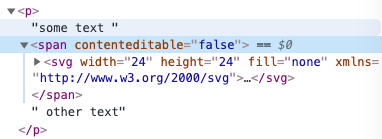
 GouTong-dandan
on 22 Feb 2021
GouTong-dandan
on 22 Feb 2021
Related issues
 dorianfm
·
3Comments
dorianfm
·
3Comments
 TinyMCE-User
·
3Comments
TinyMCE-User
·
3Comments
 dok
·
3Comments
dok
·
3Comments
 ktroendle
·
3Comments
ktroendle
·
3Comments
 suhailkc
·
3Comments
suhailkc
·
3Comments
Most helpful comment
It would seem it works the same way if the content editable is behind some text for example
Hello<br><div contenteditable="false">world</div>When you try and backspace before the word world to remove the line break it does not work. The caret moves but it does not remove the line break.