Tiny-slider: Swiping between slides not working with autoWidth on iOS
__Issue description__: Swiping between slides not working with autoWidth on iOS
__Demo link/slider setting__: http://ganlanyuan.github.io/tiny-slider/demo/#autoWidth_wrapper
On an iOS device, swiping on the images does nothing even though mouseDrag is true? I've done something similar but within the demos it doesn't work either.
_Tiny-slider version_: 2.8.7
_Browser name && version_: iOS Safari 12
_OS name && version_: iPhone
 roahes89
All 10 comments
I am also having trouble with this. Any help or advice on this would be super helpful!
 deomsj
on 25 Oct 2018
deomsj
on 25 Oct 2018
The issue seems mainly happen in webkit browsers.
Firefox works fine.
I'm still searching for the reason.
 ganlanyuan
on 28 Oct 2018
ganlanyuan
on 28 Oct 2018
@ganlanyuan thanks for looking into this!
Few things that I've noticed in trying to understand what might be going on here:
- mousedrag and appears to be working correctly in all desktop browsers
- in iOS, swiping works inconsistently across refreshing same page
- I am seeing the same behavior with
autoWidthandfixedWidth.
In my stackblitz example, I am seeing errors that lead me to believe this might be related to the cancelAnimationFrame implementation.
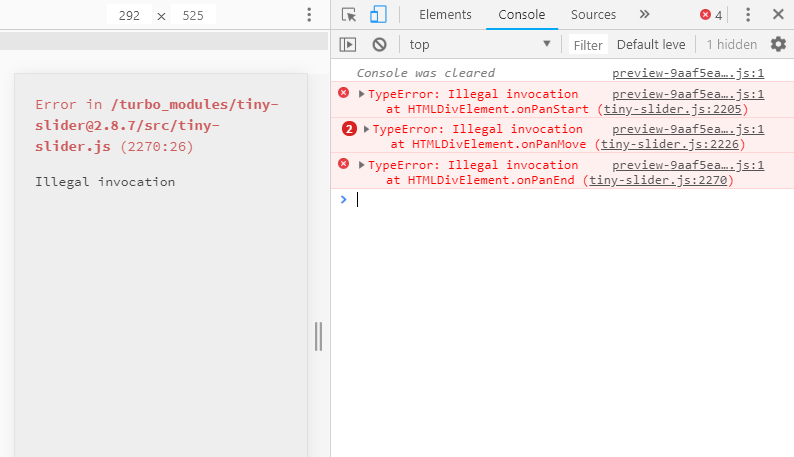
in iOS, I am getting the following error:

Hope this is helpful. Thanks for your support with this! I'll continue to share more info if I make any more discoveries...
deomsj
on 29 Oct 2018
so it looks like the errors that I described above may be specific to tiny-slider's performance in the stackblitz environment. When testing in code-sandbox, I am not able to replicate the bugs above on desktop or iOS when using fixedWidth.
In my CodeSandbox example, I am seeing the carousels inconsistently respond to swiping in iOS when the carousels are initialized with autoWidth. To see this behavior on an iOS device go to https://2wqmzoyj8r.codesandbox.io/ using chrome or safari
As far as i can tell, autoWidth works great on desktop and on iOS firefox.
deomsj
on 29 Oct 2018
The issue seems mainly happen in webkit browsers.
Firefox works fine.
I'm still searching for the reason.
not working in firefox as well..
 niroj08
on 30 Oct 2018
niroj08
on 30 Oct 2018
It turns out to be a CSS issue. Should be fixed in this commit.
ganlanyuan
on 30 Oct 2018
thanks for your efforts in running this down @ganlanyuan!
deomsj
on 30 Oct 2018
I'm experiencing this exact issue with tiny slider 2.9.1.
 jsunsawyer
on 12 Feb 2019
jsunsawyer
on 12 Feb 2019
Still experiencing this issue
 ggsandro
on 20 Jun 2019
ggsandro
on 20 Jun 2019
Confirming this is still happening on some iphones
Checked on iphone8 (ios12) iphone 8 (ios13) iphone XS (ios13) iphone XS (ios12) but somehow seemed to work on iphone 11 (ios13)
 ThaoD5
on 15 Jul 2020
ThaoD5
on 15 Jul 2020
Related issues
 fritzmg
·
4Comments
fritzmg
·
4Comments
 stu-fu
·
3Comments
stu-fu
·
3Comments
 craigryan
·
5Comments
craigryan
·
5Comments
 hernimen
·
3Comments
hernimen
·
3Comments
 snnsnn
·
3Comments
snnsnn
·
3Comments
Most helpful comment
Still experiencing this issue