Timeshift: Timeshift doesn't work on Fedora 31 either 32
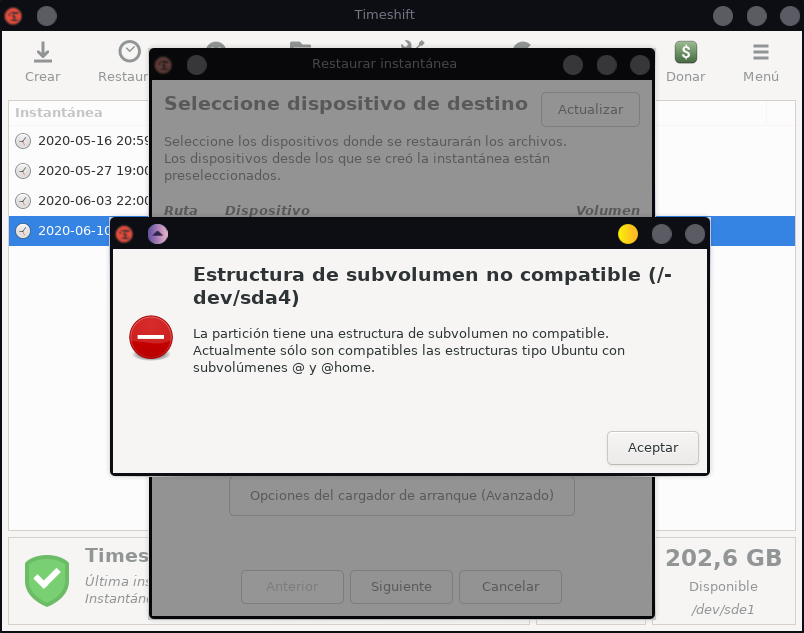
Hello the issue is basically that Timeshift isn't working as well on my Fedora system either 31 wich i had and wich i actually have that is 32 the bug is this prompt (on spanish):
La particion tiene una estructura de subvolumen no compatible.
Actualmente solo son compatibles las estructuras tipo Ubuntu con subvolumenes @ y @home
Basically it says, that it is not compatible, my subvolumes cause they are not a @ and @home
and that is very annoying cause that appeared before when i tried to create the 1st retore point in btfrs mode and my main partition is btfrs kind of and just didnt work so then i tried to do it on rsync mode and it works but now im trying to restore to a previous state of my system and i just realize i cant cause that prompt appears again and dont let me restore anything so i dont know if it is a fedora issue or timeshift or both when i try to use it as well, to reproduce the bug just install timeshit on fedora and try to use it that system, i'm on:
Linux 5.6.18-300.fc32.x86_64
Fedora 32 (KDE Plasma)
The app version is the latest (i'm not pretty sure about the exact version but i'm allways try to have my system up to date at all)
So i really need to know if you can help me with this issue i hope so, and thanks beforehand. Have a nice day.
 cann357
All 12 comments
Fedora installs use the sub volumes root and home instead of the normal @ for root and @home for home. I'd really like to move to Fedora but I really don't want to give up timeshift and Fedora really doesnt want me to rename my sub volumes on install
 JHrenyk
on 9 Aug 2020
JHrenyk
on 9 Aug 2020
Fedora installs use the sub volumes root and home instead of the normal @ for root and @home for home. I'd really like to move to Fedora but I really don't want to give up timeshift and Fedora really doesnt want me to rename my sub volumes on install
can't just timeshift support a different subvolume name?
 ShrirajHegde
on 13 Feb 2021
ShrirajHegde
on 13 Feb 2021
You can use my fork of timeshift for this: https://github.com/wmutschl/timeshift
I am still working on implementing a GUI option to change the names, but in my fork you can already change the name in the config file of timeshift.
 wmutschl
on 13 Feb 2021
wmutschl
on 13 Feb 2021
Alternatively, you can rename the subvolumes after installation. I have written down the steps here
wmutschl
on 13 Feb 2021
Alternatively, you can rename the subvolumes after installation. I have written down the steps here
I already installed it with @root subvolume, but still, BTRFS won't work
I have a separate /boot partition with ext4
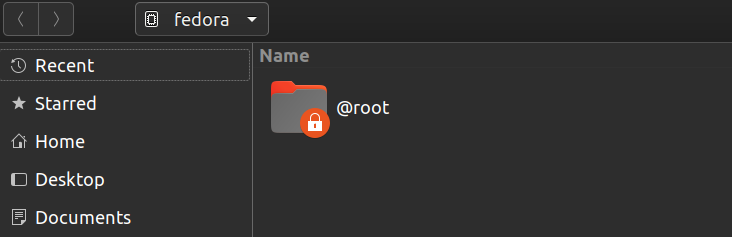
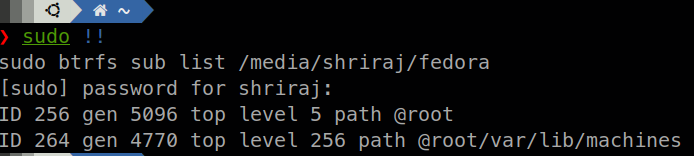
Anyway to fix this??
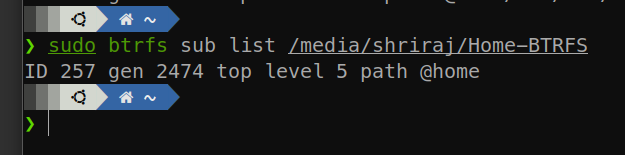
Home is in separate partition inside subvolume @home too.
ShrirajHegde
on 13 Feb 2021
it should be called just @ and not @root
wmutschl
on 13 Feb 2021
it should be called just @ and not @root
can I just rename it in nautilus??
ShrirajHegde
on 13 Feb 2021
it can be done (with root privileges) but it is best done from a live usb stick! you also have to adapt your /etc/fstab file. BUT if you dont know what you are doing here, please stop as this will very likely make your computer not boot anymore. again take my guide above as resource if you do wanna try.
wmutschl
on 13 Feb 2021
No, I have experience with BTRFS (got Timeshift working on Arch), I am doing the changes from Ubuntu and I have made the adaptions in fstab necessary.
what is x-systemd.device-timeout=0 in mount options?
ShrirajHegde
on 13 Feb 2021
Alternatively, you can rename the subvolumes after installation. I have written down the steps here
Everything else is clear, how to update grub config from live environment??
ShrirajHegde
on 13 Feb 2021
chroot into your system and run grub2-mkconfig -o /boot/efi/EFI/fedora/grub.cfg, again it is outlined in the link given above. I think you can close this issue. If you have other questions, feel free to write me an email.
wmutschl
on 15 Feb 2021
chroot into your system and run
grub2-mkconfig -o /boot/efi/EFI/fedora/grub.cfg, again it is outlined in the link given above. I think you can close this issue. If you have other questions, feel free to write me an email.
Not my issue, chroot didn't work so I reversed the rename and did it in the system, everything works and I even had to restore once. Thanks
ShrirajHegde
on 16 Feb 2021
Related issues
 joshirio
·
4Comments
joshirio
·
4Comments
 setsunati
·
8Comments
setsunati
·
8Comments
 RBRapha
·
6Comments
RBRapha
·
6Comments
 tahaun
·
9Comments
tahaun
·
9Comments
 johncparr
·
6Comments
johncparr
·
6Comments
Most helpful comment
You can use my fork of timeshift for this: https://github.com/wmutschl/timeshift
I am still working on implementing a GUI option to change the names, but in my fork you can already change the name in the config file of timeshift.