Timeshift: Folder exclusion doesn't work
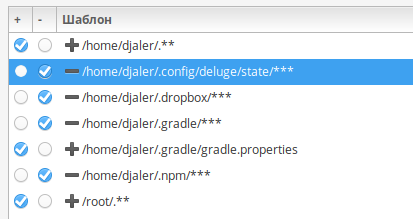
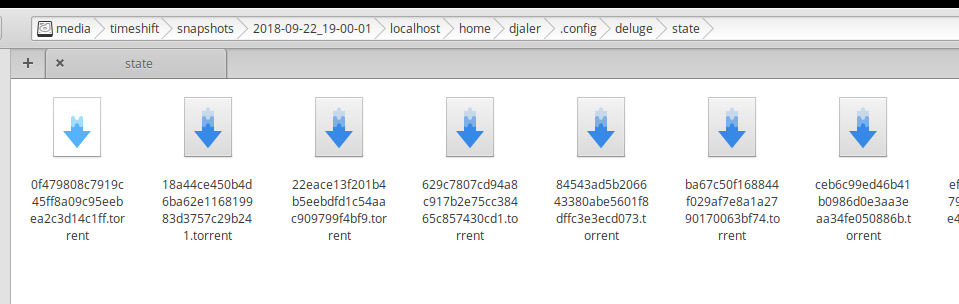
I create some exclusions, because I don't need to backup this folder. But they are still exists in snapshots. See my screenshots. Am I doing something wrong?
System:
- elementary OS Juno (base on Ubuntu 18.04)
- v18.9.1
 Djaler
All 7 comments
you should try to move home folders at the end
thats how it worked for me.
i added .steam folder and Games (from lutris) first for exclusion
and moved home folder on last position.
if home folders were before exclusion then i would get every file in home folder stored in backup
 logan001
on 7 Oct 2018
logan001
on 7 Oct 2018
@logan001 this parially works for me. But not completely. For example, I have .gradle folder in my home. I need to exclude it content, but keep .gradle/gradle.properties
So I have this config:

But there are no .gradle folder completely in created backup
Djaler
on 7 Oct 2018
Hmm, looks like I found the way:

But I do not quite understand the logic
Djaler
on 7 Oct 2018
its a mystery :)
i don't understand it either, sorry.
its just trial and error for me
the problem with trial and error is that it takes time and space
logan001
on 8 Oct 2018
The file inclusion/exclusion is really upsetting. For one thing, there is a set of included/excluded paths that cannot be modified. And I agree with @logan001: it's a draining trial and error. I quit.
 arialdomartini
on 11 Nov 2018
arialdomartini
on 11 Nov 2018
For every file rsync will match the first pattern that it finds and ignore all other patterns. Since the first pattern in the list is to include /home/djaler/.** every hidden file in home will get included. Any pattern you add after this does not matter as rsync has already matched the first one and will ignore remaining patterns.
Move that pattern to the bottom of the list.
 teejee2008
on 25 Nov 2018
teejee2008
on 25 Nov 2018
Just curious why there are implicit patters already set. Makes everything so confusing... Explicit is better than implicit.
arialdomartini
on 25 Nov 2018
Related issues
 johncparr
·
6Comments
johncparr
·
6Comments
 Areahints
·
7Comments
Areahints
·
7Comments
 dm2912
·
8Comments
dm2912
·
8Comments
 Dude4Linux
·
6Comments
Dude4Linux
·
6Comments
 phd21
·
5Comments
phd21
·
5Comments