Timber: ACF Date Picker field renders as today's date when using "date" Twig filter
Expected behavior
When an Advanced Custom Field group is created with a Date Picker field, I expect the field to display the correct date when formatted using the date filter in Twig.
For example, I expect 03/01/2018 (assuming saved as d/m/Y) to be formatted as 'January 3, 2018' when passed through the date filter with that particular date format (e.g. date("F j, Y")).
Actual behavior
When I use the date filter, it is displayed as today's date, instead of the date saved in the field group.
Steps to reproduce behavior
- Create a custom post type (as an example, we'll call it "Events").
- Using ACF, create a new field group.
- Add a new Date Picker field to the field group (we'll give it a field label of Event Date with a field name of
event_date). - Set the Date PIcker's Display Format to be F j, Y, and Return Format to be d/m/Y
- For the field group's Rules under Location, have it display for just your custom post type.
- Create a new post for your custom "Events" post type. Set the date for event_date to be any date other than today's date (e.g. June 21, 2017). Publish the post.
- In your theme, confirm that it renders the right date when you do something like this:
single-events.twig
{% if post.get_field('event_date') %}
    Date: {{ post.get_field('event_date')|escape('wp_kses_post') }}<br/>
{% endif %}
Returns the correct result, albeit unformatted:

Expected: 21/06/2017
Actual: 21/06/2017 ✔️
- However, when a date Twig filter is applied, it returns today's date:
{% if post.get_field('event_date') %}
    Date: {{ post.get_field('event_date')|date("F j, Y")|escape('wp_kses_post') }}<br/>
{% endif %}

Expected: June 21, 2017
Actual: September 27, 2019 ❌
What steps have you tried?
- Switching the date format - same result
- Renaming the ACF Date Picker field to something else gets you the same result
- I have tried not escaping the field, i.e. not using escape('wp_kses_post') - same result
- Renaming the post in the context doesn't change anything, e.g.
single-events.php
$context = Timber::get_context();
$timber_post = Timber::query_post();
$context['post'] = $timber_post;
to
//...
$context['event'] = $timber_post;
single-events.twig
...
{% if event.get_field('event_date') %}
    Date: {{ event.get_field('event_date')|date("F j, Y")|escape('wp_kses_post') }}<br/>
{% endif %}
What version of WordPress, PHP and Timber are you using?
Wordpress 5.2.2, Timber 1.9.4, and Advanced Custom Fields 5.7.12.
Also have installed the Classic Editor plugin v. 1.5, if that makes a difference.
How did you install Timber? (for example, from GitHub, Composer/Packagist, WP.org?)
Upgraded to newest version via plugin updater in WordPress dashboard.
Notes
This seems similar to #1584 in nature. If this is something on my end, any advice on getting this to work would be much appreciated. Thanks!
 kgquan
All 5 comments
@kgquan thanks so much for the A+++++ bug report. This seriously belongs in the bug report hall of fame for its clarity and form. I'm backed up right now with some other issues and PRs, so if someone else wants to take this, I think this is a perfect self-contained issue for investigation and solving (@romainmenke?). Otherwise, I'll try to grab this one in my next batch
 jarednova
on 2 Oct 2019
jarednova
on 2 Oct 2019
@kgquan Hi I just tested it and I don't think it's a Timber bug, but it's more related to strtotime
In short - when using strtotime you should:
* Date values separated by slash are assumed to be in American order: m/d/y
* Date values separated by dash are assumed to be in European order: d-m-y
So using / it searched for month number 21.
So you should either return format as m/d/y or ymd (also works).
 palmiak
on 3 Oct 2019
palmiak
on 3 Oct 2019
@kgquan The conclusion by @palmiak is correct. ACF lets you specify the Return Format in case you want ACF to handle all output formatting. This is handy if you want a uniform output without extra code in each template.
In case you do want to format differently per template this is not ideal.
Full note from strtotime
Note:
Dates in the m/d/y or d-m-y formats are disambiguated by looking at the separator between the various components: if the separator is a slash (/), then the American m/d/y is assumed; whereas if the separator is a dash (-) or a dot (.), then the European d-m-y format is assumed. If, however, the year is given in a two digit format and the separator is a dash (-), the date string is parsed as y-m-d.
To avoid potential ambiguity, it's best to use ISO 8601 (YYYY-MM-DD) dates or DateTime::createFromFormat() when possible.
 romainmenke
on 3 Oct 2019
romainmenke
on 3 Oct 2019
Hmm, this is interesting.... I'm using a _DateTime_ field, set up to output d/m/Y g:i a:
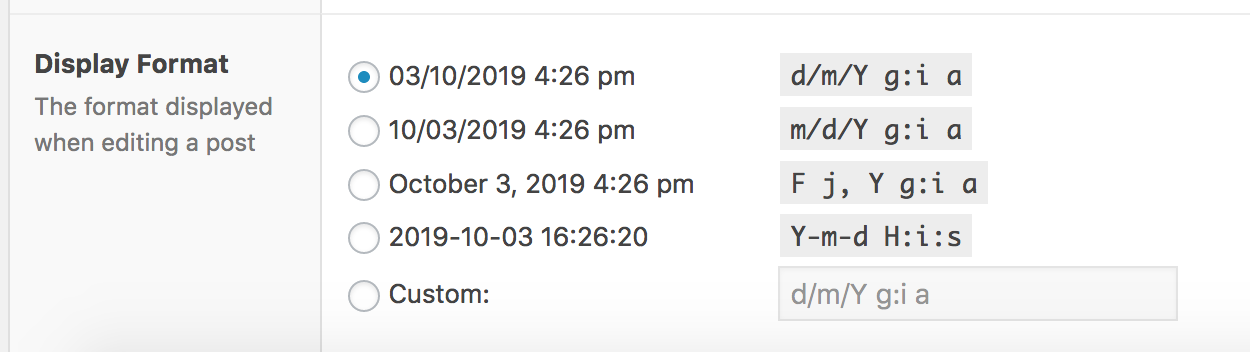
I wonder why it works correctly... is it because the time is included in the string?
 danburzo
on 3 Oct 2019
danburzo
on 3 Oct 2019
Thank you @palmiak and @romainmenke for the clarification! Yes, I see now that if I change the Return Format to something like Y-m-d, then I'm able to use the date filter to return the correct date (I use the date filter to reformat the date to a more user-friendly output, after doing calculations with it in the PHP file).
Again, thanks for your help! 😀
kgquan
on 3 Oct 2019
Related issues
 sgu1
·
3Comments
sgu1
·
3Comments
 claudiopedrom
·
5Comments
claudiopedrom
·
5Comments
 chaimaech
·
4Comments
chaimaech
·
4Comments
 petenorris
·
4Comments
petenorris
·
4Comments
 chetzof
·
4Comments
chetzof
·
4Comments
Most helpful comment
@kgquan The conclusion by @palmiak is correct. ACF lets you specify the Return Format in case you want ACF to handle all output formatting. This is handy if you want a uniform output without extra code in each template.
In case you do want to format differently per template this is not ideal.
Full note from strtotime