Tiled: Zooming in the tileset editor simply resizes the image instead of resizing and panning to the mouse like in the map editor
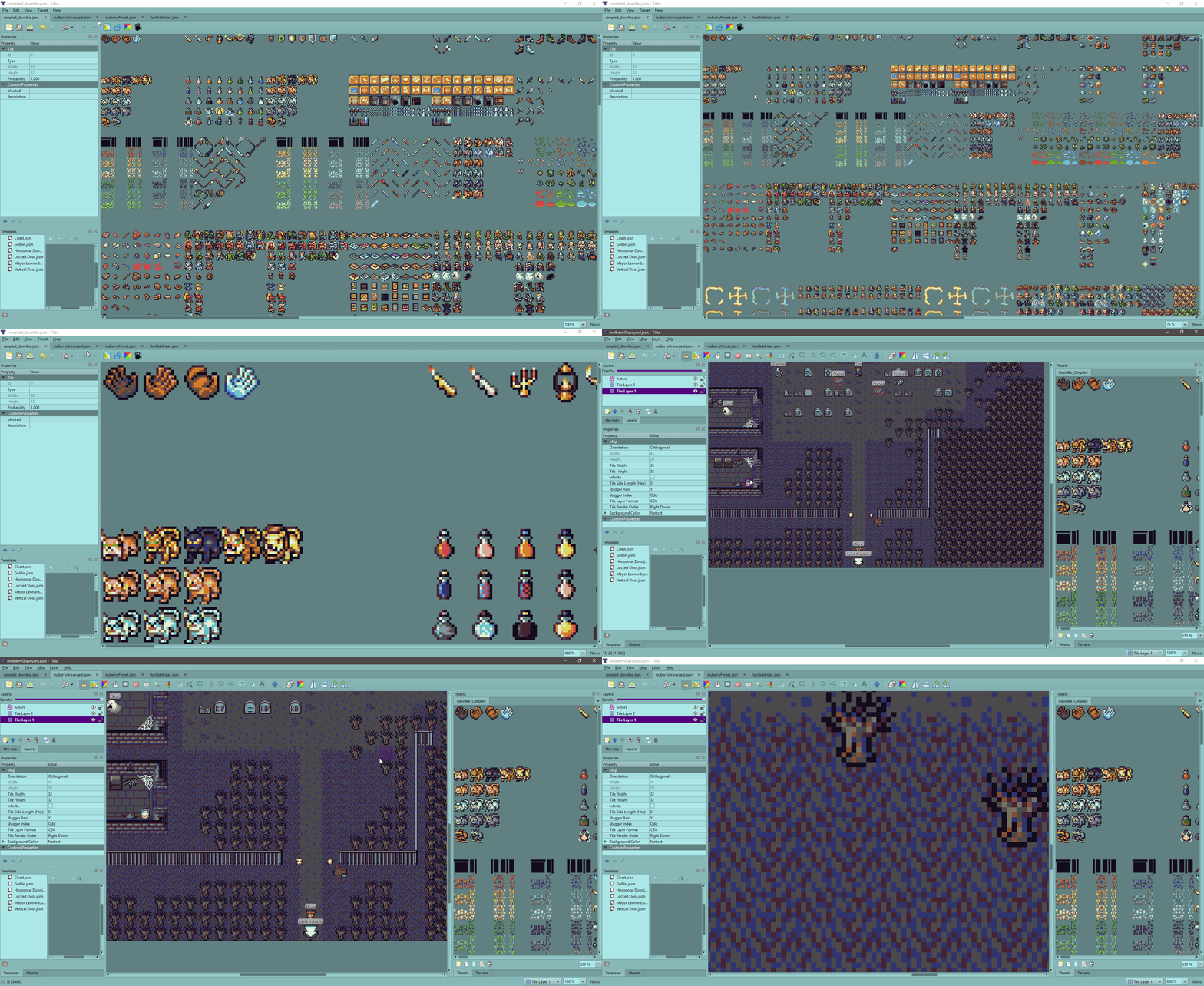
Here's a gif showing the difference between the map editor zooming vs tileset zooming. I don't know if it's a common use case, but my tileset image is just one huge image, so I am very often zooming and panning around the map. Being able to zoom in with the mouse would be immensely helpful for my workflow, because otherwise if I zoom while I am looking at a particular area of the tileset, I have to rescroll over.
 Larkenx
All 10 comments
Yeah, this has bothered me ever since I implemented zooming for tileset views. The reason is mostly that the map view is implemented using a QGraphicsView whereas the tileset view is implemented using QTableView. The implementations of the zooming are totally different, and it wasn't easy to get the table view to zoom from the mouse cursor (zooming even resets the selection...).
It is definitely something to try improving though. Either by finding some approach that makes this functionality working with a QTableView, or by reimplementing the tileset view based on a QGraphicsView. I've been considering the latter, because it would bring also other advantages.
 bjorn
on 1 Dec 2018
bjorn
on 1 Dec 2018
At least you have a working solution with QGraphicsView. Are you not able to use it on tilesets?
 Bobjt
on 1 Apr 2019
Bobjt
on 1 Apr 2019
@Bobjt The functionality is easy with a QGraphicsView, but rewriting the tileset view based on QGraphicsView is not trivial and may not be ideal either because it would not give us dynamic wrapping, which is another missing feature that would be quite useful for image collection tilesets.
I'll try have a go soon at writing a QGraphicsView based tileset view, that will only be used for tileset image based tilesets for now.
bjorn
on 2 Apr 2019
Knowing is only half the battle, ay Bjorn? :) Cool! I'm not sure but I think image-based tilesets are what I'm using. Crossing my fingers the change isn't too grueling after all.
Bobjt
on 2 Apr 2019
So yeah, I've found a way without rewriting the whole thing, and at the same time even fixed the selection reset when changing the scale!
bjorn
on 4 Sep 2019
Just tried in Tiled 1.3.1 and it's still zooming the tileset window about the top-left versus the mouse pointer. Was there maybe a regression? I haven't yet tried the fix in the prior targeted release (1.3).
Bobjt
on 21 Jan 2020
@Bobjt If the complete tileset is smaller than the tileset view, it will still align to the top-left, because it can't scroll beyond the bounds like the map does. What I could fix, is that when you zoom in and the tileset becomes bigger than the view, the tile under the mouse stays where it is.
bjorn
on 21 Jan 2020
The first case is understood, Bjorn. It's the latter case - when the tileset is larger than the tileset window - that's the problem. You're solution sounds perfect! It's a highly-welcome fix.
Bobjt
on 21 Jan 2020
@Bobjt Hmm, I meant "could fix" in the sense that I already was able to do it. This works for me in Tiled 1.3.0 and 1.3.1. Do you maybe have an image collection tileset, which gets dynamic wrapping by default?
bjorn
on 21 Jan 2020
Sorry for the late reply. Nope, there's no dynamic wrapping going on. My tilesets are large 4096x4096, composed of 16x16s, but a single image. The tileset type in Tiled is "Based on Tileset Image", not "Collection of Images."
I don't know what to say, on Mojave or Catalina, neither pinch gesture zooming or command+mousewheel anchor the zoom around either mouse pointer, nor the selected tile. The anchor point is always way up in the top left corner which caused the tileset to pan to some other part of the tileset unintentionally. 🤷♂️
Bobjt
on 19 Mar 2020
Related issues
 pixelr0
·
8Comments
pixelr0
·
8Comments
 Willowblade
·
8Comments
Willowblade
·
8Comments
 noam-c
·
6Comments
noam-c
·
6Comments
 Yanrishatum
·
5Comments
Bobjt
·
8Comments
Yanrishatum
·
5Comments
Bobjt
·
8Comments
Most helpful comment
So yeah, I've found a way without rewriting the whole thing, and at the same time even fixed the selection reset when changing the scale!