Tidyr: FR: order of columns resulting from pivot_wider
In case I'm not just missing an obvious pre-existing solution, it would be nice to be able to specify how resulting columns from pivot_wider will be ordered. Using the us_rent_income example,
us_rent_income %>%
  pivot_wider(names_from = variable, values_from = c(estimate, moe))
produces the columns, estimate_income, estimate_rent, moe_income, and moe_rent. In my use-case (getting to a double-header table), I want them to be in the order, estimate_income, moe_income, estimate_rent, and moe_rent.
 mattantaliss
All 25 comments
DItto. Is the "fix" to go back to spread that always worked "correctly"? There are several closed issues but I didn't see solutions.
 EarlGlynn
on 15 Dec 2019
EarlGlynn
on 15 Dec 2019
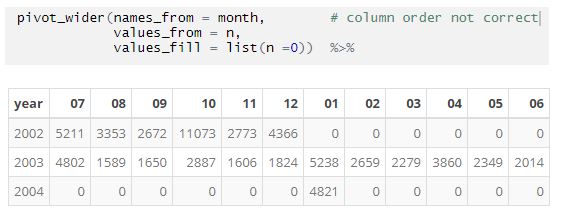
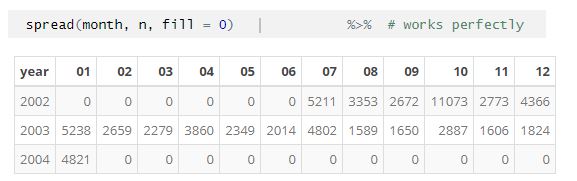
More info. Hadley's comment in another thread says to sort the data to control the column order. But this doesn't make sense for large datasets in some cases. I have data from July 2002 till Jan 2004 sorted by year and month. Why would I want to sort by month first than year to get the factor order right -- this file will eventually have over a million records.
EarlGlynn
on 15 Dec 2019
The order of the output display should be independent of the order of the input data. In processing dates that start in July (example above), that should not mean the first month of the year is July for the output display. I want to code "pivot_wider" in new code, but spread works much better for now.
EarlGlynn
on 29 Dec 2019
I think this issue is really two separate issues, 1) one for specifying the order in which multiply variables are combined, as per @mattantaliss original comment, and 2) one for how values within a variable are ordered, as in #850 (which was closed as a duplicate of this issue) and @EarlGlynn’s comments.
Here are my comments and regexp for the second part. The columns (within a variable) should be ordered the same as in spread(). For example, for factors, the columns should be ordered
by the ordering in the factor levels. And for numeric variables, they should be ordered by numbers. Here is a regexp, for both factors, numeric and character levels:
library(tidyr)
library(dplyr)
d = tibble(day_int = c(4,3,5,1,2),
day_fac = factor(day_int, levels=1:5,
labels=c("Mon","Tue", "Wed","Thu","Fri")),
day_char = as.character(day_fac))
d
#> # A tibble: 5 x 3
#> day_int day_fac day_char
#> <dbl> <fct> <chr>
#> 1 4 Thu Thu
#> 2 3 Wed Wed
#> 3 5 Fri Fri
#> 4 1 Mon Mon
#> 5 2 Tue Tue
levels(d$day_fac)
#> [1] "Mon" "Tue" "Wed" "Thu" "Fri"
# spread() respects the ordering of the factor levels ...
d %>%
select(day_fac, day_int) %>%
spread(key = "day_fac", value = "day_int")
#> # A tibble: 1 x 5
#> Mon Tue Wed Thu Fri
#> <dbl> <dbl> <dbl> <dbl> <dbl>
#> 1 1 2 3 4 5
# ... but pivot_wider() does not
d %>%
select(day_fac, day_int) %>%
pivot_wider(names_from = day_fac, values_from = day_int)
#> # A tibble: 1 x 5
#> Thu Wed Fri Mon Tue
#> <dbl> <dbl> <dbl> <dbl> <dbl>
#> 1 4 3 5 1 2
# spread() respects the ordering of numeric variables ...
d %>%
select(day_int) %>%
spread(key = "day_int", value = "day_int")
#> # A tibble: 1 x 5
#> `1` `2` `3` `4` `5`
#> <dbl> <dbl> <dbl> <dbl> <dbl>
#> 1 1 2 3 4 5
# ... but pivot_wider() does not
d %>%
select(day_int) %>%
pivot_wider(names_from = day_int, values_from = day_int)
#> # A tibble: 1 x 5
#> `4` `3` `5` `1` `2`
#> <dbl> <dbl> <dbl> <dbl> <dbl>
#> 1 4 3 5 1 2
# spread() respects the (alphabetic) ordering of character variables ...
d %>%
select(day_char, day_int) %>%
spread(key = "day_char", value = "day_int")
#> # A tibble: 1 x 5
#> Fri Mon Thu Tue Wed
#> <dbl> <dbl> <dbl> <dbl> <dbl>
#> 1 5 1 4 2 3
# ... but pivot_wider() does not
d %>%
select(day_char, day_int) %>%
pivot_wider(names_from = day_char, values_from = day_int)
#> # A tibble: 1 x 5
#> Thu Wed Fri Mon Tue
#> <dbl> <dbl> <dbl> <dbl> <dbl>
#> 1 4 3 5 1 2
Basically, the request (for the second sub-issue) is that pivot_wider() should use the same ordering as order() does:
order(d$day_fac)
#> [1] 4 5 2 1 3
order(d$day_int)
#> [1] 4 5 2 1 3
order(d$day_char)
#> [1] 3 4 1 5 2
 huftis
on 31 Mar 2020
huftis
on 31 Mar 2020
@huftis they're currently ordered by their first appearance in the data frame. Unfortunately, I don't think ordering to match order() is a good default because it the ordering of character vectors depends on the current environment.
 hadley
on 21 Apr 2020
hadley
on 21 Apr 2020
For the ordering case, I think names_sort = TRUE makes sense.
I don't know what to call the argument for the other case which is about whether names_from or values_from comes first.
hadley
on 22 Apr 2020
Random idea: maybe names_from could recognise the special .values variable:
us_rent_income %>%
  pivot_wider(names_from = c(variable, .value), values_from = c(estimate, moe))

us_rent_income %>%
  pivot_wider(names_from = c(.value, variable), values_from = c(estimate, moe))
No, I don't think I can make that work without a lot more thinking. So then the only choice you get is whether values comes first or last. That suggests an argument name involving loc or pos, maybe values_names_loc = "first"? Or is it names_values_pos = "last"?
hadley
on 28 Apr 2020
Does it seem right to change the order of the column names when you change the position of the variable name?
library(tidyr)

pivot_wider(
  us_rent_income,
  names_from = variable,
  values_from = c(estimate, moe),
  names_value_loc = "first"
)
#> # A tibble: 52 x 6
#>    GEOID NAME                 estimate_income estimate_rent moe_income moe_rent
#>    <chr> <chr>                          <dbl>         <dbl>      <dbl>    <dbl>
#>  1 01    Alabama                        24476           747        136        3
#>  2 02    Alaska                         32940          1200        508       13
#>  3 04    Arizona                        27517           972        148        4
#>  4 05    Arkansas                       23789           709        165        5
#>  5 06    California                     29454          1358        109        3
#>  6 08    Colorado                       32401          1125        109        5
#>  7 09    Connecticut                    35326          1123        195        5
#>  8 10    Delaware                       31560          1076        247       10
#>  9 11    District of Columbia           43198          1424        681       17
#> 10 12    Florida                        25952          1077         70        3
#> # … with 42 more rows

pivot_wider(
  us_rent_income,
  names_from = variable,
  values_from = c(estimate, moe),
  names_value_loc = "last"
)
#> # A tibble: 52 x 6
#>    GEOID NAME                 income_estimate income_moe rent_estimate rent_moe
#>    <chr> <chr>                          <dbl>      <dbl>         <dbl>    <dbl>
#>  1 01    Alabama                        24476        136           747        3
#>  2 02    Alaska                         32940        508          1200       13
#>  3 04    Arizona                        27517        148           972        4
#>  4 05    Arkansas                       23789        165           709        5
#>  5 06    California                     29454        109          1358        3
#>  6 08    Colorado                       32401        109          1125        5
#>  7 09    Connecticut                    35326        195          1123        5
#>  8 10    Delaware                       31560        247          1076       10
#>  9 11    District of Columbia           43198        681          1424       17
#> 10 12    Florida                        25952         70          1077        3
#> # … with 42 more rows
Created on 2020-04-27 by the reprex package (v0.3.0)
hadley
on 28 Apr 2020
I don't think I wanted to add any more than two arguments for these features as the tradeoff increased complexity of pivot_wider() outweights the limited gain in futures. (Especially since you can also generate the pivot spec yourself to exercise greater control).
hadley
on 28 Apr 2020
Hmm, I would be okay with relying on generating the pivot spec myself if that'd produce what you are getting from your idea for modifying column orderings. My original use-case, however, seems to be slightly different. It looks like your idea was to handle the case of having columns be \ I'm thinking about all of this as a pair of nested loops. I want to be able to say whether the outer-loop (or inner-loop, whichever is easier or makes more sense to specify) is over names or values, with the current/default behavior being that the outer-loop is iterating over values and the inner-loop is iterating over names.
mattantaliss
on 28 Apr 2020
@mattantaliss yes, sounds like you just want to control this yourself with a pivot spec. I'll work on more docs for this.
hadley
on 28 Apr 2020
Please don't phase out spread. I've quit using pivot_wider since spread is what I usually need. This "simplification" is adding complexity.
EarlGlynn
on 29 Apr 2020
@EarlGlynn it's been superseded which means that it will no longer receive any improvements but we don't have any immediate plans to remove it.
hadley
on 29 Apr 2020
@huftis they're currently ordered by their first appearance in the data frame. Unfortunately, I don't think ordering to match
order()is a good default because it the ordering of character vectors depends on the current environment.
This is true, but so does the ordering used in arrange(). And is this really a problem? There may be a few rare cases where this causes problems (for these, there are always as_factor()), but in general I would think locale-aware sorting is a good thing. And for other type of variables (numeric, factors, dates, date-times, …), the order() gives the natural ordering.
I have now used pivot_wider() quite a few times (mostly with factor or numeric variables), and the ‘new’ default of arranging the columns by the row the values first appear in in the data frame have never been the desired order. (The only exception is where the row order happens to be the same as the factor or numeric order, e.g. after using a summarise() on grouped tibble.) It’s actually so annoying that I several times have just gone back to just using spread().
huftis
on 29 Apr 2020
Does it seem right to change the order of the column names when you change the position of the variable name?
Yes, that make sense. It’s a very easy and intuitive way of specifying the order. (And it’s actually how I would expect the function to work.)
huftis
on 29 Apr 2020
Does it seem right to change the order of the column names when you change the position of the variable name?
Yes, that make sense. It’s a very easy and intuitive way of specifying the order. (And it’s actually how I would _expect_ the function to work.)
Hm. I think I misunderstood the example (didn’t take a proper look at the data set first). I’m not really sure what I think of this anymore. But it seems more natural to always use the names_from values as the prefix of the column names, not the suffix.
huftis
on 29 Apr 2020
I don't think there is agreement about what "natural order" means. My original example where "07" ("July") appears first will never be natural to me when "01" (January) was my expectation. The results were caused when a very large file started with July data instead of January data. Who would know about such ordering in advance in general?
I think "natural order" should be a property of the set, not a property of the processing order. I wish you had "no plans to remove" spread instead of "no immediate plans" -- I saw the video of your RStudio Conference talk about the software cycle. I'm lobbying that spread always be available to work with the "natural order" it now provides instead of being on a list to someday be eliminated. I can't see using pivot_wider very often with the "natural order" you're suggesting.
EarlGlynn
on 30 Apr 2020
Note that it’s often not actually possible to fix the column order by running arrange() on the data frame before pivot_wider(). The reason is that it may mess up the row order, even if you also apply a subsort based on on the original row numbers. Here’s a simple example, similar in structure to data I often work with:
d = head(mtcars) %>%
  group_by(gear, cyl) %>%
  summarise(mean_hp = mean(hp)) %>%
  ungroup()
I want to show the mean_hp variable, with gear as rows and cyl as columns, with a natural sorting order. (Here, the grouping variables are numbers, but they are typically factors, sometimes characters.)
A plain pivot_wider() gives the wrong column order:
d %>%
  pivot_wider(names_from = cyl, values_from = mean_hp)
## A tibble: 2 x 4
#    gear   `6`   `8`   `4`
#   <dbl> <dbl> <dbl> <dbl>
# 1     3  108.   175    NA
# 2     4  110     NA    93
Sorting the tibble by the column variable gives the wrong row order:
arrange(d, cyl) %>%
  pivot_wider(names_from = cyl, values_from = mean_hp)
# # A tibble: 2 x 4
#    gear   `4`   `6`   `8`
#   <dbl> <dbl> <dbl> <dbl>
# 1     4    93  110     NA
# 2     3    NA  108.   175
Subsorting by the original row variable still gives the wrong row order.
arrange(d, cyl, gear) %>%
  pivot_wider(names_from = cyl, values_from = mean_hp)
# # A tibble: 2 x 4
#    gear   `4`   `6`   `8`
#   <dbl> <dbl> <dbl> <dbl>
# 1     4    93  110     NA
# 2     3    NA  108.   175
So it looks like it’s actually impossible to get both the row and the column order correctly. Unless one uses spread():
spread(d, key = cyl, value = mean_hp)
# # A tibble: 2 x 4
#    gear   `4`   `6`   `8`
#   <dbl> <dbl> <dbl> <dbl>
# 1     3    NA  108.   175
# 2     4    93  110     NA
hello.
there is a way to sort the order of the col as needed using "contains()"
pivot_wider(names_from = c(name),values_from = c(value1,value2)) %>%
    select(Id_variables,contains(paste(other_table_with_name %>%
distinct(name) %>%
pull(name))))
hope it helps :)
 alon-sarid
on 30 Apr 2020
alon-sarid
on 30 Apr 2020
@huftis you may be right that names_sort = TRUE is the correct default, but I don't have the time to fully analyse the situation (since I need to get an tidyr update out before dplyr 1.0.0). So I'm going to add the names_sort argument but leave it set to FALSE to preserve the existing behaviour.
hadley
on 5 May 2020
Note to self for when I come back to this: before encoding the options in pivot_wider(), it would be better to thoroughly document how to create your own spec to solve this problem.
hadley
on 5 May 2020
For what it's worth, the situation @huftis describes for factor values is exactly the scenario that brought me here. My package, pollster, depends on using factor levels to arrange the columns and the rows.
I've tested the development version of tidyr, and the names_sort = TRUE argument solves my problem entirely. I'll be using spread in my package until the development version is released to CRAN.
It's not my place to say whether or not the default value of names_sort should be TRUE, but that is the only way I foresee ever using it.
 jdjohn215
on 8 May 2020
jdjohn215
on 8 May 2020
Random idea: maybe
names_fromcould recognise the special.valuesvariable:us_rent_income %>% pivot_wider(names_from = c(variable, .value), values_from = c(estimate, moe)) us_rent_income %>% pivot_wider(names_from = c(.value, variable), values_from = c(estimate, moe))
It tried adding .value last in names_from hoping to iterate on value columns in the innermost loop - before reading your comment, so it is intuitive! I would suggest that the documentation names_sort would say "Should the columns be sorted?" rather than "Should the column names be sorted?". I only realized they are sorted by how the columns are ordered in names_from after using names_glue where I changed the order.
 Superstud
on 21 Sep 2020
Superstud
on 21 Sep 2020
I'm looking for the same feature mentioned by @mattantaliss above:
What I was looking for, however, is to have
<value1>_<name1>, <value2>_<name1>, <value2>_<name2>,etc. instead of<value1>_<name1>, <value1>_<name2>,etc.
... as well as in this Stack Overflow issue (where a user has provided a pretty funky workaround).
Hope this feature may be added someday! If it's possible to do with pivot_wider_spec(), I haven't figured it out yet or found an explainer online to help me.
 mcleanle
on 29 Jan 2021
mcleanle
on 29 Jan 2021
Related issues
 coatless
·
6Comments
coatless
·
6Comments
 jennybc
·
5Comments
jennybc
·
5Comments
 yusuzech
·
3Comments
yusuzech
·
3Comments
 davidhunterwalsh
·
4Comments
davidhunterwalsh
·
4Comments
 kendonB
·
5Comments
kendonB
·
5Comments
Most helpful comment
Random idea: maybe
names_fromcould recognise the special.valuesvariable: