Tiddlywiki5: [BUG] github saver not creating new commits
Describe the bug
Cannot save to github with personal access token - no new commits
To Reproduce
Steps to reproduce the behavior:
- $:/ControlPanel
- click on Saving tab
- github saver
- add all the required fields - including the access token (with all the permissions enabled)
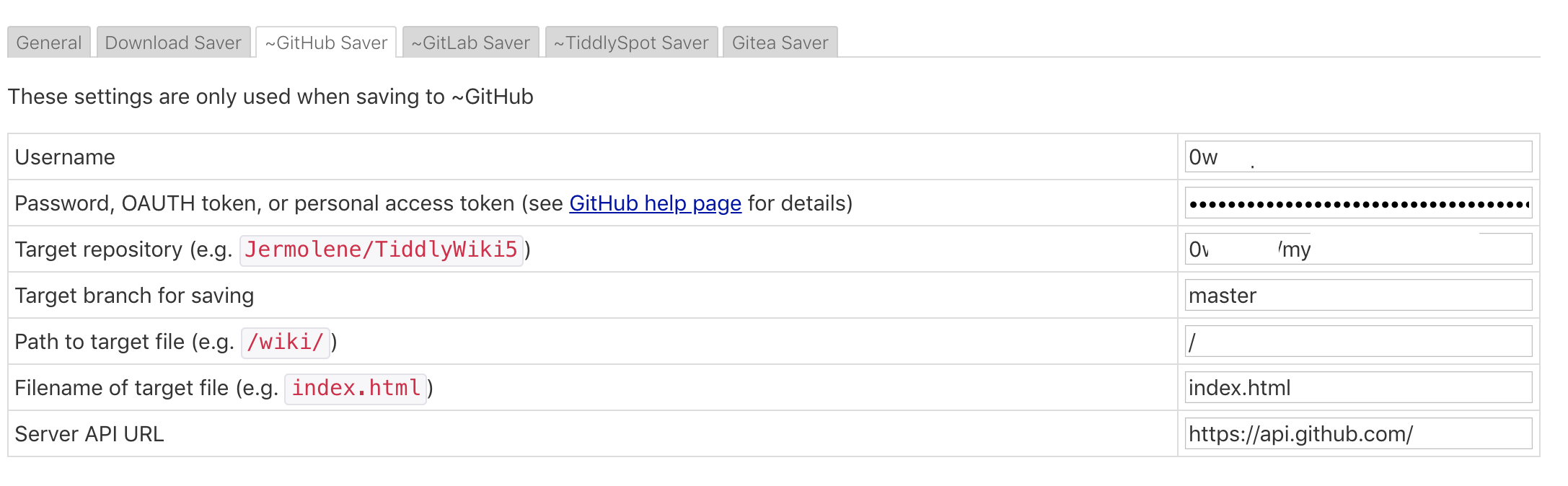
- No new commits appear in the PRIVATE repository
Expected behavior
New commits should appear when creating and saving a new tiddler
Desktop (please complete the following information):
- OS: macOS Mojave 10.14.5 (18F132)
- Browser Chrome 81.0.4044.129 (Official Build) (64-bit)
- Installation with node.js
tiddlywiki --version
5.1.22
 0wnrepo
All 12 comments
- Installation with node.js
If you want to use the github saver, you can't run your wiki from a 3rd party server.
It needs to be served by github as a single file wiki.
 pmario
on 6 May 2020
pmario
on 6 May 2020
- Installation with node.js
If you want to use the github saver, you can't run your wiki from a 3rd party server.
It needs to be served by github as a single file wiki.
Thank you for your reply.
I used this tutorial to locally run a server: https://tiddlywiki.com/static/Installing%2520TiddlyWiki%2520on%2520Node.js.html
Why doesn't this setup work (local tiddlywiki server with node + github saving)?
I don't understand. Is this mentioned anywhere?
0wnrepo
on 6 May 2020
The main reason, this can't work is: Same origin policy used in browsers. ...
Which basically means: You can only save to pages, where you did load content from.
The second reason is: Only 1 saver can be active at the moment. There is some discussion going on here at github, to change this. ... BUT
It will never be possible to load from localhost and save to github directly from the browser, because of security reasons. ... see "same origin policy"
It would be possible to save a file back to the node-server and the node server could push the changes to github. ... BUT nobody did implement it that way atm.
pmario
on 6 May 2020
The main reason, this can't work is: Same origin policy used in browsers. ...
Which basically means: You can only save to pages, where you did load content from.
The second reason is: Only 1 saver can be active at the moment. There is some discussion going on here at github, to change this. ... BUT
It will never be possible to load from localhost and save to github directly from the browser, because of security reasons. ... see "same origin policy"
It would be possible to save a file back to the node-server and the node server could push the changes to github. ... BUT nobody did implement it that way atm.
Ahh, makes sense, thought it was passed to the server and the server did all the "magic" to git commit push.
0wnrepo
on 6 May 2020
@pmar is there a way to actually automate this? I'm fine with writing shell scripts, but not sure how to export the server version automagically to html so i can then apply a script to commit and push to github.
0wnrepo
on 6 May 2020
you may have a look at: https://github.com/OokTech/TW5-Bob Imo it allows you to start shell scripts, from within the wiki
pmario
on 7 May 2020
Just out of curiosity, how is the github saver different from e.g. the tiddlyspot saver? For that one, saving from the server and local files worked fine (<=5.1.21, when the save button was still there on the server).
 KendrickLamarck
on 12 May 2020
KendrickLamarck
on 12 May 2020
.. For that one, saving from the server and local files worked fine (<=5.1.21, when the save button was still there on the server).
It probably didn't. ... If you remove the username from the tiddlyspot configuration, it will use the "fallback" saver, which is the standard browser download saver. ... That's a possibility why it "looked like" it would work for both systems.
The same is true, if you remove the github token from the config. (Be aware, that you will need to create a new token at github, if you delete it.) The default saver will take over here too.
pmario
on 13 May 2020
@pmario I'm almost positive it worked. I entered username and password, clicked the save button, no download prompt popped up and the changes showed up on tiddlyspot.
It certainly did and still does work for local single-file wikis in Chrome (that's how I push changes to tiddlyspot now), whereas github saving doesn't work there either. Could that be a separate issue though? Or could the same-origin-policy issue apply there as well?
KendrickLamarck
on 13 May 2020
I'm almost positive it worked. I entered username and password, clicked the save button, no download prompt popped up and the changes showed up on tiddlyspot.
That's the way, how it should work.
I don't know, if Chrome still allows you to save from a file:// URI to tiddlyspot. ... I don't use Chrome. So I trust you ;)
I'm pretty sure github will only let you save to github, if a file is served by github. ... Security concerns, and "same origin policy" is one of the best excuses here, because it is an issue, among other reasons to behave that way.
pmario
on 13 May 2020
@Jermolene this can be closed.
 saqimtiaz
on 29 Oct 2020
saqimtiaz
on 29 Oct 2020
Thanks @saqimtiaz
 Jermolene
on 31 Oct 2020
Jermolene
on 31 Oct 2020
Related issues
 felixhayashi
·
28Comments
Jermolene
·
48Comments
saqimtiaz
·
31Comments
felixhayashi
·
28Comments
Jermolene
·
48Comments
saqimtiaz
·
31Comments
 dufferzafar
·
27Comments
Jermolene
·
38Comments
dufferzafar
·
27Comments
Jermolene
·
38Comments