Three.js: new THREE.Color(0, 0, 255).getHexString() produces unexpected output
Describe the bug
Using the getHexString() function of the threejs Color objects yields unexpected (wrong?) results.
To Reproduce
Steps to reproduce the behavior:
Code
    const blue = new THREE.Color(0, 0, 255); //blue
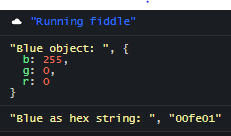
    console.log("Blue as object: ", blue); // still blue
    console.log("Blue as hex string: ", blue.getHexString()); // yields 00fe01, which represents a bright green
Live example
Expected behavior
In this example I would expect the resulting string to be "0000ff".
Screenshots
Platform:
- Device: [Desktop]
- OS: [Windows]
- Browser: [Chrome]
- Three.js version: [r119]
 Malte-Hansen
All 2 comments
const blue = new THREE.Color(0, 0, 255); //blue
If you're passing R, G, and B arguments to Color they must be in the range [ 0, 1 ]. Alternatively you can pass a full hex number representing RGB to Color directly:
blue = new THREE.Color( 0, 0, 1 );
blue = new THREE.Color( 0x0000ff );
 gkjohnson
on 23 Oct 2020
gkjohnson
on 23 Oct 2020
In my case, printing the object did not help me find the cause of the problem. It seemed so obvious that 255 is a valid value.
Thanks a lot for the clarification! I think this is still quite unusual but I can see that changing this is not sensible and that there are plenty of alternative formattings available.
Malte-Hansen
on 23 Oct 2020
Related issues
 jlaquinte
·
3Comments
jlaquinte
·
3Comments
 scrubs
·
3Comments
scrubs
·
3Comments
 makc
·
3Comments
makc
·
3Comments
 alexprut
·
3Comments
alexprut
·
3Comments
 zsitro
·
3Comments
zsitro
·
3Comments
Most helpful comment
If you're passing R, G, and B arguments to
Colorthey must be in the range [ 0, 1 ]. Alternatively you can pass a full hex number representing RGB to Color directly: