Three.js: After the gamma changes in r112, how to make colors look the same as before?
Description of the problem
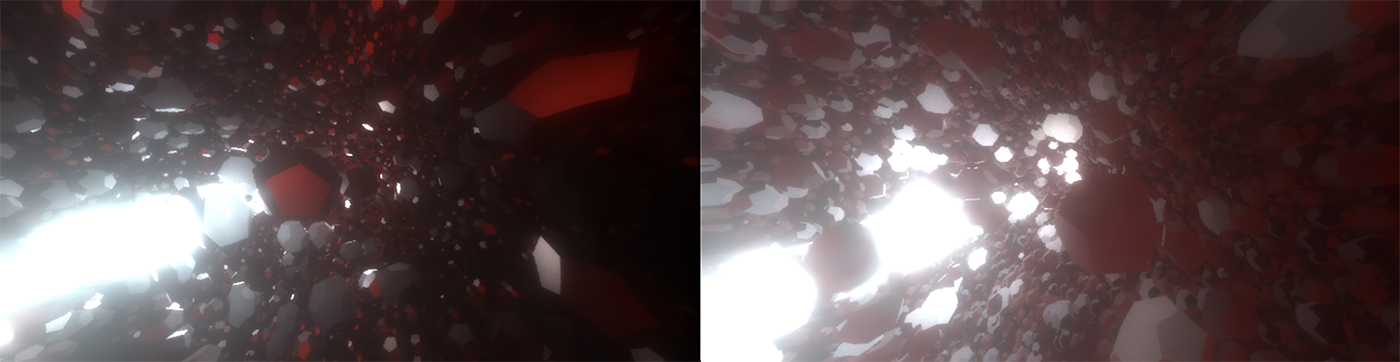
I get why the change was made and most things look better, i'm just trying to update some old projects and for some i can't figure out how to get the contrast back.
r109: https://codesandbox.io/s/r3f-particles-ii-pjcc1
Colors are rich and deep.
r113: https://codesandbox.io/s/r3f-particles-ii-rnp2c
Washed out and bland.
The original didn't specify any settings for gamma and tonemapping. In the second sandbox (r113), where the canvas is created down below, there's a onCreated callback where all the encondings can be set. I have tried mostly everything but couldn't make it work.
      onCreated={({ gl }) => {
        gl.gammaFactor = 2
        gl.toneMappingExposure = 1
        gl.toneMappingWhitePoint = 1
        gl.toneMapping = THREE.LinearToneMapping
        gl.outputEncoding = THREE.LinearEncoding
      }}>
 drcmda
All 2 comments
I'm afraid this issue has nothing to do with color spaces. Your original code did not set gammaOutput to true so your app used linear color space. This is still true in your R113 code.
The root cause for the deviation is the fact that the default values for metalness/roughness have changed in R112 (see https://github.com/mrdoob/three.js/wiki/Migration-Guide#r111--r112). By using the previous values, the result looks good again.
 Mugen87
on 10 Feb 2020
Mugen87
on 10 Feb 2020
I must've overslept that guide, sorry for wasting your time, and thanks so much! 🎉
drcmda
on 10 Feb 2020
Related issues
 zsitro
·
3Comments
zsitro
·
3Comments
 jack-jun
·
3Comments
jack-jun
·
3Comments
 scrubs
·
3Comments
scrubs
·
3Comments
 yqrashawn
·
3Comments
yqrashawn
·
3Comments
 clawconduce
·
3Comments
clawconduce
·
3Comments
Most helpful comment
I must've overslept that guide, sorry for wasting your time, and thanks so much! 🎉