Three.js: Editor: Question about i18n support
How can I do something about I18n for three.js?
But it not useful,like this.
// ProjectDir\editor\js\Menubar.File.js
var title = new UI.Panel();
title.setClass( 'title' );
// title.setTextContent( 'File' );
title.setTextContent( '文件' );
container.add( title );
 linbingquan
All 16 comments
In general, the editor does not support i18n. You would have to develop a solution by yourself if want to add some sort of language setting.
@mrdoob Should we consider this issue as a feature request?
 Mugen87
on 20 Oct 2018
Mugen87
on 20 Oct 2018
Considering we're adding localisation to the docs, adding localisation support to the editor sounds good to me.
 mrdoob
on 23 Oct 2018
mrdoob
on 23 Oct 2018
@linbingquan for now, can you complete this list?
File > 文件
    New >
    Import >
    Export Geometry >
    Export Object >
    Export Scene >
    Export DAE >
    Export STL (Binary) >
    Publish >
Edit >
    Undo >
    Redo >
    Clear History >
    Clone >
    Delete >
    Minify Shaders >
Add >
    Group >
    Plane >
    Box >
    Circle >
    Cylinder >
    Sphere >
    Icosahedron >
    Torus >
    TorusKnot >
    Lathe >
    Sprite >
    PointLight >
    DirectLight >
    HemisphereLight >
    AmbientLight >
    PerspectiveCamera >
Play >
Examples >
Help >
    Source Code >
    About >
@mrdoob Complete like this.
File > 文件
    New > 新建
    Import > 导入
    Export Geometry > 导出几何体
    Export Object > 导出物体
    Export Scene > 导出场景
    Export DAE > 导出DAE
    Export STL (Binary) > 导出STL(二进制)
    Publish > 发布
Edit > 编辑
    Undo > 撤销
    Redo > 重做
    Clear History > 清空历史记录
    Clone > 拷贝
    Delete > 删除
    Minify Shaders > 压缩着色器
Add > 添加
    Group > 组
    Plane > 平面
    Box > 正方体
    Circle > 圆
    Cylinder > 圆柱体
    Sphere > 球体
    Icosahedron > 二十面体
    Torus > 圆环体
    TorusKnot > 环面纽结体
    Lathe > 酒杯
    Sprite > 精灵
    PointLight > 点光源
    DirectLight > 平行光
    HemisphereLight > 半球光
    AmbientLight > 环境光
    PerspectiveCamera > 透视相机
Play > 启动
Examples > 示例
Help > 帮助
    Source Code > 源码
    About > 关于
@linbingquan Thank you! I've implemented it in #15110.
mrdoob
on 23 Oct 2018
@mrdoob I found some words not yet complete, can you complete it?
Add > 添加
    spotlight > 聚光灯
    directionallight > 平行光

// ProjectDir\editor\js\Strings.js
'menubar/add/spotlight': '聚光灯',
'menubar/add/directionallight': '平行光',
@mrdoob Please merge it. I've finished it in #15113.
linbingquan
on 23 Oct 2018
Thank you!
mrdoob
on 24 Oct 2018
Lets do more! 😊
Scene >
    Background >
    Fog >
    Object >
    Geometry >
    Material >
    Script >
Project >
    Title >
    Editable >
    VR >
    Renderer >
Settings >
    Language >
    Theme >
    Translate >
    Rotate >
    Scale >
    Undo >
    Focus >
    Grid >

Translate >
Rotate >
Scale >
Local >

Objects >
Vertices >
Triangles >
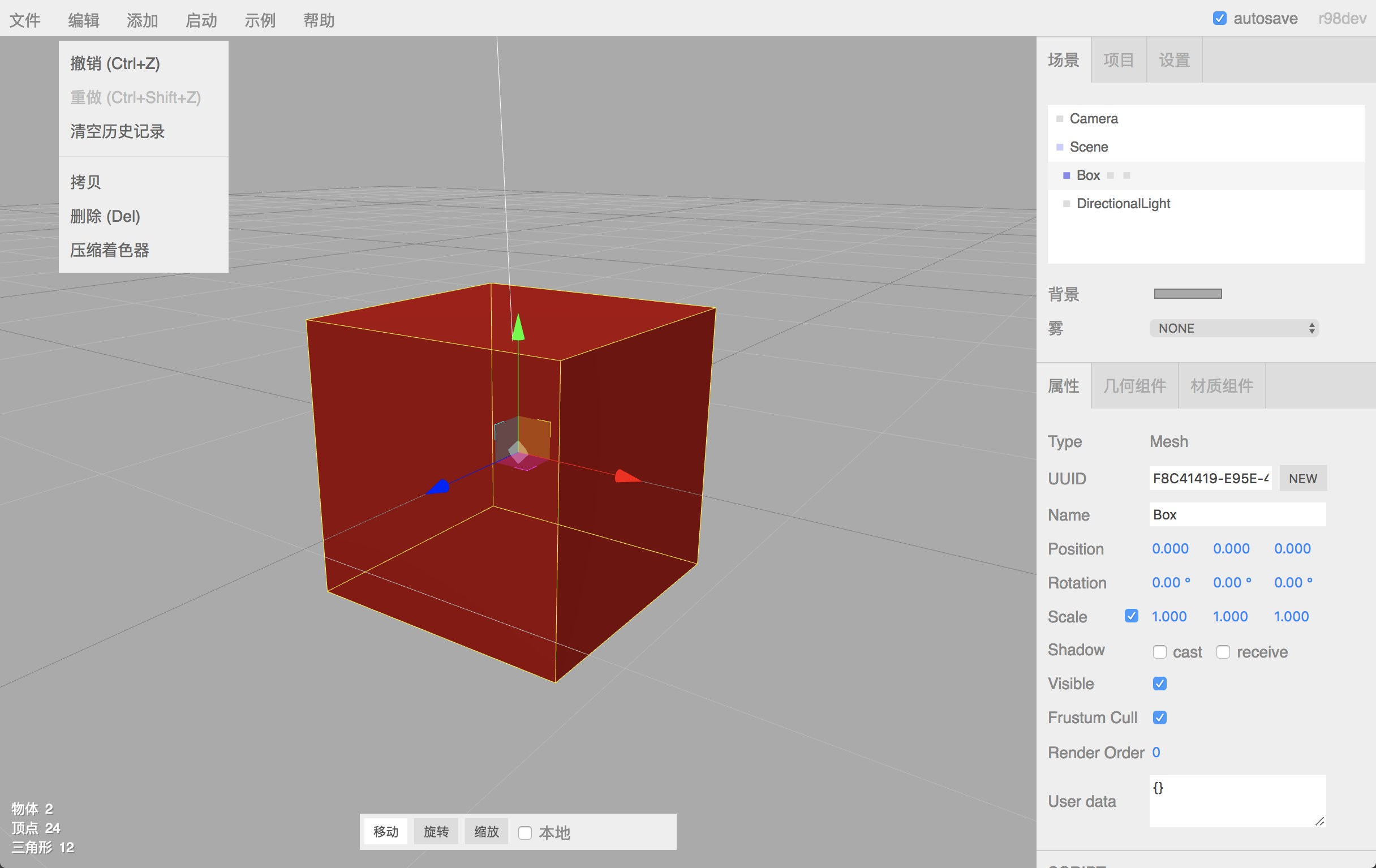
@mrdoob I think Scene.Object and Scene.Material as a component is suitable. I've completed it like this.
Scene > 场景
    Background > 背景
    Fog > 雾
    Object > 属性
    Geometry > 几何组件
    Material > 材质组件
    Script > 脚本
Project > 项目
    Title > 标题
    Editable > 编辑性
    VR > 虚拟现实
    Renderer > 渲染器
Settings > 设置
    Language > 语言
    Theme > 主题
    Translate > 移动
    Rotate > 旋转
    Scale > 缩放
    Undo > 撤销
    Focus > 聚焦
    Grid > 网格

Translate > 移动
Rotate > 旋转
Scale > 缩放
Local > 本地

Objects > 物体
Vertices > 顶点
Triangles > 三角形
 mrdoob
on 25 Oct 2018
mrdoob
on 25 Oct 2018
@mrdoob I commited example. https://github.com/linbingquan/three.js/commit/4936e19dc94b538d4a99129330f69af1d4a42d2c
But which one is better? 'sidebar/geometry/boxgeometry/width' or 'sidebar/geometry/boxGeometry/width'
linbingquan
on 27 Oct 2018
'sidebar/geometry/boxgeometry/width' 👌
These translations look good! Would you like to create a Pull Request with these changes?
mrdoob
on 29 Oct 2018
@mrdoob I created a Pull Request in #15179
linbingquan
on 31 Oct 2018
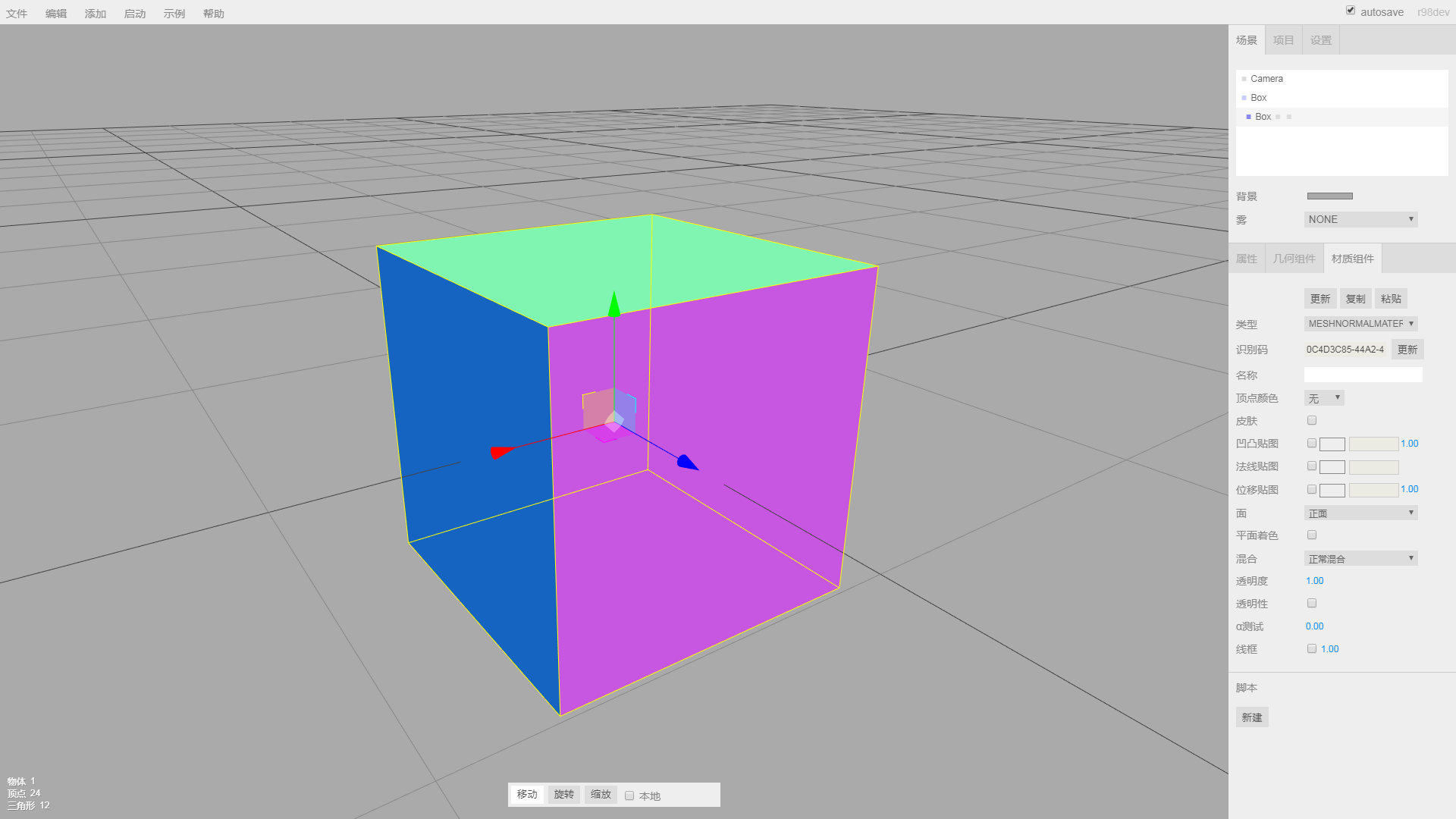
@mrdoob Hello! I can't find position, normal and uv, would you tell me?
linbingquan
on 1 Nov 2018
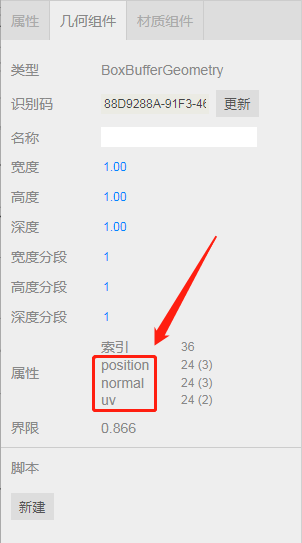
Hello! I can't find
position,normalanduv, would you tell me?
这几个是动态获取的(These are dynamically acquired).
var attributes = geometry.attributes;

for ( var name in attributes ) {

    var attribute = attributes[ name ];

    container2.add( new UI.Text( name ).setWidth( '80px' ) );
    container2.add( new UI.Text( ( attribute.count ).format() + ' (' + attribute.itemSize + ')' ).setFontSize( '12px' ) );
    container2.add( new UI.Break() );

}
 sweerwen
on 1 Nov 2018
sweerwen
on 1 Nov 2018
Related issues
 jlaquinte
·
3Comments
jlaquinte
·
3Comments
 akshaysrin
·
3Comments
akshaysrin
·
3Comments
 jens-duttke
·
3Comments
jens-duttke
·
3Comments
 danieljack
·
3Comments
danieljack
·
3Comments
 Bandit
·
3Comments
Bandit
·
3Comments