Three.js: GLTFLoader: De-duplicate node names.
Names of nodes are user-specified, and not guaranteed to be unique within a glTF file. But because THREE.PropertyBinding relies on track names to target animation, having two nodes with the same name will cause animation to affect the wrong part of a model. We should de-duplicate node names on import, to ensure that every node ends up with a unique name.
Filing to follow up on https://discourse.threejs.org/t/gltf-animation-bug-or-wrong-usage/4536/2.
 donmccurdy
All 23 comments
Can't we use uuid instead of node name?
 takahirox
on 19 Oct 2018
takahirox
on 19 Oct 2018
That would work for the initial load, but I'd prefer to avoid it — cloned meshes would not be able to reuse the same animations.
donmccurdy
on 19 Oct 2018
Anyone working on it? If not I can start working on it right away, feel free to assign it to me.
Can you point me where to start and how to reproduce the bug?
From what I understand this method is the culprit: https://github.com/mrdoob/three.js/blob/54c5665b176722ccc1b27e089e57cde19684de01/examples/js/loaders/GLTFLoader.js#L3029
Thanks
 dannycalleri
on 21 Oct 2018
dannycalleri
on 21 Oct 2018
Thanks @dannycalleri — I don't think anyone is working on this, so feel free to give it a try. To reproduce the bug, use this model:
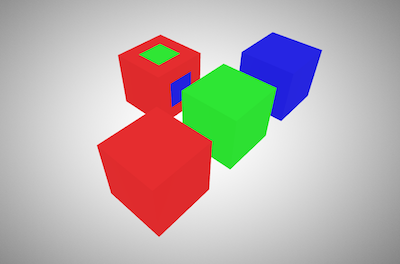
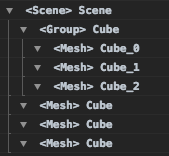
It should look correct visually, but if you inspect the node names1 you'll see something like this:
| 3d | node hierarchy |
|---|---|
|  |
|  |
|
The problem here is that four objects (three Meshes and one Group) all have the same name, "Cube". This will cause issues for the animation system, so we need to rename things automatically.
A mesh could have multiple parts. For completeness I've included one mesh (the multi-color cube) with multiple parts here — those parts are already renamed automatically, but whatever fix you choose should avoid generating names that conflict with another mesh's sub-parts.
1 I generated the graph of the node hierarchy with this script. Inspecting node.name works just as well.
donmccurdy
on 22 Oct 2018
Can you wait to start to work on it for a bit? I have some concerns of renaming, and wanna discuss more. I think I can share my thoughts in a week. Sorry I've been busy lately.
takahirox
on 22 Oct 2018
@donmccurdy If you have other concerns about using uuid in addition to cloning, can you share with us? It helps me to think.
takahirox
on 22 Oct 2018
Sure, my only concerns with using UUID to target animation would be breaking mesh.clone() and clip.toJSON().
donmccurdy
on 22 Oct 2018
Hi @takahirox , sure no problem, please keep me posted.
@donmccurdy , thank you for your explanation, pretty clear 😉
Just to make sure that I understood correctly, your concerns about mesh.clone() and clip.toJSON(), is related to the fact that those methods - in particular mesh.clone() - would regenerate the UUIDs right? So basically the animations attached to the original mesh won't apply for the new one.
dannycalleri
on 23 Oct 2018
That's correct. I think that sort of issue would be likely to cause more confusion than appending a suffix to user-provided names when they conflict, or generating names for nodes the user hasn't named.
donmccurdy
on 23 Oct 2018
I agree, especially because after all we're talking about a name, not an id. I suppose that assigning names could help users better recognize/visualize nodes, like you did above.
I'll wait for @takahirox to understand how to tackle the problem
dannycalleri
on 23 Oct 2018
I think we'll need to address this soon.
donmccurdy
on 1 Jun 2019
@donmccurdy is there a way to opt out? I have like a 100 of files where multiple button holes are specifically named the same, and I guess this application will break if we update 3js now.
 makc
on 8 Dec 2020
makc
on 8 Dec 2020
I guess I could do something like
GLTFParser.prototype.createUniqueName = function ( originalName ) { return originalName; }
how safe would that be for the future updates?
makc
on 8 Dec 2020
Hm, GLTFParser is not an export from the module, and it doesn't look like it would be global in the examples/js version either. Software like Blender enforces unique names too, so in the future I'd recommend trying to use something like object.userData.isButton = true, but understand that it's probably a pain to script that update to your files now. :/
donmccurdy
on 10 Dec 2020
^if it's helpful I can share a script to do that in batch, but understand if that's not what you need.
donmccurdy
on 10 Dec 2020
I have been thinking (but I haven't deeply thought yet) of making the use of the plugin system for creating unique names.
// In the GLTFParser
object.name = this._invokeOneSync(ext => {
  return ext.assignName && ext.assignName(object, objectDef);
}) || originalName;

// In the GLTFLoader.js but not in GLTFLoader or GLTFParser class.
// And it's registered by default.
class GLTFLoadUniqueNameCreator {
  constructor(parser) {
    this.parser = parser;
  }
  assignName(object, objectDef) {
    ...
    return uniqueName;
  }
}
Advantages are
- Core GLTFParser will be simpler by moving the unique name creation logic out.
- Users who don't need unique names (because they don't use animation and they want to keep the original names) can opt-out the unique name feature by unregistering the built-in plugin.
takahirox
on 10 Dec 2020
GLTFParser is not an export from the module
ha, I did no check that :( so, nothing short of patching js file, or traversing/un-renaming, hmm
makc
on 10 Dec 2020
ah, but takahirox comment got me thinking - you could get a parser reference by registering some dummy plugin, right?
plugins are called before parser does anything, so you could override its createUniqueName method from there
makc
on 11 Dec 2020
You could do that in the dummy plugin constructor but it's hacky, I can't say it's safe for the future update.
takahirox
on 11 Dec 2020
Hey guys - also just swinging by to add another example of where opting out would be useful - I assumed the export side was adding these unique names but unfortunately not.
In my case I have a tree of road tile objects like this:
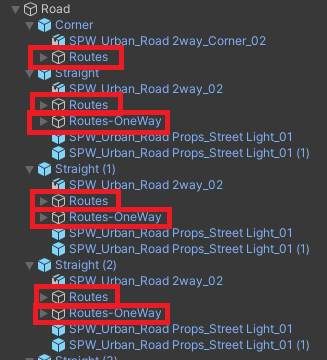
Each tile has some little traffic routes as a child. I've just gone to iterate over the tiles to start linking these routes together to form a road network, except the object called Routes and Routes-OneWay being renamed is adding hassle (mainly because this same naming pattern happens throughout - on a few hundred different types of object). E.g. consider that name.startsWith("Routes") doesn't work here, so I have to e.g. name.startsWith("Routes_") || name == "Routes" and it just starts getting a bit ugly. We'll probably end up just rolling a custom build of three with this unique naming bit removed in the meantime.
 LukeBriggs4Roads
on 11 Dec 2020
LukeBriggs4Roads
on 11 Dec 2020
So I have tested this dummy plugin idea:
let loader = new GLTFLoader( manager );
loader.register( function( parser ) {
    parser.createUniqueName = function ( originalName ) {
        return originalName; };
    return { name: 'OriginalNames' };
} );
this does successfully avoid @donmccurdy -s name mangling, but it creates another problem. these names

turn into this:

i.e. names that had funny unicode characters in them get swallowed entirely:
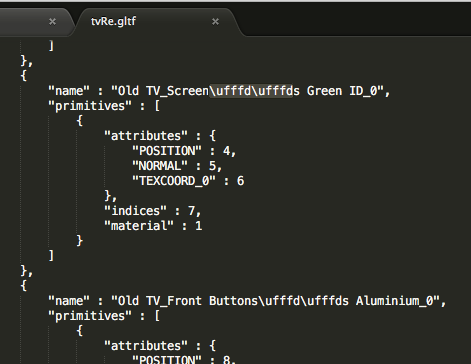
I take it noone knows where that happens, right?
makc
on 24 Dec 2020
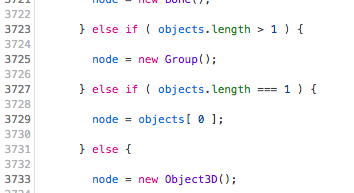
ok, it looks like it was actually supposed to happen either way, in loadNode mesh names are replaced by names from parser.json.nodes... so not a problem as far as only the names are important, but if you want to preserve hierarchy as well - you will need to edit these lines, I guess?
makc
on 24 Dec 2020
ok, so I hacked the plugin up a bit to preserve both the names and the hierarchy:
let loader = new GLTFLoader( manager );
loader.register( function( parser ) {
    parser.createUniqueName = function ( originalName ) { return originalName; };
    return { name: 'OriginalNamesAndHierarchy', createNodeAttachment: function ( nodeIndex ) {
        let nodes = parser.json.nodes, meshes = parser.json.meshes;
        if( nodes[ nodeIndex ] && meshes[ nodes[ nodeIndex ].mesh ] ) {
            return Promise.resolve( new THREE.Group() );
        }
    } };
});
it undoes GLTFParser optimization in the screenshot above, but you get a bunch of empty Groups in addition to original hierarchy :D
makc
on 25 Dec 2020
Related issues
 fuzihaofzh
·
3Comments
makc
·
3Comments
fuzihaofzh
·
3Comments
makc
·
3Comments
 danieljack
·
3Comments
danieljack
·
3Comments
 jlaquinte
·
3Comments
donmccurdy
·
3Comments
jlaquinte
·
3Comments
donmccurdy
·
3Comments