Three.js: THREE.BufferGeometryUtils.mergeBufferGeometries
I tried to merge a lot of cylinders, but the result was not expected. I didn't know where the problem came out. Maybe it was a bug, but when I lowered the number of creation to 600 times code, who could help me, thank you very much!
var geos = [];
for (var i = 0; i < 1000; i++) {
    var geo = new THREE.CylinderBufferGeometry(1, 1, 20, 16);
    var pos = new THREE.Vector3();
    pos.x = Math.random() * 800 - 400;
    pos.z = Math.random() * 800 - 400;
    geo.translate(pos.x, pos.y, pos.z);
    geos.push(geo);
}
var bf_geo = THREE.BufferGeometryUtils.mergeBufferGeometries(geos);
var mergeMesh = new THREE.Mesh(bf_geo, new THREE.MeshLambertMaterial({ color: 0xff0000 }));
scene.add(mergeMesh);
 xjindf
All 15 comments
Um, there seems to a problem with the index of the final geometry. If I lower the amount of geometries (e.g. 500), the result looks good. If I increase the amount to 700, lines appear between the single cylinders.
@xjindf Is that what you mean with "unexpected result"?
The problem does not occur if the CylinderBufferGeometry is turned into a non-indexed geometry via geo = geo.toNonIndexed();.
 Mugen87
on 19 Jun 2018
Mugen87
on 19 Jun 2018
I haven't looked into the detail yet but my quick guess. Because of TypedArray? mergeBufferAttributes reuses the current type. If merged attribute needs bigger type, the data will be broken.
https://github.com/mrdoob/three.js/blob/dev/examples/js/BufferGeometryUtils.js#L296
https://github.com/mrdoob/three.js/blob/dev/examples/js/BufferGeometryUtils.js#L368
If my guess is right, using BufferGeometry.setIndex( array ); with regular array instead of mergeBufferAttributes would be an easy fix because it automatically chooses an appropriate typed array.
https://github.com/mrdoob/three.js/blob/dev/src/core/BufferGeometry.js#L61
 takahirox
on 19 Jun 2018
takahirox
on 19 Jun 2018
@Mugen87 Yes, as you have described, using geo.toNonIndexed() seems to solve it, but can there be a better way, as takahirox said, thanks
xjindf
on 19 Jun 2018
Just in case, "An easy fix" I've mentioned meant an easy fix in BufferGeometryUtils, not in user code.
takahirox
on 19 Jun 2018
@takahirox Yes, that seems to be the root cause. Using setIndex() ensures that Uint32BufferAttribute is used if necessary.
Mugen87
on 19 Jun 2018
/ping @donmccurdy
BTW, after this commit, I would have expected to find BufferGeometryUtils.js in the js/utils directory.
 WestLangley
on 19 Jun 2018
WestLangley
on 19 Jun 2018
I don't know the historical reasons, but yeah it seems that BufferGeometryUtils.js should be under js/utils like GeometryUtils.js and SceneUtils.js from its name.
takahirox
on 19 Jun 2018
+1 for moving to js/utils, the docs already claim it's there. Not sure what I think about changing the type of the index yet but open to reviewing a PR if it's a simple change.
 donmccurdy
on 19 Jun 2018
donmccurdy
on 19 Jun 2018
How about the following approach: https://jsfiddle.net/f2Lommf5/7387/
if ( isIndexed ) {

    var indexOffset = 0;
    var mergedIndex = [];

    for ( var i = 0; i < geometries.length; ++ i ) {

        var index = geometries[ i ].index;

        if ( indexOffset > 0 ) {

            for ( var j = 0; j < index.count; ++ j ) {

                mergedIndex.push( index.getX( j ) + indexOffset );

            }

        }

        indexOffset += geometries[ i ].attributes.position.count;

    }

    mergedGeometry.setIndex( mergedIndex );

}
I think you can remove
if ( ! mergedIndex ) return null;
And I think you can remove if ( indexOffset > 0 ) {
if ( isIndexed ) {

    var indexOffset = 0;
    var mergedIndex = [];

    for ( var i = 0; i < geometries.length; ++ i ) {

        var index = geometries[ i ].index;

        for ( var j = 0; j < index.count; ++ j ) {

            mergedIndex.push( index.getX( j ) + indexOffset );

        }

        indexOffset += geometries[ i ].attributes.position.count;

    }

    mergedGeometry.setIndex( mergedIndex );

}
Yeah, looks good. I'll make a PR when your #14329 is merged.
Mugen87
on 19 Jun 2018
I am experiencing the same issue with a model. Other part is confidential so I am only able to paste a small part of the model where the issue is, here is a screenshot:

I have loaded the json file of the model, converted all its geometries to buffergeometries, merged vertices, created a list and then used BufferGeometryUtils to merge these geometries.
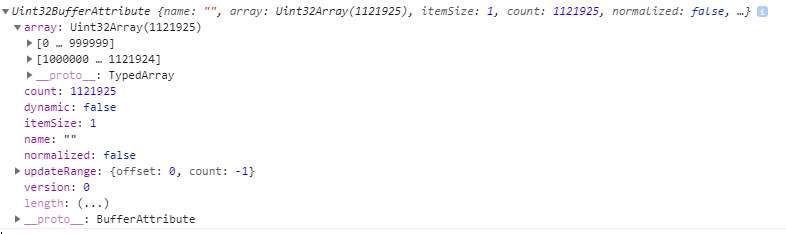
Following is the index of the final geometry:
 ndhabrde11
on 26 Apr 2019
ndhabrde11
on 26 Apr 2019
@ndhabrde11 Please see if you can produce a _simple_, live example that reproduces the issue.
WestLangley
on 26 Apr 2019
You can mark this as closed. The geoemtry is broken in the original model itself which is causing it to break when geometries are merged.
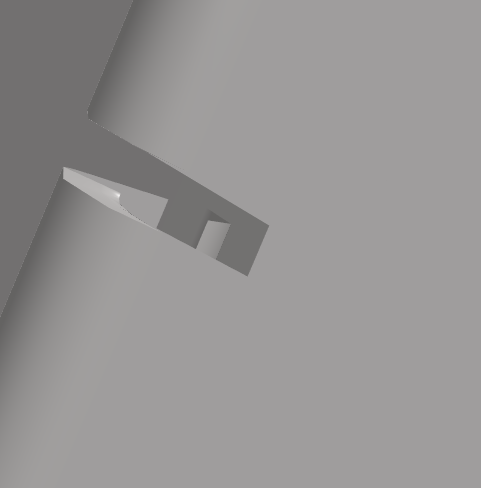
Without merge
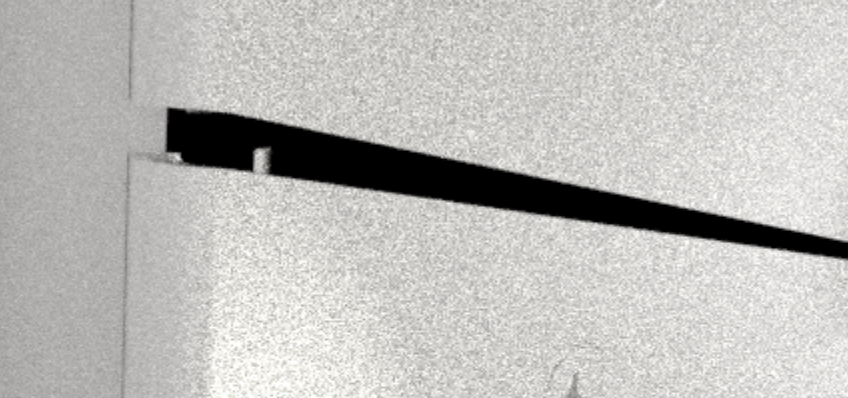
With merge
ndhabrde11
on 29 Apr 2019
Related issues
 danieljack
·
3Comments
danieljack
·
3Comments
 jack-jun
·
3Comments
jack-jun
·
3Comments
 seep
·
3Comments
seep
·
3Comments
 Horray
·
3Comments
Horray
·
3Comments
 scrubs
·
3Comments
scrubs
·
3Comments