Three.js: Incorrect bounding box, collada model
Description of the problem
In the latest version (r92) the stormtrooper collada model has an incorrect boundingBox.
I tried the BoxHelper:
const box = new THREE.BoxHelper(object, 0xff0000);
scene.add(box);
or a manual approach:
const boundingBox = new THREE.Box3().setFromObject(trooper);
const size = boundingBox.getSize();
const center = boundingBox.getCenter();
const geometry = new THREE.BoxGeometry(size.x, size.y, size.z);
const material = new THREE.MeshBasicMaterial({ wireframe: true, color: 0x0000ff });
const box2 = new THREE.Mesh(geometry, material);
box2.position.set(center.x, center.y, center.z);
scene.add(box2);
Both approaches result in the model not being in the boundingbox:

I already figured out that this started with r87,
r86 didn't have this issue:
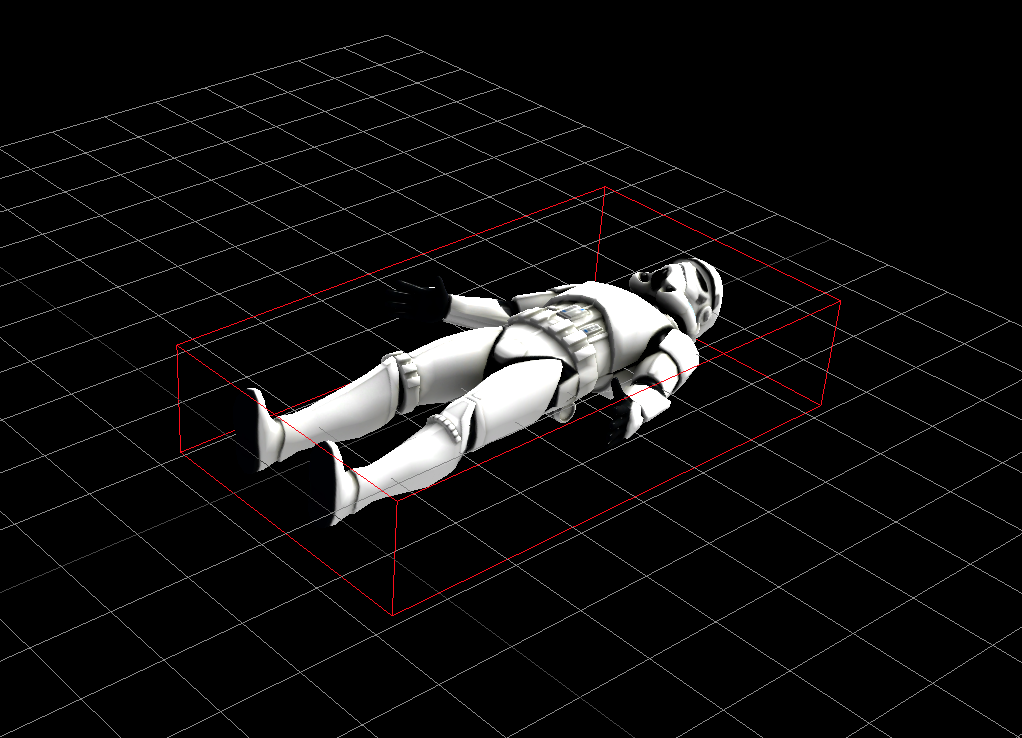
example code:
r86: https://github.com/mrdoob/three.js/compare/r86...stijndeschuymer:bounding-box-test
r87: https://github.com/mrdoob/three.js/compare/r87...stijndeschuymer:bounding-box-test-r87
I'm currently trying to figure out what causes this, but I'm quite new to three.js,
so I'd highly appreciate it if someone pointed me in the right direction!
Three.js version
- [x] r92
- [x] r87
- [ ] r86
 stijndeschuymer
All 6 comments
apperently the example in r87 is ColladaLoader2.js
stijndeschuymer
on 4 May 2018
This is because of the usage of skinning. The calculation of bounding volumes does not honor the vertex transformations applied via vertex blending or morphing.
 Mugen87
on 4 May 2018
Mugen87
on 4 May 2018
Thanks @Mugen87, is this a bug?
Is there a way to get around this?
stijndeschuymer
on 4 May 2018
From my point of view, it's not a bug. It works as designed.
Is there a way to get around this?
Read https://github.com/mrdoob/three.js/issues/11991 for more information.
Mugen87
on 4 May 2018
This issue is essentially a duplicate of #11991 since both are related to bounding volumes and animation.
Mugen87
on 4 May 2018
Thanks! I checked #11991 but I still have issues trying to draw a boundingbox, I'll move this to stackoverflow https://jsfiddle.net/66sor15y/4/
stijndeschuymer
on 4 May 2018
Related issues
 scrubs
·
3Comments
scrubs
·
3Comments
 akshaysrin
·
3Comments
akshaysrin
·
3Comments
 clawconduce
·
3Comments
clawconduce
·
3Comments
 konijn
·
3Comments
konijn
·
3Comments
 danieljack
·
3Comments
danieljack
·
3Comments
Most helpful comment
Thanks! I checked #11991 but I still have issues trying to draw a boundingbox, I'll move this to stackoverflow https://jsfiddle.net/66sor15y/4/