Three.js: Difference in Anti-alias quality for Phong and Physical Material
Difference in Anti-alias quality for MeshPhongMaterial and MeshPhysicalMaterial
Hello team,
As per the image attached here, there looks to be a certain limitation with the MeshPhysicalMaterial.
The antialias is not working as effectively as it works for MeshPhongMaterial.
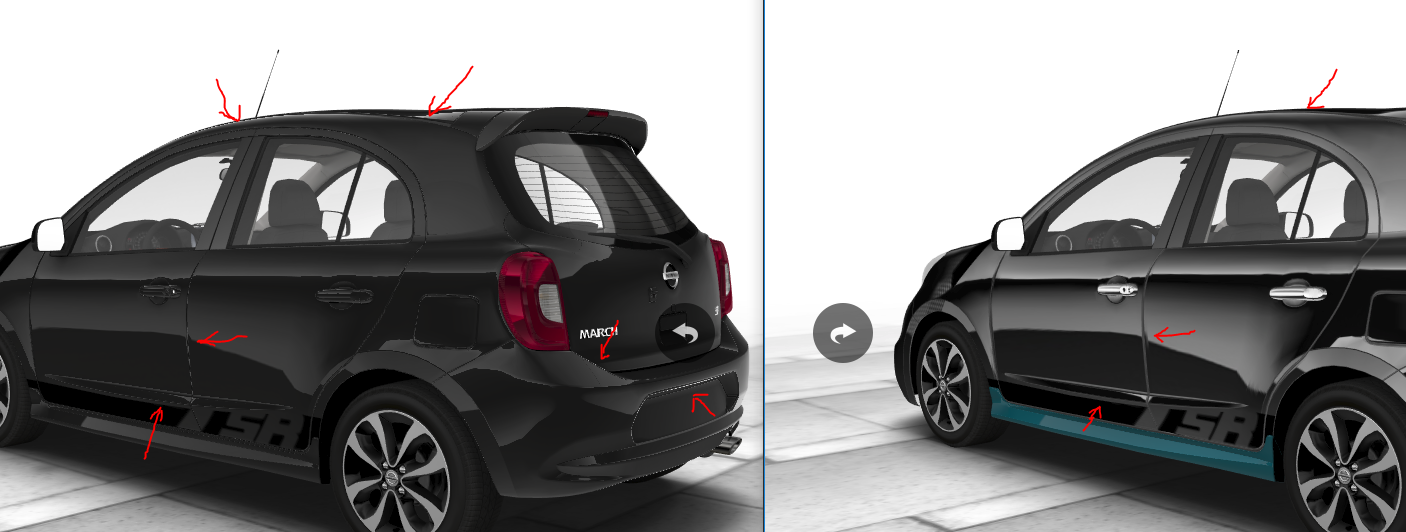
In the attached image, you can see the visual difference between the edges of the two images.
The left image is using MeshPhysicalMaterial and the right image is using MeshPhongMaterial.
I have tried to tweak around all the MeshPhysicalMaterial Properties, but no luck.
Please consider this issue as a feature request if its a limitation of the MeshPhysicalMaterial.
Feel free to close the issue if not a bug or limitation but my improper implementation.
Note: WebGLRenderer's antialias is true for both the images. Pixel ratio is as per devices. Adding postprocessing is an overkill so not going to use it.
Three.js version
- [ ] Dev
- [x] r90
- [ ] ...
Browser
- [x] All of them
- [ ] Chrome
- [ ] Firefox
- [ ] Internet Explorer
OS
- [x] All of them
- [ ] Windows
- [ ] macOS
- [ ] Linux
- [ ] Android
- [ ] iOS
Hardware Requirements (graphics card, VR Device, ...)
 atul-mourya
All 18 comments
maybe pbr just has more variety with the normal going from 0 to 90 degrees from the camera. try to make two spheres with these materials and look what is going on around the edge.
 makc
on 22 Feb 2018
makc
on 22 Feb 2018
I've seen similar artifacts and couldn't figure out what's going on. My thought was that the reflection was just too strong and that messed up the aliasing, but nothings overblown in your image.
 pailhead
on 23 Feb 2018
pailhead
on 23 Feb 2018
Is that what they call specular antialiasing?
 mrdoob
on 23 Feb 2018
mrdoob
on 23 Feb 2018
Anyway, if you can provide a couple of simple jsfiddles it'll be help us to look into it.
mrdoob
on 23 Feb 2018
Also, is this a MeshPhysicalMaterial issue or do you get the same results with MeshStandardMaterial?
mrdoob
on 23 Feb 2018
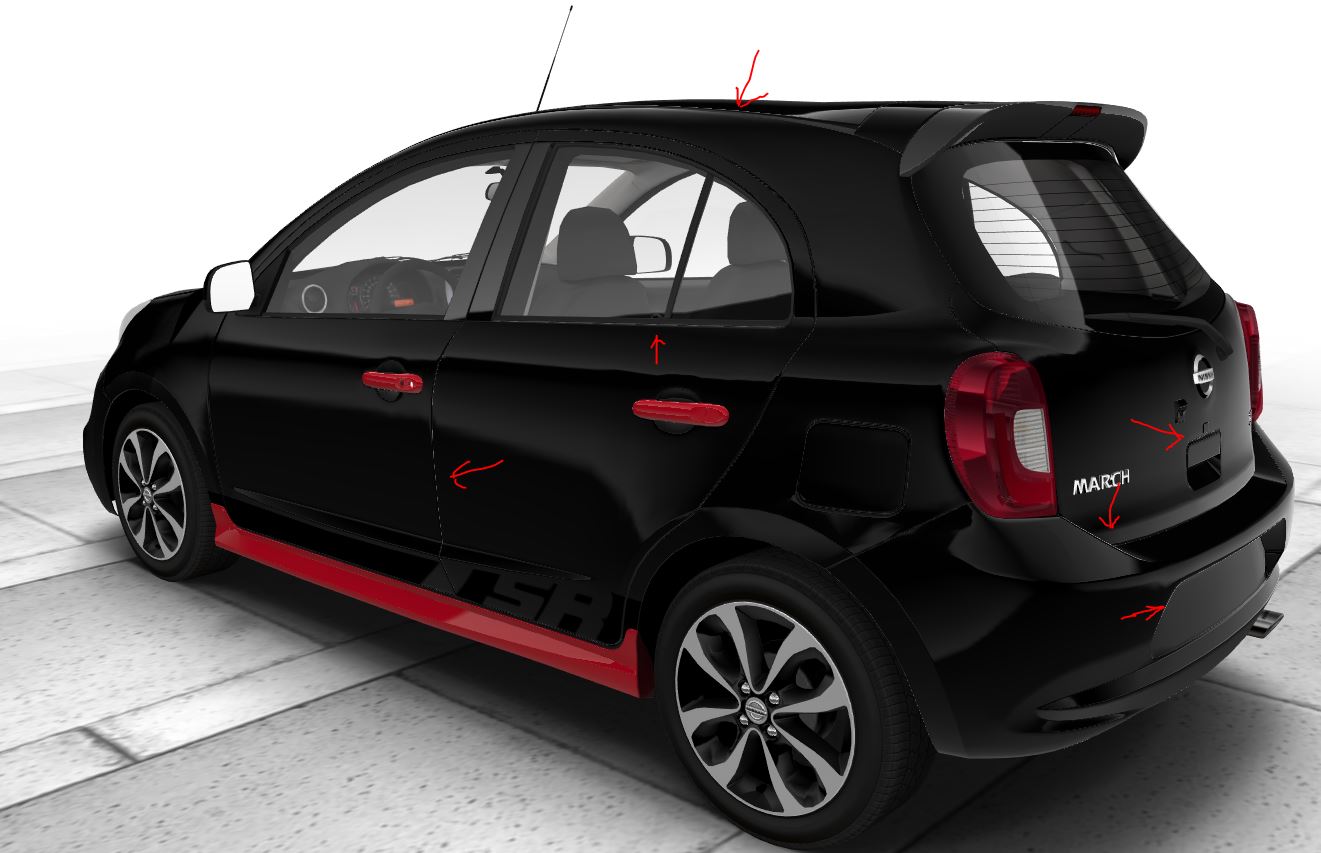
I get the same result with the MashStandardMaterial as well
Here's a snapshot.
atul-mourya
on 23 Feb 2018
Besides, I'll also create a jsfiddle for the sample and will link it here.
atul-mourya
on 23 Feb 2018
https://jsfiddle.net/gdzj7ju8/34/
Here's the sample case to play around. Also, do let me know it if there's any more support that I can provide.
atul-mourya
on 23 Feb 2018
Is that what they call specular antialiasing?
https://www.gamedev.net/forums/topic/664808-example-of-specular-aliasing/
looks like it, not sure :(
pailhead
on 23 Feb 2018
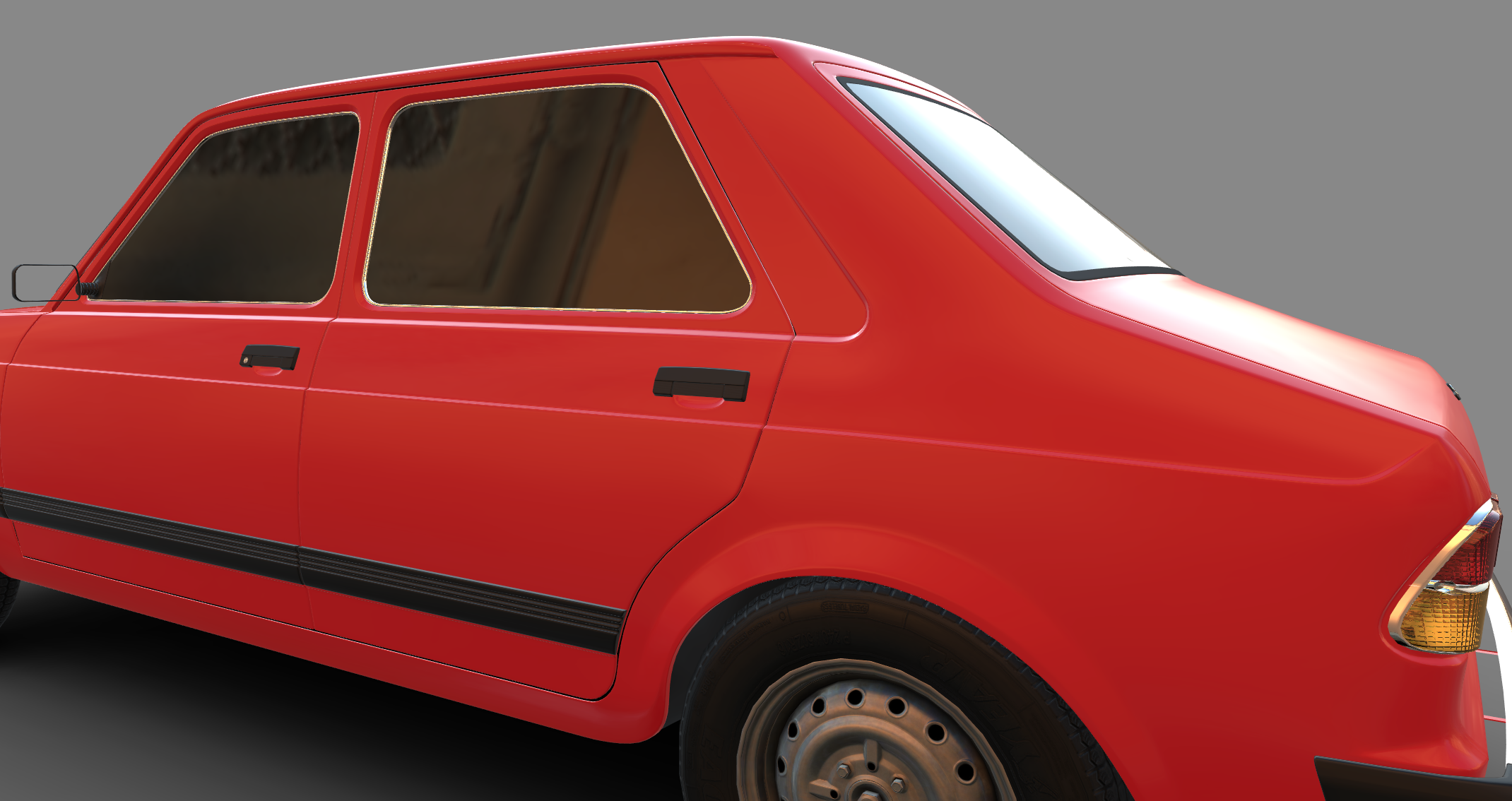
I'm seeing a lot less on my car but it looks like the same thing.
pailhead
on 23 Feb 2018
In my case the darker the color is, the more prominent aliasing gets.
White color camouflage with the aliasing color, but black color show much more intense aliasing
,
atul-mourya
on 23 Feb 2018
Here's the sample case to play around.
https://jsfiddle.net/gdzj7ju8/34/
Set
obj.material.envMapIntensity = 0.3;
and try again
 RemusMar
on 25 Feb 2018
RemusMar
on 25 Feb 2018
obj.material.envMapIntensity = 0.3;
With this parameter, I'm loosing much of the reflections. The car doesn't blend with the scene properly.
I do have multiple environments as the library for my scene.
obj.material.envMapIntensity = 1.5 blends perfectly with all those other scenes.
That's why I have to keep it close to 1.5
At the same time, don't want to switch the entire body material from MeshPhysicalMaterialto MeshPhongMaterialfor reasons:
1. Changing the scene from current to any other scene requires a change in material properties of most of the car components as well which adds up to the unnecessary complexity.
2. Creating material withMeshPhongMaterial to achieve certain realism is not as easy MeshStandardMaterial or MeshPhysicalMaterial as phong don't have properties like clearCoat, metalness and roughness
atul-mourya
on 25 Feb 2018
maybe try to patch the shader and multiply envMapIntensity with something like (1 - screen-space derivative of normal), this should kill it around the hard edges
makc
on 25 Feb 2018
The artifacts you are seeing are on the rocker panels, door jams, back bumper. In those locations, you have very, very thin and long triangular faces. I can reproduce the same aliasing artifacts using whiteMeshBasicMaterial and a thin PlanBufferGeometry. See fiddle: https://jsfiddle.net/bk72sga5/. When setting antialias: false in the fiddle, the artifacts are much worse, of course.
You are using black MeshStandard/PhysicalMaterial. In that case, what you are seeing is the specular reflection from the environment map, and given your 'black' setting, those reflections are predominately at grazing angles.
I am not sure of a way to mitigate these artifacts with your model.
 WestLangley
on 25 Feb 2018
WestLangley
on 25 Feb 2018
But why do even higher contrast pixels seem to be smooth with the Phong material in the first screenshot? Your fiddle illustrates what happens when black and white pixels are next to each other, but the screenshot and comparison between Phong and Standard show almost the opposite? The sm screenshot looks like it has less contrast, hence should behave better? What else plays a role here, do mipmaps maybe?
pailhead
on 27 Feb 2018
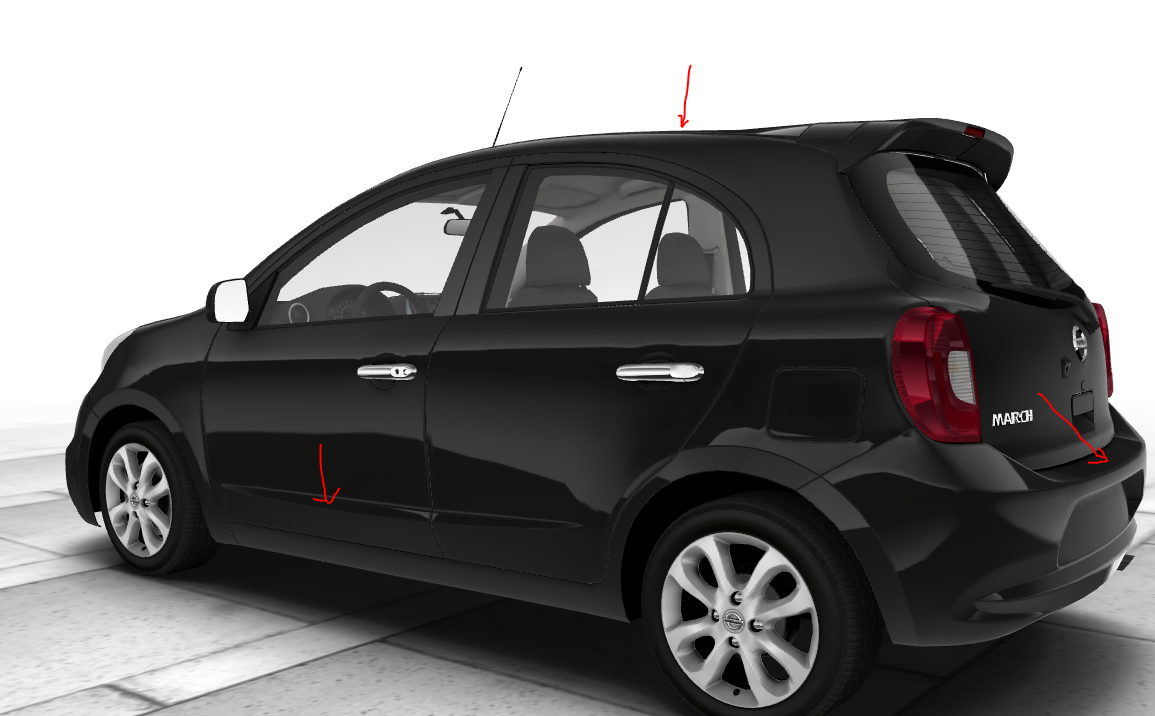
Interestingly, Ms edge and Internet Explorer doesn't seem to have such a pronounced aliasing.
However, EXT_shader_texture_lod is missing in IE and Edge.
atul-mourya
on 5 Mar 2018
This is something really worth exploring. I read a lot of resources on PBR shading but don’t recal reading that your aa is gonna go to hell.
pailhead
on 5 Mar 2018
Related issues
 clawconduce
·
3Comments
clawconduce
·
3Comments
 scrubs
·
3Comments
scrubs
·
3Comments
 jens-duttke
·
3Comments
jens-duttke
·
3Comments
 fuzihaofzh
·
3Comments
fuzihaofzh
·
3Comments
 donmccurdy
·
3Comments
donmccurdy
·
3Comments
Most helpful comment
https://jsfiddle.net/gdzj7ju8/34/
Here's the sample case to play around. Also, do let me know it if there's any more support that I can provide.