Three.js: FBXLoader: Wrong transform when using geometry.translate(x, y, z)
Description of the problem
I want to ask if it's a problem that when I use geometry.translate(x, y, z) to transform the geometry, the pre rotation of the geometry leads to split the geometry. just like the following picture. It happen in FBXLoader and I can't get the original rotation matrix so that I can't fix it outside the loader.
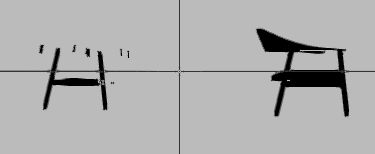
The result for OBJLoader:

The code:
group.traverse(function (mesh) {
      mesh.geometry.translate(1, 0, 0)
})
Three.js version
- [ ] Dev
- [x] r87
- [ ] ...
Browser
- [x] All of them
- [ ] Chrome
- [ ] Firefox
- [ ] Internet Explorer
OS
- [x] All of them
- [ ] Windows
- [ ] macOS
- [ ] Linux
- [ ] Android
- [ ] iOS
Hardware Requirements (graphics card, VR Device, ...)
 jy-tao
All 13 comments
Yeah, this will be a problem with setting the transformed pivot by rotating or translating the geometry.
I wonder if it will be possible to directly apply the transformed pivot to the geometry as it's being created? I'll investigate.
By the way, any kind of transformed pivot is probably going to be a problem if the geometry is shared between multiple meshes, but so far this hasn't come up.
In the meantime, is there a reason you are doing group.traverse(function (mesh) { mesh.geometry.translate(1, 0, 0) }) instead of just group.position.set( 1, 0, 0) ?
 looeee
on 25 Nov 2017
looeee
on 25 Nov 2017
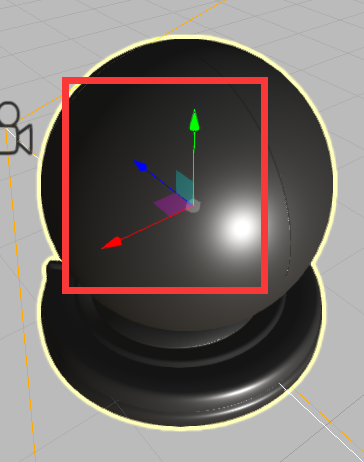
The reason is that I want to implement a function which the user can edit the position of "control axis" for a mesh.(I use the transform control in example)
The transform control just apply the matrix of the selected model. And I think I can implement by translate the geometry of the mesh and inversely translate the mesh position. This is where I found the problem.
Control axis like this:
jy-tao
on 25 Nov 2017
OK, that makes sense. You can probably achieve the same effect by making the mesh a child of a Group though, and apply the transform to the control axis by transforming the child mesh instead of the mesh's geometry.
looeee
on 25 Nov 2017
I investigated whether applying the transforms directly to the geometry as it's created, rather than afterwards via translate and rotate methods - see #12744.
Unfortunately it doesn't fix this issue.
I would say that the reason this works in OBJ format is because animation is not supported there, so the issue of transformed pivots never comes up and all geometries are exported with centred pivots (or rather, without any pivots at all) - although I don't know enough about OBJ format to say this for certain.
With regards to making this work for FBX files, unless someone else can see something I'm missing, I would say that this is just a limitation of three.js - since transformed pivots are not supported, we have to transform the underlying geometry to mimic support, which means that geometry.translate and geometry.rotate methods will no longer work as expected.
looeee
on 25 Nov 2017
With regards to making this work for FBX files, unless someone else can see something I'm missing, I would say that this is just a limitation of three.js - since transformed pivots are not supported
This issue keeps popping up...
Maybe we can add this.pivot = null; to Object3D? If defined (as Vector3) we can then take it into account in the updateMatrix code.
/cc @WestLangley @Mugen87
 mrdoob
on 26 Nov 2017
mrdoob
on 26 Nov 2017
Maybe we can add this.pivot
fbx has two different pivots, actually:
WorldTransform = ParentWorldTransform * T * Roff * Rp * Rpre * R * Rpost -1 * Rp -1 * Soff * Sp * S * Sp -1
 makc
on 30 Nov 2017
makc
on 30 Nov 2017
fbx has two different pivots, actually:
😓
mrdoob
on 1 Dec 2017
Rp = rotation pivot, Sp = scaling pivot
I don't think the situation is quite so dire. I'm not sure how useful these docs are, they relate to the FBX SDK and I'm pretty sure at this stage that there is not a 1-1 correspondance with the FBX model format.
There are supposed to be two properties of FBX models relating to these: RotationPivot, ScalingPivot.
However, I have so far not come across any models with these set.
Instead, there is GeometryRotation and GeometryTranslation fields in the FBX files, which correspond to the 3DS Max transformation, not the Maya/FBX one.
As far as I can tell, we are dealing with some combination of the 3DS Max and Maya transforms as described in the doc you linked - the pivot is set from a combination of GeometryRotation and GeometryTranslation (also there's GeometryScaling which we don't support yet).
The transform we are currently doing (basically, the 3DS version but with pre-rotation):
WorldTransform = ParentWorldTransform * Translation * preRotation * Rotation * Scaling
And then the geometry is transformed by the GeometryRotation and GeometryTranslation, which is equivalent to doing a post transform on the model, after it has been transformed / animated.
This is where the pivot point would come in.
looeee
on 4 Dec 2017
...OK, so I've done some investigation with files exported from a few different apps
Maya: the pivot is specified by
RotationPivotandScalingPivot. However, they seem to be identical - it looks like it may not be possible to set them separately in Maya. Certainly if you just move the pivot point in the interface, both get moved together, and while it is possible to select them seperately, any way I tried moving them resulted in both being moved.3DS Max: I exported the same scene from 3DS Max (using "Send to Max" from Maya). Here, the transformed pivot is specified by
GeometricRotationandGeometricTranslation, while there is no sign ofRotationPivotandScalingPivot.Blender: seems like transformed pivots are not exported - they are baked into the standard transform.
With this in mind, I think that we can do the following:
- Assume that if
RotationPivotandScalingPivotare present thenGeometricRotationandGeometricTranslationwill not be, or multiply them together just in case. - Assume that
RotationPivotandScalingPivotwill be equal (maybe add a comment at the top of the file stating this assumption) - in fact, just ignoreScalingPivotand always useRotationPivot.
Using assumptions 1 and 2 we are back to a single pivot, which we can apply the same way we are currently doing... or maybe add a pivot to Object3D as @mrdoob suggests 🤞 😬
looeee
on 6 Dec 2017
keep in mind that up until now - that is, for the last 7 years - people successfully used Object3D with no pivot, and now you're going to add the pivot into every Object3D matrix update just for the sake of simplifying the code of this specific use case.
( to be clear, I am not arguing against it, just making sure this point is made)
makc
on 6 Dec 2017
now you're going to add the pivot into every Object3D
Well, we are discussing whether it would be a good idea or not.
For what it's worth, I think that if it's coded correctly - i.e. Object3D.pivot = null by default, and then
in the renderer somewhere if ( object.pivot !== null ) { // apply pivot transform }, there should be no performance overhead - that is, the calculation will only take place if the pivot is defined, not every matrix update for every object.
looeee
on 6 Dec 2017
@nNightKil can you confirm whether this is still an issue for you after #13513 ?
looeee
on 7 Mar 2018
Closing - as far as I know this was fixed by #13513. We can reopen if it's still an issue.
looeee
on 12 Apr 2018
Related issues
 Bandit
·
3Comments
Bandit
·
3Comments
 filharvey
·
3Comments
filharvey
·
3Comments
 seep
·
3Comments
seep
·
3Comments
 alexprut
·
3Comments
alexprut
·
3Comments
 donmccurdy
·
3Comments
donmccurdy
·
3Comments