Three.js: THREE.Points sprites are not scaled correctly by THREE.Water shader
THREE.Points particle sprites are not scaled correctly by the THREE.Water shader. Freeciv WebGL uses THREE.Points with sprites to implement trees on the map, however, the trees looks too large when reflected in the ocean. I have attached a minimal test-case which is a modified webgl_shaders_ocean.html from Three.js.
Screenshot of the modified webgl_shaders_ocean.html which shows that the particle sprites are not scaled correctly when reflected in the water:

Screenshot from Freeciv WebGL where the reflected trees in the water are too large:
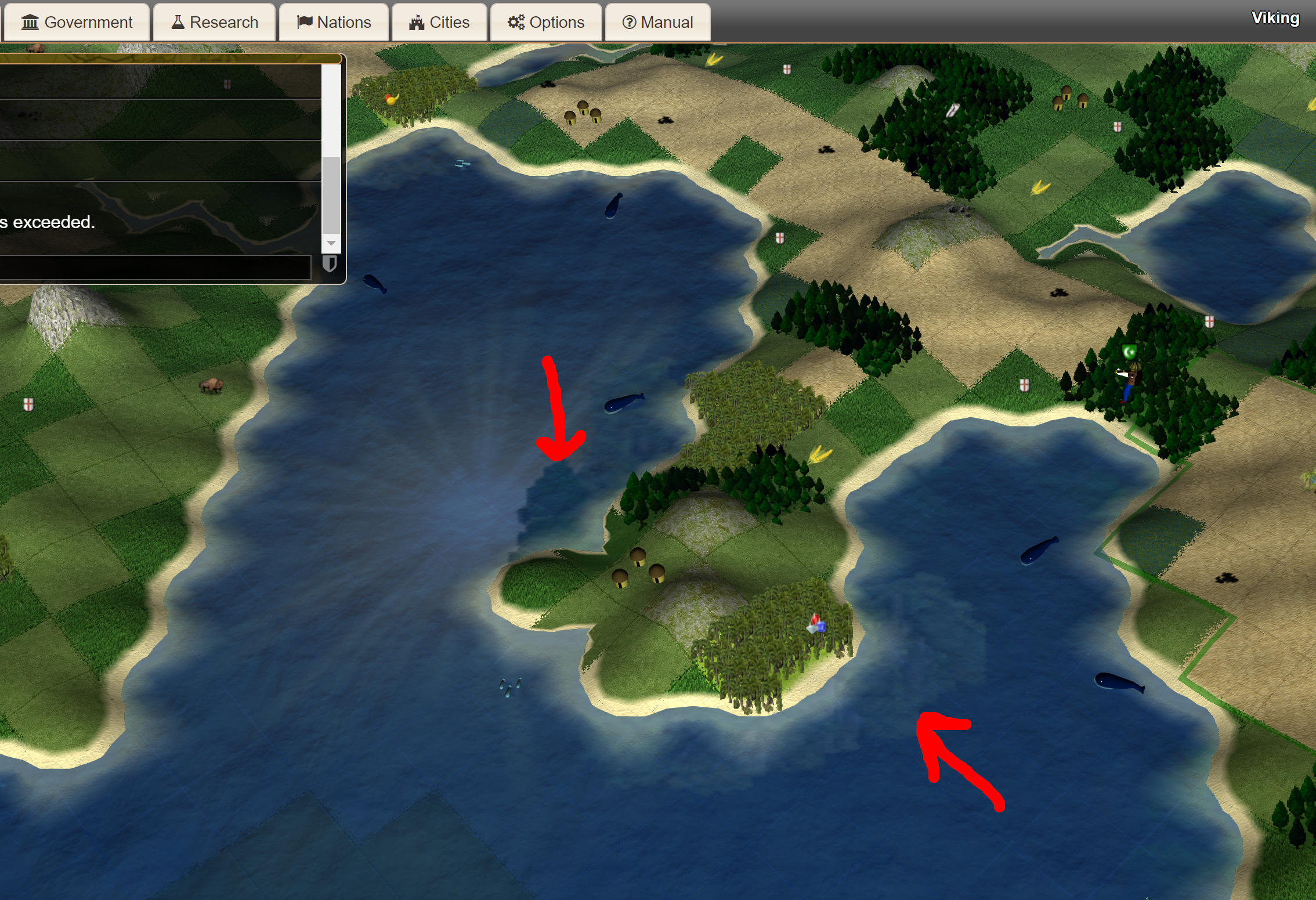
This is using the latest version of Three.js (r86). This can also be tested in production on play.freeciv.org.
Attached source of minimal testcase:
webgl_shaders_ocean.zip
 ghost
ghost
All 5 comments
THREE.Points are sized in pixels, not world units, so it is not surprising to me that the reflection of THREE.Points in THREE.Mirror are not sized correctly.
BTW, you only need 1 point sprite in your example to demonstrate the issue. You can also remove the bouncing sphere.
Related #10385.
 WestLangley
on 5 Aug 2017
WestLangley
on 5 Aug 2017
Thanks for the reply, @WestLangley. THREE.Points seemed like a good idea to use as trees at the time, especially since there are several bundled examples in Three.js using Points with image sprites.
How do you recommend that I implement trees for this usage in Freeciv WebGL? A large map can have a large number of trees, so it should be memory-efficient and look nice.
ghost
on 5 Aug 2017
How do you recommend that I implement trees
Use InstancedBufferGeometry with RawShaderMaterial and a billboard shader.
Sized in world units, I assume that would reflect correctly. Alternatively, you could remove the mirror and fake the reflections.
WestLangley
on 5 Aug 2017
As demonstrated by the following fiddle, you can get a 1:1 reflection if the custom framebuffer of the mirror has the same size like the default framebuffer:
https://jsfiddle.net/w1sb5dgr/1/
I don't think it's possible to fix this in Reflector somehow. AFAICT, it's a more general problem. This scaling issue can happen all times when your render points to a render target which has different dimensions than the default framebuffer.
 Mugen87
on 24 Apr 2020
Mugen87
on 24 Apr 2020
@Mugen87 I would not even bother to try to fix it. You can't mix units (pixels vs. world units) and expect things to work.
WestLangley
on 24 Apr 2020
Related issues
 fuzihaofzh
·
3Comments
fuzihaofzh
·
3Comments
 Bandit
·
3Comments
Bandit
·
3Comments
 konijn
·
3Comments
konijn
·
3Comments
 boyravikumar
·
3Comments
boyravikumar
·
3Comments
 donmccurdy
·
3Comments
donmccurdy
·
3Comments
Most helpful comment
@Mugen87 I would not even bother to try to fix it. You can't mix units (pixels vs. world units) and expect things to work.