Themekit: config.yml not changed but still see "Reloading config changes"
Describe the bug
Hello, could I please get some help?
I start ThemeKit by running theme watch --env=development and after saving the file I'm working on ThemeKit will occasionally _process_ and _update_ files that have not been touched. Then I get this message: "Reloading config changes".
Then if I check the Shopify theme editor I see that it has been reset back to default, which means that settings_data.json was overwritten. That is despite having settings_data in my ignore section like this:
ignore_files:
    - config/settings_data.json
    - locales/en.default.json
It started yesterday and it happened one time. Today it has happened twice so far.
I have not touched my config.yml file for about ten days.
To Reproduce
Steps to reproduce the behavior:
It has been an intermittent issue so I'm not completely sure how to reproduce it. However, I'll still list the steps...
- theme watch --env=environmentName
- change a file and save 3.
Expected behavior
when I save my work, ThemeKit should _only_ process and update the file that was touched.
Environment (please complete the following information):
- OS: Win 10 64bit
- Themekit version: 1.0.1
- Editor: VSCode
- Ignore:
Additional context
I am a former Slate user who switched back to ThemeKit about a month ago. I don't recall this issue ever happening in the past, and I have worked on lots of client websites.
 preston206
All 30 comments
Themekit only touches files that have been updated. This means if the contents have changed or the timestamp has changed. It is very likely that you have another tool running that is periodically touching your files.
Then if I check the Shopify theme editor I see that it has been reset back to default, which means that settings_data.json was overwritten.
Are you seeing theme watch output those filenames as being processed? Do you have someone else working on this theme? You should confirm that your ignore config is being respected by running watch and changing the config, then seeing if themekit processes it.
 tanema
on 12 Jul 2019
tanema
on 12 Jul 2019
Thanks for the response. I'll keep an eye on the timestamp. I have no idea what would be changing files within the watched dir.
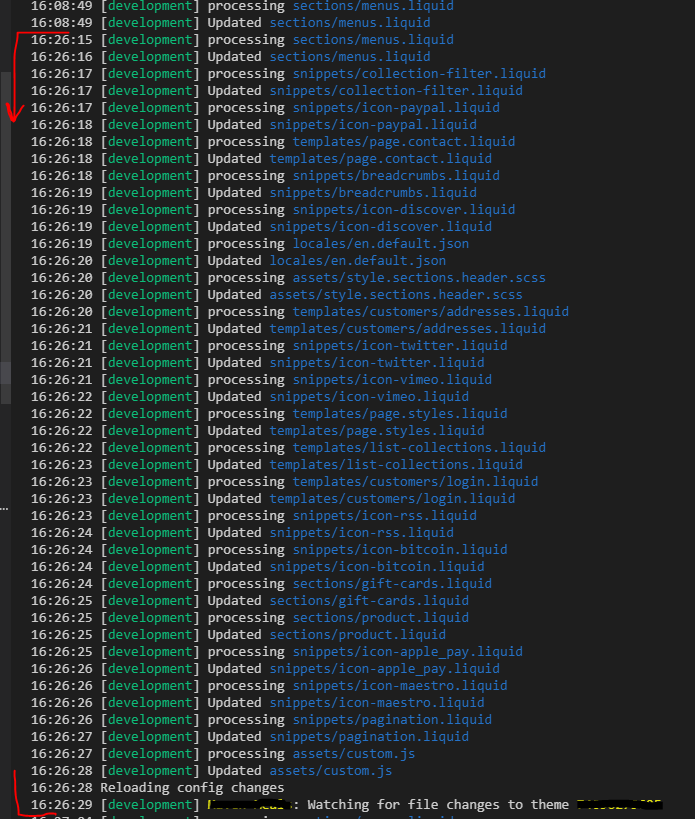
I still have my console open from yesterday so I grabbed a screenshot of the output when it occurred. It mostly includes files that I have _never_ touched. Like icons that I'm not using in this project, for example. There are a few files included that I touched earlier in the day as well.
It's not really the processing of untouched files that bothers me. It's the overwrite of settings_data.json that is causing a problem.
In the screenshot you can see that the timestamps within the red marks are all within a second of each other. And then it reloaded config settings and then restarted the watch command. All I did was save one file called menus.liquid and then it did all of that.
I'm the only one working on this theme. I'll test the config ignores soon and reply back.
So what exactly triggers "Reloading config changes"? Is it a change to config.yml or settings_data.json?
preston206
on 12 Jul 2019
I also have this problem while I run Watch. It's happening on different themes on different stores. No idea what's causing the change. It's only happening in the most recent version of themekit, it never happened before the update. I may just roll back my themekit version.
It has the added annoyance of rolling back my settings data to a previous version so I have to go in to the customize panel and make my changes again.
It sees that all theme files are updated and processes each then just says "Reloading config changes" and stops watching.
I am the only person working on this theme and I have no clue what other program may be accessing these files.
 Ethan-Newthink
on 12 Jul 2019
Ethan-Newthink
on 12 Jul 2019
@Ethan-Newthink that sounds exactly like my issue. Thanks for sharing. Maybe we've uncovered a bug that needs to be investigated?
One tip for you, in case you haven't done this yet. Grab a backup of your settings file so next time it happens you can either copy and paste the backup into the online code editor version of your settings file or deploy the backup. I did that yesterday after it happened for the third time and my down time was only about a minute instead of 15-20 rebuilding via the editor.
preston206
on 12 Jul 2019
There was a small change to how files are watched in 1.0.1 so please roll back to 1.0.0 and see if it still happens on that version. This can be done by running theme update --version=v1.0.0
tanema
on 12 Jul 2019
@tanema Thanks, rolling back now. Will update you in a few days if it doesn't happen again.
Ethan-Newthink
on 12 Jul 2019
after rolling back, it has not happened yet. Let's monitor for another week and report back and go from there.
preston206
on 20 Jul 2019
@tanema @preston206 It hasn't happened since I rolled back ten days ago and I've used themekit every day since.
Ethan-Newthink
on 22 Jul 2019
okay good to know. and both of you are using VScode and Windows?
tanema
on 22 Jul 2019
@tanema I'm actually running themekit on OSX, through terminal in PhpStorm. One on High Sierra and one on Mojave. Both had the issue. Both were fixed by downgrading.
Ethan-Newthink
on 22 Jul 2019
still good here. I have about 50 hours of dev time since rolling back. Nobody on my team has reported it but they might just be putting up with the issue. I'll poll and reply back.
preston206
on 22 Jul 2019
update: only one person on my team has updated to 1.0.1 and he uses Linux and he hasn't experienced the issue yet.
preston206
on 23 Jul 2019
still no issues since rolling back
preston206
on 31 Jul 2019
Okay, I am looking into why this might be. This is really weird as it doesn't seem to be happening to everyone. I have a feeling that it may still be linked to another tool because the watcher backend was switched to a polling mechanism that checks every files timestamps rather than using kqueue or something like that. This has made themekit work everywhere (including docker now) but now I might have to figure out something to mitigate this as well.
tanema
on 31 Jul 2019
ok thanks for looking into it. Let me know if you need any info about my OS, laptop, tools, or anything else like that. And I might be able to do a screen share if needed. I have a busy schedule but I could probably fit a quick session in.
preston206
on 31 Jul 2019
Hey @preston206 and @Ethan-Newthink can you try a prerelease version for a while? You can try it out by running theme update --version=v1.0.2-issue649 I added content checking to it so that only files whose content has changed will be processed. This should stop all of these extra events.
tanema
on 13 Aug 2019
hi, sure I'll update in the morning.
preston206
on 14 Aug 2019
@preston206 Have you seen a change for the better?
tanema
on 19 Aug 2019
@tanema I'm sorry I forgot to update last week. I just tried now and I'm getting an error:
_C:\ theme update --version=v1.0.2-issue649
An update for Themekit is available. To update please run theme update
Updating from 1.0.0 to v1.0.2-issue649
Could not update and had to roll back. open C:\Program Files\Theme Kit.theme.exe.new: Access is denied._
I used my local admin account and I also tried rebooting.
preston206
on 19 Aug 2019
@preston206 Can you try is again? It must have been some sort of issue with the CDN because it seems fine now.
tanema
on 26 Aug 2019
yes it worked this time. I'll run it for a few days and get back to you.
preston206
on 26 Aug 2019
Any update?
tanema
on 6 Sep 2019
so far no issues
preston206
on 6 Sep 2019
I'm running into a similar issue when using the popular lint-staged tool. One of the features of lint-staged is support for linting partially staged files, introduced in v8.0.0.
I've found that when lint-staged performs stashing before running linters that theme watch starts updating every file in my repository. Upon closer inspection, this appears to be because git checkout-index -af _actually_ updates every indexed file in the working directory (even when there is nothing to change for the vast majority of files). I'm able to reproduce with this simple bash function that partly mirrors what lint-staged is doing:
function lint_staged_stash() {
  INDEX_TREE=$(git write-tree)
  git add .
  WORKING_COPY_TREE=$(git write-tree)
  git read-tree $INDEX_TREE
  git checkout-index -a -f
}
I'm not sure if this would be considered a bug with lint-staged (or even git, for that matter) but I confirmed that using v1.0.2-issue649's checksum verification is better at avoiding unnecessary updates when this happens (though it still reloads config).
 charlesbjohnson
on 11 Sep 2019
charlesbjohnson
on 11 Sep 2019
@charlesbjohnson themekit should not be responsible for the behaviour of other tools, however the change I introduced in the above mentioned PR should resolve your issues as well. You are welcome to use the patch until the next release as well by running theme update --version=v1.0.2-issue649
tanema
on 12 Sep 2019
This will be in the next release, and I will close this issue when the next release happens. Please feel free to keep using the patch until then
tanema
on 17 Sep 2019
this just happened to me again. I checked my themekit version and some how I'm back to v1.0.1. Was there some type of auto update? Is the fix in a production release yet? Should I still be using "version=v1.0.2-issue649"?
this time it was _slightly_ different. I'm working in a dev env but prod got overwritten. Entire theme got wiped out so I need to re-build it via shopify customizer.
EDIT:
and now I'm unable to update to version=v1.0.2-issue649. I get the access denied error again. I need this fixed soon please. I have a client demo today.
$ theme update --version=v1.0.2-issue649
Updating from 1.0.1 to v1.0.2-issue649
Could not update and had to roll back. open C:\Program Files\Theme Kit\.theme.exe.new: Access is denied.
I mean, I can still work and get the site done but I'm taking a risk of the theme getting wiped just before the client sees it.
preston206
on 12 Dec 2019
Hey @preston206 the error seems to be from your OS and not themekit. Also the themekit version I released for you will still say 1.0.1 because it has not been released officially yet. I will release soon sorry about the delay. Also just to make sure I redeployed that patched version for you to grab. I will try to deploy 1.0.2 later today
tanema
on 12 Dec 2019
Okay I have deployed 1.0.2 so this is now deployed. You can get it by running update.
tanema
on 12 Dec 2019
ok updated. The update issue was indeed on my end. Thanks!
preston206
on 12 Dec 2019
Related issues
 OliverHuntsman
·
4Comments
OliverHuntsman
·
4Comments
 tbeseda
·
3Comments
tbeseda
·
3Comments
 justinmetros
·
9Comments
justinmetros
·
9Comments
 smjeffries-snap
·
9Comments
smjeffries-snap
·
9Comments
 arypbatista
·
9Comments
arypbatista
·
9Comments
Most helpful comment
This will be in the next release, and I will close this issue when the next release happens. Please feel free to keep using the patch until then