Thelounge: The audio for the notification doesn't play on safari
I think this is because Safari doesn't support .ogg files
ref: http://stackoverflow.com/questions/10583827/ogg-audio-in-safari
Converting the file from .ogg to .wav and changing the path to the file should fix it
 ziyadparekh
All 22 comments
As far as I understand from your link, converting to .wav would break it on Chrome.
 astorije
on 17 Jul 2016
astorije
on 17 Jul 2016
Internet Explorer and Microsoft Edge also do not support the OGG format. IE11 does not support WAV format.
Seems like the fallback we should add is AAC.
 xPaw
on 9 Oct 2016
xPaw
on 9 Oct 2016
For the record, this is the list of supported formats: https://en.wikipedia.org/wiki/HTML5_Audio#Supported_audio_coding_formats
So yeah, it might be an option. But AAC is not an open format (like MP3) so there might be some things to do/know if we add AAC...
Aaah, you'd expect browsers to be consistent on that in 2016, but no! Argh...
astorije
on 9 Oct 2016
According to the link posted by @astorije, everything supports MP3 (assuming the OS supports it).
With the MP3 patent having expired, it not being an open format is no longer an issue. Maybe we should change to MP3 now?
Of course, the other option is having mp3/aac as a fallback if the browser doesn't support ogg, but that feels a little unnecessary.
I see no reason not to use mp3 on this now.
 McInkay
on 24 May 2017
McInkay
on 24 May 2017
everything supports MP3 (assuming the OS supports it)
I think your parenthesis is key here. I don't want to break this on some Linux distro.
It seems to me the safest route is OGG then fallback to MP3 or AAC (iirc, "fallback" is not even code, just multiple source files in the HTML).
Sounds reasonable?
astorije
on 12 Jun 2017
I'm fine with ogg as default with fallback to MP3.
iirc, "fallback" is not even code, just multiple source files in the HTML
It would be code, as we do this in js here. It would just be a case of checking if we can play the ogg and if not, selecting the mp3 instead. Not difficult.
McInkay
on 13 Jun 2017
It would be code, as we do this in js here. It would just be a case of checking if we can play the ogg and if not, selecting the mp3 instead. Not difficult.
Ah, right, I was referring to a comment @xPaw made some time ago. If that's doable, then we would avoid checking this ourselves.
astorije
on 19 Jun 2017
Well, the problem with doing that way (if it's possible, not looked into it) is that then we have an actual element on the page somewhere (even if hidden), whereas with the way that we currently do it, we just play it from JS, there is no element on the dom.
McInkay
on 19 Jun 2017
That's fair, but I'm not too worried about an extra element in the DOM. If this makes the browser play the file it prefers, then I still think that's a nice win as opposed to capability-check this ourselves.
I don't have a strong opinion though, but I just thought that this was a rather nice (and still clean) trick.
astorije
on 20 Jun 2017
Started missing the notification sound when using Safari.
Seeing inconsistent information about codec support online. W3C reports that MP3 is the most supported format, Wikipedia says the support comes from the OS. MDN's audio codec support section states We are at the stage where nearly all browsers support MP3 with a link to further details.
I have put up a testing page for people to test their browser playback capabilities. The ogg sound is sourced from thelounge's repo and the mp3 and wav versions are generated with ffmpeg:
ffmpeg -i pop.ogg pop.wav
ffmpeg -i pop.ogg pop.mp3
All sounds play fine on macOS 10.13 with the latest Chrome, Opera, Firefox and Safari with the exception that the last one doesn't like ogg.
PS: Caniuse shows promising results for mp3.
 realies
on 7 Jan 2018
realies
on 7 Jan 2018
This is most likely due to WebKit's audio/video play policy.
 williamboman
on 10 Mar 2018
williamboman
on 10 Mar 2018
Updates:
- WAV now is supported by everything except IE (and we don't support IE)
- FLAC now is supported by everything except IE (and we don't support IE)
- MP3 still is an issue due to some OS issues
- OGG support basically the same
So, looks like we want to move to WAV or FLAC.
- WAV supports slightly older versions of safari (4% of the global market)
- FLAC gives smaller file sizes.
Bikeshedding, go!
McInkay
on 11 Jul 2018
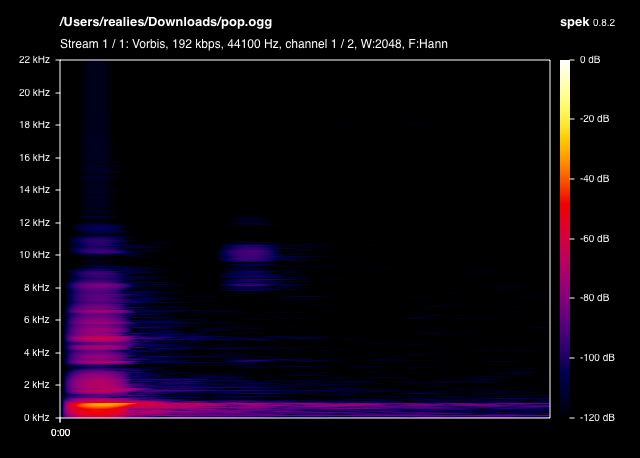
Considering that most of the frequency content of the current alert sound ends at 12 KHz, the sample rate of 44.1 KHz can be downsampled to 2*12 KHz (Nyquist limit) to reduce the file size of bigger FLAC and WAV formats without audible quality loss. The current alert sound is stereo, which can be downmixed to mono and the bit-depth could probably go down from 16-bit to 8-bit.
Did some transcoding tests with ffmpeg, going down to 11 KHz makes the alert sound muffled, so sticking to 22 KHz. Couldn't transcode the pop.ogg to a mono 22 KHz 8-bit FLAC, but the WAV one seems to be smaller than the current sound.
Here's a file-size sorted comparison:
pop_22khz_8bit_mono.wav | 7.0 KiB
pop.ogg | 11.4 KiB
pop_11khz.wav | 13.9 KiB
pop_22khz_mono.wav | 13.9 KiB
pop_22khz_mono.flac | 18.4 KiB
pop_11khz.flac | 18.7 KiB
pop_22khz.wav | 27.7 KiB
pop_22khz.flac | 28.3 KiB
pop.flac | 45.6 KiB
pop.wav | 55.3 KiB
Looks good, @realies, feel free to stick up a PR with the new file.
McInkay
on 11 Jul 2018
A bit pedantic, but @xPaw has pointed out that pop_22khz_8bit_mono.wav sounds worse than pop.ogg which I can agree with and think it sounds too "crispy" due to the 16 to 8-bit reduction.
I guess it would be good if people that might care take a listen and choose between pop_22khz_8bit_mono.wav (7.0 KiB) and pop_22khz_mono.wav (13.9 KiB) before a PR?
realies
on 11 Jul 2018
Pretty subtle difference on my speakers, but the 8bit version does sound slightly "less great."
 dgw
on 11 Jul 2018
dgw
on 11 Jul 2018
I notice no difference on casual usage, which is all I'll ever hear the notification in, so go with whatever.
McInkay
on 16 Jul 2018
Went through all of them (both on laptop speakers and crappy headphones so casual hardware) and I agree that the 8bit mono version sounds horrible. Noticeable on laptop, actually atrocious on headphones 🤷♂️
The 11khz ones also sound muffled, not terrible in quality, but sound as if someone puts their hand over the speakers, which does not do too well with the purpose of a notification sound.
The mono versions have kind of an unclean echoing trail. I only hear that from the crappy headphones, not the laptop speakers, so less of an issue than the above. I do prefer the cleanliness of the non-mono files though, I'm wondering if it's due to encoding or actual mono or something.
Apart from those, the others are fine. I fail to identify the 22khz vs. normal ones with whatever hardware when I blind test myself so I'd go with the smaller ones which are pop_22khz.wav or pop_22khz.flac (1kb difference so it comes down to support or your personal preference I guess).
Thanks for your efforts on this, @realies!!
astorije
on 17 Jul 2018
@astorije, the oscillating trail should be because the mono version is done by summing up the left and right channels into a single channel, which apparently could have this effect with reverberant sounds.
Just uploaded pop_22khz_left.wav, which is another mono but only of one of the channels, so shouldn't have the weird trail and I'm willing to go with it vs the stereo one for 1/2 the file size.
realies
on 17 Jul 2018
Very interesting analysis (TIL), thanks. I still hear the trail with pop_22khz_left.wav. Mind trying with _right? :D
astorije
on 17 Jul 2018
Right channel is up, but I can't notice any oscillation on the release/trail for both... 🎧🤔
realies
on 17 Jul 2018
I can't hear any difference between left and right, but I can hear a slight difference between left-or-right and mono (blind test, slight as I hesitate before identifying), and I can _definitely_ hear a clear difference between those 3 and the normal one.
I'd vote to go for pop_22khz.wav. 14k extra is not going to make a difference IMO.
astorije
on 17 Jul 2018
Related issues
 emberian
·
15Comments
emberian
·
15Comments
 zeten30
·
15Comments
McInkay
·
18Comments
zeten30
·
15Comments
McInkay
·
18Comments
 Komic
·
18Comments
McInkay
·
19Comments
Komic
·
18Comments
McInkay
·
19Comments