Theia: Theia Docker does not display extensions does not recognize Java class.
I'm trying to use Eclipse Theia.
I installed the same via docker, but it does not equal the screen that is displayed in README .md.
Not to mention you do not have the Java option or the extension option.
How do you install this option?
see my image below, it stays the same way when I use the latest or the next. :


 Daniel-Dos
All 10 comments
Hi @Daniel-Dos,
First, from the backend log, I see you have reached your host's inotify limit. You can increase it easily. When you run-out of these, Theia loses the ability to detect changes in files within its workspace(s), breaking many things.
The theiaide/theia image that you used is the base one, meant for web development (e.g. TypeScript). If you open such a file, then your screen should look like one in the README.MD
For Java development, we have another image you can try: theiaide/theia-java. All these images are from the theia-ide/theia-apps repo.
BTW, these images are currently used mostly for demo purposes or a quick way to try a few different Theia applications without doing much setup.
 marcdumais-work
on 17 Oct 2018
marcdumais-work
on 17 Oct 2018
got it.
he had not noticed that he had other images ready.
a doubt, I always execute the theiaide with the command informed, but to do recording in the files, it does not allow me, it says that I am not allowed.
in case I would have to give the pemissoes? even though / home / myUser?
Daniel-Dos
on 17 Oct 2018
@Daniel-Dos It's a known issue, that I think we recently discussed on gitter. In our docker images, such as the ones mentioned above, the user under which you run (uid) is determined at image build time and is 1000. If on the docker host your uid is different, you will have permission mismatch (on linux use command id in a shell to get your uid).
For demos and such, you could open the permissions on the content of the workspace before starting the image. e.g. chmod -R 777 <workspace folder> (probably on a copy you can discard after, if the content is valuable). You can also consider re-creating your workspace content inside the container. e.g. re-clone your git repo from inside Theia.
marcdumais-work
on 18 Oct 2018
Hello @marcdumais-work
I'll try it that way.
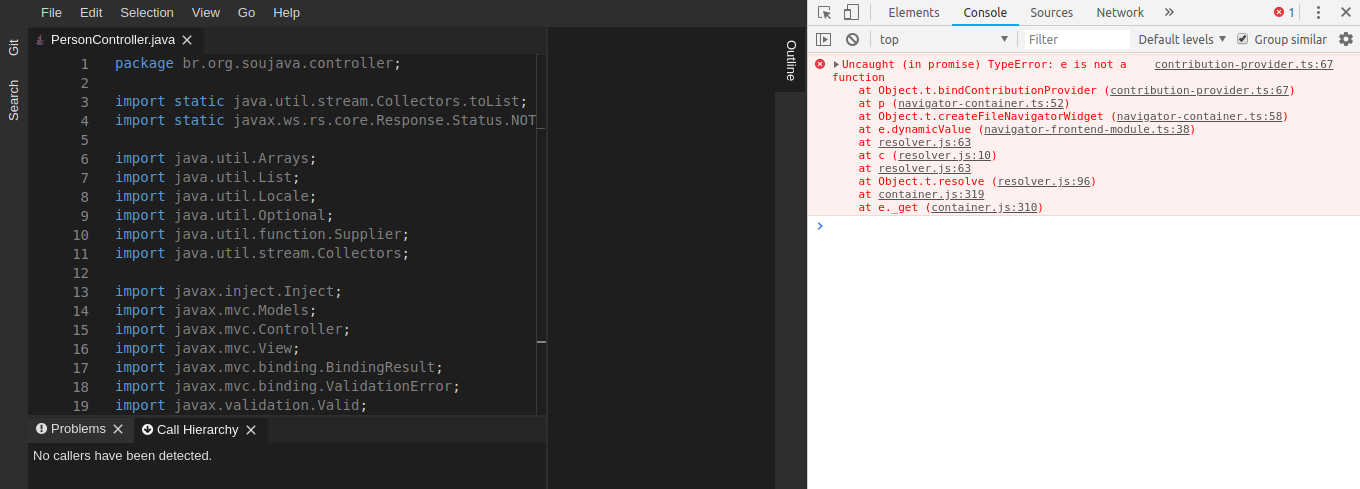
I did the pull of the theiaide: theia-java: next, he recognized the class, but he is not presenting the tree of files as can be seen in the image and when doing CTRL + SHIFT + E does not work by pressing the error in the browser console:
thanks.
Daniel-Dos
on 18 Oct 2018
It's because of https://github.com/theia-ide/theia/issues/3204
 akosyakov
on 19 Oct 2018
akosyakov
on 19 Oct 2018
Inside the theia container the group id 1001 is used. You can change the group of the workspace folder on your host to that: chgrp -R 1001 <workspace folder>. This should not interfere with Git as using chmod would. 🎆
If theia would start out using group id 1000 the whole problem should go away, right? 🤔
 perguth
on 20 Jan 2019
perguth
on 20 Jan 2019
For anyone stumbling across this, I cloned the theia-ide/theia-apps and made the following changes to build a working image (basically just take out all this business about a second user):
diff --git a/theia-docker/Dockerfile b/theia-docker/Dockerfile
index a5c355c..ad37d18 100644
--- a/theia-docker/Dockerfile
+++ b/theia-docker/Dockerfile
@@ -16,19 +16,11 @@ RUN yarn --pure-lockfile && \
     yarn cache clean

 FROM node:${NODE_VERSION}-alpine
-# See : https://github.com/theia-ide/theia-apps/issues/34
-RUN addgroup theia && \
-    adduser -G theia -s /bin/sh -D theia;
-RUN chmod g+rw /home && \
-    mkdir -p /home/project && \
-    chown -R theia:theia /home/theia && \
-    chown -R theia:theia /home/project;
 RUN apk add --no-cache git openssh bash
 ENV HOME /home/theia
 WORKDIR /home/theia
-COPY --from=0 --chown=theia:theia /home/theia /home/theia
+COPY --from=0 /home/theia /home/theia
 EXPOSE 3000
 ENV SHELL /bin/bash
 ENV USE_LOCAL_GIT true
-USER theia
 ENTRYPOINT [ "node", "/home/theia/src-gen/backend/main.js", "/home/project", "--hostname=0.0.0.0" ]
The reason for this seems to be discussed here, but I don't really see the reason (admittedly, I am ignorant here).
 cemulate
on 22 Apr 2019
cemulate
on 22 Apr 2019
For anyone stumbling across this, I cloned the theia-ide/theia-apps and made the following changes to build a working image (basically just take out all this business about a second user):
diff --git a/theia-docker/Dockerfile b/theia-docker/Dockerfile
index a5c355c..ad37d18 100644
--- a/theia-docker/Dockerfile
+++ b/theia-docker/Dockerfile
@@ -16,19 +16,11 @@ RUN yarn --pure-lockfile && \
     yarn cache clean

 FROM node:${NODE_VERSION}-alpine
-# See : https://github.com/theia-ide/theia-apps/issues/34
-RUN addgroup theia && \
-    adduser -G theia -s /bin/sh -D theia;
-RUN chmod g+rw /home && \
-    mkdir -p /home/project && \
-    chown -R theia:theia /home/theia && \
-    chown -R theia:theia /home/project;
 RUN apk add --no-cache git openssh bash
 ENV HOME /home/theia
 WORKDIR /home/theia
-COPY --from=0 --chown=theia:theia /home/theia /home/theia
+COPY --from=0 /home/theia /home/theia
 EXPOSE 3000
 ENV SHELL /bin/bash
 ENV USE_LOCAL_GIT true
-USER theia
 ENTRYPOINT [ "node", "/home/theia/src-gen/backend/main.js", "/home/project", "--hostname=0.0.0.0" ]
The reason for this seems to be discussed here, but I don't really see the reason (admittedly, I am ignorant here).
While this is a good patch, keep in mind this is bad Docker practice to NOT use Users.
 sr229
on 9 Aug 2019
sr229
on 9 Aug 2019
@sr229 Won't you mind if i will ping you on docker related issues?
akosyakov
on 9 Aug 2019
@sr229 Won't you mind if i will ping you on docker related issues?
I don't mind, you can ping me for those issues.
sr229
on 10 Aug 2019
Related issues
 kpge
·
3Comments
kpge
·
3Comments
 cekvenich
·
3Comments
cekvenich
·
3Comments
 vince-fugnitto
·
3Comments
vince-fugnitto
·
3Comments
 Beetix
·
3Comments
Beetix
·
3Comments
 kittaakos
·
3Comments
kittaakos
·
3Comments
Most helpful comment
While this is a good patch, keep in mind this is bad Docker practice to NOT use Users.