Thehive: Additional fields not showing up
Request Type
Bug
Work Environment
Docker images latest and 3.2.1
Problem Description
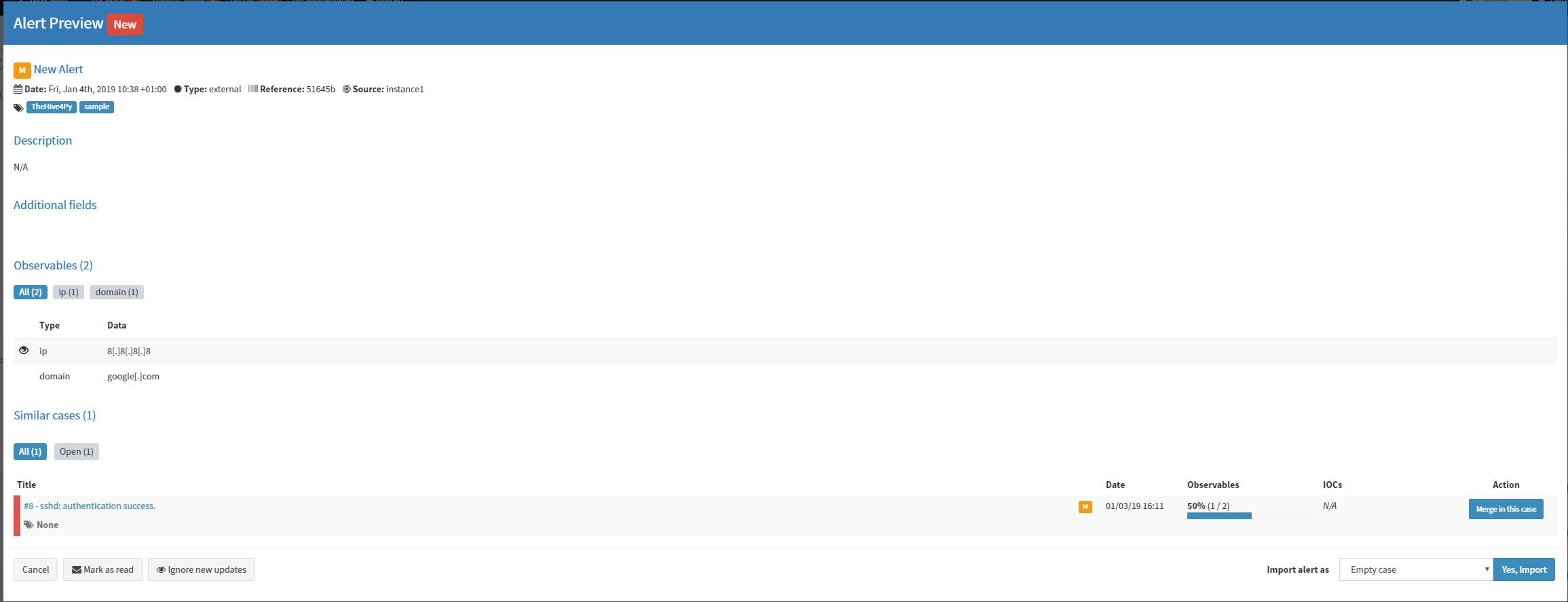
Additional fields are not displayed on the Alert Preview dialog. If they are not specified with the alert field "customFields", the dialog shows "No aditional information have been specified". By setting them up using the API this message dissapears, but the Additional fields are not displayed.
Steps to Reproduce
- Post an alert with customFields.
Complementary information
On the Live Stream that can be displayed in the main dashboad page, the specified additional fields are correctly displayed.
 masual
All 8 comments
What do you mean by If they are not specified with the alert field "customFields". You mean you don't set a value for the custom fields you specify?
 nadouani
on 3 Jan 2019
nadouani
on 3 Jan 2019
Thank you for your response @nadouani . I mean that if I construct an alert with the TheHive4py API without the "customFields" field and POST it to the TheHive API, the behavior is as expected: the Additional Fields area display the message "No additional information have been specified". However if I set such a parameter (using the CustomFieldHelper() provided by the TheHive4py), the specified custom fields are not displayed on the Alert Preview dialog. Even if I escalate the Alert to a case, the same behavior occurs, displaying the message "No additional information have been specified" if the Alert was created without any customField or being completely empty if some additional fields were set.
masual
on 4 Jan 2019
Can you please share a code sample that creates the alerts?
nadouani
on 4 Jan 2019
Thank you again @nadouani for your quick response.
I used my own code but I also tried with the example provided by TheHive4py (removing pic.png and sample.txt from the artifacts): https://github.com/TheHive-Project/TheHive4py/blob/master/samples/test-alert-create.py.
The result was the same.
Here two captures when using this example:
Live Feed:

Alert dialog:
masual
on 4 Jan 2019
Ok, but do you have those custom fields, defined in your system? or are you referring to custom fields you don't have?
nadouani
on 4 Jan 2019
I have no defined any custom fields. The only reference I found on the documentation about custom fields is in the case template management. However I am not able to add custom fields from there. If I click on "Add a custom field" an empty dropdown menu appears and the "Save case template" button is greyed out until I remove it.
masual
on 4 Jan 2019
ok, so this is the issue. If you have access to case template admin, then you are an administrator.
You have access to the administration of custom fields where you have to define them, then you can reference them on templates, alerts or case.
nadouani
on 4 Jan 2019
Thank you very much for your support, that was the issue.
masual
on 4 Jan 2019
Related issues
 smogm
·
5Comments
smogm
·
5Comments
 milesflo
·
3Comments
milesflo
·
3Comments
 vi-or-die
·
4Comments
vi-or-die
·
4Comments
 ecapuano
·
6Comments
ecapuano
·
6Comments
 shortstack
·
4Comments
shortstack
·
4Comments
Most helpful comment
ok, so this is the issue. If you have access to case template admin, then you are an administrator.
You have access to the administration of custom fields where you have to define them, then you can reference them on templates, alerts or case.